
Mimic Ai
About
Transforms HTML into Figma using only your design system, enforcing correct component usage and falling back safely when needed, while improving accuracy with every build.
Details
- Author
- miapre
- GitHub stars
- 9
- Downloads
- 377
- Categories
- Productivity, Media
Jump to
- Builds real Figma layers with component instances, variable bindings, and auto-layout
- Learns component recipes, layout patterns, and design rules across builds
- Correct it once; all future builds use the correction
- Automatically detects design system changes (new components, renamed tokens)
- Generates a build report with component usage, binding quality, and DS gap recommendations
- Enforces 18 quality rules across 6 phases (text styles, variable categories, auto-layout, etc.)

Setting up with Highlight
This MCP is not yet compatible with Highlight’s one-click setup. However, you can still use it with Highlight by following these steps:
- Download and install Highlight from highlightai.com/download
- Navigate to the plugins tab and select "Add Custom Plugin"
-
Configure the plugin with the settings below
Plugin Name
Mimic AiCommand (node, npx, python, etc.)Please refer to the README for specific instructions on how to obtain API keys or other required environment variables.
- Enable "Start Automatically" if you want the plugin to start when Highlight launches





From the repository
Install Node.js v20.6+, Figma desktop (Professional plan or above), and the Mimic AI plugin. Run the install script, add the Figma plugin, then configure an MCP client (e.g., Claude Code, Cursor, VS Code) with npx -y @miapre/mimic-ai. Start a build by sending a prompt or HTML to the MCP server.
mimic_status
Returns plugin connection status, current build phase, enforcement profile, knowledge store summary, and a contextual hint for what to do next.
mimic_discover_ds
Complete DS discovery in two steps. Step 1: call with fileKey — discovers variables, text styles, components via plugin API, caches everything, stays at Phase 1. Step 2: call again with communitySearchResults (library names from Figma MCP search_design_system) — verifies no community libraries were missed, then advances to Phase 2 (build-ready). Build tools are BLOCKED until Step 2 completes. If a community library's variables are not discoverable via the plugin API (communityVariablesRequired response), fetch them via Figma MCP search_design_system and pass as externalVariables.
figma_preload_styles
Sends text style keys to the plugin for caching. Call during DS setup phase.
figma_preload_variables
Stores DS variables in the local cache for enforcement and resolution.
figma_set_session_defaults
Computes the enforcement profile from cached DS data and sends it to the plugin. Advances to Phase 2 (inventory ready).
figma_list_text_styles
Returns all cached text styles from the DS.
figma_preload_fill_styles
Preloads fill (color) styles into the DS cache from a library file key. Call when discovery missed fill styles (e.g. library variables not enumerable but fill styles exist in the REST API).
figma_list_fill_styles
Returns all cached fill (color) styles from the DS. Use the style key as fillStyleId in create_frame, create_text, create_rectangle, create_ellipse, or set_node_fill.
figma_discover_library_styles
Discovers and caches text styles from a Figma library file.
figma_discover_library_variables
Discovers and caches variables from a Figma library file.
figma_discover_library_components
Scans existing component instances on the current page to discover available DS library components, their keys, and variant properties. Call during DS discovery phase.
mimic_map_components
Maps HTML element types to DS component keys. Call once to get initial mapping. If FIGMA_TOKEN is configured (REST API discovery), all library components are already cached — missing types after the first call are confirmed gaps, proceed to build. If REST API is not available (no token), search the library via Figma MCP search_design_system for missing types, then call AGAIN with librarySearchResults to confirm gaps.
figma_read_variable_values
Returns cached variable values, optionally filtered by category.
figma_create_frame
Creates an auto-layout frame in Figma. All sizing uses DS variables when available. The name parameter should describe the HTML section or element role (e.g., "Header Section", "Metrics Row", "Card: Revenue"). Meaningful names enable iteration. IMPORTANT: Before creating frames for section-level elements (header, footer, sidebar), first check if the DS has a component for it via mimic_map_components or Figma MCP search_design_system.
figma_create_text
Creates a text node in Figma with DS text style and color variable. The name parameter should describe the HTML element role (e.g., "Page Title", "Card: Revenue Label", "Subtitle"). Meaningful names enable iteration.
figma_create_rectangle
Creates a rectangle node in Figma.
figma_create_ellipse
Creates an ellipse node in Figma. Supports arcData for donut charts.
figma_create_svg
Creates a node from an SVG string in Figma. Useful for icons and custom graphics. Returns unboundChildren — a list of child nodes that need DS variable bindings. You MUST apply figma_set_node_fill to every unbound vector and figma_set_text_style + figma_set_node_fill to every unbound text. Leaving unbound children breaks DS compliance and light/dark mode.
figma_insert_component
Imports and inserts a DS component instance. Returns component info and configuration hints from the knowledge store.
figma_set_component_text
Sets text on a component instance by finding a text node with the given name. Prefer figma_set_component_text_by_id when configurationHints include text node IDs, because many components contain repeated text node names.
figma_set_component_text_by_id
Sets text on a component instance using an exact text node ID from configurationHints.textNodes. Use this instead of name-based text overrides when available.
figma_batch_set_component_text
Sets ALL text overrides on a component instance in a single call. Pass an array of {textNodeName, content} overrides. Saves 1 tool call per text node vs. individual figma_set_component_text calls. Use after figma_insert_component — configurationHints.textNodes tells you which nodes to override.
figma_set_variant
Sets variant properties on a component instance.
figma_swap_main_component
Swaps the main component of an instance to a different component.
figma_replace_component
Replaces an instance node with a new component instance at the same position.
figma_fill_slot
Inserts a DS component instance into a SLOT-type component property on an existing instance (Figma Slots, GA June 2026). Use configurationHints.slotProperties from figma_insert_component to find the slotName.
figma_reset_slot
Resets a SLOT-type component property back to its default content (Figma Slots, GA June 2026).
figma_set_text
Sets the text content of a text node.
figma_set_node_fill
Sets the fill of a node to a DS fill style, color variable, or raw color. Priority: fillStyleId (DS color style) → fillVariable (DS variable) → fill (raw hex/RGB).
figma_set_layout_sizing
Updates layout sizing, padding, gap, and max width on a frame node.
figma_set_visibility
Shows or hides a node.
figma_set_variable_mode
Sets the explicit variable mode on a node for a given collection. Required on every new artboard to render DS variables correctly.
figma_set_all_variable_modes
Sets the default variable mode on ALL variable collections for a node at once. Use this on every new artboard instead of figma_set_variable_mode — it eliminates collection name guessing.
figma_set_text_style
Applies a DS text style to a text node.
figma_set_node_position
Sets the absolute x/y position of a node. Use to correct top-level artboard placement after inspecting page nodes.
figma_move_node
Moves a node to a new parent at the specified index.
figma_delete_node
Deletes a node from the Figma document. NEVER deletes artboards (top-level frames) — only child nodes within an artboard. To rebuild a screen, create a NEW artboard alongside the existing one.
figma_restyle_artboard
Updates styling properties on an existing artboard or frame.
figma_get_node_props
Returns comprehensive properties of a Figma node: type, size, layout, fills, strokes, text styles, variable bindings, and children count.
figma_get_node_children
Returns the children of a node up to the specified depth.
figma_get_node_parent
Returns the parent node info for a given node.
figma_get_pages
Returns all pages in the current Figma file.
figma_change_page
Switches to a different page in the Figma file.
figma_get_page_nodes
Returns top-level nodes (artboards, frames) on the current page.
figma_get_component_variants
Returns all variants for a component set.
figma_get_text_info
Returns detailed text information: content, style, font, color, variable bindings.
figma_get_selection
Returns the currently selected nodes in Figma.
figma_select_node
Selects a node in Figma and scrolls it into view.
mimic_find_node
Find a Figma node by its HTML section name from the last build. Returns the node ID and metadata if found, or lists available sections.
figma_batch
Executes up to 6 operations sequentially via the Figma plugin bridge. Each operation specifies a type (bridge handler name) and payload. Returns an array of results in order.
mimic_ai_knowledge_read
Loads and returns the full knowledge store contents: components, patterns, gaps, and meta.
mimic_ai_knowledge_write
Saves a pattern, component recipe, or DS gap to the knowledge store.
mimic_generate_build_report
Compiles build session data into a structured report (markdown or HTML). Advances phase to 5.
mimic_generate_design_md
Compiles current DS knowledge into DESIGN.md format. Returns the content as a string.
mimic_compute_chart
Takes chart data and returns pre-computed geometry for building in Figma. Supports bar, donut, line, radar, scatter, and heatmap.
figma_validate_ds_compliance
Validates a Figma node against the current DS enforcement profile. Returns compliance results from the plugin.
mimic_pipeline_resolve
Classifies input as a URL, file path, or raw HTML and returns the resolved content.
mimic_render_url
Placeholder for Puppeteer-based URL rendering. Currently returns instructions to provide HTML directly.
mimic_build_table
Builds an entire data table in one call. Creates column frames with DS Table header cell and Table cell components, configures all variants, text, and sizing. Requires table cell components in the DS — if missing, returns guidance on creating them. Reduces table builds from 200+ tool calls to 1.
mimic_build_chart
Builds an entire chart in one tool call. Creates chart container, visualization (SVG or native rectangles), axis labels, grid lines, and legend — all bound to DS variables. Supports line, bar, donut, and radar charts. Reduces chart builds from 30-50 tool calls to 1.
Claude Desktop / Cursor
Paste into your MCP client config file to install this server.
{
    "mcpServers": {
        "mimic ai": {
            "mimic-ai": {
                "command": "npx",
                "args": [
                    "-y",
                    "@miapre/mimic-ai"
                ]
            }
        }
    }
}McpServers
{
    "mimic-ai": {
        "command": "npx",
        "args": [
            "-y",
            "@miapre/mimic-ai"
        ]
    }
}
Mimic AI
Everything to Figma using your DS. Learns it. Gets better every build.
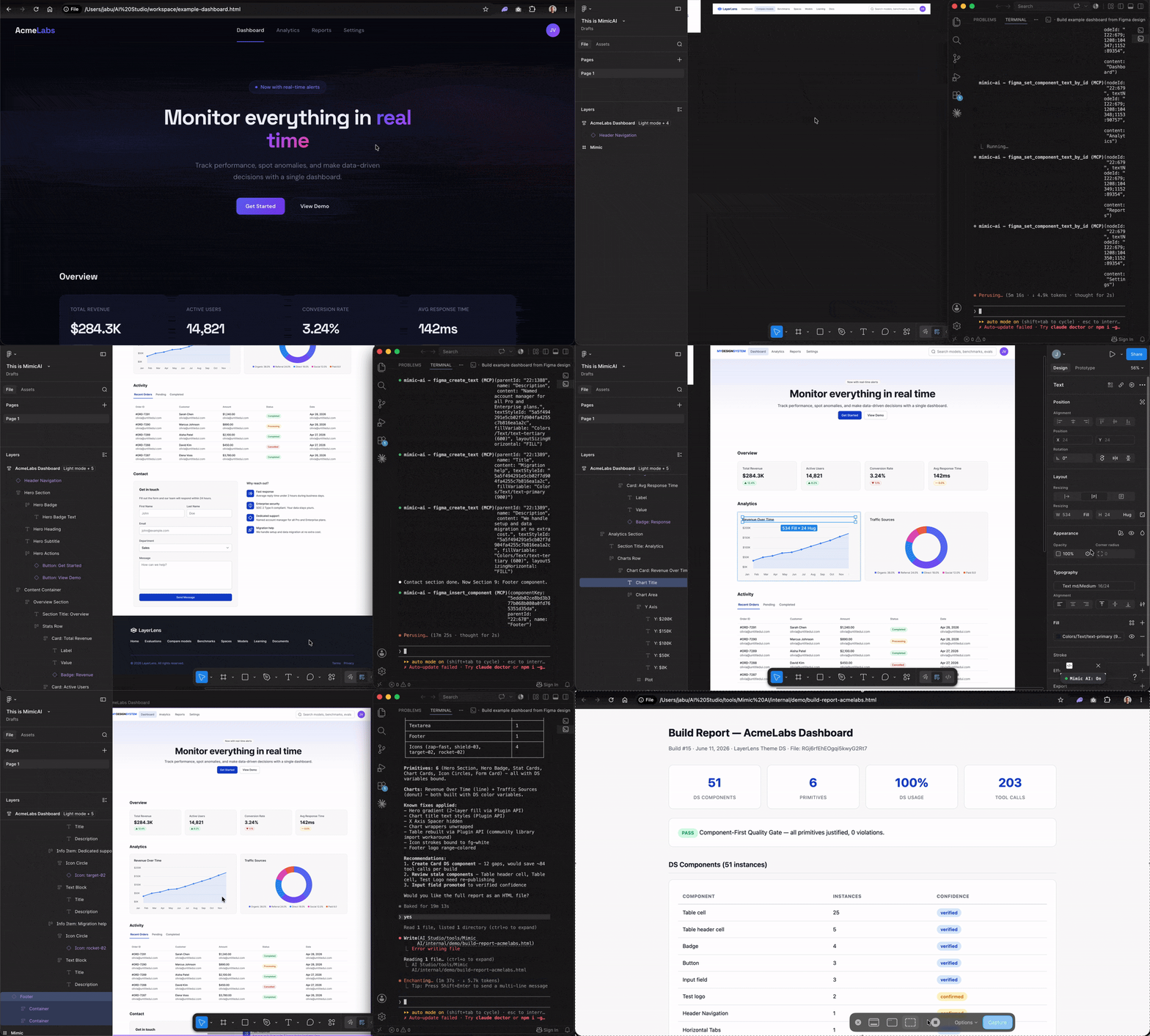
Give Mimic any HTML, a prompt, or a description. It builds production-ready Figma using your real components, tokens, and auto-layout. Correct it once, it remembers forever. After every build, it tells you what your design system is missing.
---





> Open-source MCP server. Runs locally. Your design data never leaves your machine.
---
<p align="center">
</p>
---
Why Mimic exists
You built a design system. Components, tokens, variables. Every decision intentional. Then someone needs a screen in Figma and starts from scratch. Hardcoded colors. Raw font sizes. Frames that break when you resize them. Your system sits right there in the library panel. Unused.
AI tools don't help either. Claude Design generates prototypes you have to rebuild in Figma. Figma Make produces interactive demos with raw CSS values instead of real components. The cleanup takes as long as building it yourself.
Mimic is different. The output is the deliverable: real Figma layers with real component instances, variable bindings, and auto-layout. Nothing to convert. Nothing to swap. Hand it off.
---
It learns your system
The first build scans the design system. By the third, recurring components auto-verify. By the tenth, most decisions are instant. The knowledge compounds across every build.
| Build | What Mimic knows | What you experience |
|---|---|---|
| 1 | Nothing. Cold start. Scans your entire DS. | "It found my components and used them. Some primitives where my DS has gaps." |
| 5 | Core patterns verified. Common components cached. | "It remembered that I use Button/Primary for CTAs. It didn't ask about tabs this time." |
| 20 | Deep knowledge. Recipes for every common component. | "I point it at an HTML and get a DS-compliant Figma screen in minutes. It knows my system better than the new hire." |
| 50+ | Comprehensive DS audit data. Recurring gaps visible. | "The gap report says I've used status badges as primitives 31 times. I finally built the component. Mimic started using it immediately." |
Correct it once. Tell Mimic "That's not the right Badge, use Tag/Neutral." The mapping updates permanently. Every future build uses the correction without you having to repeat yourself.
Your DS evolves. Mimic keeps up. New components, renamed tokens, updated variants, all detected at the start of every build. You never have to tell Mimic your DS changed.
Every build is a DS review. After each build, Mimic generates a report: what components it used, what it built from primitives and why, what patterns it learned, and what your DS is missing. Recommendations come as questions, not commands: "Should your DS include a Status Badge? 4 elements across 3 builds were built as primitives."
---
How it works
Pick any starting point:
> "Build a dashboard with three metric cards and an activity table"
> "Here's the HTML from our staging environment, build it in Figma"
> "Rebuild this Claude Design prototype with real components"
Mimic discovers the design system on your file, matches components and tokens, and builds structured Figma. Same rules, same output quality, regardless of how you start.
---
How Mimic compares
| | Mimic | Claude Design | Figma Make | Framelink | html.to.design |
|---|---|---|---|---|---|
| Output | Figma canvas (real layers) | HTML / React prototype | Interactive prototype | Read-only context | Figma canvas (paid) |
| Uses your components | Yes, real instances | No | Partial (Make Kits) | No (agent infers) | Partial |
| Variable bindings | Yes, every node | No | No (raw values) | No | No |
| Auto-layout | Every frame | N/A | N/A | N/A | Partial |
| Works with any library | Yes | No | Make Kits only | N/A | Limited |
| Learns across builds | Yes | No | No | No | No |
| DS gap detection | Yes, every build | No | No | No | No |
| Open source | Yes (MIT) | No | No | Yes (MIT) | No |
Claude Design is great for ideation. Figma Make is great for interactive prototyping. Framelink is great for giving AI context about your designs. Mimic is for when the output needs to be the actual Figma file you ship with.
---
Who it's for
Mimic works with any Figma library: your team's, a community kit, or a client's published system.
- Designers who want DS-compliant screens without manual component hunting
- Design system leads testing their system by building real screens, surfacing coverage gaps with evidence
- New team members learning a DS by building with it, seeing what components exist and what's missing
- Agencies and freelancers picking up a client's library and needing to produce screens fast
- DS migration teams rebuilding existing screens with a new system to assess coverage before committing
- Developers who need a Figma reference that matches their frontend components
- Product managers who want to mock up ideas using the DS without waiting for a designer
---
Get started
> Node.js v20.6+, Figma desktop, Professional plan or above.
1. Install
bash <(curl -fsSL https://raw.githubusercontent.com/miapre/mimic-ai/main/install.sh)
2. Add the Figma plugin
Plugins > Development > Import plugin from manifest > select ~/mimic-ai/plugin/manifest.json
3. Connect (each session)
Figma: Plugins > Development > Mimic AI > Run
The bridge starts automatically when you make your first tool call. No separate process to manage.
4. Enable your design system
Assets panel > Team library icon > toggle on. Once per file. Community libraries work out of the box.
5. Build
> "Build a settings page with three form fields and a save button."
One call discovers the entire DS (variables, styles, components), preloads everything, and advances to build-ready. No multi-step setup.
---
What it learns and enforces
What it learns:
- Component recipes: Configure a component once (variants, booleans, text slots), Mimic replays that configuration on every future insert. After 3 builds, the recipe is confirmed and auto-applied.
- Layout patterns: Frame configs (direction, padding, gap, fills) captured from the first build and reused when the same pattern appears.
- Design rules: Correct Mimic once ("brand color is only for links", "cards must have a card header component"), it saves the rule and enforces it on every future build.
- DS gaps: Patterns built as primitives are tracked across builds. Mimic surfaces recommendations backed by evidence ("Status Badge used 31 times as primitives across 5 builds").
How it enforces:
- Variable categories. Uses bg- for a stroke? Mimic warns and suggests border-. Uses bg- as text color? Warns and suggests text-.
- Component-first from experience. If Mimic has used a Badge component in 3+ builds and you try to build one as a raw frame, it blocks with the component key and says "use this instead."
- Rule compliance. Every build report audits stored rules against what was built. Violations are listed with evidence.
- Chart color semantics. Brand, Success, Warning, and Error colors are excluded from chart palettes. Only neutral utility colors suggested for data visualization.
Efficiency features:
- Text batch: All text overrides on a component instance set in a single call
- Bulk table builder: An entire data table (headers, cells, variants, text) in one call
- Bulk chart builder: Bar, line, donut, and radar charts in one call with DS color bindings
---
What gets checked automatically
Every build enforces 18 quality rules across 6 sequential phases.
- Text uses DS text styles, not raw font properties
- Colors bound to DS variables, not hardcoded
- Variable categories enforced: text- for text, bg- for fills, border-* for strokes
- Semantic colors (Brand, Success, Warning, Error) restricted to their intended use
- Spacing and radius bound to DS tokens where available
- Every frame uses auto-layout
- Content matches the source exactly, character for character
- DS components used wherever a match exists, including learned components from prior builds
- Components fully configured: text overrides, variants, icon slots
- User-defined design rules enforced at point of use and audited in the build report
- Build report with component usage %, binding quality, rule compliance, and DS gap recommendations
Full specification: CLAUDE.md
---
Works with any design system
| Design system type | What Mimic does |
|---|---|
| Team library (components + tokens) | Full usage: components, variables, text styles |
| Team library (components only) | Uses components, flags missing tokens, recommends adding them |
| Community libraries (Material Design, Apple iOS, etc.) | Full support including variable and component discovery |
Enforcement adapts to what the DS provides. A library with text styles but no color variables enforces text styles and accepts raw colors. The build report shows what's missing and what adding it would unlock.
---
MCP client setup
Works with any MCP client. Optimized for Claude Code.
<details>
<summary><strong>Claude Code</strong></summary>
{
  "mcpServers": {
    "mimic-ai": {
      "command": "npx",
      "args": ["-y", "@miapre/mimic-ai"]
    }
  }
}
</details>
<details>
<summary><strong>Cursor</strong></summary>
Add to .cursor/mcp.json:
{
  "mcpServers": {
    "mimic-ai": {
      "command": "npx",
      "args": ["-y", "@miapre/mimic-ai"]
    }
  }
}
</details>
<details>
<summary><strong>VS Code</strong></summary>
Click the install badge above, or add to settings:
{
  "mcp": {
    "servers": {
      "mimic-ai": {
        "command": "npx",
        "args": ["-y", "@miapre/mimic-ai"]
        }
    }
  }
}
</details>
<details>
<summary><strong>Windsurf / JetBrains</strong></summary>
Windsurf: ~/.codeium/windsurf/mcp_config.json
JetBrains: Settings > Tools > AI Assistant > MCP Servers
{
  "mcpServers": {
    "mimic-ai": {
      "command": "npx",
      "args": ["-y", "@miapre/mimic-ai"]
    }
  }
}
</details>
All clients need the Figma plugin active. The bridge is embedded and starts automatically.
---
<details>
<summary><strong>How it works (architecture)</strong></summary>
MCP Client (Claude Code, Cursor, VS Code)
    |
    | MCP Protocol (stdio)
    v
MCP Server (intelligence layer)
    - Tool registry, DS cache, knowledge store
    - Variable validation + suggestions before plugin
    - Circuit breaker (3 failures -> stop + report)
    - Chart geometry engine (Node.js)
    - Phase enforcement (6 sequential phases)
    |
    | Embedded WebSocket bridge (auto-starts)
    v
Figma Plugin (enforcement gate)
    - DS enforcement: rejects raw values when DS has tokens
    - Binding feedback: reports which bindings succeeded/failed
    - Thin handlers: mechanical operations only
    |
    v
Figma Plugin API > Canvas
Intelligence flows down. Binding feedback flows up. The MCP layer validates variable paths before reaching the plugin. The plugin reports exactly which DS bindings succeeded and which failed. Tool responses carry contextual hints so the LLM always knows what to do next.
- Building is unlimited. Frames, components, and token bindings have no rate limit.
- Inspecting is limited. Reading the library uses Figma's daily quota. Mimic caches aggressively to stay well under.
- Token bindings are real. Update a variable in the DS, re-publish, and every node updates automatically.
- Auto-layout everywhere. Every frame resizes correctly. Nothing is manually positioned.
</details>
<details>
<summary><strong>58 tools available</strong></summary>
Status and learning: mimic_status, mimic_discover_ds, mimic_ai_knowledge_read, mimic_ai_knowledge_write, mimic_generate_build_report, mimic_generate_design_md
DS setup: figma_preload_styles, figma_preload_variables, figma_discover_library_styles, figma_discover_library_variables, figma_discover_library_components, figma_set_session_defaults, figma_list_text_styles, figma_read_variable_values, mimic_map_components
Build: figma_create_frame, figma_create_text, figma_create_rectangle, figma_create_ellipse, figma_create_svg, figma_insert_component, figma_batch, mimic_build_table, mimic_build_chart
Edit: figma_set_component_text, figma_batch_set_component_text, figma_set_component_text_by_id, figma_set_text, figma_set_text_style, figma_set_node_fill, figma_set_node_position, figma_set_layout_sizing, figma_set_variant, figma_set_visibility, figma_set_variable_mode, figma_set_all_variable_modes, figma_swap_main_component, figma_replace_component, figma_restyle_artboard, figma_move_node, figma_delete_node
Inspect and QA: figma_get_node_props, figma_get_node_children, figma_get_node_parent, figma_get_text_info, figma_get_component_variants, figma_get_selection, figma_select_node, figma_get_page_nodes, figma_get_pages, figma_change_page, figma_validate_ds_compliance, mimic_find_node
Rendering and charts: mimic_pipeline_resolve, mimic_render_url, mimic_compute_chart
</details>
<details>
<summary><strong>Figma setup details</strong></summary>
Desktop app required. Browser Figma won't work. Download
Personal Access Token. Figma > Profile > Settings > Security > Personal access tokens > Generate new token. Name: "Mimic AI", expiration: 90 days. Check five scopes: current_user:read, file_content:read, file_metadata:read, library_assets:read, library_content:read. All read-only. Mimic never writes to your library. Copy the token immediately.
Publish your DS. Components and tokens in a separate file, published as a team library. Re-publish after changes.
Professional plan or above. Free plan can't publish libraries.
</details>
---
FAQ
<details>
<summary><strong>Does it work with community libraries like Material Design or Apple iOS kits?</strong></summary>
Yes. Mimic discovers components and variables from any library enabled in your Figma file, including community-published libraries.
</details>
<details>
<summary><strong>Does my design data leave my machine?</strong></summary>
No. Everything runs locally. The only outbound call is to the Figma REST API for published component keys (read-only). No telemetry, no tracking.
</details>
<details>
<summary><strong>What MCP clients are supported?</strong></summary>
Any MCP client works. The 6-phase protocol and contextual tool hints are optimized for Claude Code. Cursor, VS Code, Windsurf, and JetBrains get the full toolset but may not follow the protocol as closely.
</details>
<details>
<summary><strong>How is this different from screenshot-to-Figma tools?</strong></summary>
Screenshot tools capture pixels, not structure. The result is a flat image you can't iterate on. Mimic reads semantic HTML and produces structured, layered Figma with real components, variable bindings, and auto-layout.
</details>
<details>
<summary><strong>What happens when my design system changes?</strong></summary>
Mimic detects DS changes at the start of every build. New components surface automatically. Renamed tokens re-map. Removed components fall back gracefully with an explanation in the build report.
</details>
<details>
<summary><strong>Can I use it without a published design system?</strong></summary>
Yes, but with limited enforcement. Without published components, Mimic builds with primitives and raw values. Without tokens, it accepts hardcoded colors. The build report shows exactly what's missing and what adding it would unlock.
</details>
---
Privacy
Everything runs locally.
No design data leaves your machine.
No telemetry.
No tracking.
The only outbound call is to the Figma REST API for published component keys.
---
Constraints
- Figma Professional plan required. Free plan can't publish libraries.
- First-build font caching. Non-Inter DS fonts may fail on the first text node. Retry succeeds.
- npx mode. Doesn't set FIGMA_ACCESS_TOKEN. Use the full installer for team library support.
- Graduated DS enforcement. Adapts to what the DS provides. A component-only library gets components; raw values fill the gaps. The report shows what to add.
- Claude-optimized. The 6-phase protocol and contextual tool hints work best with Claude Code. Other MCP clients get the tools but may not follow the full protocol.
---
Contributing
Issues and PRs welcome. See the issue tracker.
---
License
MIT
Sign in to leave a review
Use Google, GitHub, or an email account so ratings stay tied to real people.
No reviews posted yet.





