Sample Nova Sonic Mcp
- web-chat
About
What is Sample Nova Sonic Mcp?
Sample Nova Sonic Mcp is a WebSocket-based bidirectional audio streaming application that integrates with Amazon Nova Sonic model for real-time speech-to-speech conversations. It runs on a Node.js server with a modern web client and is built for developers and users who want natural conversational AI with tool integration via MCP.
How to use Sample Nova Sonic Mcp?
Install Node.js v18.0.0 or higher, configure AWS credentials with Bedrock access, clone the repository, run npm install, then npm run build and npm start. Open http://localhost:3000 in a browser, grant microphone permissions, and click the call button to begin. MCP servers are configured through a mcp_config.json file. CLI mode is available via npm run cli -- --input=/path/to/audio.wav.
Key features of Sample Nova Sonic Mcp
- Bidirectional real-time audio streaming with low latency
- Multi-language interface (English and Chinese)
- Multiple AI voice personas (Tiffany, Matthew, Amy)
- MCP tool integration for extended functionality
- Audio visualization and barge-in interruption support
- CLI mode for processing pre-recorded audio files
Use cases of Sample Nova Sonic Mcp
- Real-time speech-to-speech AI assistant with tool access
- Multilingual customer service application
- Interactive voice applications with custom workflows
- Prototyping conversational AI using Amazon Nova Sonic and MCP
FAQ from Sample Nova Sonic Mcp
What does Sample Nova Sonic Mcp do differently from other speech AI tools?
It combines Amazon Nova Sonic’s speech-to-speech model with an MCP tool integration system, enabling real-time bidirectional audio streaming and the ability to call external tools during a conversation, all through a responsive web interface.
Which platforms and models does Sample Nova Sonic Mcp support?
It runs on any modern browser with WebAudio API support and requires a Node.js server (v18+). The speech model used is Amazon Nova Sonic via AWS Bedrock.
Does Sample Nova Sonic Mcp support MCP servers?
Yes. MCP servers can be configured in a mcp_config.json file, with support for command, arguments, environment variables, and enabling/disabling each server. The UI lists available tools per server.
What are the pricing and licensing terms?
The project is licensed under the ISC License. Usage requires an AWS account with Bedrock access; AWS charges apply for the Nova Sonic model and related services.
Are there any known limits or caveats?
Microphone permissions must be granted in the browser. A default 5-minute session timeout exists (adjustable in server.ts). WebSocket connections depend on correct AWS credential configuration.
Details
- Author
- aws-samples
- GitHub stars
- 5
- Category
- web-chat
- Repository
- aws-samples/sample-nova-sonic-mcp
Amazon Nova Sonic and MCP
This project implements a WebSocket-based bidirectional audio streaming application integrated with Amazon Nova Sonic model for real-time speech-to-speech conversations. The application enables natural conversational interactions through a modern web interface while leveraging Amazon's powerful Nova Sonic model for processing and generating responses.
English | 中文
Project Overview
Amazon Nova Sonic is an advanced speech model provided by AWS Bedrock, capable of processing natural human voice input and generating high-quality speech responses. This project demonstrates how to build a complete application system, including:
- Bidirectional real-time audio streaming: Supports continuous voice input and output for a natural conversation experience
- Multi-language support: Built-in bilingual interface (English and Chinese) that can be easily switched
- Multiple voice options: Supports various AI voice personas (tiffany, matthew, amy, etc.)
- Tool integration system: Supports extended functionality through MCP (Model Context Protocol)
- WebSocket real-time communication: Ensures low-latency audio transmission and processing
- Responsive web interface: Modern user interface that adapts to different devices
- Audio visualization: Real-time audio waveform display to enhance user experience
- CLI mode support: Ability to interact using pre-recorded audio through command line
The system consists of a server that handles bidirectional streaming and AWS Bedrock integration, along with a modern web client that manages audio streams and user interactions. It supports real-time audio streaming, integration with Amazon Nova Sonic model, bidirectional communication processing, and a responsive web interface with chat history management.
Usage Instructions
System Requirements
- Node.js (v18.0.0 or higher)
- AWS account with Bedrock access enabled
- AWS CLI configured with appropriate credentials
- Modern browser with WebAudio API support
- Microphone and speakers for audio capture and playback
Dependencies
The project uses the following main dependencies:
{
  "dependencies": {
    "@aws-sdk/client-bedrock-runtime": "^3.787.0",
    "@aws-sdk/credential-providers": "^3.787.0",
    "@modelcontextprotocol/sdk": "^1.9.0",
    "@smithy/node-http-handler": "^4.0.4",
    "@smithy/types": "^4.2.0",
    "axios": "^1.8.4",
    "cors": "^2.8.5",
    "express": "^4.18.0",
    "rxjs": "^7.8.2",
    "socket.io": "^4.8.1"
  }
}
Installation Steps
1. Clone the repository:
git clone <repository-url>
cd aws-nova-sonic-mcp
2. Install dependencies:
npm install
3. Configure AWS credentials:
# Configure AWS CLI with your credentials
aws configure --profile default
4. Build TypeScript code:
npm run build
Quick Start
1. Start the server:
npm start
2. Open in browser:
http://localhost:3000
3. Grant microphone permissions when prompted.
4. Click the call button to start a conversation.
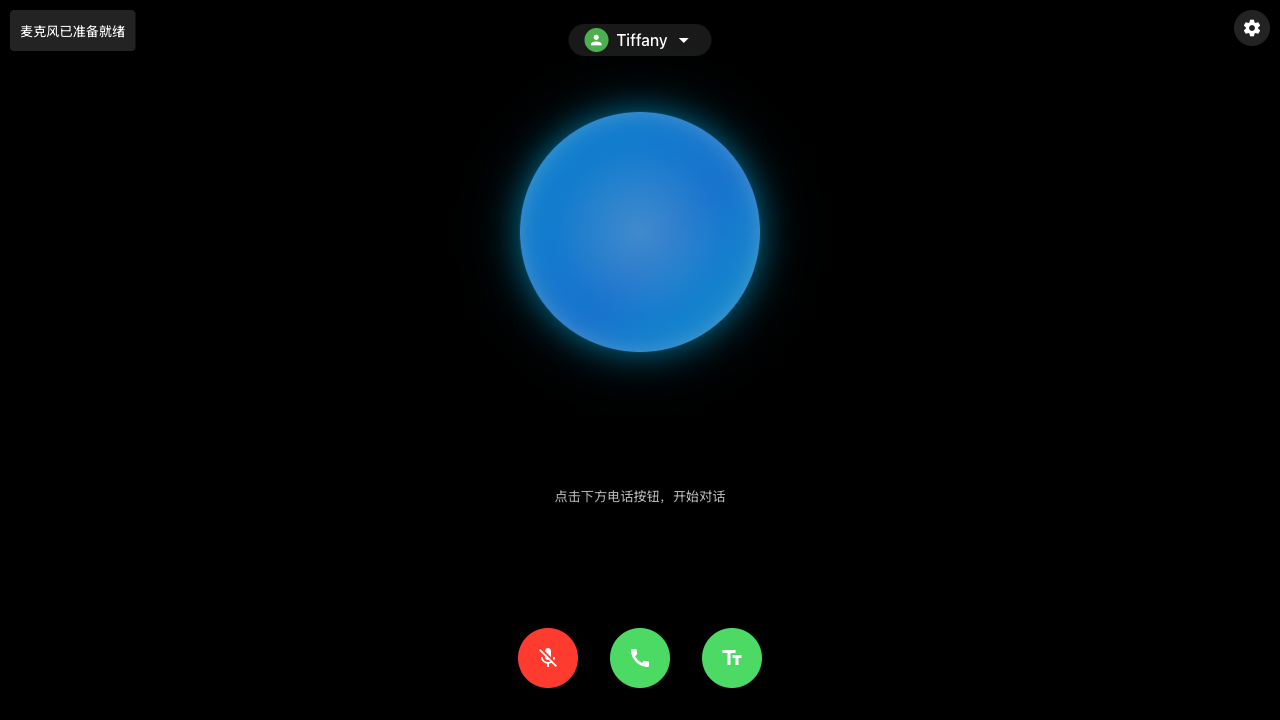
After the application loads, you will see the interface as shown above. The interface is divided into the following main sections:
- Top status bar: Displays connection status and voice persona selector
- Central interaction area: Large blue circular audio visualization display area
- Bottom control bar: Microphone control, call control, and text display buttons
Configuration Options
System Prompts
You can customize system prompts through the configuration button on the interface. The system provides multiple preset templates, and you can also write custom prompts.
// Custom system prompt example
const SYSTEM_PROMPT =
  "You are an assistant. The user and you will have a spoken conversation...";
socket.emit("systemPrompt", SYSTEM_PROMPT);
Voice Configuration
Multiple AI voice personas are supported and can be selected from the user avatar dropdown menu:
// Voice configuration example
socket.emit("voiceConfig", { voiceId: "tiffany" });
Language Settings
English and Chinese interface switching is supported:
// Language setting options
const currentLanguage = "en"; // English, can be set to "zh" for Chinese
updateUITexts(); // Update interface text
MCP Server Configuration
Configure MCP servers through the mcp_config.json file:
{
  "mcpServers": {
    "github.com/tavily-ai/tavily-mcp": {
      "command": "npx",
      "args": ["-y", "tavily-mcp@0.1.4"],
      "env": {
        "TAVILY_API_KEY": "your-api-key"
      },
      "disabled": false,
      "autoApprove": []
    }
  }
}
Command Line Interface (CLI) Mode
You can use CLI mode to process pre-recorded audio files:
# Run in CLI mode
npm run cli -- --input=/path/to/audio.wav
Troubleshooting
1. Microphone Access Issues
- Problem: Browser displays "Microphone permission denied"
- Solution:
  // Check microphone permissions

  const permissions = await navigator.permissions.query({ name: "microphone" });

  if (permissions.state === "denied") {

    console.error("Microphone access permission required");

    // Display instructions to guide users to enable permissions

  }
2. Audio Playback Issues
- Problem: No audio output
- Solution:
  // Verify if AudioContext is initialized
  if (audioContext.state === "suspended") {
    await audioContext.resume();
  }
// Check audio player

  if (!audioPlayer.initialized) {

    await audioPlayer.start();

  }
3. Connection Issues
- Check server logs
- Verify AWS credential configuration
- Validate WebSocket connection:
  socket.on("connect_error", (error) => {

    console.error("Connection failed:", error);

  });
4. Session Timeout Issues
- Problem: Session disconnects after a period of inactivity
- Solution: The system has a 5-minute automatic session cleanup, which can be adjusted in server.ts
Client-side Audio Processing
- Uses WebAudio API to capture and process audio
- 16kHz sampling rate, mono PCM format
- Real-time audio visualization display
- Audio interruption (Barge-in) support, allowing users to interrupt AI responses at any time
Server-side Audio Processing
- Uses HTTP/2 streaming for efficient communication
- Supports concurrent processing of multiple sessions
- Automatic session cleanup mechanism to prevent resource leaks
Infrastructure
The application runs on a Node.js server with the following key components:
- Express.js server handling WebSocket connections and HTTP requests
- Socket.IO for real-time communication
- Nova Sonic client for speech-to-speech model processing
- MCP tool integration system for extended functionality
Web Interface Features
The application provides a modern web interface with the following features:
Main Interface
The main interface contains the following key elements:
- Connection status indicator: Top-left corner displays the current connection status, such as "Connected to server" or error messages
- Voice persona selection: Top-center dropdown menu for selecting different AI voice personas
- Settings button: Top-right gear icon for opening the configuration panel
- Audio visualization: Central blue circular area displaying real-time audio waveforms and speech activity
- Control buttons:
- Bottom-left microphone button: Controls microphone on/off
- Center call button: Starts/ends conversation (red indicates active conversation)
- Bottom-right text button: Toggles display/hide of text conversation content
Conversation Interface
- Real-time display of conversation history
- Support for showing/hiding text conversation content
- Audio visualization displaying user and assistant speech activity
- Multi-language UI support (English and Chinese)
Configuration Panel
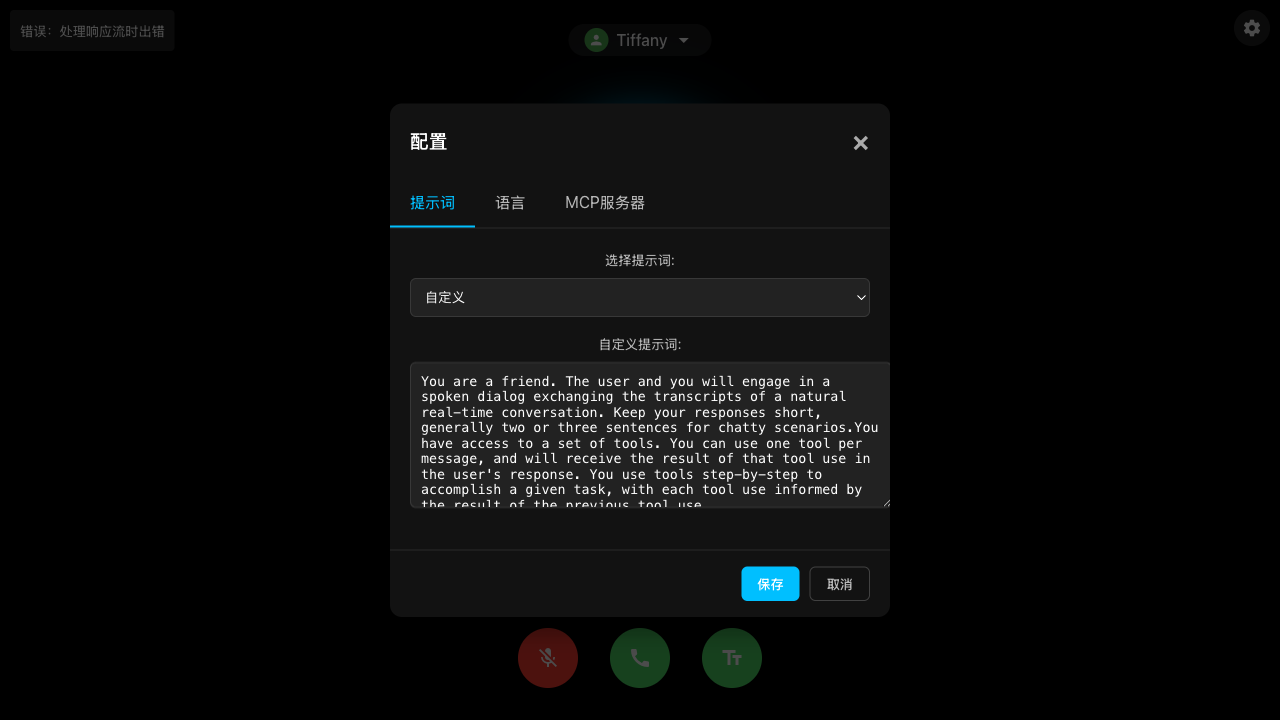
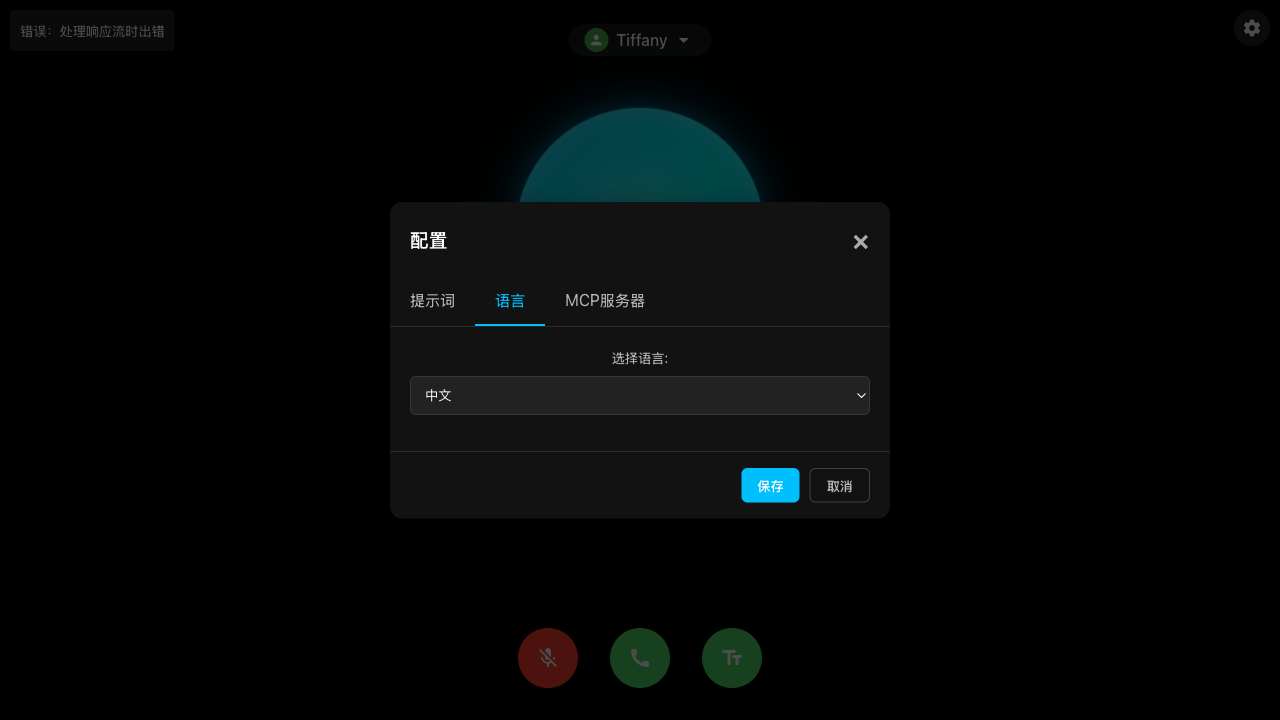
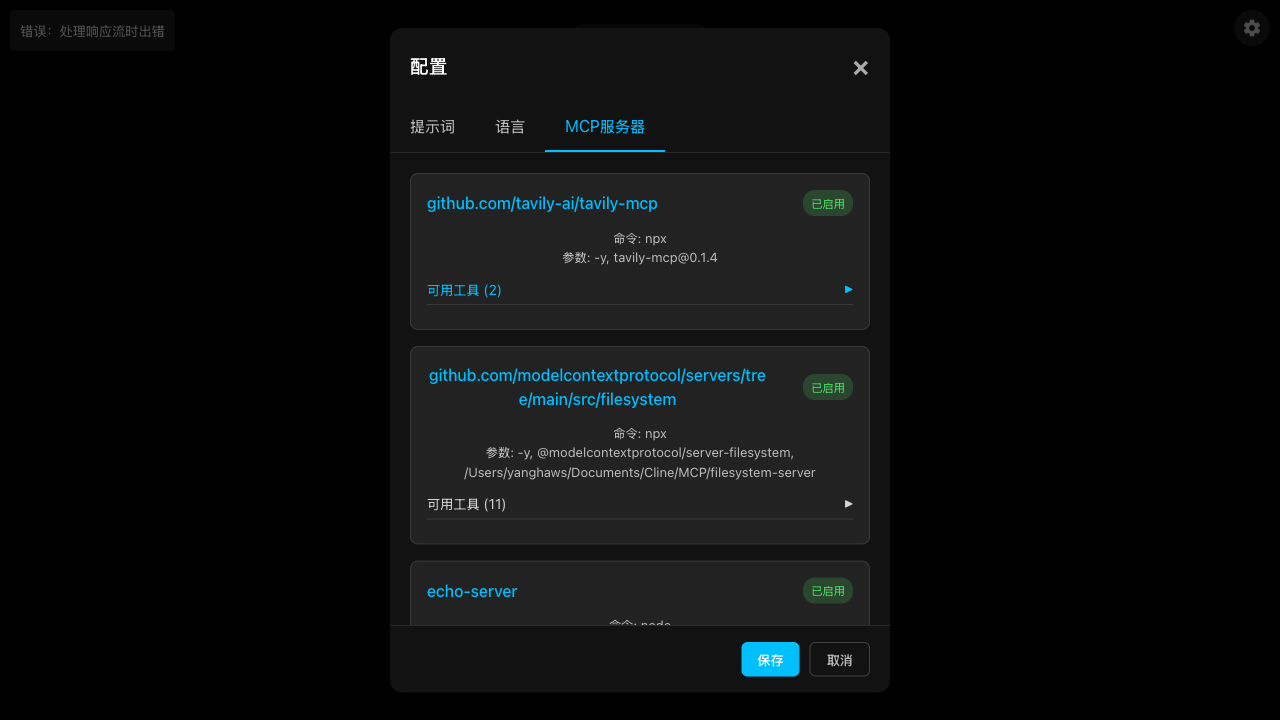
The configuration panel contains three main tabs:
1. Prompts Tab
- Provides system prompt template selection dropdown
- Displays current system prompt text content
- Supports custom prompt editing
2. Language Tab
- Provides interface language selection (English and Chinese supported)
- Simple and intuitive language switching interface
3. MCP Servers Tab
- Displays all configured MCP servers
- Includes server URL, command, parameters, and enabled status
- Shows the number of available tools provided by each server
- Can be expanded to view detailed tool information
Voice Persona Selection
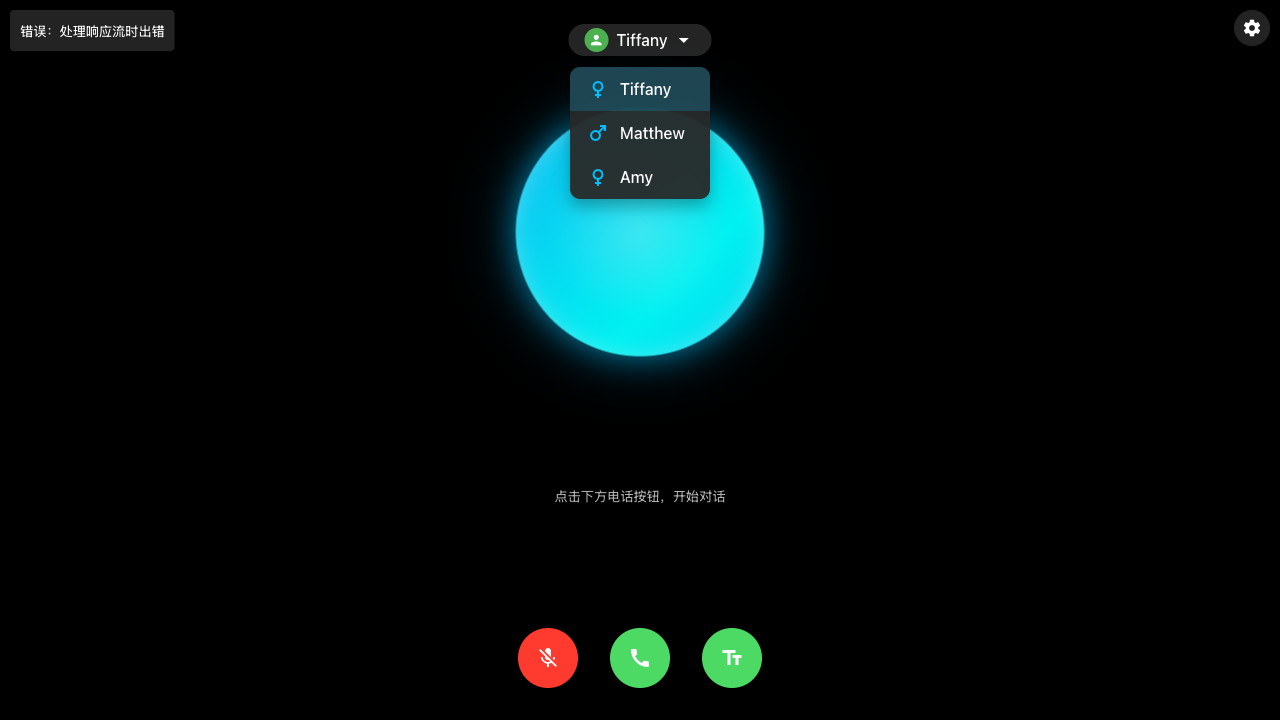
- Supports multiple AI voice persona options:
- Tiffany (female) - Default voice, natural and friendly tone
- Matthew (male) - Calm and professional male voice
- Amy (female) - Clear and lively female voice
- Each voice persona comes with an icon indicating gender
- Users can switch voices at any time, changes apply immediately to the next AI response
Security Considerations
- All AWS credentials should be properly secured and not embedded directly in code
- WebSocket connections are configured with CORS protection
- API secure access can be implemented through token mechanisms
- Consider enabling HTTPS in production environments
- MCP tool execution requires appropriate security restrictions
Contribution Guidelines
Contributions to this project are welcome:
1. Fork the repository
2. Create your feature branch (git checkout -b feature/amazing-feature)
3. Commit your changes (git commit -m 'Add some amazing feature')
4. Push to the branch (git push origin feature/amazing-feature)
5. Open a Pull Request
License
This project is licensed under the ISC License - see the LICENSE file for details.
Related Resources
- AWS Bedrock Documentation
- Nova Sonic Model Guide
- Model Context Protocol