
Desktop Image Manager
About
Provides tools for managing and manipulating local desktop images with capabilities for file counting, filename retrieval, and image compression using the Sharp library
Details
- Author
- zhixiaoqiang
- Repository
- zhixiaoqiang/desktop-image-manager-mcp
- GitHub stars
- 1
- Categories
- Developer Tools, Design, File Management, AI, Media, Frontend
Jump to

Setting up with Highlight
This MCP is not yet compatible with Highlight’s one-click setup. However, you can still use it with Highlight by following these steps:
- Download and install Highlight from highlightai.com/download
- Navigate to the plugins tab and select "Add Custom Plugin"
-
Configure the plugin with the settings below
Plugin Name
Desktop Image ManagerCommand (node, npx, python, etc.)npxArguments-
Argument 1
-y -
Argument 2
@jzone-mcp/desktop-image-manager-mcp
Please refer to the README for specific instructions on how to obtain API keys or other required environment variables.
-
Argument 1
- Enable "Start Automatically" if you want the plugin to start when Highlight launches





list-desktop-images
获取桌面上所有图片文件的名称。参数: 无
compress-image
压缩图片文件。参数: fileName (string) - 要压缩的图片文件名; quality (number) - 压缩质量 (1-100),默认 80; outputName (string, optional) - 输出文件名
Claude Desktop / Cursor
Paste into your MCP client config file to install this server.
{
    "mcpServers": {
        "desktop image manager": {
            "cwd": "~/Library/Application Support/Claude",
            "env": {},
            "args": [
                "-y",
                "@jzone-mcp/desktop-image-manager-mcp"
            ],
            "shell": false,
            "command": "npx"
        }
    }
}Linux
{
    "cwd": null,
    "env": [],
    "args": [
        "-y",
        "@jzone-mcp/desktop-image-manager-mcp"
    ],
    "shell": false,
    "command": "npx"
}
Macos
{
    "cwd": "~/Library/Application Support/Claude",
    "env": [],
    "args": [
        "-y",
        "@jzone-mcp/desktop-image-manager-mcp"
    ],
    "shell": false,
    "command": "npx"
}
Windows
{
    "cwd": "%APPDATA%/Claude",
    "env": [],
    "args": [
        "-y",
        "@jzone-mcp/desktop-image-manager-mcp"
    ],
    "shell": false,
    "command": "npx"
}
Desktop Image Manager MCP Server
基于 Model Context Protocol (MCP) 开发的桌面图片管理服务器,提供图片文件统计、查看和压缩功能。
<a href="https://glama.ai/mcp/servers/@zhixiaoqiang/desktop-image-manager-mcp">
</a>
操作示例:
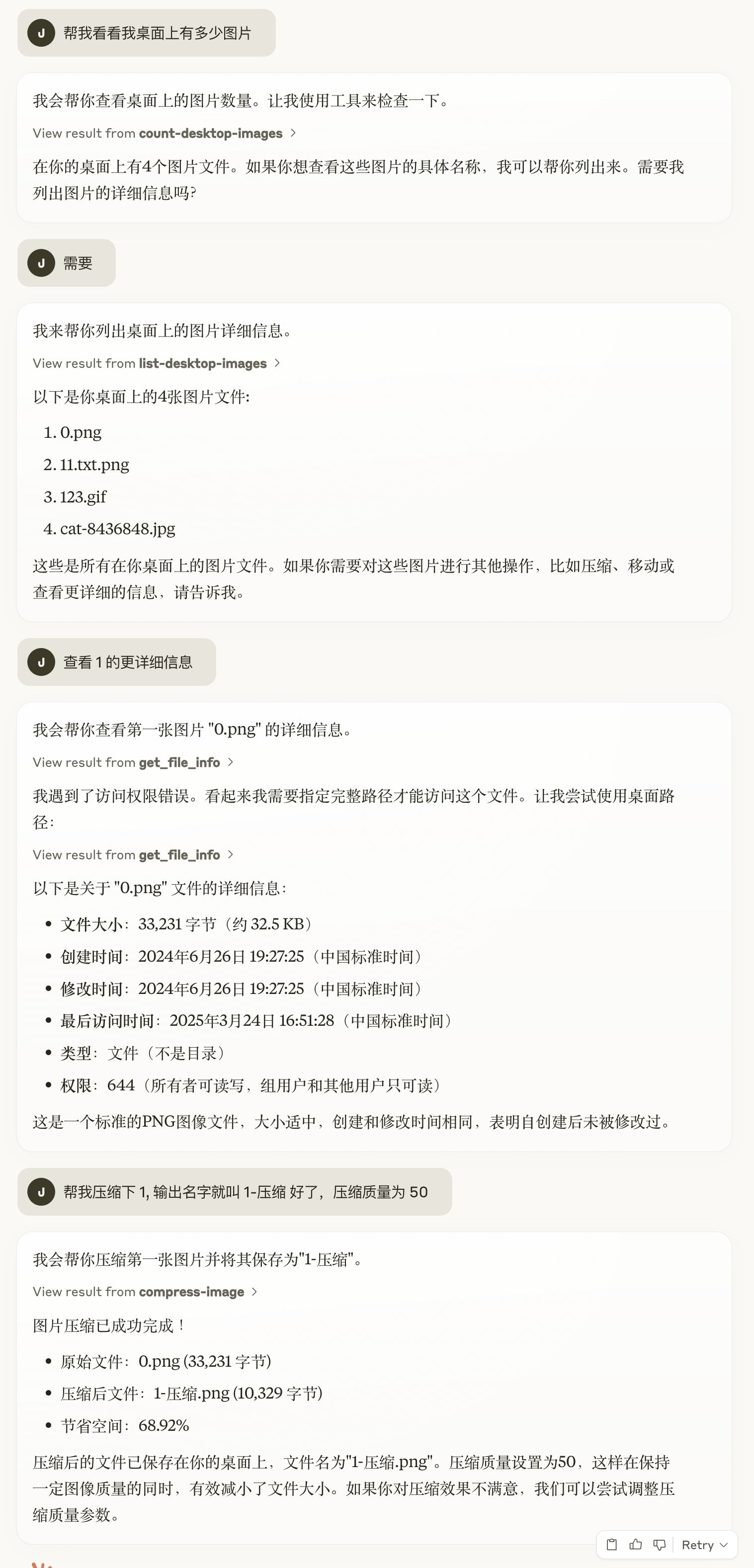 https://claude.ai/share/0ffbad1e-502e-4188-b008-0bb966acf06d
功能特性
- 统计桌面图片数量:快速获取桌面上的图片文件总数
- 获取图片列表:列出桌面上所有图片文件的名称
- 图片压缩:支持压缩 JPG、PNG、WebP 等格式的图片文件,可自定义压缩质量
实现提示
让 Trae 引用 ./demand.md 进行功能代码生成,简化版如下
... (这里是已经引入的 domain knowledge)
打造一个 MCP 服务器,它能够:

- 功能:

  - 统计当前桌面上的图片文件数量

  - 获取对应文件的名称

  - 支持压缩图片
要求:

- 不需要给出 prompt 和 resource 相关代码。

- 你可以假设我的桌面路径为 /Users/{username}/Desktop
支持的图片格式
- JPG/JPEG
- PNG
- GIF
- BMP
- WebP
- TIFF
- SVG
环境要求
- Node.js >= 16
- pnpm >= 8
安装
```bash
Sign in to leave a review
Use Google, GitHub, or an email account so ratings stay tied to real people.
No reviews posted yet.





