
Your Money Left The Chat
About
A Rust + MCP powered financial tracker that knows exactly where your money ghosted you.
Details
- Author
- Rayato159
- GitHub stars
- 23
- Downloads
- 369
- Categories
- AI
Jump to
- Natural language input for logging expenses
- Smart summaries (daily, monthly, yearly breakdowns)
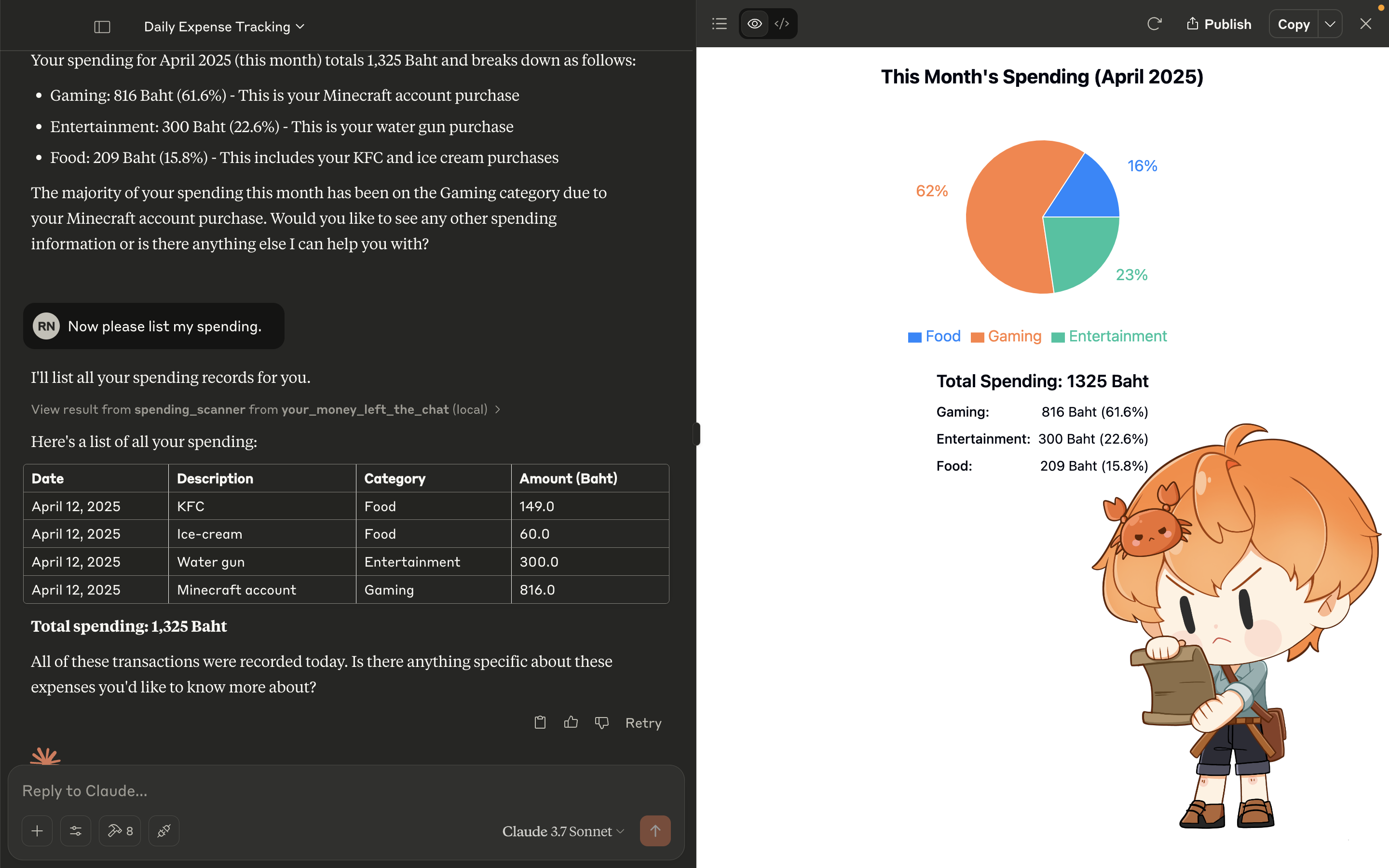
- Graph view for visualizing spending (Claude only)
- Tax calculation to estimate owed amounts
- Offline and local-first: no internet or accounts required
Install Rust, SQLite, and Make, clone the repository, install Diesel CLI, create a database.db file, run database migrations (make migrate-up), build the project (make build-release), add the binary and database path to your MCP agent’s config.json, then chat with the agent to log expenses.
Your Money Left The Chat
📀 Demo Video
TL;DR
A Rust-native 🦀, SQLite-backed, LLM-powered financial tracking system
AI-powered money tracker that logs your spending, analyzes your habits, and calculates taxes. all through natural conversation.
Talk to Claude or Ollama, and the system will store everything locally using SQLite, no cloud bullshit.
🧠 Features
- ✍️ Natural Language Input
Log expenses like:
> “Spent 129 baht on KFC today” → Stored instantly
- 📆 Smart Summaries
Daily, monthly, yearly breakdowns, including category-based analytics
- 📊 Graph View (Only Claude Can Do THIS!!!)
Visualize how much of your soul goes into food every month
- 📉 Tax Calculation
Estimate how much you’ll owe Uncle Sam (or whoever)
- 🔒 Offline & Local-First
100% yours – no internet, no accounts, no surveillance capitalism
🦀 Tech Stack
| Layer | Tech |
| ------------ | ------------------------------- |
| Backend | MCP Rust SDK + SQLite + Diesel |
| AI Interface | Claude / Ollama (via mcp-cli) |
🔧 Getting Started
1. Install Rust, SQLite, and Makefile
Rust: https://www.rust-lang.org/tools/install
SQLite: https://sqlite.org/download.html
GNU Make: https://www.gnu.org/software/make/
2. Clone the Repo
   https://github.com/Rayato159/your-money-left-the-chat
   cd your-money-left-the-chat
3. Install Diesel CLI
cargo install diesel_cli --no-default-features --features sqlite
> If you facing with the error that can't find sqlite3.lib, Please install sqlite3 on your machine first.
4. Create Sqlite Database
Just create file database.db in any folder you want, or you can use this command
5. Database Setup
Makefile:
make migrate-up
Or using cargo as original
diesel migrate run
6. Build the Project
Makefile:
make build-release
Or using cargo as original
cargo build --release --bin your_money_left_the_chat
7. Edit the config file
Find the config.json, of your MCP agent then add this
Windows:
   {
     "mcpServers": {
       "money": {
         "command": "PATH-TO/your-money-left-the-chat/target/release/your_money_left_the_chat.exe",
         "args": ["PATH-TO/database.db"]
       }
     }
   }
Linux/MacOS:
   {
     "mcpServers": {
       "money": {
         "command": "PATH-TO/your-money-left-the-chat/target/release/your_money_left_the_chat",
         "args": ["PATH-TO/database.db"]
       }
     }
   }
8. Chatting with your dude (MCP Agent):
    You: "Hey, I spent 129 baht on KFC today"
    MCP Agent: "Got it! I've logged that expense for you. Anything else?"
Sign in to leave a review
Use Google, GitHub, or an email account so ratings stay tied to real people.
No reviews posted yet.



