
VMware Fusion MCP Server
About
A MCP Server for Managing VMware Fusion Virtual Machines.
Details
- Author
- yeahdongcn
- GitHub stars
- 9
- Downloads
- 318
- Categories
- Cloud Service
Jump to
- List all VMs registered in VMware Fusion.
- Retrieve detailed info about a specific VM.
- Perform power actions: on, off, suspend, pause, unpause, reset.
- Query the current power state of a VM.
- Exposes all features as MCP tools for LLMs and agent frameworks.

Setting up with Highlight
This MCP is not yet compatible with Highlight’s one-click setup. However, you can still use it with Highlight by following these steps:
- Download and install Highlight from highlightai.com/download
- Navigate to the plugins tab and select "Add Custom Plugin"
-
Configure the plugin with the settings below
Plugin Name
VMware Fusion MCP ServerCommand (node, npx, python, etc.)Please refer to the README for specific instructions on how to obtain API keys or other required environment variables.
- Enable "Start Automatically" if you want the plugin to start when Highlight launches





From the repository
Install the package with uvx or pip, enable the VMware Fusion REST API in Fusion Pro (default port 8697), and set the VMREST_USER and VMREST_PASS environment variables. Then run the server using uvx vmware-fusion-mcp-server or make run with the credentials.
Claude Desktop / Cursor
Paste into your MCP client config file to install this server.
{
    "mcpServers": {
        "vmware fusion mcp server": {
            "vmware-fusion": {
                "command": "uvx",
                "args": [
                    "vmware-fusion-mcp-server"
                ],
                "env": {
                    "VMREST_USER": "your-username",
                    "VMREST_PASS": "your-password"
                }
            }
        }
    }
}McpServers
{
    "vmware-fusion": {
        "command": "uvx",
        "args": [
            "vmware-fusion-mcp-server"
        ],
        "env": {
            "VMREST_USER": "your-username",
            "VMREST_PASS": "your-password"
        }
    }
}
VMware Fusion MCP Server
<div align="center" id="top">
</img>
</div>
</p>
<p align="center">
<a href="https://pypi.org/project/vmware-fusion-mcp-server/">
<a href="https://pypi.org/project/vmware-fusion-mcp-server/"> </a>
</a>
<a href="https://github.com/yeahdongcn/vmware-fusion-mcp-server/issues">
<a href="https://pepy.tech/projects/vmware-fusion-mcp-server">
<a href="https://github.com/yeahdongcn/vmware-fusion-mcp-server/blob/main/LICENSE">
</p>
---
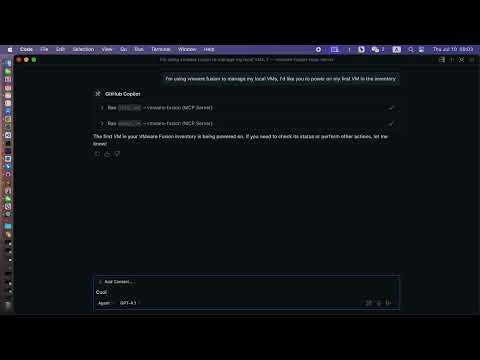
A Model Context Protocol (MCP) server for managing VMware Fusion virtual machines via the Fusion REST API, built with FastMCP.
<p align="center">
</p>
---
Features
- List VMs: View all VMs registered in VMware Fusion.
- Get VM Info: Retrieve detailed information about a specific VM.
- Power Operations: Perform power actions (on, off, suspend, pause, unpause, reset) on a VM.
- Get Power State: Query the current power state of a VM.
- Modern MCP/LLM Integration: Exposes all features as MCP tools for LLMs and agent frameworks.
---
Prerequisites
- VMware Fusion Pro (with REST API enabled)
- Python 3.10+
- uv (recommended) or pip
- uvx (for VS Code/LLM integration)
---
Installation
1. Clone the repository:
   git clone https://github.com/yeahdongcn/vmware-fusion-mcp-server.git

   cd vmware-fusion-mcp-server
2. Set up the environment and install dependencies:
make env
---
VMware Fusion Setup
1. Enable the REST API:
- Open VMware Fusion > Preferences > Advanced
- Check "Enable REST API"
- Note the API port (default: 8697)
2. Start the REST API service:
vmrest
The API will be available at
http://localhost:8697 by default.
---
Configuration
The server connects to VMware Fusion's REST API at http://localhost:8697 by default. You must configure authentication for the vmrest API using environment variables:
- VMREST_USER: Username for the vmrest API (required if authentication is enabled)
- VMREST_PASS: Password for the vmrest API (required if authentication is enabled)
These must be set in your shell, in your VS Code MCP config, or in your deployment environment.
Example: MCP server config for VS Code with credentials
{
  "mcpServers": {
    "vmware-fusion": {
      "command": "uvx",
      "args": ["vmware-fusion-mcp-server"],
      "env": {
        "VMREST_USER": "your-username",
        "VMREST_PASS": "your-password"
      }
    }
  }
}
- Set VMREST_USER and VMREST_PASS to your vmrest credentials.
---
Usage
Run the MCP Server
With Make
VMREST_USER=your-username VMREST_PASS=your-password make run
With uvx (recommended for VS Code/LLM)
VMREST_USER=your-username VMREST_PASS=your-password uvx vmware-fusion-mcp-server
---
VS Code / LLM Integration
To use this server as a tool provider in VS Code (or any MCP-compatible client):
1. Install uvx:
uv pip install uvx
2. Add to your MCP server config (e.g., .vscode/mcp.json):
   {

     "mcpServers": {

       "vmware-fusion": {

         "command": "uvx",

         "args": ["vmware-fusion-mcp-server"],

         "env": {

           "VMREST_USER": "your-username",

           "VMREST_PASS": "your-password"

         }

       }

     }

   }
- Set
VMREST_USER and VMREST_PASS to your vmrest credentials.- You can now use the VMware Fusion tools in any MCP-enabled LLM or agent in VS Code.
---
MCP Tools
list_vms
- Description: List all VMs in VMware Fusion.
- Parameters: None
get_vm_info
- Description: Get detailed information about a specific VM.
- Parameters:
- vm_id (string): The ID of the VM
power_vm
- Description: Perform a power action on a VM.
- Parameters:
- vm_id (string): The ID of the VM
- action (string): One of: "on", "off", "suspend", "pause", "unpause", "reset"
get_vm_power_state
- Description: Get the power state of a specific VM.
- Parameters:
- vm_id (string): The ID of the VM
---
Development
Run Tests
make test
Format Code
make fmt
Lint
make lint
---
Project Structure
- vmware_fusion_mcp/server.py - Main FastMCP server implementation
- vmware_fusion_mcp/vmware_client.py - VMware Fusion REST API client
- tests/ - Unit and integration tests
---
License
MIT License - see LICENSE for details.
---
Contributing
1. Fork the repository
2. Create a feature branch
3. Make your changes
4. Run tests and linting: make test && make lint
5. Submit a pull request
---
References
- FastMCP Documentation
- Model Context Protocol
- uvx
- fetch server example
Sign in to leave a review
Use Google, GitHub, or an email account so ratings stay tied to real people.
No reviews posted yet.




