
Ui Annotator Mcp
About
MCP server that annotates any web page with hover labels for AI assistants. Reverse proxy injection — zero browser extensions, works in any browser. 5 tools: annotate, get_elements, highlight_element, rescan_elements, inspect_mode.
Details
- Author
- mcpware
- Downloads
- 299
- Categories
- Other, Developer Tools
Jump to
- Hover any element to see its name, CSS selector, content preview, and dimensions
- Click‑to‑copy element name via inspect mode
- Collapsible toolbar with inspect toggle and element count
- Auto‑rescan DOM via MutationObserver after page changes
- Zero external dependencies: uses Node.js built‑in http and @modelcontextprotocol/sdk

Setting up with Highlight
This MCP is not yet compatible with Highlight’s one-click setup. However, you can still use it with Highlight by following these steps:
- Download and install Highlight from highlightai.com/download
- Navigate to the plugins tab and select "Add Custom Plugin"
-
Configure the plugin with the settings below
Plugin Name
Ui Annotator McpCommand (node, npx, python, etc.)Please refer to the README for specific instructions on how to obtain API keys or other required environment variables.
- Enable "Start Automatically" if you want the plugin to start when Highlight launches





From the repository
Run npx @mcpware/ui-annotator to start the proxy on port 7077 (or override with UI_ANNOTATOR_PORT env). Open a proxied URL like http://localhost:7077/localhost:YOUR_PORT in any browser. Hover any element to see its information. AI assistants can use MCP tools such as annotate(url), get_elements(), highlight_element(name), rescan_elements(), and inspect_mode(enabled).
annotate
Open a web page with hover annotations. Returns a proxy URL that adds interactive element labels to any page. User opens this URL in any browser to see annotations on hover.
get_elements
Get all UI elements detected on the currently annotated page. Returns element names, CSS selectors, positions, and sizes. Use this to understand what the user is referring to when they describe a UI element.
highlight_element
Briefly flash-highlight a specific element on the page so the user can see which element you are referring to. Useful for confirming "do you mean this element?"
rescan_elements
Force the annotated page to rescan all UI elements. Use this after the page content has changed (e.g. after navigation, DOM updates, or user interaction).
inspect_mode
Toggle inspect mode on the annotated page. When ON, the user can click any element to copy its name. When OFF, the page behaves normally. Use this to help the user copy element names for communicating design changes.
Claude Desktop / Cursor
Paste into your MCP client config file to install this server.
{
    "mcpServers": {
        "ui annotator mcp": {
            "ui-annotator": {
                "command": "npx",
                "args": [
                    "-y",
                    "@mcpware/ui-annotator"
                ]
            }
        }
    }
}McpServers
{
    "ui-annotator": {
        "command": "npx",
        "args": [
            "-y",
            "@mcpware/ui-annotator"
        ]
    }
}
UI Annotator MCP




English | 廣東話
See what every UI element is called — in any browser, zero extensions.
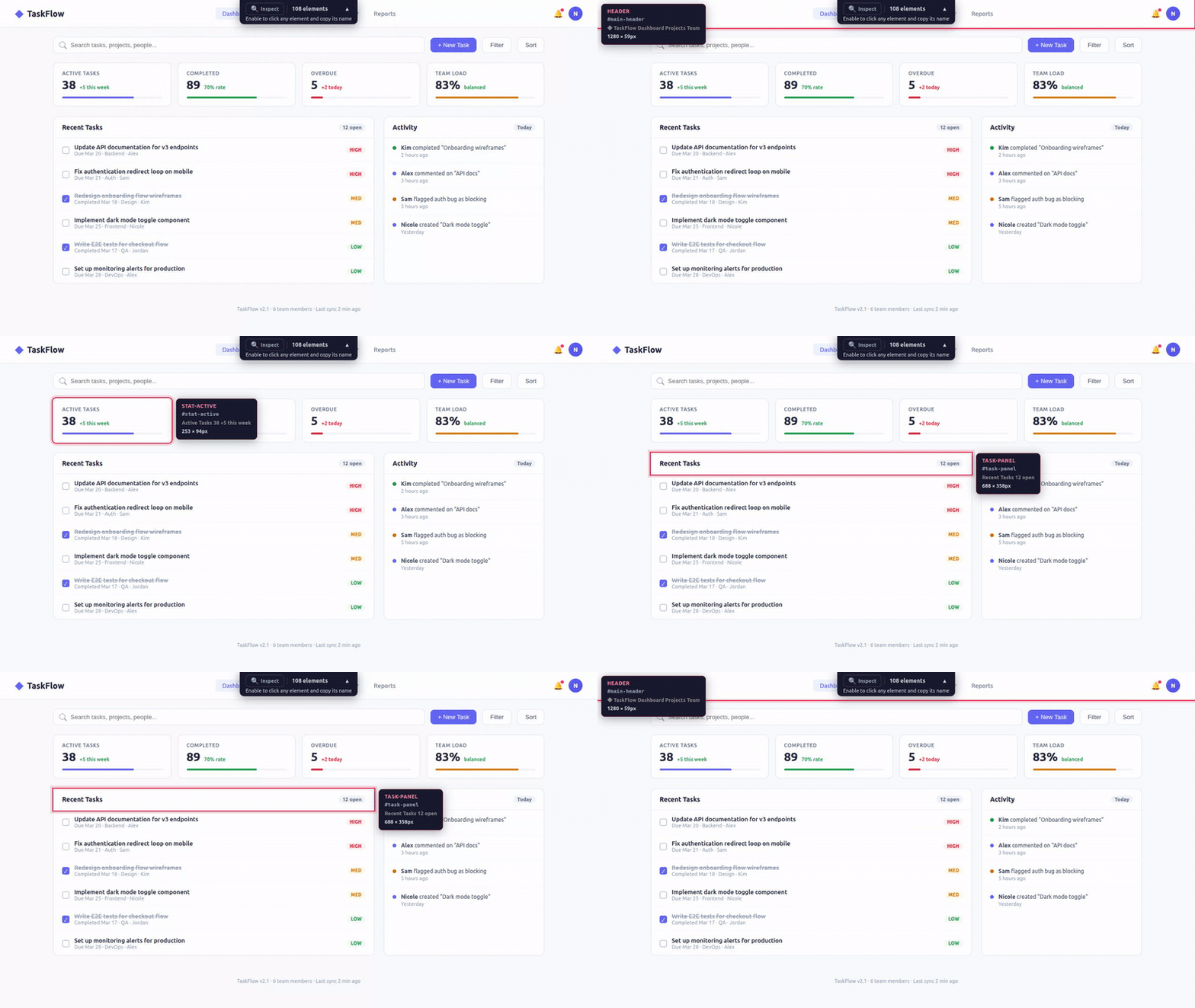
An MCP server that adds interactive hover annotations to any web page. Open a proxied URL, hover any element, see its name. Tell your AI assistant "make the sidebar wider" — it knows exactly what you mean.
The Problem
When reviewing a web UI with an AI coding assistant, the hardest part isn't the code change — it's describing which element you want changed.
> "That thing on the left... the second row... no, the one with the icon..."
You don't know what it's called. The AI doesn't know what you're pointing at. You waste time on miscommunication instead of shipping.
The Solution
Open your page through the annotator proxy. Hover any element — instantly see its name, CSS selector, and dimensions. Now you both speak the same language.
```
Sign in to leave a review
Use Google, GitHub, or an email account so ratings stay tied to real people.
No reviews posted yet.





