
Trayd
Description
# Trayd Trade Robinhood from Claude. Portfolio analysis, real-time quotes, and order execution through natural language.  …
About
# Trayd Trade Robinhood from Claude. Portfolio analysis, real-time quotes, and order execution through natural language.     ##…
Details
- Author
- trayders
- Downloads
- 204
- Categories
- Other, Finance
Jump to
- Portfolio analysis: "What's my portfolio worth?"
- Real-time quotes: "What's NVDA trading at?"
- Buy/sell and limit orders via natural language
- Ladder orders: set multiple limit orders in one sentence
- Multi-account support: list and switch accounts
- Batch operations: buy multiple tickers at once
- 24/7 quotes with automatic data source fallback
- OAuth 2.1 with PKCE and in-memory token storage
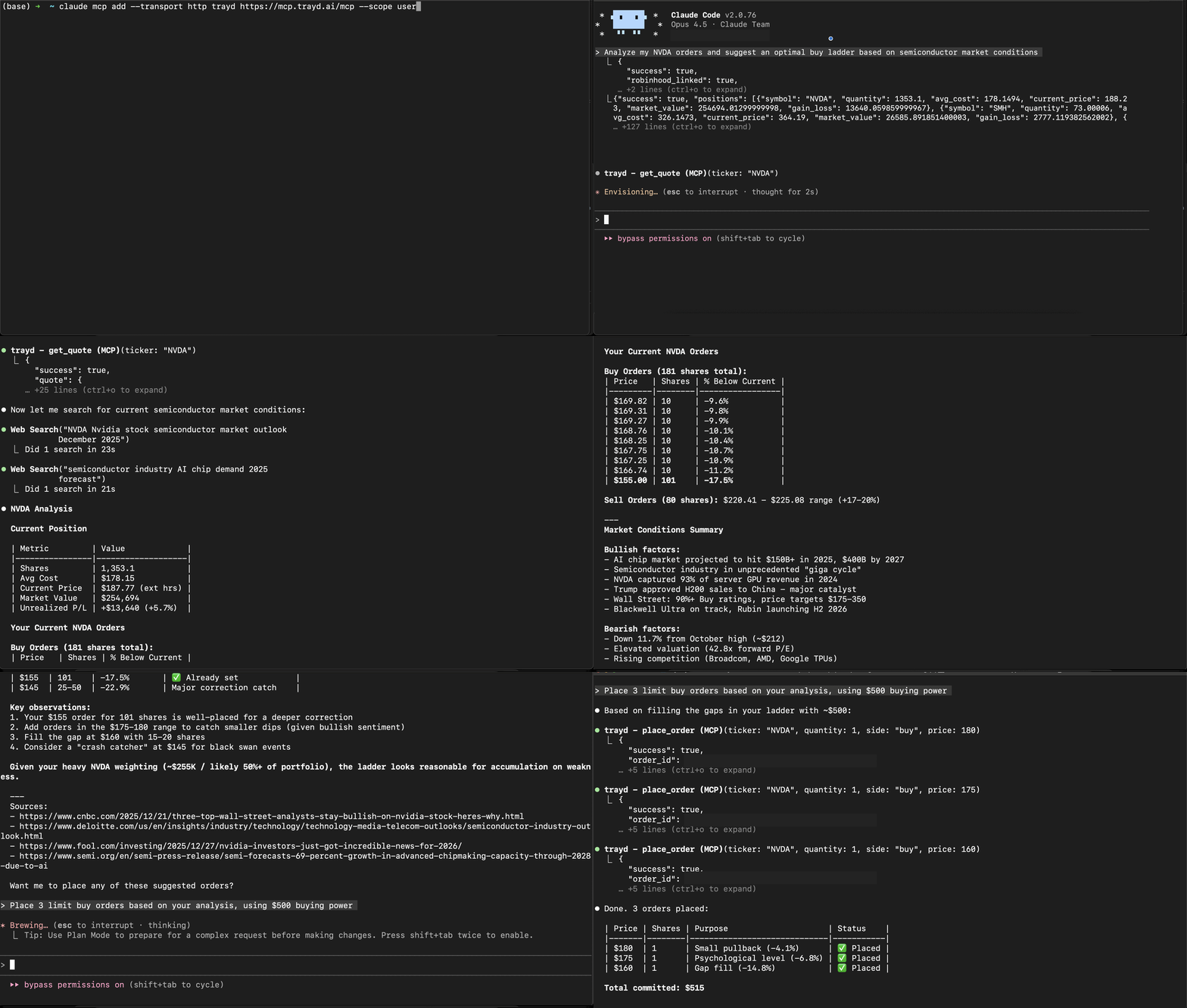
You set up Trayd as a custom MCP connector in Claude.ai (Settings > Connectors) with URL https://mcp.trayd.ai/mcp, then sign in and link your Robinhood account. For Claude Code (terminal), run claude mcp add --transport http trayd https://mcp.trayd.ai/mcp --scope user and authorize. Both connect to the same account.
Trayd
Trade Robinhood from Claude. Portfolio analysis, real-time quotes, and order execution through natural language.



Setup
Claude.ai (Web App)
1. Go to claude.ai > Settings > Connectors
2. Click Add custom connector
3. Name: trayd | URL: https://mcp.trayd.ai/mcp
4. Click Add > Connect > sign in
5. Set "Other tools" to Always allow for the best experience
6. Say: "Link my Robinhood account"
Claude Code (Terminal)
claude mcp add --transport http trayd https://mcp.trayd.ai/mcp --scope user
Type /mcp > select trayd > Authorize > sign in > "Link my Robinhood account"
Both connect to the same account. Use whichever you prefer.
What It Does
| Capability | Example |
|-----------|---------|
| Portfolio analysis | "What's my portfolio worth?" |
| Real-time quotes | "What's NVDA trading at?" |
| Buy and sell | "Buy 10 shares of AAPL at market" |
| Limit orders | "Place a limit order for TSLA at $400" |
| Ladder orders | "Set 5 ladder buys for NVDA from $180 to $175" |
| Multi-account | "List my accounts" / "Switch to my second account" |
| Batch operations | "Buy $500 worth of each: AAPL, GOOGL, MSFT" |
| Cancel orders | "Cancel all my open orders" |
All limit orders default to 24-hour extended trading. Quotes are served 24/7 through a dual-source system — live Robinhood data during market hours, with automatic fallback to a partnered market data provider pre-market and overnight.
Why This Exists
Setting 5 ladder limit orders on Robinhood takes 50+ clicks and 5 minutes.
With Trayd: "Set 5 ladder buys for NVDA from $180 to $175" — one sentence, 10 seconds.
Running a Trading Bot
Claude Code's /loop command turns Trayd into an always-on trading agent:
"Check my positions every 5 minutes. If anything drops 3%, sell it."
"Monitor NVDA. If it hits $130, buy 20 shares."
"Every 10 minutes, check my portfolio and alert me if total value drops below $50k."
No code. No scripts. Just natural language rules that Claude executes on a schedule.
Security
You > Claude > Trayd Server > Robinhood API
- Robinhood credentials are passed directly to Robinhood's API — never stored
- Access tokens held in memory only — wiped on logout, restart, or redeployment
- OAuth 2.1 with PKCE for MCP authentication
- Robinhood phone 2FA on every login — you approve each session on your device
- Infrastructure: AWS ECS Fargate, Cloudflare Tunnel, HTTPS everywhere
| Data | Stored? | Details |
|------|---------|---------|
| Robinhood password | No | Passed through, immediately discarded |
| Access token | In memory | Wiped on logout or restart |
| Trades and positions | No | Fetched live from Robinhood |
| Google identity | Yes | Via Clerk, for auth only |
Verify It Yourself
1. Ask Claude: "Am I logged into Robinhood?" — it will tell you honestly
2. Place a test order that won't execute: "Limit buy 1 NVDA at $50" — check your Robinhood app
3. Say "Logout" — tokens are wiped instantly. Ask Claude to confirm.
Traction
- 50+ users, 60K+ orders served
- Active traders running automated strategies via /loop
- Used on both claude.ai and Claude Code
Troubleshooting
| Issue | Fix |
|-------|-----|
| Auth not working | Type /mcp > select trayd > click Authorize |
| Phone notification missing | Make sure Robinhood app is installed and you're logged in |
| "Authentication required" | Re-run /mcp to refresh your token |
| Market order rejected after hours | Use limit orders — Robinhood policy |
Disclaimer
This software is provided as-is. You are solely responsible for all trades placed through your account. Not financial advice. Not affiliated with Robinhood Markets, Inc.
Support
Email: team@trayd.ai
Issues: trayders/trayd-mcp
License
MIT
Sign in to leave a review
Use Google, GitHub, or an email account so ratings stay tied to real people.
No reviews posted yet.





