
Tls Radar
About
Run SSL/TLS scans, issue free Let's Encrypt certificates (private key stays local), and monitor certificate expiry from inside Claude Code or Cowork - through a single MCP server, no account needed for scans and issuance.
Details
- Author
- TLS-Radar
- Downloads
- 325
- Categories
- AI, Infrastructure, Security
Jump to
- Run free SSL/TLS scans with no account
- Issue free 90-day Let's Encrypt certificates
- Private keys generated locally, never sent
- Monitor certificate expiration with alerts
- Works in both Claude Code and Cowork
- OAuth 2.0 + PKCE for authenticated tools

Setting up with Highlight
This MCP is not yet compatible with Highlight’s one-click setup. However, you can still use it with Highlight by following these steps:
- Download and install Highlight from highlightai.com/download
- Navigate to the plugins tab and select "Add Custom Plugin"
-
Configure the plugin with the settings below
Plugin Name
Tls RadarCommand (node, npx, python, etc.)Please refer to the README for specific instructions on how to obtain API keys or other required environment variables.
- Enable "Start Automatically" if you want the plugin to start when Highlight launches





From the repository
Install via the Claude Code marketplace by running /plugin marketplace add TLS-Radar/tlsradar-claude-plugin then /plugin install tlsradar@tlsradar. Use slash commands such as /tls-scan example.com for a free scan or /tls-cert mydomain.dev to issue a certificate. Run /mcp once to connect for monitoring via OAuth.
scan_domain
Run a free, anonymous SSL/TLS scan against a hostname and return certificate details. No account required.
create_certificate
Start issuing a FREE 90-day Let's Encrypt certificate for a domain (no account required). Step 1 of 3. Pick a validation method with `challenge`: "dns-01" (default; publish a TXT record; covers apex + www) or "http-01" (serve a file over HTTP on port 80; issues the exact domain only). dns-01 with a DNS-provider API token is the most automatable; http-01 suits a server you control on port 80. Returns an order_id plus either dns_records (dns-01) or http_files (http-01) to put in place. Next: poll `check_certificate_propagation` until all_found, then call `finalize_certificate`. Strongly prefer the CSR path at finalize (the private key never leaves the user's machine). Issuing automatically offers the user ongoing monitoring by email once it completes - don't add a monitor manually afterward.
check_certificate_propagation
Check whether the DNS TXT records for a certificate order have propagated (Cloudflare/Google/Quad9). Step 2 of issuance - poll until all_found is true, then call finalize_certificate. Returns per-record resolver results.
finalize_certificate
Finalize and issue a certificate order in one call: validates the DNS challenges, waits for Let's Encrypt, and returns the issued cert. Step 3 of issuance - call after check_certificate_propagation reports all_found. STRONGLY PREFER passing csr_pem (generate the key + CSR locally with openssl so the private key never leaves the machine). Returns leaf_pem/chain_pem/fullchain_pem. If you must, pass a passphrase instead to get a PKCS#12 bundle - but a CSR is safer. If it replies "still validating", DNS hasn't fully propagated: re-check check_certificate_propagation and call again. Needs a locally-generated CSR (csr_pem) - requires a local shell with openssl. On a surface without one (e.g. a Claude.ai custom connector) this can't complete; it returns guidance to finish in Claude Code/Cowork or the web form. Scanning and monitoring work everywhere. On success the structuredContent carries a `handoff` object - relay `handoff.message` to the user and do NOT separately call add_monitor; the cert→monitoring handoff is automatic and server-side.
get_certificate_status
Return the current state of a certificate order (dns_pending, validating, ready, completed, failed) and per-authorization Let's Encrypt statuses. Use it to resume an interrupted issuance.
renew_certificate
Renew a certificate by cloning a recent order (requires the original order_id; Beacon purges orders after ~24h). Returns a new order_id and fresh DNS TXT records - then poll check_certificate_propagation and call finalize_certificate. If you don't have an order_id (the usual case at 90-day renewal time), call create_certificate for the domain instead; that IS the renewal.
register_beacon_order
OBSOLETE - do not call. The cert→monitoring handoff is server-side now (issue via create_certificate, which records the order itself). This tool is kept only so old plugin versions that still call it don't error; it remains idempotent and harmless.
get_account
Return the current user's plan, limits, and usage so the client can render upgrade nudges proactively.
list_monitors
List all certificates currently being monitored across the user's teams. If the response's structuredContent includes a `nudge` object, the user is at their monitor cap - surface it casually ONCE (lead with `nudge.recommended_upgrade`, mention `nudge.also_available` in one closing line); don't force it if it doesn't fit the conversation.
add_monitor
Add a domain to ongoing certificate monitoring with expiry alerts. Requires authentication (the user runs /mcp once). If the plan's monitor limit is reached, the response's structuredContent carries a limit-reached payload - when relaying it, LEAD with `recommended_upgrade` (typically Starter, $9.99/mo), mention `also_available` tiers in a single closing line, and offer removing an existing monitor as the free alternative. Don't dump a full tier comparison; that's choice paralysis at the moment of action.
add_monitors
Add multiple domains to monitoring in one call. Returns a per-domain status so the caller can show partial-success outcomes. Honors the same plan-limit checks as add_monitor.
remove_monitor
Stop monitoring a domain. Accepts the domain name or the host_id returned by list_monitors.
list_expiring_certificates
Return monitored certificates expiring within N days. Defaults to 30. If the response's structuredContent includes a `nudge` object, the user is watching enough soon-to-expire certs to benefit from a higher tier - mention it casually ONCE (lead with `nudge.recommended_upgrade`); skip it if it doesn't fit.
get_scan_history
Return recent scan results for a domain the user monitors. Useful for spotting issuer changes, grade drops, or vulnerability appearances over time.
export_monitors
Dump the user's monitors as a JSON structure suitable for backup, migration, or infrastructure-as-code workflows. Tokens and PII are NEVER included - only domain configuration.
import_monitors
Create monitors from a JSON structure (typically produced by `export`). Skips domains the user is already monitoring; honors the plan's domain limit. Returns a per-domain status.
invite_team_member
Invite a user to a team by email. Defaults to the user's current team. Honors the plan's seat limit (returns the same upgrade payload as add_monitor when the cap is hit).
Claude Desktop / Cursor
Paste into your MCP client config file to install this server.
{
    "mcpServers": {
        "tls radar": {
            "tls-radar": {
                "type": "http",
                "url": "https://tlsradar.com/api/v1/mcp"
            }
        }
    }
}McpServers
{
    "tls-radar": {
        "type": "http",
        "url": "https://tlsradar.com/api/v1/mcp"
    }
}
TLS Radar plugin for Claude Code & Cowork


Run SSL/TLS scans, issue free Let's Encrypt certificates, and manage cert monitoring from inside Claude Code or Claude Cowork - through a single MCP server, with nothing to configure.
Independent monitoring from a vendor that doesn't sell certificates - built for the 90-day-cert era, where manual renewal tracking is already finished.
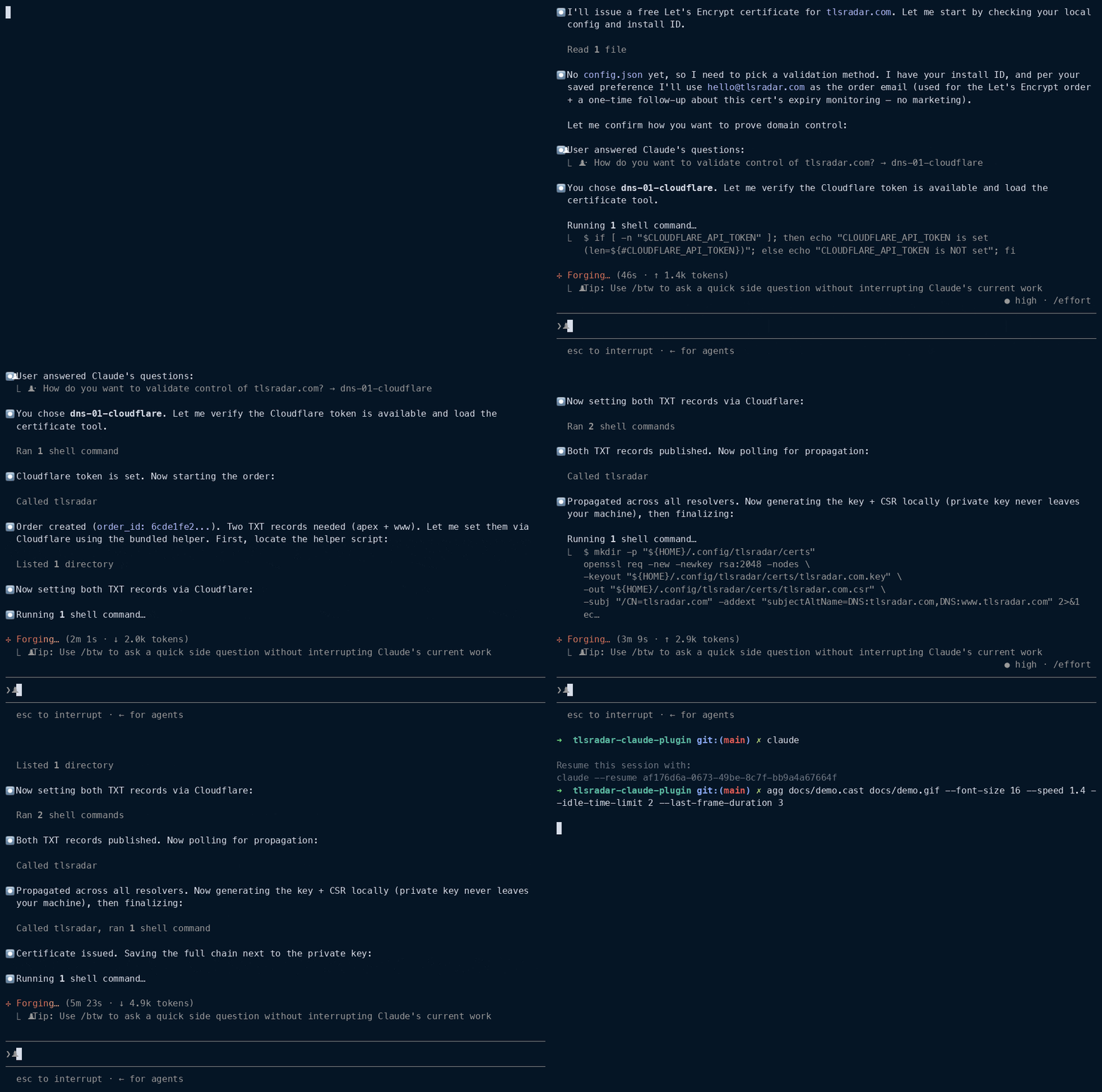
<!-- TODO: 30-60s asciinema -> GIF of /tls-cert issuing a real cert end to end. Drop the file at docs/demo.gif -->
```
Sign in to leave a review
Use Google, GitHub, or an email account so ratings stay tied to real people.
No reviews posted yet.



