
Tibber MCP Server
About
Model Context Protocol (MCP) Server for Tibber
Details
- Author
- linkcd
- GitHub stars
- 2
- Downloads
- 136
- Categories
- Other
Jump to
- Provides current, today's, and tomorrow's energy price info
- Retrieves hourly consumption data for the last 30 days
- Returns home info: owner, address, subscription details
- Exposes two clear tools for LLM interaction
- Integrates with Claude Desktop and Roo Code

Setting up with Highlight
This MCP is not yet compatible with Highlight’s one-click setup. However, you can still use it with Highlight by following these steps:
- Download and install Highlight from highlightai.com/download
- Navigate to the plugins tab and select "Add Custom Plugin"
-
Configure the plugin with the settings below
Plugin Name
Tibber MCP ServerCommand (node, npx, python, etc.)Please refer to the README for specific instructions on how to obtain API keys or other required environment variables.
- Enable "Start Automatically" if you want the plugin to start when Highlight launches





From the repository
Install Python 3.12 and uv, clone the repository, set up a virtual environment, and install dependencies. Configure the host (e.g., Claude Desktop, Roo Code) with the uv command, the server script path, and your TIBBER_API_TOKEN environment variable. The server exposes two tools: get_consumption_data() and get_price_and_home_info().
Claude Desktop / Cursor
Paste into your MCP client config file to install this server.
{
    "mcpServers": {
        "tibber mcp server": {
            "tibber-mcp": {
                "command": "npx",
                "args": [
                    "@modelcontextprotocol/inspector",
                    "-e",
                    "TIBBER_API_TOKEN=[YOUR-TIBBER-TOKEN]",
                    "python",
                    "server.py"
                ]
            }
        }
    }
}McpServers
{
    "tibber-mcp": {
        "command": "npx",
        "args": [
            "@modelcontextprotocol/inspector",
            "-e",
            "TIBBER_API_TOKEN=[YOUR-TIBBER-TOKEN]",
            "python",
            "server.py"
        ]
    }
}
Tibber MCP Server
This is a Model Context Protocol (MCP) Server for Tibber, a Norwegian power supplier.You can run the MCP server locally and access it via different hosts such as Claude Desktop or Roo Code.
For more details, check out my blog post:
Building a Tibber MCP Server: Connect Your AI Agent to Energy Consumption Data
Overview
The Tibber MCP server provides an AI agent with a convenient way to interact with the Tibber API and query information such as current energy prices and your energy consumption data.Example Queries
Once connected to the MCP server, you can ask questions like: - "Analyze my power consumption data and present the usual peak hours and any other interesting patterns in an easy-to-read format." - "When did I use the most power yesterday?" - "How much power did I consume yesterday at 7 AM?" - "What is the current energy price?" - "List the 3 cheapest hours of tomorrow." - "Is the energy price higher or lower tomorrow?"Demo video
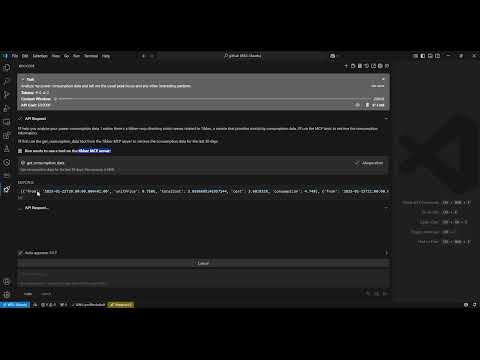
Architecture
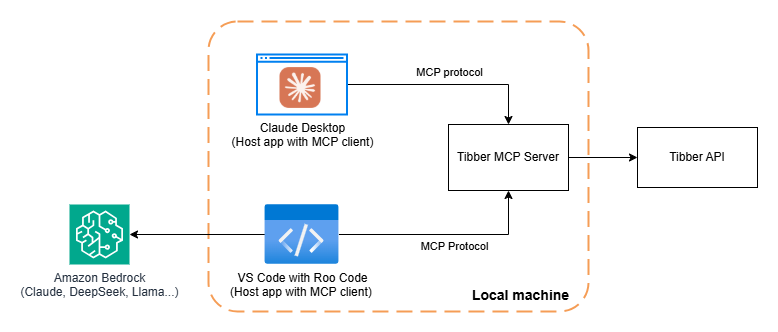
Requirements
- Python 3.12 - Tibber API token (You can get it from Tibber developer portal)Installation
1. Installuv:
   # On macOS and Linux
   curl -LsSf https://astral.sh/uv/install.sh | sh
   # On Windows
   powershell -ExecutionPolicy ByPass -c "irm https://astral.sh/uv/install.ps1 | iex"
2. Clone this repository:
   git clone https://github.com/linkcd/tibber-mcp.git

   cd tibber-mcp
3. Set up the Python virtual environment and install dependencies:
uv venv --python 3.12 && source .venv/bin/activate && uv pip install --requirement pyproject.toml
Host Configuration
In Claude Desktop or Roo Code in VS{
"mcpServers":{
"tibber":{
"command":"uv",
"args":[
"--directory",
"[PATH-TO-ROOT-OF-THE-CLONED-TIBBER-MCP-FOLDER]",
"run",
"server.py"
],
"env":{
"TIBBER_API_TOKEN":"[YOUR-TIBBER-TOKEN]"
}
}
}
}
[YOUR-TIBBER-TOKEN] with your actual token. Never commit actual credentials to version control.
Debug and test the MCP server locally
Run the server locally and run MCP inspector against itnpx @modelcontextprotocol/inspector -e TIBBER_API_TOKEN=[YOUR-TIBBER-TOKEN] python server.py
Available Tools
The server exposes the following tools that LLM can use: 1.get_consumption_data(): Get the hourly consumption data for the last 30 days, such as time period, total cost, base energy cost, and consumpted kwh
2. get_price_and_home_info(): Get price info (current, today and tomorrow) and home info (owner, address, subscription...)
License
MIT LicenseAcknowledgments
- This tool uses Anthropic's MCP framework - Built with FastMCP for server implementation - The tibber ingeratoin is based on pyTibber librarySign in to leave a review
Use Google, GitHub, or an email account so ratings stay tied to real people.
No reviews posted yet.





