
Terminal History Mcp
About
terminal-history-mcp gives AI agents (Claude Code, Cursor, Cline, Zed, any MCP client) full-text search over your shell history.
Details
- Author
- HasanJahidul
- Downloads
- 397
- Categories
- Developer Tools, Search, AI
Jump to
- Local‑only SQLite FTS5 search of shell history
- Supports zsh, bash, and fish shells
- Secrets redacted before storage
- Tools for search, recent commands, failures, chains
- Idempotent reindex with hash dedupe
- Zero network calls, fully offline

Setting up with Highlight
This MCP is not yet compatible with Highlight’s one-click setup. However, you can still use it with Highlight by following these steps:
- Download and install Highlight from highlightai.com/download
- Navigate to the plugins tab and select "Add Custom Plugin"
-
Configure the plugin with the settings below
Plugin Name
Terminal History McpCommand (node, npx, python, etc.)Please refer to the README for specific instructions on how to obtain API keys or other required environment variables.
- Enable "Start Automatically" if you want the plugin to start when Highlight launches





From the repository
Install globally with npm, then run terminal-history-mcp index for a one‑time backfill and terminal-history-mcp install-hook to capture working directory, exit code, and duration. Alternatively, use zero‑install via npx by adding it to your mcpServers configuration. Tools available: reindex, search_history, recent_in_dir, failed_commands, command_chains.
reindex
Re-parses the local shell history files (`~/.zsh_history`, `~/.bash_history`) and the hook's extended log into the SQLite index. Idempotent — already-indexed commands are skipped by hash, so it is safe to call repeatedly. Run it after a burst of shell activity to make recent commands searchable. Reads only local files; writes only to `~/.terminal-history-mcp/`. Takes no arguments. Returns counts of parsed / inserted / skipped entries.
search_history
Read-only. Full-text search (SQLite FTS5, stemmed, Unicode-aware) over all indexed shell commands. Supports keyword and prefix queries — e.g. `docker build`, `git reb*`. Returns the most recent matches first, each with timestamp, shell, cwd, and exit code when available. Local index only; nothing is sent anywhere. If a query returns nothing you may need `reindex` first.
recent_in_dir
Read-only. Lists the most recent commands that were run with a given working directory — answers "what was I doing in this project?". Requires the shell hook to have been installed (legacy entries have no cwd and won't appear). Returns newest first with timestamps and exit codes. Local index only.
failed_commands
Read-only. Lists recent commands that exited non-zero — a quick "what just broke?" feed. Optionally restrict to commands after a given epoch-millisecond timestamp. Requires the shell hook for exit-code capture (legacy entries have no exit code). Newest first. Local index only.
command_chains
Read-only. For each command matching `query`, returns the commands run within a time window around it (default ±5 min) — surfacing multi-step sequences like `cd → npm run build → deploy`. Useful for reconstructing "how did I do X last time?". Returns up to `limit` chains, each a time-ordered list of command rows. Local index only.
Claude Desktop / Cursor
Paste into your MCP client config file to install this server.
{
    "mcpServers": {
        "terminal history mcp": {
            "terminal-history": {
                "command": "npx",
                "args": [
                    "-y",
                    "terminal-history-mcp"
                ]
            }
        }
    }
}McpServers
{
    "terminal-history": {
        "command": "npx",
        "args": [
            "-y",
            "terminal-history-mcp"
        ]
    }
}
Terminal History MCP
Search your shell history (zsh / bash / fish) from Claude Code, Cursor, Cline, Zed, or any MCP client. Local-only. SQLite FTS5. Secret-redacted before storage.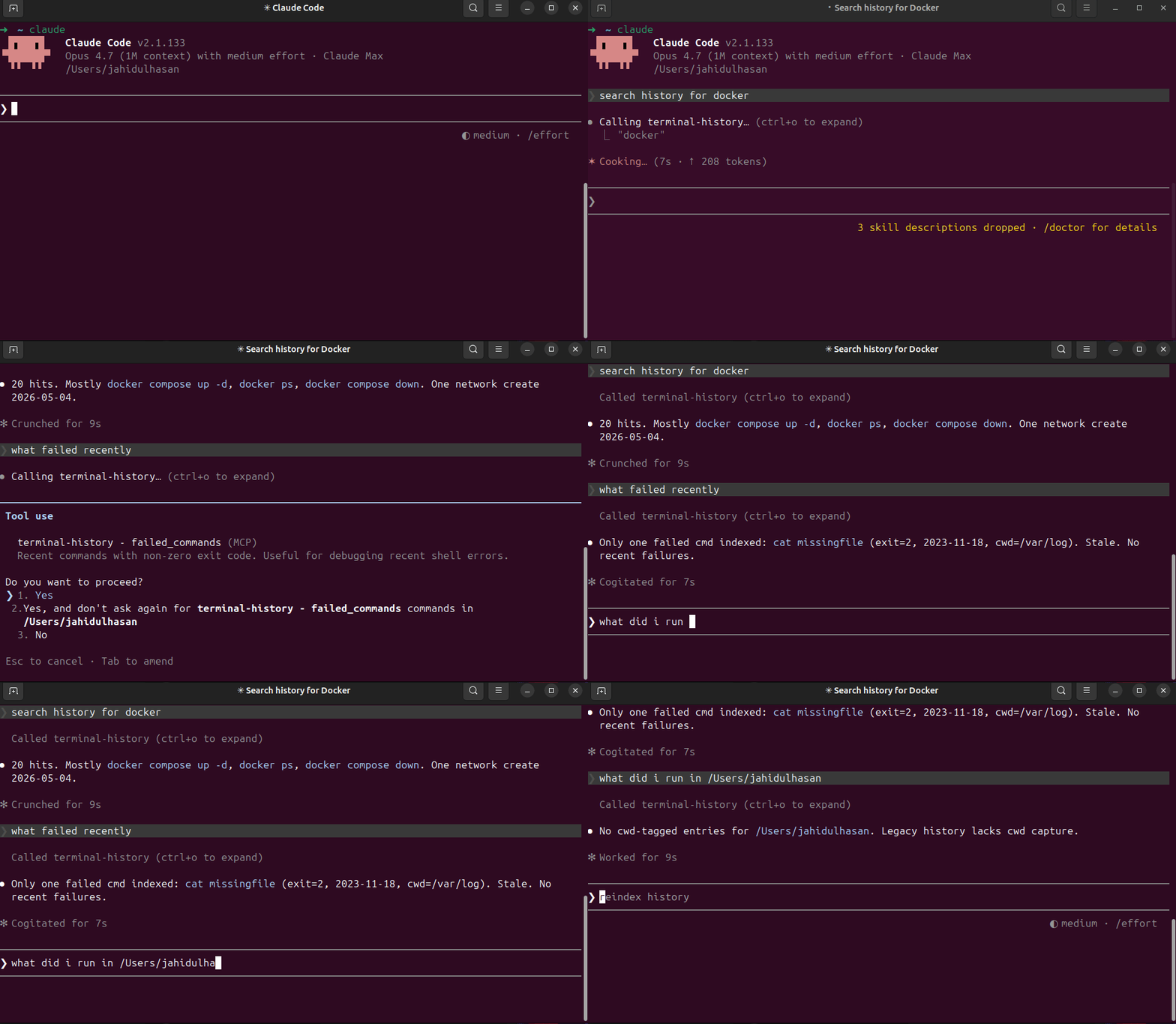
Why
- "What was that longdocker compose flag I used 3 weeks ago?"
- "When did I last ssh into staging?"
- "Show failed commands today."
- "What did I run yesterday in /etc/nginx?"
- "Show context around kubectl apply."
grep ~/.zsh_history | sort | uniq is not memory. This is.
Install
``bash
npm install -g terminal-history-mcp
terminal-history-mcp index # one-time backfill
terminal-history-mcp install-hook # opt-in: capture cwd / exit / duration
`
Or zero-install via npx:
`json
{
"mcpServers": {
"terminal-history": {
"command": "npx",
"args": ["-y", "terminal-history-mcp"]
}
}
}
`
Tools


| Tool | Purpose |
|------|---------|
|
reindex | Re-parse history files + extended log into FTS5 DB |
| search_history | FTS5 keyword + prefix search over command history |
| recent_in_dir | Commands run in a given working directory |
| failed_commands | Non-zero-exit commands since timestamp |
| command_chains | ±5min context window around matches |
Privacy / Security
- Local-only. Nothing leaves your machine. DB at ~/.terminal-history-mcp/history.db.
- Secrets redacted BEFORE insert — defense in depth, raw SQLite browse can't leak.
- 11 ordered patterns: GitHub PATs (ghp_), OpenAI keys (sk-), Slack tokens, AWS access keys, generic Token:/Key:/Secret:/ApiKey: headers, Authorization: Bearer/Basic, env-style FOO_TOKEN=val, CLI flags (--token=val, -k val), URL basic-auth (https://user:pass@host), JWTs.
- WAL mode — concurrent shell sessions safe.
Shell support
| Shell | History parse | Hook capture (cwd / exit / duration) |
|-------|--------------|--------------------------------------|
| zsh | ✅ | ✅ (EPOCHREALTIME) |
| bash | ✅ | ✅ (awk ms math) |
| fish | ✅ | ✅ (date +%s%N) |
Tech
- TypeScript (ESM), Node 18+
- better-sqlite3 (sync, no callback hell)
- FTS5 + porter + unicode61 — Unicode-safe, stems plurals
- Hash-based dedupe (sha1(shell|ts|cmd)`) — idempotent reindex
- Zero network calls
Pairs with
localhost-mcp — what's currently running on which port. Together: full dev environment memory for AI agents (what you ran + what's running).Source
- GitHub: https://github.com/HasanJahidul/terminal-history-mcp - npm: https://www.npmjs.com/package/terminal-history-mcp - Hosted: https://mcpize.com/mcp/terminal-history - License: MITSign in to leave a review
Use Google, GitHub, or an email account so ratings stay tied to real people.
No reviews posted yet.





