
Task Tracker
About
A mcp server for task management with Linear and time tracking with TrackingTime
Details
- Author
- reminia
- Downloads
- 473
- Categories
- Productivity, AI
Jump to
- Create new tasks with optional project, description, and state
- Set current working team
- Get projects and view tasks by status
- Search tasks by title
- Update task status
- Start and stop time tracking for tasks
- View currently active tracked task
- Add notes to a tracking task

Setting up with Highlight
This MCP is not yet compatible with Highlight’s one-click setup. However, you can still use it with Highlight by following these steps:
- Download and install Highlight from highlightai.com/download
- Navigate to the plugins tab and select "Add Custom Plugin"
-
Configure the plugin with the settings below
Plugin Name
Task TrackerCommand (node, npx, python, etc.)Please refer to the README for specific instructions on how to obtain API keys or other required environment variables.
- Enable "Start Automatically" if you want the plugin to start when Highlight launches





From the repository
Set up environment variables using the .env.example file, then build the package with uv build and run uv run task-tracker. Finally, configure the server in Claude Desktop by adding the command with the correct path to the task-tracker directory.
Claude Desktop / Cursor
Paste into your MCP client config file to install this server.
{
    "mcpServers": {
        "task tracker": {
            "task-tracker": {
                "command": "uv",
                "args": [
                    "build"
                ]
            }
        }
    }
}McpServers
{
    "task-tracker": {
        "command": "uv",
        "args": [
            "build"
        ]
    }
}
Task Tracker

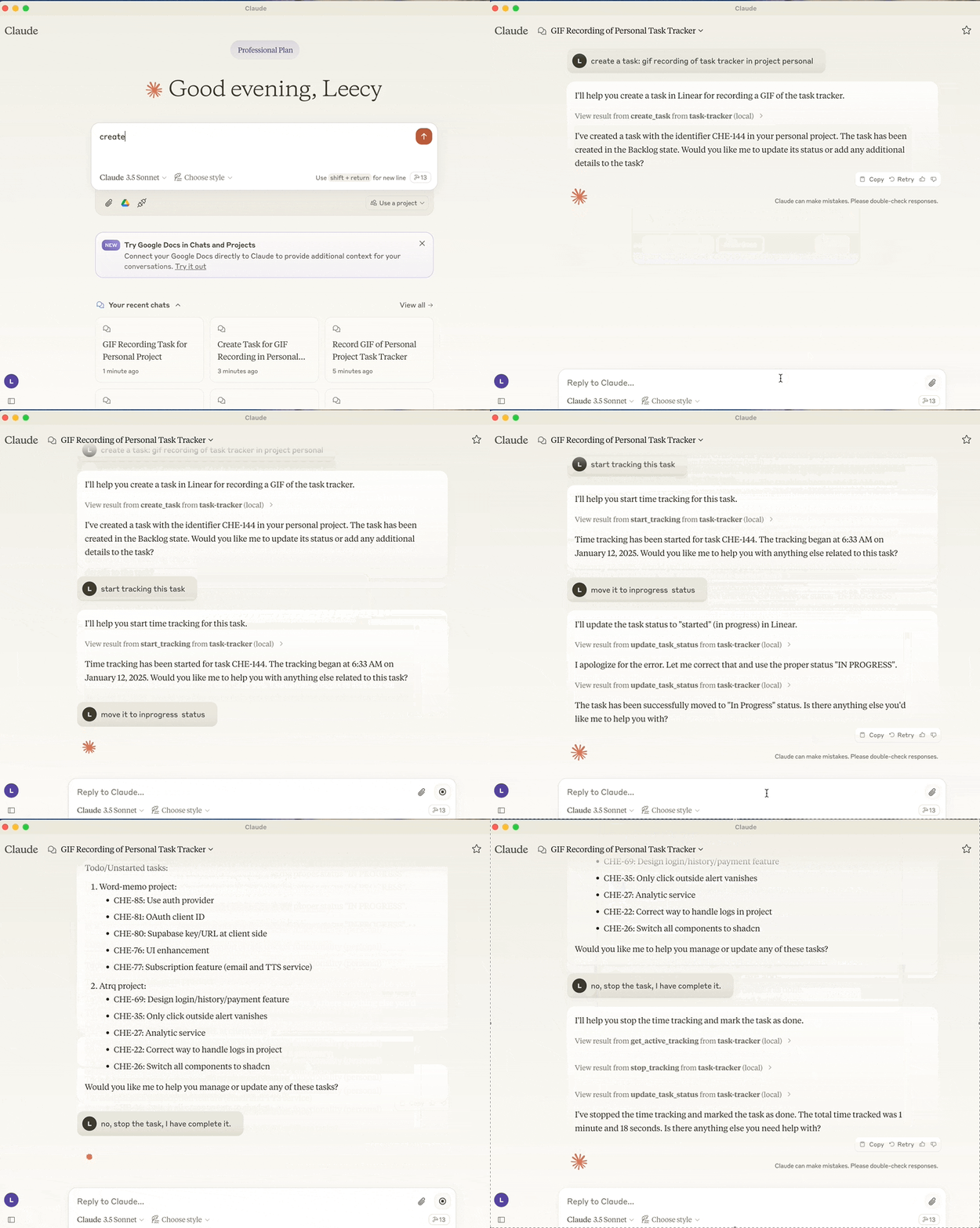
A Model Context Protocol server that integrates Linear task management and TrackingTime time tracking.
Motivation
I've been using Linear for task management and TrackingTime for time tracking for a long time. I found it could be very helpful to use LLM to automate my workflows and tasks.
With the benifits of large language models, I can use natural language to create tasks, update task statuses, start and stop time tracking, and more.
If I develop more MCP servers tailored to my own needs, I can make the Claude client an all-in-one workspace for me.
Features
- Integration with Linear API for task management
- Create new task with optional project, description and state assignments
- Set current working team
- Get projects
- View tasks by status (backlog, unstarted, started, done, canceled)
- Search tasks by title
- Update task status
- Integration with TrackingTime for task time tracking
- Start time tracking for tasks
- Stop active time tracking
- View currently active tracked task
- Add notes to tracking task
Setup
1. setup the environment, refer to the .env.example file.
2. sh scripts/setup.sh to build the package or run below uv commands directly.
  uv build
  uv run task-tracker
3. setup it in the Claude Desktop:
  {
  "mcpServers": {
      "task-tracker": {
          "command": "uv",
          "args": [
              "--directory",
              "/path/to/task-tracker",
              "run",
              "task-tracker"
          ]
      }
  }
}
Sign in to leave a review
Use Google, GitHub, or an email account so ratings stay tied to real people.
No reviews posted yet.




