

Superbased Observer
About
Local-first cost & token tracking for Claude Code, Cursor, Codex & 23 more AI coding agents — proxy-accurate per-model spend, an MCP server your agent can query, and an opt-in team rollup. 100% local, no telemetry.
Details
- Author
- marmutapp
- GitHub stars
- 28
- Downloads
- 344
- Categories
- Developer Tools
Jump to
- What it is in 30 seconds
- Install
- First-run walkthrough
- Dashboard tour
- MCP server — 25 cross-tool intelligence calls

Setting up with Highlight
This MCP is not yet compatible with Highlight’s one-click setup. However, you can still use it with Highlight by following these steps:
- Download and install Highlight from highlightai.com/download
- Navigate to the plugins tab and select "Add Custom Plugin"
-
Configure the plugin with the settings below
Plugin Name
Superbased ObserverCommand (node, npx, python, etc.)Please refer to the README for specific instructions on how to obtain API keys or other required environment variables.
- Enable "Start Automatically" if you want the plugin to start when Highlight launches





From the repository
Follow the repository README to install the server and add its MCP configuration to your client.
Claude Desktop / Cursor
Paste into your MCP client config file to install this server.
{
    "mcpServers": {
        "superbased observer": {
            "superbased-observer": {
                "command": "uv",
                "args": [
                    "tool",
                    "install",
                    "superbased-observer",
                    "#",
                    "uv",
                    "(isolated",
                    "env,",
                    "fastest)"
                ]
            }
        }
    }
}McpServers
{
    "superbased-observer": {
        "command": "uv",
        "args": [
            "tool",
            "install",
            "superbased-observer",
            "#",
            "uv",
            "(isolated",
            "env,",
            "fastest)"
        ]
    }
}
SuperBased Observer
> The exact tokens your AI provider billed you — cache splits,
> reasoning tokens, long-context surcharges — reconciled across 26
> coding tools, entirely on your own machine. Nothing you build here
> ever leaves your machine unless you opt a node into it.




<p align="center">
</p>
---
Table of contents
- What it is in 30 seconds
- Install
- First-run walkthrough
- Dashboard tour
- MCP server — 25 cross-tool intelligence calls
- API proxy — accurate token capture + compression
- Architecture
- Teams & Org Visibility
- Security & control layer (guard)
- CLI reference
- Configuration
- Post-upgrade hygiene + recovery
- Build from source
- Contributing
- License
---
What it is in 30 seconds
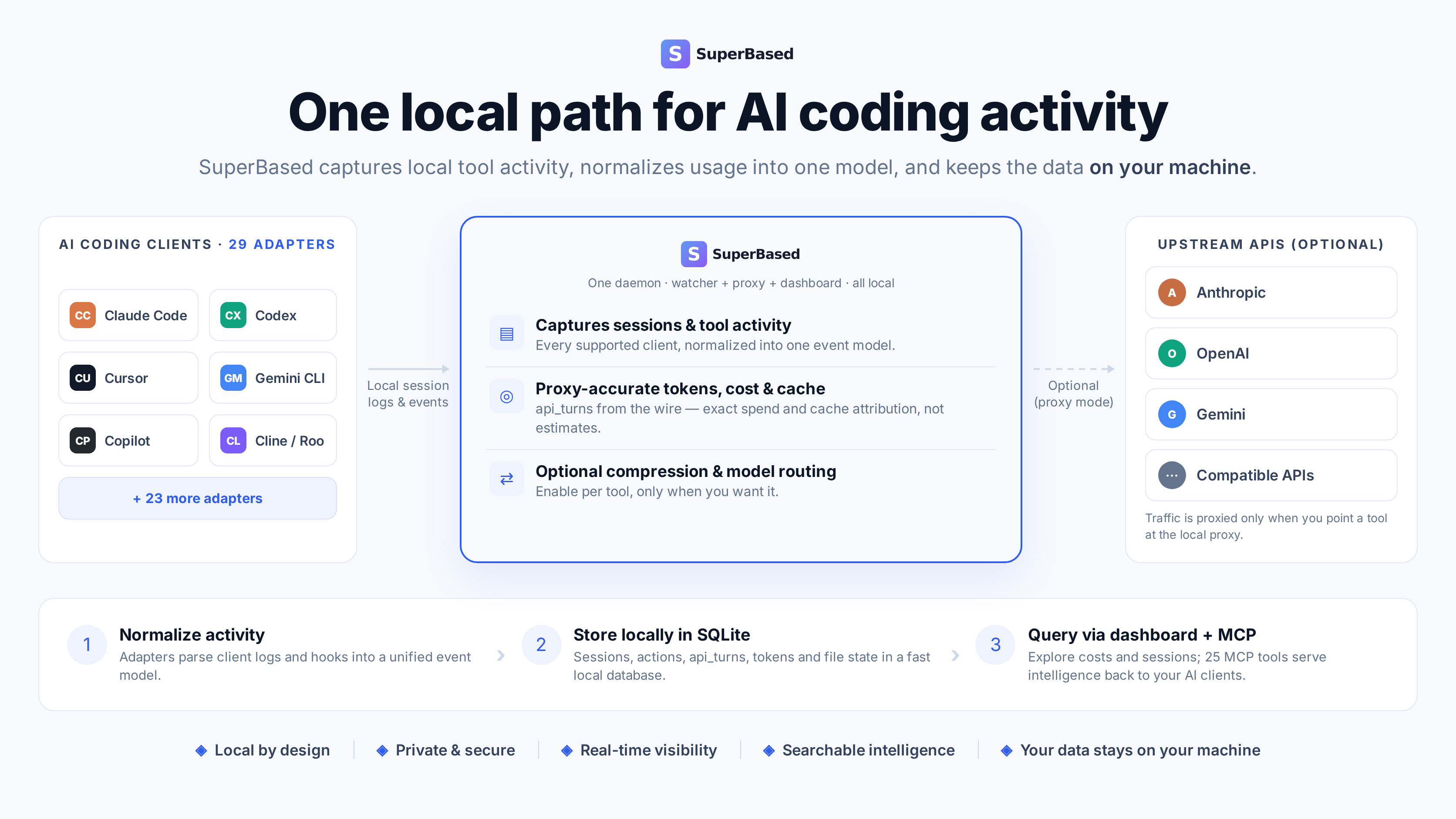
A single local Go binary built on three things a hosted usage console
can't give you, in order of how much they matter:
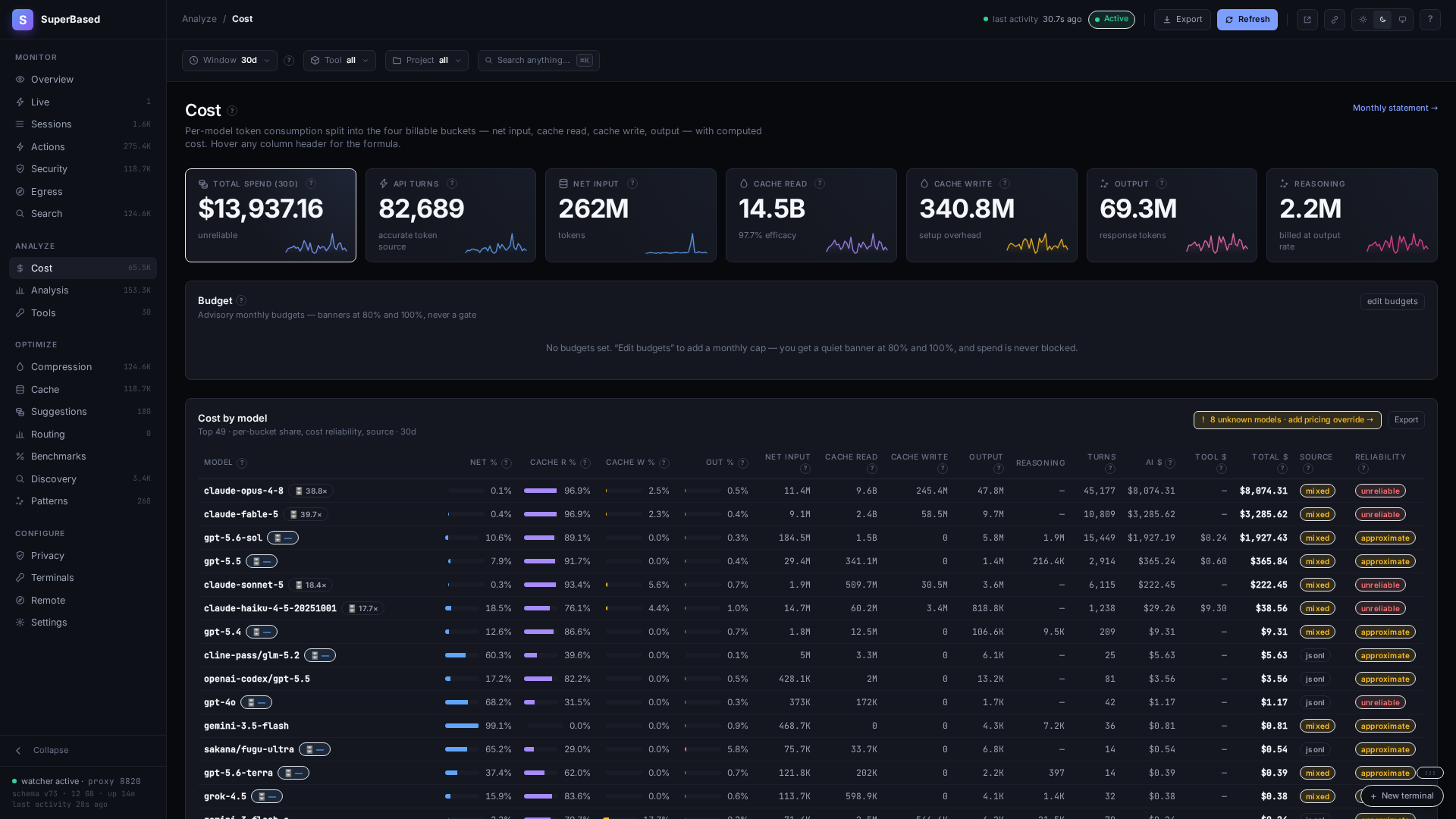
1. Proxy-accurate, cross-vendor cost attribution. An optional API
reverse proxy reads the token counts your provider actually
billed — net input, 5m/1h cache read/write splits, reasoning
tokens, long-context repricing — the same math your invoice uses,
not a JSONL-derived estimate. It's accurate enough that it caught
its own bug: a Codex reasoning-token double-billing regression
Observer found and back-corrected months of history for
(migration 058, shipped v1.18.0) — the kind of self-audit a vendor
console has no incentive to run against itself.
2. Local-first, by construction. The watcher, proxy, dashboard,
MCP server, and CLI make zero outbound calls on your behalf — no
telemetry, no analytics, no remote reporting. An optional team
rollup server ships only hashed metadata by default; raw content
ships only when the node opts in, never a remote admin toggle.
Full details: PRIVACY.md.
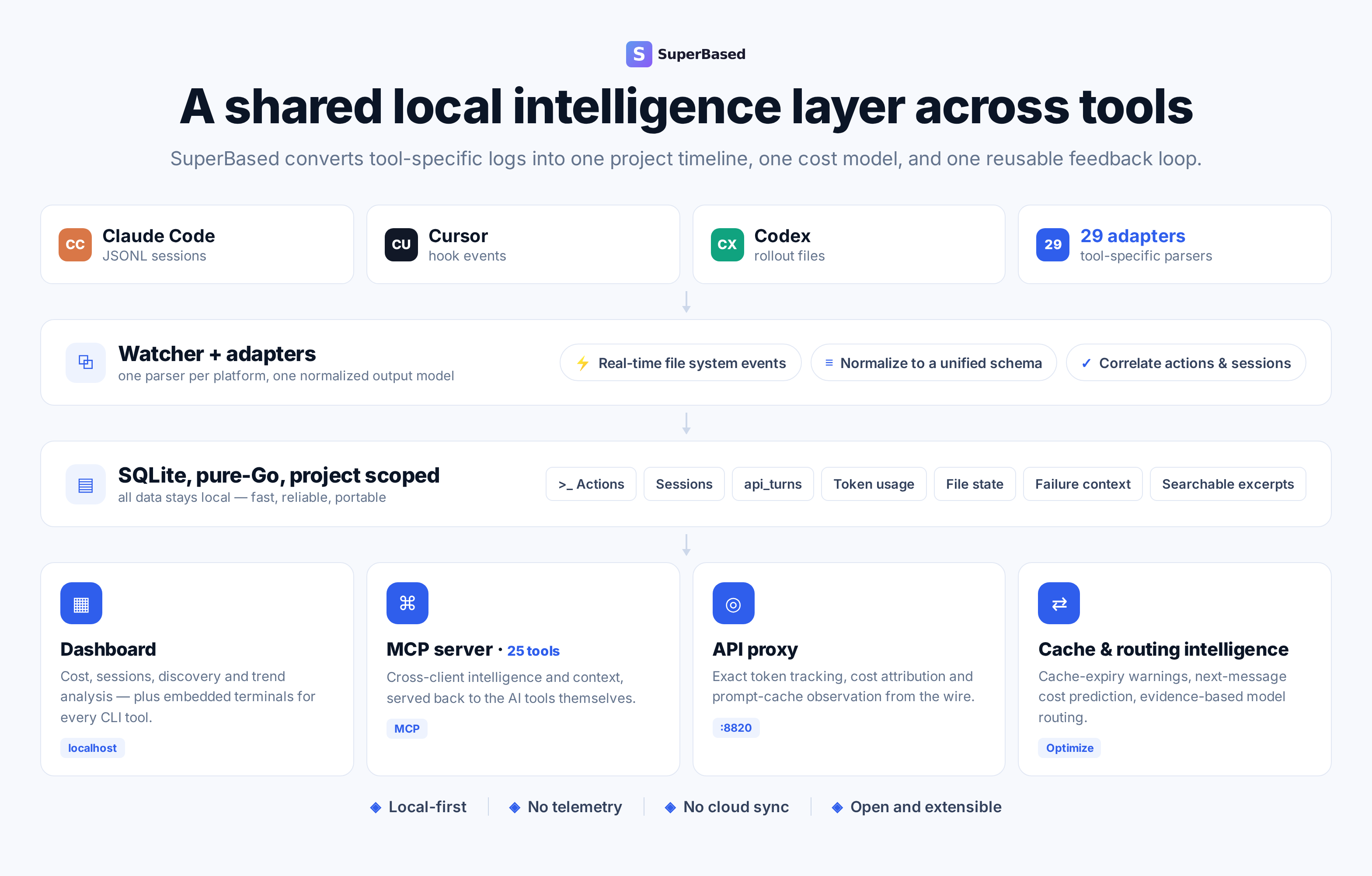
3. One capture layer, every tool you actually use. 26 adapters —
Claude Code, Codex, Cursor, Cline + Cline CLI, GitHub Copilot +
Copilot CLI, Gemini CLI, OpenCode, Google Antigravity, Cowork,
Hermes Agent, Kilo Code, Aider, Goose, Devin, Qoder, Crush, Grok,
Kiro CLI, Kimi Code, Qwen Code, OpenClaw, Pi, and more — parsed
into one normalized schema, queryable from a local dashboard, an
MCP server (so the tools themselves can query it), and a CLI.
(Five of the 26 are -web adapters for ChatGPT/Claude.ai/Gemini/
Copilot/Perplexity in the browser — those need the browser-capture
extension, which today only installs unpacked; every tool listed
above works out of the box.)
Raw token counting across tools is table stakes here — it's the
substrate the accurate-cost layer above is built on, not the pitch.
Two planes, one binary. Plane B is coding-agent observability
— desktop-first: capture, proxy-accurate cost, compression, cache
tracking, and session handoff for every AI coding tool on your
machine, with an optional team rollup server for org-wide spend.
Plane A is general LLM-app observability — admin-server-first:
OTLP trace/span capture, evals, and an LLM-as-judge input-admission
guardrail for an application you host, whose end users route
through Observer. Most solo developers only ever touch Plane B; teams
add Plane A when they're also running an LLM-powered product. Full
explainer: superbased.app/docs/getting-started/two-planes
(or docs/deployment-models.md if you're reading this in the repo).
<p align="center">
</p>
<p align="center">
</p>
<p align="center">
</p>
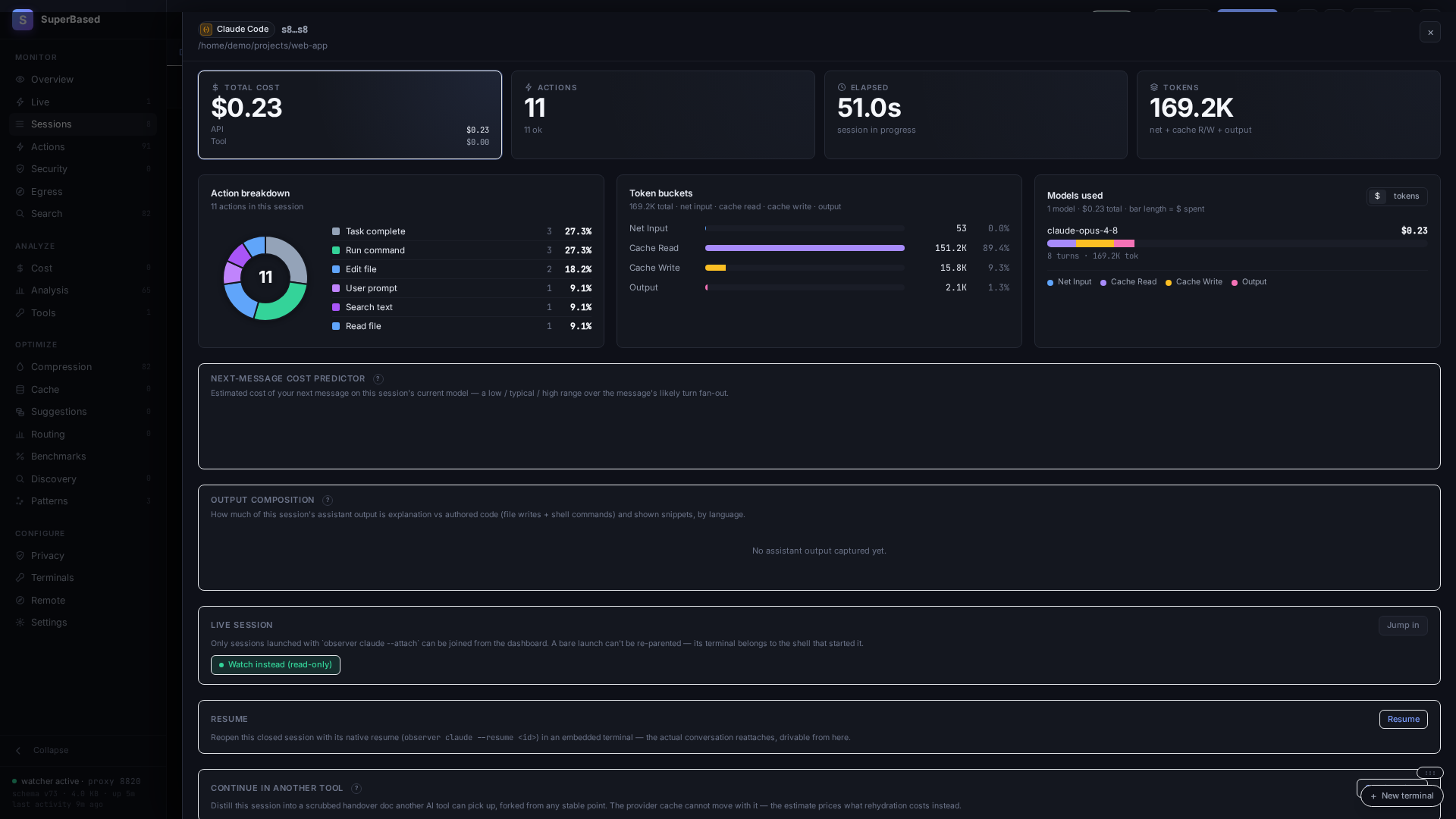
It answers questions like:
- Where did this week's $147 Claude bill come from — which projects,
models, sessions, tool calls? And is that number the same one my
provider's invoice would show?
- Did I spend more on Opus or Sonnet? Are my Sonnet sessions hitting
the long-context tier and getting repriced at 2×?
- How much did I waste re-reading files that hadn't changed since
the last read in the same session?
- Could that trivial Opus session have been done by Sonnet for 1/5
the cost?
- Across Claude Code, Cursor, and Codex working in the same repo,
what files are touched by all three? Where are they stepping on
each other?
- What will my next message roughly cost — and how much of my 5-hour
and weekly subscription limit is left before I hit it?
- Where did my own OpenTelemetry-instrumented agent spend its tokens
— with the proxy's exact per-span cost where it routed through the
proxy?
---
Install
Pick whichever package manager fits your environment — npm and PyPI
ship the same prebuilt binary from the same v tag, version
numbers kept in lock-step.
Via VS Code (Marketplace or Open VSX)
code --install-extension superbased.superbased-observer
The VS Code extension bundles the observer binary, lifts the
dashboard / sidebar / status bar / file decorations into the editor,
and contributes a terminal profile that pre-exports the proxy env
vars so AI CLIs launched from it route through observer
automatically. Cursor, VSCodium, and Windsurf install the same VSIX
via Open VSX.
After install, VS Code's Get Started page surfaces an in-editor
walkthrough; the long-form user guide lives at
docs/vscode-extension-user-guide.md
and the command + settings reference is at
docs/vscode-extension.md.
Via npm (recommended for Node users)
npm install -g @superbased/observer
observer --version
Via pip / uv / pipx (recommended for Python users)
pip install superbased-observer            # plain pip
uv tool install superbased-observer        # uv (isolated env, fastest)
pipx install superbased-observer           # pipx (isolated env)
observer --version
Wheels ship for manylinux2014_{x86_64,aarch64},
macosx_*_{x86_64,arm64}, and win_amd64. uv tool and pipx
keep the install isolated from your project's Python env — generally
what you want for a CLI tool.
Via go install (latest main, builds locally)
go install github.com/marmutapp/superbased-observer/cmd/observer@latest
observer --version
Via direct download (pre-built per-platform archive)
Each tagged release attaches per-platform archives to the
Releases page,
verifiable against the published SHA256SUMS:
| Asset | Platform | Contents |
|---|---|---|
| observer-vX.Y.Z-linux-x64.tar.gz | Linux x86_64 | observer + antigravity-bridge.exe (for WSL2) |
| observer-vX.Y.Z-linux-arm64.tar.gz | Linux arm64 | observer + antigravity-bridge.exe (for WSL2) |
| observer-vX.Y.Z-darwin-x64.tar.gz | macOS Intel | observer |
| observer-vX.Y.Z-darwin-arm64.tar.gz | macOS Apple Silicon | observer |
| observer-vX.Y.Z-win32-x64.zip | Windows x86_64 | observer.exe |
| SHA256SUMS | — | sha256 of all five archives |
```bash
Sign in to leave a review
Use Google, GitHub, or an email account so ratings stay tied to real people.
No reviews posted yet.





