
secured-remote-mcp-server-on-aws
About
# secured-remote-mcp-server-on-aws 認証付きのAPI Gateway (HTTP) をエントリポイントとし、VPC内に配置されたプライベートなLambdaを経由してS3にアクセスすることで、安全にMCP Serverを公開するソリューションです</br> </br> 本リポジトリでは、S3のファイルリストを返す簡易的な例を示していますが、Lambdaに様々なリソースにアクセスするMCP Serverを実装することで多様な用途に対応できます</br> </br>…
Details
- Author
- komination
- Downloads
- 193
- Categories
- Cloud Service
Jump to
- OAuth2 authentication via API Gateway and Cognito
- Private Lambda execution inside a VPC
- S3 access through VPC endpoints
- Terraform-based infrastructure as code
- Devcontainer for reproducible development environment
- HCP Terraform for deployment management
- Supports both local and remote MCP clients
Clone the repository, set up the devcontainer environment, configure .env and .auto.tfvars, bootstrap HCP Terraform with terraform init/plan/apply, then obtain an OAuth access token using the just get-token command. Finally, configure an MCP Client (e.g., VSCode's mcp.json) with the API Gateway endpoint URL and Bearer token.
secured-remote-mcp-server-on-aws
認証付きのAPI Gateway (HTTP) をエントリポイントとし、VPC内に配置されたプライベートなLambdaを経由してS3にアクセスすることで、安全にMCP Serverを公開するソリューションです</br>
</br>
本リポジトリでは、S3のファイルリストを返す簡易的な例を示していますが、Lambdaに様々なリソースにアクセスするMCP Serverを実装することで多様な用途に対応できます</br>
</br>
※TerraformやMCPのキャッチアップを目的に、プロダクション環境へのデプロイを想定したユースケースでポートフォリオ開発を進めています。なお、CloudTrailのようにコストが高くなるサービスの構築は一旦対象外としています。
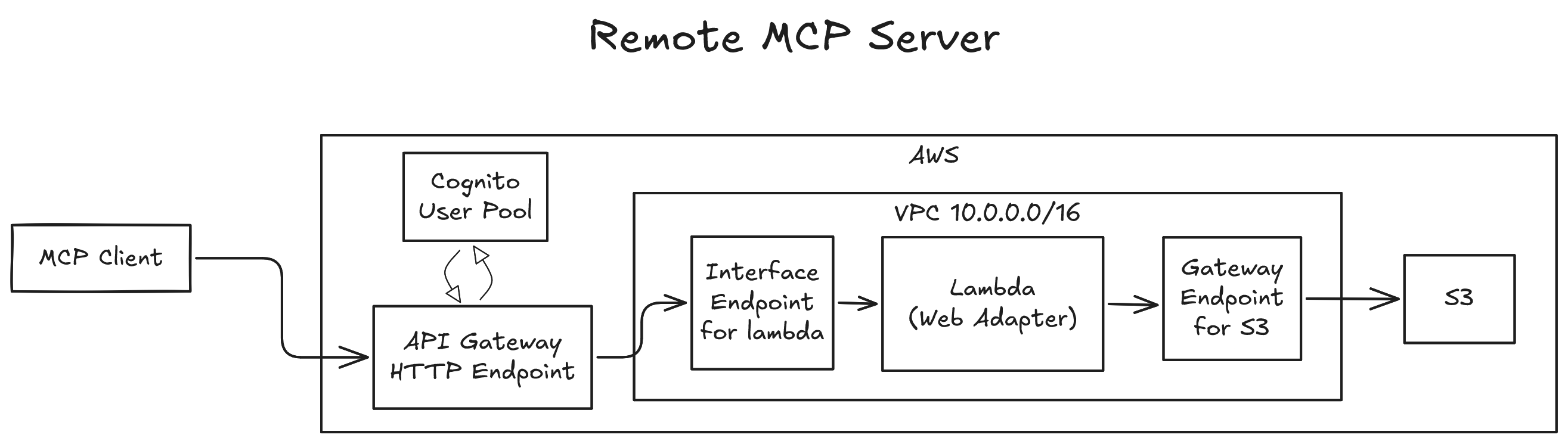
ディレクトリ構成
├── /.devcontainer                     # VS Code Dev Container設定
│   ├── devcontainer.json
│   ├── init.sh                        # AWS SSO Profile設定
│   └── github_deployments_delete.sh   # GitHubデプロイメント削除スクリプト
├── /.vscode
│   ├── mcp.json                       # MCP Server接続設定(ローカル/リモート)
│   └── settings.json
├── /.github
│   ├── /workflows
│   │   ├── pr-closed-deploy-develop.yml
│   │   ├── reusable-build-and-push.yml
│   │   ├── reusable-plan-and-deploy-with-tfc.yml  # HCP Terraform連携デプロイ
│   │   ├── reusable-update-lambda.yml
│   │   └── reusable-validate-environment-secrets.yml   # 環境変数検証
│   └── copilot-instructions.md       # GitHub Copilotのカスタム指示
├── /terraform
│   ├── /env                          # 環境別設定
│   │   └── /dev
│   │       ├── main.tf
│   │       ├── variables.tf
│   │       └── terraform.tf          # バックエンド設定(HCP Terraform)
│   └── /modules                      # 再利用可能モジュール定義
│       ├── /api_gateway              # API Gateway (HTTP) with OAuth2認証
│       ├── /cognito                  # AWS Cognito OAuth2設定
│       ├── /lambda
│       ├── /lambda_layer
│       ├── /s3
│       ├── /vpc                      # VPCとプライベートサブネット
│       ├── /vpc_endpoint_lambda      # Lambda用VPCエンドポイント
│       └── /vpc_endpoint_s3          # S3用VPCエンドポイント
├── /sam                              # AWS SAM実装(未完成・比較用)
│   ├── template.yaml
│   └── samconfig.toml
├── /src                              # MCP Serverソースコード
│   ├── main.py                       # FastMCPベースのサーバー実装
│   ├── pyproject.toml
│   ├── requirements.txt
│   ├── uv.lock                       # uv パッケージマネージャーロックファイル
│   ├── run.sh
│   └── /deps                         # Lambda Layer用依存関係
├── .env.sample
├── .auto.tfvars.sample               # HCP Terraform向け
├── .gitignore
├── .pre-commit-config.yaml           # pre-commitフック(Terraform検証)
├── .terraform-version                # Terraformバージョン指定(1.12.1)
├── api_connectivity_test.sh          # API接続テストスクリプト
├── architecture.png
├── bootstrap.tf                      # HCP Terraform/GitHub OIDCを設定
├── CLAUDE.md                         # Claude Code用指示ファイル
├── compose.yml                       # devcontainer用
├── dockerfile.devcontainer
├── justfile                          # タスクランナー(make代替)
└── README.md
環境構築
前提条件:
1. devcontainer実行環境
1. GitHubアカウント連携が済んでいるHCP Terraform アカウント
1. AWSアカウントと紐づいたIAM Identity Centerユーザー
.env作成:
cp .env.sample .env
cp .auto.tfvars.sample .auto.tfvars
HCP Terraform bootstrap:
1. 「TFE_TOKEN」は「<https://app.terraform.io/app/settings/tokens>」で発行
1. 「TFE_ORGANIZATION」は「<https://app.terraform.io/app/organizations/new>」で作成
1. HCP Terraformワークスペースの作成
```bash
Sign in to leave a review
Use Google, GitHub, or an email account so ratings stay tied to real people.
No reviews posted yet.




