
mcp-package-version
About
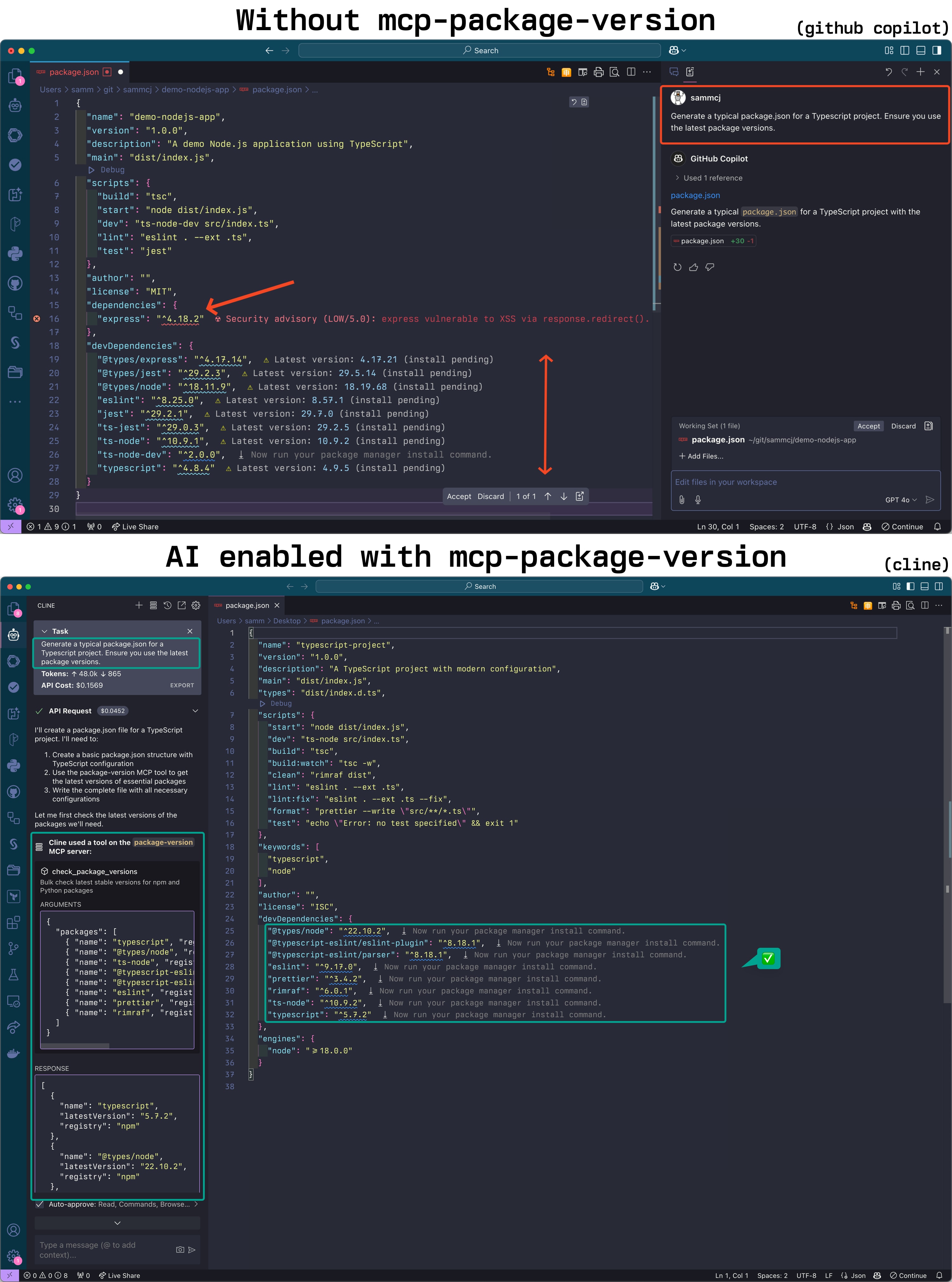
Suggests the latest stable package versions when writing code.
Details
- Author
- sammcj
- Repository
- sammcj/mcp-package-version
- GitHub stars
- 117
- Downloads
- 1
- License
- MIT License
- Categories
- Developer Tools, Productivity
Jump to

Setting up with Highlight
This MCP is not yet compatible with Highlight’s one-click setup. However, you can still use it with Highlight by following these steps:
- Download and install Highlight from highlightai.com/download
- Navigate to the plugins tab and select "Add Custom Plugin"
-
Configure the plugin with the settings below
Plugin Name
mcp-package-versionCommand (node, npx, python, etc.)/Users/sammcj/go/bin/mcp-package-versionPlease refer to the README for specific instructions on how to obtain API keys or other required environment variables.
- Enable "Start Automatically" if you want the plugin to start when Highlight launches





check_npm_versions
Check the latest versions of NPM packages. Arguments: dependencies (object with package names and versions), constraints (optional object with constraints for specific packages).
check_python_versions
Check the latest versions of Python packages from requirements.txt. Arguments: requirements (array of package specifications).
check_pyproject_versions
Check the latest versions of Python packages from pyproject.toml. Arguments: dependencies (object with required and optional dependencies).
check_maven_versions
Check the latest versions of Java packages from Maven. Arguments: dependencies (array of objects with groupId, artifactId, and version).
check_gradle_versions
Check the latest versions of Java packages from Gradle. Arguments: dependencies (array of objects with configuration, group, name, and version).
check_go_versions
Check the latest versions of Go packages from go.mod. Arguments: dependencies (object with module and require array of objects with path and version).
check_docker_tags
Check available tags for Docker images. Arguments: image (string), registry (string), limit (integer), filterTags (array of strings), includeDigest (boolean).
check_bedrock_models
List or search AWS Bedrock models. Arguments: action (string, either 'list' or 'search'), query (optional string for search), provider (optional string for specific provider).
get_latest_bedrock_model
Get the latest Claude Sonnet model. No arguments.
check_swift_versions
Check the latest versions of Swift packages. Arguments: dependencies (array of objects with url and version), constraints (optional object with version constraints).
check_github_actions
Check the latest versions of GitHub Actions. Arguments: actions (array of objects with owner, repo, and currentVersion), includeDetails (boolean to include more information).
Claude Desktop / Cursor
Paste into your MCP client config file to install this server.
{
    "mcpServers": {
        "mcp-package-version": {
            "cwd": null,
            "env": {},
            "args": [],
            "shell": false,
            "command": "/Users/sammcj/go/bin/mcp-package-version"
        }
    }
}Linux
{
    "cwd": null,
    "env": [],
    "args": [],
    "shell": false,
    "command": "/Users/sammcj/go/bin/mcp-package-version"
}
Macos
{
    "cwd": null,
    "env": [],
    "args": [],
    "shell": false,
    "command": "/Users/sammcj/go/bin/mcp-package-version"
}
Windows
{
    "cwd": null,
    "env": [],
    "args": [],
    "shell": false,
    "command": "/Users/sammcj/go/bin/mcp-package-version"
}
Package Version MCP Server
An MCP server that provides tools for checking latest stable package versions from multiple package registries:
- npm (Node.js/JavaScript)
- PyPI (Python)
- Maven Central (Java)
- Go Proxy (Go)
- Swift Packages (Swift)
- AWS Bedrock (AI Models)
- Docker Hub (Container Images)
- GitHub Container Registry (Container Images)
- GitHub Actions
This server helps LLMs ensure they're recommending up-to-date package versions when writing code.
IMPORTANT: I'm slowly moving across this tool to a component of my mcp-devtools server
<a href="https://glama.ai/mcp/servers/zkts2w92ba"></a>
Screenshot
- Package Version MCP Server
- Screenshot
- Installation
- Usage
- Tools
- Releases and CI/CD
- License
Installation
Sign in to leave a review
Use Google, GitHub, or an email account so ratings stay tied to real people.
No reviews posted yet.





