
Bring your real authenticated browser session to AI coding agents. Local-first MCP server + Chrome MV3 extension. No cloud. No telemetry.
About
Two OSS products on one rrweb substrate: tracelane (self-contained HTML test-failure replays for WDIO/Playwright/Cypress) + peek (local-first browser-session forensics + repro for AI coding agents, over MCP). No SaaS, no telemetry, local-first.
Details
- Author
- Cubenest
- GitHub stars
- 6
- Downloads
- 431
- Categories
- Developer Tools, Automation
Jump to
- Local-first: no cloud, no telemetry, all data in ~/.peek
- Chrome MV3 extension records real browser sessions
- MCP server exposes sessions as structured, AI‑ready data
- Consent‑gated live read and act tools for AI agents
- Five‑level per‑origin permission model (default: Read‑only)
- Destructive‑action blocklist always prompts for confirmation

Setting up with Highlight
This MCP is not yet compatible with Highlight’s one-click setup. However, you can still use it with Highlight by following these steps:
- Download and install Highlight from highlightai.com/download
- Navigate to the plugins tab and select "Add Custom Plugin"
-
Configure the plugin with the settings below
Plugin Name
Bring your real authenticated browser session to AI coding agents. Local-first MCP server + Chrome MV3 extension. No cloud. No telemetry.Command (node, npx, python, etc.)Please refer to the README for specific instructions on how to obtain API keys or other required environment variables.
- Enable "Start Automatically" if you want the plugin to start when Highlight launches





From the repository
Install the CLI globally (npm install -g @peekdev/cli), then run npx peek init. The Chrome MV3 extension is installed from the Chrome Web Store. Once running, use peek sessions list and peek sessions show --format markdown to query recorded sessions. The MCP server (@peekdev/mcp) runs over stdio and exposes captured sessions plus consent-gated live read/act tools to MCP clients such as Claude Code, Cursor, Cline, and Windsurf.
list_recent_sessions
List the user's recorded browser sessions, newest first — the entry point for debugging what already happened (the get_session_* and DOM tools). Returns compact JSON rows ({ sessionId, origin, url, title, startedAt, ... }); free-text fields are clipped (origin 100, url 300, title 200 chars). If the MCP client scoped roots to specific origins and no origin filter is given, results are restricted to the client's scoped origins. Start here to obtain a sessionId, then call get_session_summary.
search_sessions
Search your recorded browser sessions by metadata and facets — free text in title/URL/origin (q), exact origin, recorded date range (createdAfter/createdBefore, ISO-8601), status (active/finalized), and whether the session has console errors (hasConsoleErrors) or network errors (hasNetworkErrors). Returns the same compact rows as list_recent_sessions, newest first. Read-only and local. Use it to find a sessionId when you don't already have one, then call get_session_summary. Matches session metadata only — not page content or error-message text. Multiple facets combine with AND (e.g. hasConsoleErrors + hasNetworkErrors returns sessions that have BOTH); to find sessions with either kind of error, search for each separately.
get_session_summary
Get an LLM-readable narrative summary of one session — your orientation for debugging what already happened: pages visited, click/input/navigation counts, and error counts. Use this first for an overview before drilling into get_session_console_errors / get_session_network_errors. Returns a structured JSON summary.
get_session_console_errors
List console error messages recorded in a session, oldest first. Each row has a numeric id to pass to get_user_action_before_error. Returns JSON rows ({ id, ts, level, message, stack }); message clipped to 500 and stack to 800 chars. For error counts at a glance, use get_session_summary first.
get_session_network_errors
List failed or notable network requests in a session (HTTP status >= statusGte, or a transport-level network error), oldest first. Returns JSON rows ({ id, ts, method, url, status, statusText, resourceType, durationMs, errorText }); url and errorText clipped to 300 chars.
get_user_action_before_error
Pre-assembled causal chain for a console error: the user actions, DOM mutations, and network errors in the window before it, merged into one time-ordered timeline with a deterministic narrative — to explain how the error was triggered. Returns JSON { errorId, errorTs, error, windowMs, actions, domMutations, networkErrors, timeline, narrative, truncated }. Get errorId from get_session_console_errors first.
generate_playwright_repro
Generate a runnable Playwright test (TypeScript) reproducing the user actions in a session: clicks, typing, navigation, and <select> changes. Optionally limit to a [startTs, endTs] epoch-ms window. Pass errorId (from get_session_console_errors) to seed a console-error-absence regression assertion — the generated test will capture console errors and assert the given error is not reproduced. Returns the test source as text. Note: only single-value <select> is represented (rrweb captures one value per input).
get_dom_snapshot
Reconstruct the page DOM as it existed at a timestamp (or a selector subtree within it) and return it as HTML. Applies structural/attribute/text mutations on top of the nearest full snapshot at or before ts. Returns JSON { baseSnapshotTs, mutationsApplied, html }; html clipped to 24000 chars. Fails if no full snapshot exists at or before ts.
query_dom_history
Timeline of DOM changes in a session. Two modes: (1) selector mode — pass `selector` to track one node's attribute/text history (use `op` to restrict). (2) window mode — pass `ts` (and optional `windowMs`) instead, to get ALL DOM changes in [ts - windowMs, ts] with per-change `target` hints, no selector needed. Returns JSON { selector, changes } or { ts, windowMs, changes }.
request_authorization
Ask the user to authorize a browser action via the side-panel banner (Level-3 act-with-confirm). On Allow, returns a one-shot confirmToken to pass to execute_action; on Deny, returns the denial. Every call - allowed or denied - is recorded to ~/.peek/audit.log. Use before execute_action when the origin is at permission Level 3, or to pre-authorize.
execute_action
Execute an action (click/type/navigate/...) in the user's live browser. Requires per-origin permission Level 3+: Level 3 raises a confirm banner unless a valid confirmToken from request_authorization is passed; Level 4 auto-allows non-destructive actions; Level <3 denies. The destructive-action override (delete/remove/transfer/send/pay/purchase/buy/confirm/subscribe/logout/sign out/unsubscribe/cancel subscription/wire/withdraw) always prompts, even at Level 4. Every call is recorded to ~/.peek/audit.log. After a mutating action, re-read to confirm it took: get_element_detail on the target (its value should match what you intended) and get_page_view (no validation error should have appeared) before advancing; if it did not take, stop and report rather than blind-retrying. Password/email/PII values return masked — verify those by the absence of an error.
suggest_element
Draw a non-destructive highlight overlay on a CSS selector in the user's live browser, with an optional label, to point something out. Available at per-origin permission Level 2 (Suggest) and above; it never clicks, types, or navigates. The overlay persists until clear_highlight is called. Every call is recorded to ~/.peek/audit.log.
clear_highlight
Remove the highlight overlay previously drawn by suggest_element in the user's live browser. Available at per-origin permission Level 2 (Suggest) and above. Idempotent. Recorded to ~/.peek/audit.log.
set_intent
Set the agent's status banner shown on the control shield (e.g. 'Applying to Senior Frontend · step 2/4'), so the user can follow what you're doing. Up to 80 chars, plain text. Requires the origin at Level 4 with the shield up; auto-allowed. Recorded to ~/.peek/audit.log. Advance the step only after the previous step verified (re-read it took); on a failure, set a 'stopped — <what> didn't take' status instead of advancing. End an assisted-apply loop by calling set_intent with a short summary text plus status:'done' (success) or status:'failed' (with a brief reason), so the user sees a clear outcome.
request_user_input
Pause the agent and hand the keyboard back to the user for ONE editable, non-destructive field (or a free-text prompt), then resume. Requires the origin at Level 4 with the control shield up. Blocks until the user clicks Done, a timeout fires, or the run is stopped. Returns { resumed:true, value? } or { resumed:false, reason }. The returned value is only included when readBack:true and the field isn't a password/OTP/credit-card field. Recorded to ~/.peek/audit.log (prompt + selector only — never the value).
get_page_view
Return a compact, masked snapshot of the user's LIVE page as a list of interactive/labeled elements, each with a stable `ref` (e.g. e5). Pass a `ref` to execute_action / request_authorization (click/type/scroll/enter/dblclick) instead of authoring a CSS selector — deterministic and far cheaper than reading get_dom_snapshot's HTML. Refs expire on navigation; re-call after navigating. Available at per-origin Level 1+; non-mutating; recorded to ~/.peek/audit.log. Password/email/tel and PII-autofill (card/address/etc.) input values, and fields marked private, are masked; structured PII is scrubbed, but free-text field values may be returned.
get_element_detail
Given a `ref` from get_page_view, return the FULL masked detail of that single element (role, accessible name, accessible description, all aria-*, effective aria-hidden/disabled, a curated computed-style bag, state, value, href, position, nearby heading, and its interactive descendants with their refs, capped). The compact get_page_view stays cheap; call this only for the one element you need to disambiguate or act on. Refs expire on navigation. Level 1+; non-mutating; audited. Values for password/email/PII inputs are masked; free-text values may be returned (like the recorder). For live console/network state use get_session_console_errors / get_session_network_errors.
verify_audit_log
Verify the integrity of peek's local action audit log (~/.peek/audit.log) — the append-only, hash-chained record of every browser action peek authorized or attempted. Returns JSON { logPresent, status, entriesVerified, prelude, headPresent, brokenAtLine?, expected?, got?, gaps?, summary }. status is one of intact | broken | truncated | tail-tampered | prefix-tampered | incomplete-final | gaps | head-missing. Local and read-only. The log is tamper-EVIDENT, not tamper-proof: it has no cryptographic signature and no external timestamp anchor. Use it to confirm the action trail on this machine has not been altered.
request_pairing
Initiate a connector-pairing handshake: present a pairing code and receive a one-shot secret on approval. The connecting client name is taken from the MCP connection identity. Returns JSON { approved, secret? }. Every attempt is recorded to ~/.peek/audit.log; the secret is never written to the log.
Claude Desktop / Cursor
Paste into your MCP client config file to install this server.
{
    "mcpServers": {
        "bring your real authenticated browser session to ai coding agents. local-first mcp server + chrome mv3 extension. no cloud. no telemetry.": {
            "peek": {
                "command": "npx",
                "args": [
                    "-y",
                    "@peekdev/mcp"
                ]
            }
        }
    }
}McpServers
{
    "peek": {
        "command": "npx",
        "args": [
            "-y",
            "@peekdev/mcp"
        ]
    }
}
rrweb-stack
Two OSS products on one rrweb-based substrate. Both ship as npm packages today.
| Product | One line | Install |
|---|---|---|
| tracelane | The recorder for your WebdriverIO and Playwright tests — Cypress on the roadmap. Self-contained HTML for every run — replay failures, audit successes, attach to any bug tracker. No SaaS, no dashboard, no signup. | npx @tracelane/cli init |
| peek | Your real browser, exposed to your AI coding agent over MCP — the agent reads recorded sessions and, with your explicit consent, drives the live page. Never leaves your machine. | npm install -g @peekdev/cli && npx peek init |
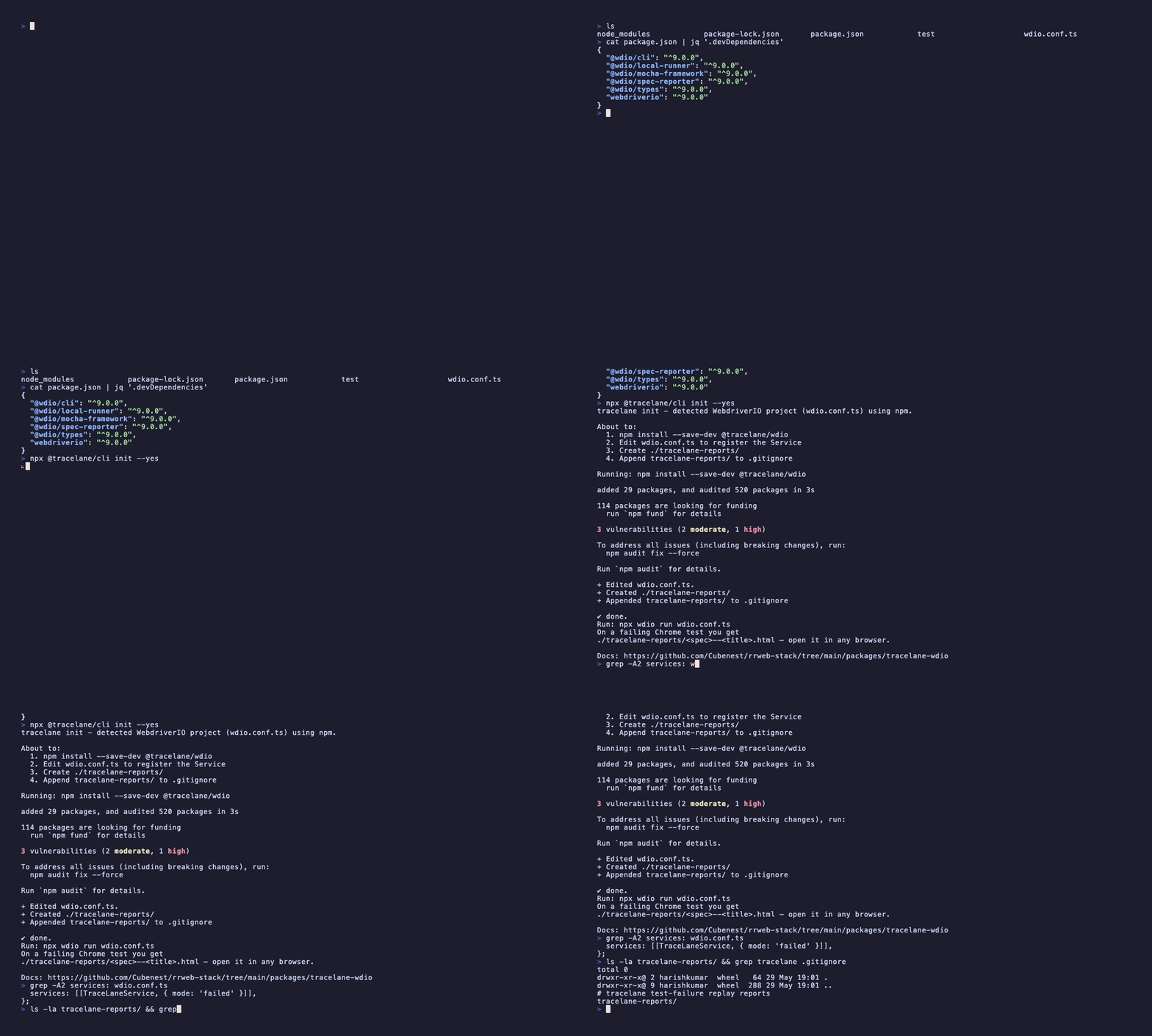
Above: npx @tracelane/cli init in a real WebdriverIO project — detect runner, install, edit wdio.conf.ts, ignore reports dir.
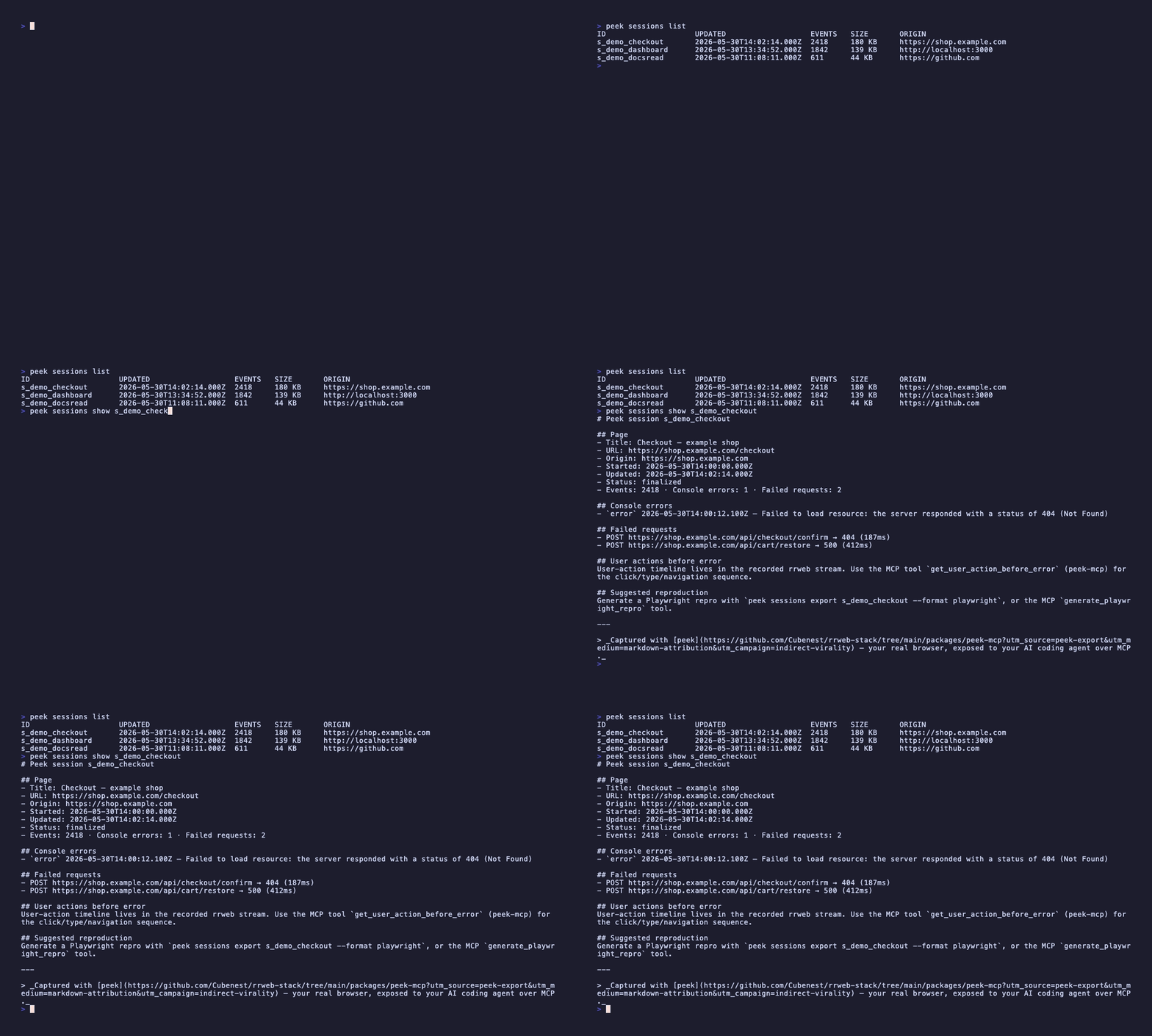
Above: peek sessions list then peek sessions show ... --format markdown — a recorded browser session as queryable structured output, AI-ready.






What's where
tracelane
| Package | Status | What it does |
|---|---|---|
| @tracelane/wdio | alpha | WebdriverIO Service — capture + write HTML report |
| @tracelane/playwright | alpha | Playwright Reporter + auto-fixture — capture + write HTML report |
| @tracelane/cypress | planned | JSON-output adapter (no Test Replay overlap) |
| @tracelane/core | alpha | Framework-agnostic capture engine — depended on by the adapters |
| @tracelane/report | alpha | Self-contained HTML report builder |
Docs: tracelane.cubenest.in (source under apps/tracelane-docs/). The tracelane-wdio README is the right starting point.
peek
| Package | Status | What it does |
|---|---|---|
| @peekdev/cli | alpha | peek init installer + peek sessions query / export |
| @peekdev/mcp | alpha | stdio MCP server — exposes captured sessions, plus consent-gated live read + act tools, to Claude Code, Cursor, Cline, Windsurf |
| peek-extension | alpha · on the Chrome Web Store | Chrome MV3 extension — the real browser, recorded |
Docs: peek.cubenest.in (source under apps/peek-docs/).
> peek requires Node.js ≥ 22. Its native better-sqlite3 dependency only
> ships prebuilt binaries for Node 22+; on older Node (notably Windows, which
> has no C/C++ toolchain by default) the install falls back to compiling from
> source and fails.
Shared substrate
@cubenest/rrweb-core — vendored PostHog rrweb fork, PII masking primitives, large-DOM throttling, screenshot fallback, network/console capture abstractions, compression helpers. Used by both products. The fork is pinned by SHA + the substrate's NOTICE attributes both PostHog's plugin lineage and the upstream rrweb roots.
Why two products, one repo
Same recording engine, same trust model, two different consumer surfaces:
- tracelane ships test-time captures into a self-contained HTML artifact your team and AI agents can read offline.
- peek ships live-browser captures into an MCP server your AI coding agent can query — and, with your explicit per-origin consent, drive the live page through.
peek's live read + act tools are gated by a five-level per-origin permission model (0 Off → 1 Read-only → 2 Suggest-only → 3 Act-with-confirm → 4 YOLO, the default is Level 1) with a destructive-action blocklist that always prompts. No telemetry, no cloud — everything stays in ~/.peek.
Shared upstream means one fork to track, one masking surface to harden, one license + DCO + security policy.
Pre-launch state
Pre-1.0. Alpha packages live on npm. Branch protection is on main (PR + CI + DCO + linear history). All workflows use Trusted Publishing OIDC + SLSA provenance. Renovate runs with a 7-day cooldown (21 days for the @posthog/rrweb lineage) and config:best-practices. tracelane has publicly launched (npm alpha + a live demo report); peek is alpha on npm and its Chrome MV3 extension is available on the Chrome Web Store.
Security
Report a vulnerability via SECURITY.md. The shared threat model for both products lives in docs/SECURITY-NOTES.md.
License
Apache-2.0. See LICENSE.
Contributing
Apache 2.0. DCO sign-off required on all contributions. See CONTRIBUTING.md, CODE_OF_CONDUCT.md, SECURITY.md.
Sponsor / support
- GitHub Sponsors — github.com/sponsors/harry-harish (opening for launch)
- The work is open-source and sustainable; sponsorship keeps it that way. See docs/SUSTAINABILITY.md for the maintenance cadence.
Sign in to leave a review
Use Google, GitHub, or an email account so ratings stay tied to real people.
No reviews posted yet.




