
RISKEN MCP Server
About
The RISKEN MCP Server is a Model Context Protocol (MCP) server that integrates with RISKEN APIs, enabling advanced automation and interaction capabilities for developers and tools. It provides tools and resources for managing security findings and alerts via AI assistants.
Details
- Author
- ca-risken
- GitHub stars
- 7
- Downloads
- 150
- Categories
- Other
Jump to
- Search and query RISKEN findings with filters.
- Archive resolved findings with optional notes.
- Search and monitor alert status in RISKEN.
- Retrieve full finding content via resource URIs.
- Support for both Organization and Project access tokens.
- Built-in OAuth2.1 support with external Identity Providers.

Setting up with Highlight
This MCP is not yet compatible with Highlight’s one-click setup. However, you can still use it with Highlight by following these steps:
- Download and install Highlight from highlightai.com/download
- Navigate to the plugins tab and select "Add Custom Plugin"
-
Configure the plugin with the settings below
Plugin Name
RISKEN MCP ServerCommand (node, npx, python, etc.)Please refer to the README for specific instructions on how to obtain API keys or other required environment variables.
- Enable "Start Automatically" if you want the plugin to start when Highlight launches





From the repository
Run the server locally using Docker or deploy on Google Cloud Run with Terraform. Configure your MCP client (Claude Desktop, Cursor) with a JSON configuration that specifies the Docker image and environment variables RISKEN_ACCESS_TOKEN and RISKEN_URL. The server supports both stdio and Streamable HTTP transports.
Claude Desktop / Cursor
Paste into your MCP client config file to install this server.
{
    "mcpServers": {
        "risken mcp server": {
            "risken-mcp-server": {
                "command": "docker",
                "args": [
                    "run",
                    "-it",
                    "--rm",
                    "\\"
                ]
            }
        }
    }
}McpServers
{
    "risken-mcp-server": {
        "command": "docker",
        "args": [
            "run",
            "-it",
            "--rm",
            "\\"
        ]
    }
}
RISKEN MCP Server
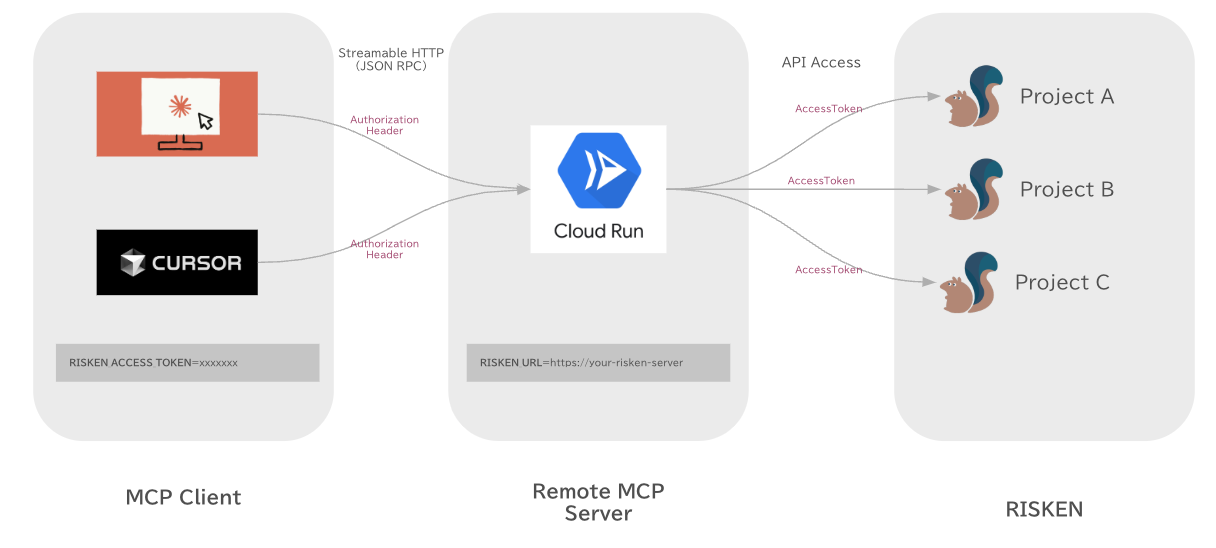
The RISKEN MCP Server is a Model Context Protocol (MCP) server that provides seamless integration with RISKEN APIs, enabling advanced automation and interaction capabilities for developers and tools.
Use Cases
By connecting the RISKEN MCP server to your everyday AI tools, you can perform various operations such as:
- Checking active alerts in RISKEN and monitoring their status.
- Searching, analyzing, and reviewing findings including their explanations and remediation steps.
- Archiving resolved findings to maintain a clean and organized security posture.
Prerequisites
1. To run the server in a container, you will need to have Docker installed.
2. Once Docker is installed, you will also need to ensure Docker is running.
3. You will also need to have a RISKEN Access Token.
Local MCP Server
Please add the following MCP server configuration to your MCP Client (Claude Desktop or Cursor) settings.
{
  "mcpServers": {
    "risken": {
      "command": "docker",
      "args": [
        "run",
        "-i",
        "--rm",
        "-e",
        "RISKEN_ACCESS_TOKEN",
        "-e",
        "RISKEN_URL",
        "ghcr.io/ca-risken/risken-mcp-server",
        "stdio"
      ],
      "env": {
        "RISKEN_URL": "http://localhost:8098",
        "RISKEN_ACCESS_TOKEN": "your_access_token"
      }
    }
  }
}
Remote MCP Server
RISKEN MCP Server supports Streamable HTTP.
on Local
docker run -it --rm \
  -e RISKEN_URL=http://localhost:8098 \
  -e RISKEN_ACCESS_TOKEN=xxxxxx \
  -p 8080:8080 \
  ghcr.io/ca-risken/risken-mcp-server http
on Cloud Run
You can deploy the server on Google Cloud Run with Terraform.
1. Visit terraform/examples/googlecloud and deploy the server on Google Cloud Run with Terraform.
2. Add the following MCP server configuration to your MCP Client (Claude Desktop or Cursor) settings.
Note: Since most MCP clients only allow stdio connections, it is currently necessary to use mcp-remote as a proxy to connect to remote MCP servers.
Claude Desktop, Cursor ...
{
  "mcpServers": {
    "risken": {
      "command": "npx",
      "args": [
        "mcp-remote",
        "http://localhost:8098/mcp",
        "--header",
        "RISKEN-ACCESS-TOKEN:${RISKEN_ACCESS_TOKEN}"
      ],
      "env": {
        "RISKEN_ACCESS_TOKEN": "xxxxxx"
      }
    }
  }
}
Third-Party Authorization (OAuth2.1)
RISKEN MCP Server supports Third-Party Authorization (OAuth2.1) that enables secure authentication through external Identity Providers (IdP).
Overview
The OAuth2.1 implementation follows the MCP Authorization specification with Third-Party Authorization Flow, where:
1. MCP Client initiates OAuth flow with MCP Server
2. MCP Server acts as authorization server and redirects user to IdP
3. IdP authenticates user and returns to MCP Server
4. MCP Server issues access token for MCP Client
5. MCP Client uses access token for subsequent MCP requests
OAuth Flow
sequenceDiagram
    participant Browser as User Browser
    participant Client as MCP Client
    participant Server as MCP Server
    participant IdP as Identity Provider
Client->>Server: POST /mcp (no auth)

    Server->>Client: 401 Unauthorized + WWW-Authenticate

    Client->>Server: GET /.well-known/oauth-authorization-server

    Server->>Client: Authorization metadata

    Client->>Server: POST /register (Dynamic Client Registration)

    Server->>Client: client_id

    Client->>Browser: Open authorization URL (with PKCE challenge)

    Browser->>IdP: User authentication

    IdP->>Browser: Redirect to callback URL (with code)

    Browser->>Server: GET /oauth/callback (IdP code)

    Note over Server: Store IdP code, generate internal JWT authorization code

    Server->>Client: Authorization complete (internal code)

    Client->>Server: POST /token (internal code + PKCE verifier)

    Note over Server: Verify PKCE challenge/verifier

    Server->>IdP: Exchange IdP code for access token

    IdP->>Server: Access token

    Server->>Client: Access token

    Client->>Server: POST /mcp (with Bearer token)

    Server->>Client: MCP response
Configuration
MCP Server Configuration
The following environment variables are required for OAuth2.1 support:
| Variable | Required | Description | Example |
|----------|----------|-------------|---------|
| MCP_SERVER_URL | ✅ | Public URL of MCP server | http://localhost:8080 |
| AUTHZ_METADATA_ENDPOINT | ✅ | IdP's OAuth metadata endpoint | https://your-idp.com/.well-known/oauth-authorization-server |
| CLIENT_ID | ✅ | OAuth client ID for IdP | your-client-id |
| CLIENT_SECRET | ✅ | OAuth client secret for IdP | your-client-secret |
| JWT_SIGNING_KEY | ✅ | Signing key for session JWT tokens | your-256-bit-secret |
Identity Provider Requirements
Your IdP must support the following OAuth features:
| Feature | Requirement | Description |
|---------|-------------|-------------|
| Authorization Code Flow | ✅ REQUIRED | Standard OAuth authorization code grant |
| JWKS Endpoint | ✅ REQUIRED | JSON Web Key Set for JWT validation |
| Metadata Discovery | ✅ REQUIRED | RFC 8414 Authorization Server Metadata |
Note: PKCE verification is handled internally by the MCP Server between MCP Client and MCP Server (per MCP specification). The IdP does not need to support PKCE.
Tools
Context
- get_context - Get the current authentication context.
- Returns Organization info if using Organization token, or Project info if using Project token.
Finding
- search_finding - Search RISKEN findings. (Supports both Organization and Project tokens)
- finding_id - Search by finding ID.
- alert_id - Search by alert ID. (Project token only)
- data_source - Search by data source.
- resource_name - Search by resource name.
- from_score - Search by minimum score.
- 0.0 ~ 0.3 - Low
- 0.3 ~ 0.6 - Medium
- 0.6 ~ 0.8 - High
- 0.8 ~ 1.0 - Critical
- status - Search by status.
- 0 - All
- 1 - Active (default)
- 2 - Pending
- offset - Search by offset.
- limit - Search by limit.
- archive_finding - Archive RISKEN finding. (Supports both Organization and Project tokens)
- finding_id - Archive by finding ID. (Required)
- note - Note.
Alert
- search_alert - Search RISKEN alert. (Project token only)
- status - Search by status.
- 1 - Active
- 2 - Pending
- 3 - Deactive (already closed)
Resources
Finding Contents
- Get Finding Contents Retrieves the content of a specific finding.
- Template: finding://{project_id}/{finding_id}
- Parameters:
- project_id: The ID of the project.
- finding_id: The ID of the finding.
License
This project is licensed under the MIT License. See the LICENSE file for details.
Sign in to leave a review
Use Google, GitHub, or an email account so ratings stay tied to real people.
No reviews posted yet.





