
Getting Started with Remote MCP Servers using Azure Functions (.NET/C#)
About
This is a quickstart template to easily build and deploy a custom remote MCP server to the cloud using Azure functions. You can clone/restore/run on your local machine with debugging, and `azd up` to have it in the cloud in a couple minutes. The MCP server is secured by design u
Details
- Author
- Azure-Samples
- GitHub stars
- 127
- Downloads
- 393
- Categories
- Cloud Service
Jump to
- Sample implementations for MCP Tools, Apps, Resources, and Prompts
- Built‑in authentication using Microsoft Entra as identity provider
- Supports securing via API Management and network isolation with VNET
- Interactive UI capabilities through MCP Apps and the Weather App demo
- One‑command cloud deployment using Azure Developer CLI (azd up)
Clone the repository, restore dependencies, and run the samples locally with debugging using Visual Studio or Visual Studio Code. Once ready, run azd up to deploy the entire server infrastructure to Azure in a few minutes. Prerequisites include .NET 10 SDK, Azure Functions Core Tools >=4.5.0, Azure Developer CLI >=1.23.x, and Docker.
Getting Started with Remote MCP Servers using Azure Functions (.NET/C#)
This repo has a collection of samples to help you easily build and deploy a custom remote MCP server to the cloud using Azure functions. You can clone/restore/run on your local machine with debugging, and azd up to have a server in the cloud in a couple minutes.
All sample MCP servers are configured with built-in authentication using Microsoft Entra as the identity provider.
You can also use API Management to secure the server, as well as network isolation using VNET.
If you're looking for samples in more languages check out the Node.js/TypeScript and Python samples.

Prerequisites
Required for all development approaches
+ .NET 10 SDK
+ Azure Functions Core Tools >= 4.5.0
+ Azure Developer CLI 1.23.x or above (for deployment)
+ Docker (for the Azurite storage emulator)
For Visual Studio development
+ Visual Studio 2022
+ Make sure to select the Azure development workload during installation
For Visual Studio Code development
+ Visual Studio Code
+ Azure Functions extension
> Choose one: You can use either Visual Studio OR Visual Studio Code. Both provide full debugging support, but the setup steps differ slightly.
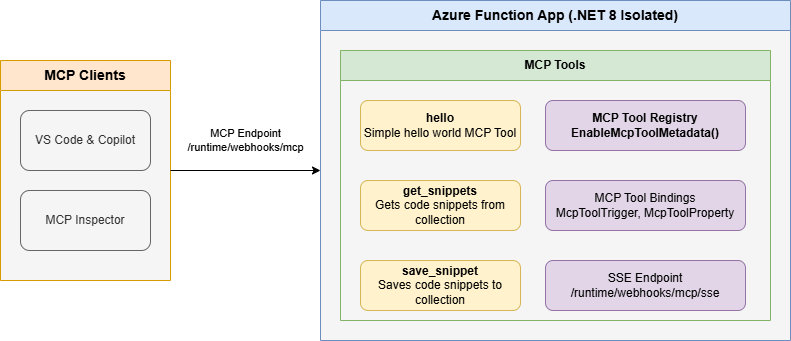
Below is the architecture diagram for the Remote MCP Server using Azure Functions:
Samples in this repo
Each project README has instructions for running locally, connecting to the MCP server, deploying to the cloud, and more.
| Project | Description | Getting Started |
|---------|-------------|-----------------|
| FunctionsMcpTool | MCP Tools — snippet CRUD, QR code generation, badges, website preview, auth (OBO) | README |
| FunctionsMcpApp | MCP Apps — fluent API for tools that return interactive UI | README |
| FunctionsMcpResources | MCP Resources — snippet resource template, server info resource | README |
| FunctionsMcpPrompts | MCP Prompts — code review checklist, summarize content, generate docs | README |
| McpWeatherApp | Weather App — MCP App demo with interactive UI | README |
Next Steps
+ Learn more about the Azure Functions MCP extension
+ Learn more about built-in MCP auth
+ Follow our blog posts on Azure SDK Blog and Tech Community for updates.
Sign in to leave a review
Use Google, GitHub, or an email account so ratings stay tied to real people.
No reviews posted yet.




