
Ransomware Live MCP Server
About
A Model Context Protocol (MCP) server that interfaces with the ransomware.live API, allowing LLM clients to query data about ransomware victims and groups tracked by the platform.
Details
- Author
- slouchd
- Downloads
- 181
- Categories
- Other
Jump to
- Retrieves details on the last 100 ransomware victims.
- Provides victim counts and details by sector.
- Filters victims by country code, year, and month.
- Queries victims by keyword.
- Lists all tracked ransomware groups and their victims.

Setting up with Highlight
This MCP is not yet compatible with Highlight’s one-click setup. However, you can still use it with Highlight by following these steps:
- Download and install Highlight from highlightai.com/download
- Navigate to the plugins tab and select "Add Custom Plugin"
-
Configure the plugin with the settings below
Plugin Name
Ransomware Live MCP ServerCommand (node, npx, python, etc.)Please refer to the README for specific instructions on how to obtain API keys or other required environment variables.
- Enable "Start Automatically" if you want the plugin to start when Highlight launches





From the repository
Start the server using the default stdio transport: uv run ransomwarelive_mcp_server. For development, run mcp dev server.py after adding mcp[cli]. To use with Claude desktop, install the server via mcp install server.py --name "Ransomware Live MCP Server".
Claude Desktop / Cursor
Paste into your MCP client config file to install this server.
{
    "mcpServers": {
        "ransomware live mcp server": {
            "ransomwarelive-mcp-server": {
                "command": "uv",
                "args": [
                    "run",
                    "ransomwarelive_mcp_server"
                ]
            }
        }
    }
}McpServers
{
    "ransomwarelive-mcp-server": {
        "command": "uv",
        "args": [
            "run",
            "ransomwarelive_mcp_server"
        ]
    }
}
Ransomware Live MCP Server
This model context protocol (MCP) server interfaces with the ransomware.live API. Allowing you to use any LLM/MCP client of your choosing to reason over this data and find insights.
Credit for ransomware.live goes to its creator Julien Mousqueton.
🧰 Available Tools and Resources
---
- get_recent_victims: __tool__ - get details about the last 100 victims claimed by ransomware groups that are tracked by ransomware.live
- get_sector_counts: __tool__ - get the number of victims by sector that are tracked by ransomware.live
- get_victims_by_sector: __tool__ - get details about victims within a specific sector
- get_victims_by_sector_countrycode: __tool__ - get details about victims within a specific sector and country code
- get_victims_by_countrycode: __tool__ - get details about victims within a specific country
- get_victims_by_year: __tool__ - get details about the victims within a specific year
- get_victims_by_year_month: __tool__ - get details about the victims within a specific year and month
- get_victims_by_keyword: __tool__ - query for victims by keyword
- get_all_ransomware_groups: __tool__ - get details about all ransomware groups that are tracked by ransomware.live
- get_ransomware_group: __tool__ - get details about a specific ransomware group according to ransomware.live
- get_ransomware_group_victims: __tool__ - get all victims of a specific ransomware group according to ransomware.live
📝 Usage
---
Start the server using the default stdio transport
uv run ransomwarelive_mcp_server
🧑💻 Usage (Development)
---
Start the server and test it with the MCP inspector
uv add "mcp[cli]"
mcp dev server.py
🔍 Example Use Case
---
Using the MCP server with Claude desktop (you must have Claude desktop installed)
uv add "mcp[cli]"
mcp install server.py --name "Ransomware Live MCP Server"
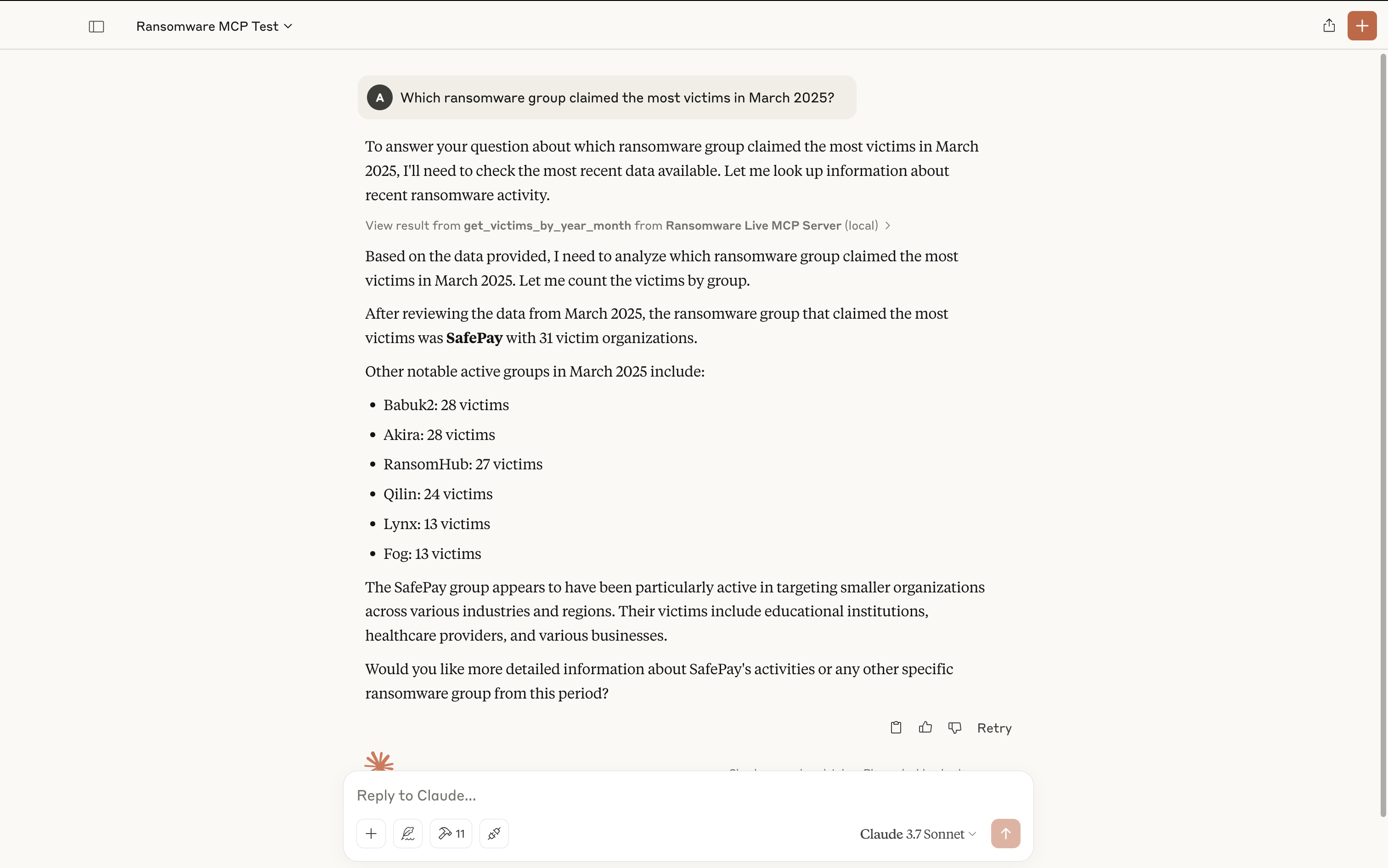
With a basic prompt:
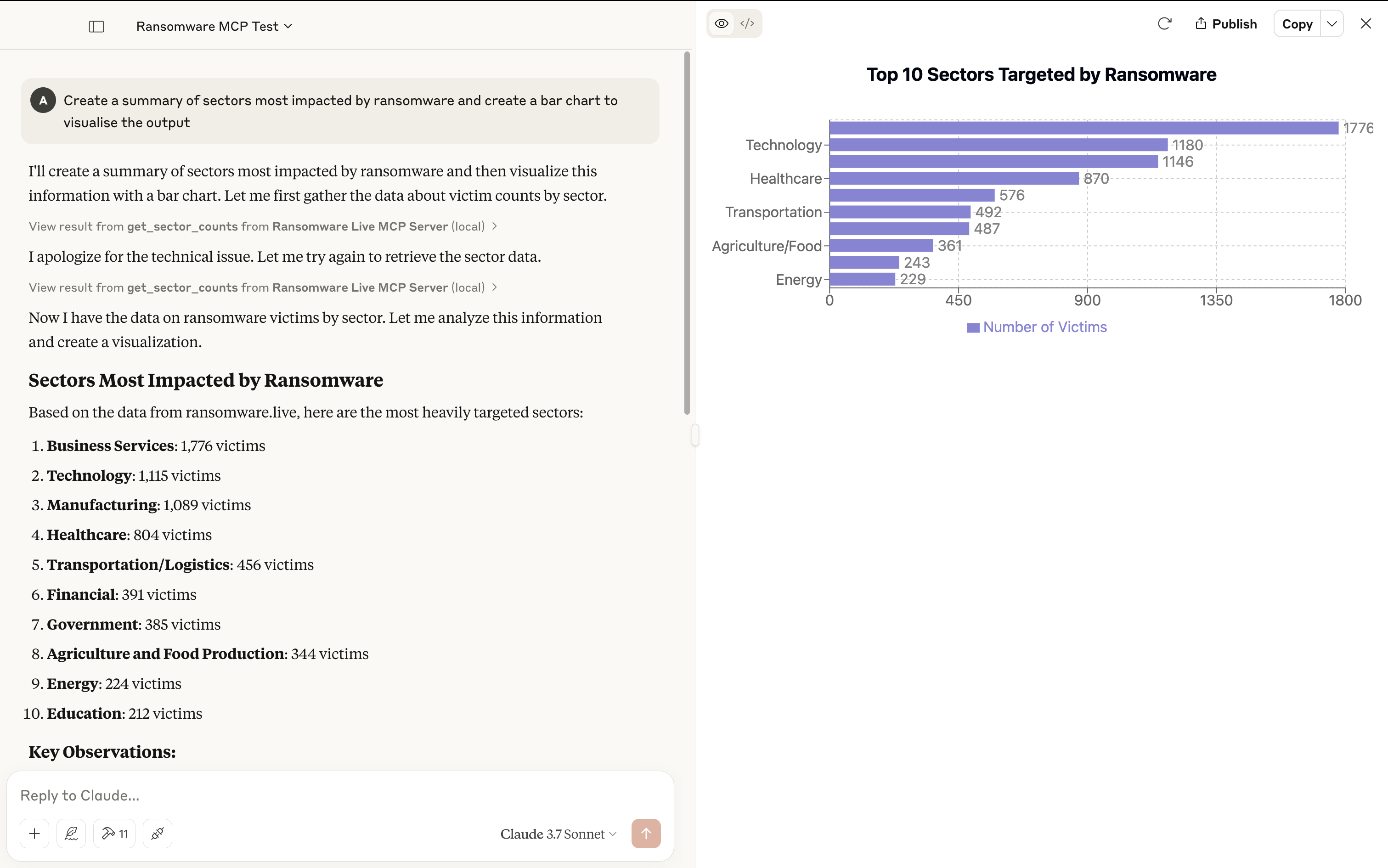
With a basic prompt and visual output:
🪪 License
---
MIT License
Sign in to leave a review
Use Google, GitHub, or an email account so ratings stay tied to real people.
No reviews posted yet.





