
Apple Notes
About
Enables semantic search and RAG (Retrieval Augmented Generation) over your Apple Notes.
Details
- Author
- RafalWilinski
- Repository
- RafalWilinski/mcp-apple-notes
- GitHub stars
- 107
- Downloads
- 856
- Categories
- Productivity, Community, Other, AI, Search, Knowledge Base
Jump to
- 🔍 Semantic search over Apple Notes using all-MiniLM-L6-v2 on-device embeddings model
- 📝 Full-text search capabilities
- 📊 Vector storage using LanceDB
- 🤖 MCP-compatible server for AI assistant integration
- 🍎 Native Apple Notes integration via JXA
- 🏃♂️ Fully local execution - no API keys needed

Setting up with Highlight
Follow these steps to add this server as a custom Highlight plugin:
- Download and install Highlight from highlightai.com/download
- Navigate to the plugins tab and select "Add Custom Plugin"
-
Configure the plugin with the settings below
Plugin Name
Apple NotesCommand (node, npx, python, etc.)/Users/<YOUR_USER_NAME>/.bun/bin/bunArguments-
Argument 1
/Users/<YOUR_USER_NAME>/apple-notes-mcp/index.ts
Please refer to the README for specific instructions on how to obtain API keys or other required environment variables.
-
Argument 1
- Enable "Start Automatically" if you want the plugin to start when Highlight launches





From the repository
1. Open Claude desktop app and go to Settings -> Developer -> Edit Config
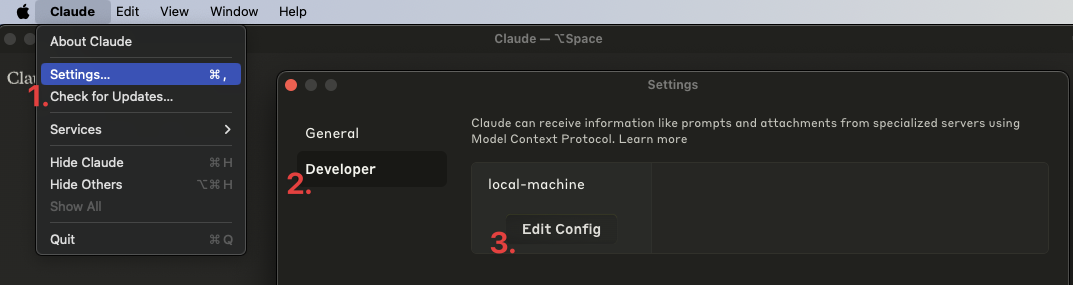
2. Open the claude_desktop_config.json and add the following entry:
{
"mcpServers": {
"local-machine": {
"command": "/Users/<YOUR_USER_NAME>/.bun/bin/bun",
"args": ["/Users/<YOUR_USER_NAME>/apple-notes-mcp/index.ts"]
}
}
}
Claude Desktop / Cursor
Paste into your MCP client config file to install this server.
{
    "mcpServers": {
        "apple notes": {
            "cwd": "",
            "env": {},
            "args": [
                "/Users/<YOUR_USER_NAME>/apple-notes-mcp/index.ts"
            ],
            "shell": false,
            "command": "/Users/<YOUR_USER_NAME>/.bun/bin/bun"
        }
    }
}Linux
{
"env": [],
"args": [
"-y",
"@highlight/mcp-server"
],
"command": "npx"
}Macos
{
"cwd": "",
"env": [],
"args": [
"/Users/<YOUR_USER_NAME>/apple-notes-mcp/index.ts"
],
"shell": false,
"command": "/Users/<YOUR_USER_NAME>/.bun/bin/bun"
}Windows
{
"env": [],
"args": [
"/c",
"npx",
"-y",
"@highlight/mcp-server"
],
"command": "cmd"
}- 🔍 Semantic search over Apple Notes usingall-MiniLM-L6-v2on-device embeddings model
- 📝 Full-text search capabilities
- 📊 Vector storage usingLanceDB
- 🤖 MCP-compatible server for AI assistant integration
- 🍎 Native Apple Notes integration via JXA
- 🏃♂️ Fully local execution - no API keys needed
git clone https://github.com/RafalWilinski/mcp-apple-notes cd mcp-apple-notes
- Open Claude desktop app and go to Settings -> Developer -> Edit Config
- Open theclaude_desktop_config.jsonand add the following entry:
{
  "mcpServers": {
    "local-machine": {
      "command": "/Users/<YOUR_USER_NAME>/.bun/bin/bun",
      "args": ["/Users/<YOUR_USER_NAME>/apple-notes-mcp/index.ts"]
    }
  }
}
Important: Replace<YOUR_USER_NAME>with your actual username.
- Restart Claude desktop app. You should see this:
- Start by indexing your notes. Ask Claude to index your notes by saying something like: "Index my notes" or "Index my Apple Notes".
tail -n 50 -f ~/Library/Logs/Claude/mcp-server-local-machine.log # or tail -n 50 -f ~/Library/Logs/Claude/mcp.log
- Apple notes are returned in the HTML format. We should turn them to Markdown and embed that
- Chunk source content using recursive text splitter or markdown text splitter
- Add an option to use custom embeddings model
- More control over DB - purge, custom queries, etc.
- Storing notes in Notes via Claude
AnkiConnect MCP server for interacting with Anki via AnkiConnect.
An MCP Server Integration with Apple Shortcuts
Add smart Backup ability to coding agents like Windsurf, Cursor, Cluade Coder, etc
This server enables LLMs to use calculator for precise numerical calculations.
A CalDAV MCP server to expose calendar operations as tools for AI assistants.
MCP server for easy access to education data through your Canvas LMS instance.
Tools to the query and execute of Dify workflows
Excel manipulation including data reading/writing, worksheet management, formatting, charts, and pivot table
Access and analyze Fathom Analytics data and reports
Sign in to leave a review
Use Google, GitHub, or an email account so ratings stay tied to real people.
No reviews posted yet.





