
Pushplus Mcp Server
About
Pushplus Mcp Server is a Java-based MCP server that integrates the pushplus real-time message push platform. It supports pushing messages to WeChat, SMS, email, enterprise WeChat, DingTalk, Feishu, bark, gotify, and other channels via a simple API call.
Details
- Author
- pushplus
- Downloads
- 549
- Categories
- Other
Jump to
- Real-time push to multiple messaging platforms (WeChat, SMS, email, etc.)
- Simple API integration via MCP
- Token-based authentication
- Java runtime with JDK21

Setting up with Highlight
This MCP is not yet compatible with Highlight’s one-click setup. However, you can still use it with Highlight by following these steps:
- Download and install Highlight from highlightai.com/download
- Navigate to the plugins tab and select "Add Custom Plugin"
-
Configure the plugin with the settings below
Plugin Name
Pushplus Mcp ServerCommand (node, npx, python, etc.)Please refer to the README for specific instructions on how to obtain API keys or other required environment variables.
- Enable "Start Automatically" if you want the plugin to start when Highlight launches





From the repository
Requires JDK21 and Maven to build (mvn clean package). Start the JAR with PUSHPLUS_TOKEN=your_token java -Dlogging.pattern.console= -jar pushplus-mcp-1.0.0.jar. The token can be fixed via environment variable or specified in prompts. For Cursor, add a new MCP server with the command pointing to the JAR and the token set in the env object.
Claude Desktop / Cursor
Paste into your MCP client config file to install this server.
{
    "mcpServers": {
        "pushplus mcp server": {
            "pushplus": {
                "command": "npx",
                "args": [
                    "-y",
                    "@perk-net/pushplus-mcp-server"
                ],
                "env": {
                    "PUSHPLUS_TOKEN": "your pushplus token"
                }
            }
        }
    }
}McpServers
{
    "pushplus": {
        "command": "npx",
        "args": [
            "-y",
            "@perk-net/pushplus-mcp-server"
        ],
        "env": {
            "PUSHPLUS_TOKEN": "your pushplus token"
        }
    }
}
pushplus 推送加 MCP Server Java版
pushplus官网:https://www.pushplus.plus/功能描述
pushplus(推送加)是一个集成了微信、短信、邮件、企业微信、腾讯轻联、钉钉、飞书、bark、gotify、集简云等实时消息推送平台。只需要调用简单的API,即可帮您迅速完成消息的推送,使用简单方便。使用方式
1. 依赖JDK21 2. 使用maven工具来构建项目,构建命令:mvn clean package 3. 在 target 目录中启动程序,命令:PUSHPLUS_TOKEN=你的token java -Dlogging.pattern.console= -jar pushplus-mcp-1.0.0.jar
4. 启动命令中可通过环境变量指定token,用来固定发送消息的token,否则需要在提示词中指定
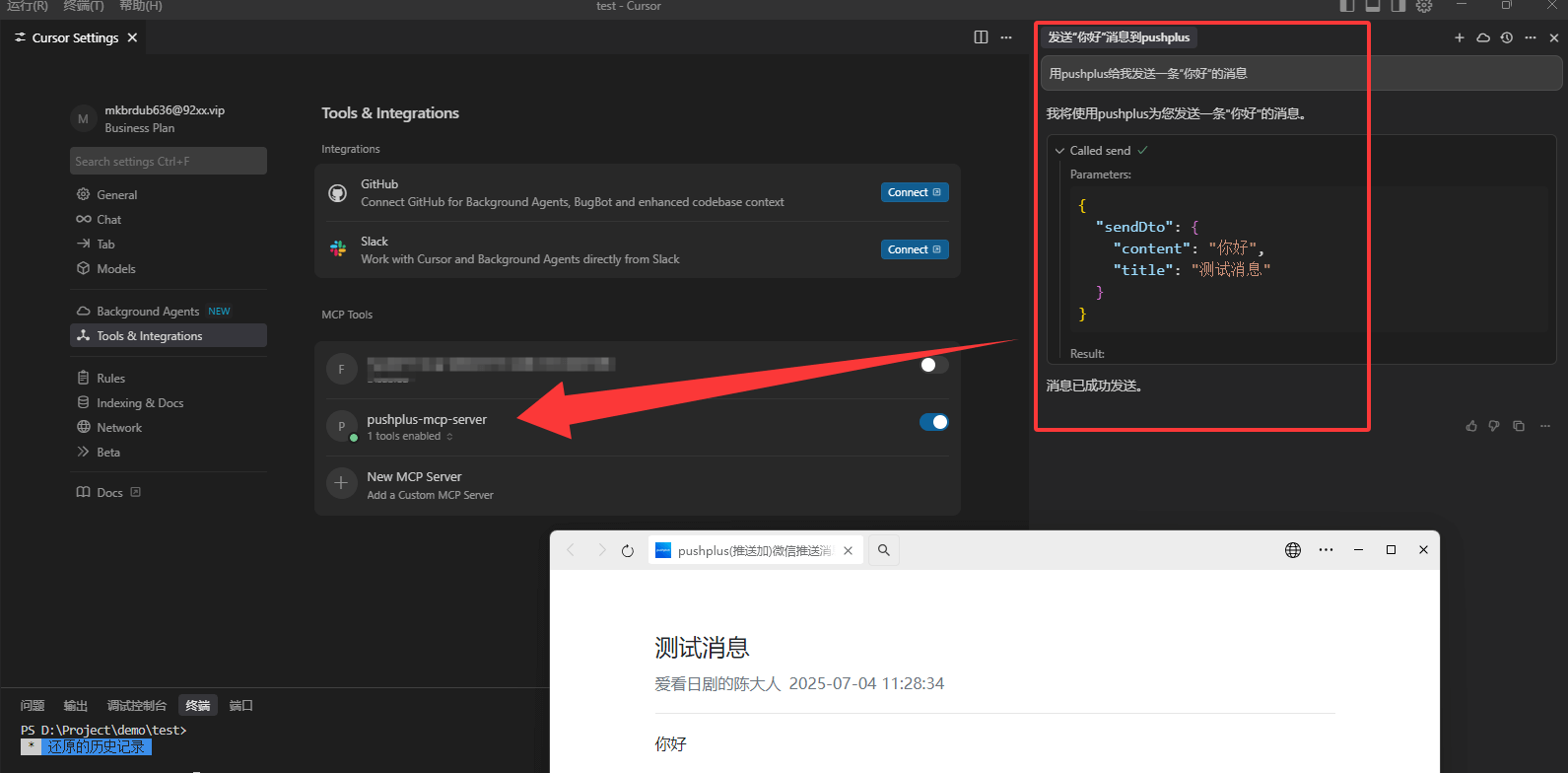
Cursor中使用
在Cursor Settings中找到Tool & Integrations, 点击New MCP Server,填入以下配置:{
"mcpServers": {
"pushplus-mcp-server": {
"command": "java",
"args": [
"-Dlogging.pattern.console=",
"-jar",
"yourFilePath\\pushplus-mcp-1.0.0.jar"
],
"env": {
"PUSHPLUS_TOKEN": "替换为自己的消息token"
}
}
}
}
说明:
- PUSHPLUS_TOKEN 替换为从pushplus官网上获取到的消息token或用户token
- yourFilePath\\pushplus-mcp-1.0.0.jar 修改为自己本地的文件路径
演示效果
Sign in to leave a review
Use Google, GitHub, or an email account so ratings stay tied to real people.
No reviews posted yet.





