
Prufa
Description
# prufa-mcp — the QA agent for your vibe-coded app <!-- mcp-name: io.github.prufa-dev/prufa-mcp --> **Vibe-coded apps ship faster than anyone can review them.** In June 2026 we audited [49 fresh Show HN…
About
# prufa-mcp — the QA agent for your vibe-coded app <!-- mcp-name: io.github.prufa-dev/prufa-mcp --> **Vibe-coded apps ship faster than anyone can review them.** In June 2026 we audited [49 fresh Show HN launches](https://prufa.dev/blog/engineering/we-audited-49-show-hn-launches/) — **38 had a critical bug on day…
Details
- Author
- prufa-dev
- Downloads
- 221
- Categories
- Other
Jump to
- One-shot public-page audit with JSON report.
- 44 tools for audits, flows, monitors, chaos QA, and discovery.
- Multi-step flow testing from plain-text test cases.
- Scheduled monitors with deploy-hook integration.
- Gremlin chaos QA imitating difficult users.
- Full-auto site discovery to draft meaningful flows.

Setting up with Highlight
This MCP is not yet compatible with Highlight’s one-click setup. However, you can still use it with Highlight by following these steps:
- Download and install Highlight from highlightai.com/download
- Navigate to the plugins tab and select "Add Custom Plugin"
-
Configure the plugin with the settings below
Plugin Name
PrufaCommand (node, npx, python, etc.)Please refer to the README for specific instructions on how to obtain API keys or other required environment variables.
- Enable "Start Automatically" if you want the plugin to start when Highlight launches





From the repository
Install prufa-mcp via pipx or pip, get a free API key from prufa.dev, then wire the MCP server into your agent (e.g., Claude Code, Cursor, Cline, Continue) using stdio subprocess. Use tools like prufa_run_audit to audit URLs and prufa_get_report to fetch reports.
Claude Desktop / Cursor
Paste into your MCP client config file to install this server.
{
    "mcpServers": {
        "prufa": {
            "prufa": {
                "command": "uvx",
                "args": [
                    "prufa-mcp"
                ],
                "env": {
                    "PRUFA_API_KEY": "<YOUR_TOKEN>"
                }
            }
        }
    }
}McpServers
{
    "prufa": {
        "command": "uvx",
        "args": [
            "prufa-mcp"
        ],
        "env": {
            "PRUFA_API_KEY": "<YOUR_TOKEN>"
        }
    }
}
prufa-mcp — the QA agent for your vibe-coded app
<!-- mcp-name: io.github.prufa-dev/prufa-mcp -->
Vibe-coded apps ship faster than anyone can review them. In June 2026 we
audited 49 fresh Show HN launches —
38 had a critical bug on day one: a broken signup, a silent console error,
analytics that never fired, a consent banner that did nothing.
Prufa is the agent that catches those before your users do. Point it at a URL
and it audits the things humans skip when they're moving fast — broken flows,
JS console errors, missing tracking, consent violations, security headers,
mobile tap targets, accessibility — and hands back machine-verified findings,
graded A–F. This repo is the open-source MCP server that wires that audit
straight into your coding agent.
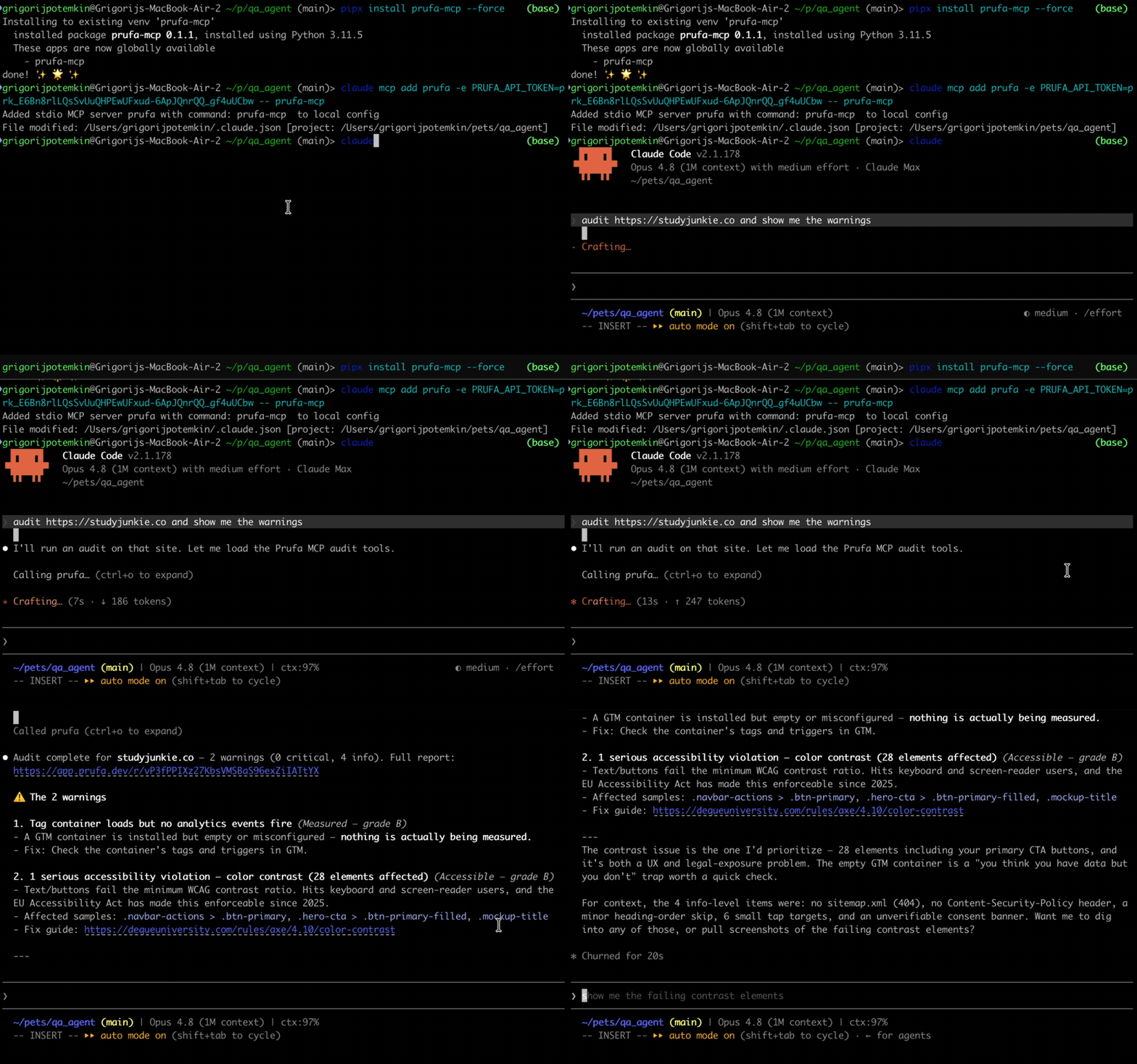
30-second demo
What an audit gives you
Ask your agent to audit https://yourapp.com and prufa_run_audit returns one
JSON report. Findings are grouped into graded sections, each finding carries a
severity, the impact (why it matters), and a fix hint. Real output,
trimmed:
{
  "url": "https://yourapp.com",
  "headline": "2 warnings found",
  "counts": { "critical": 0, "warning": 2, "info": 5 },
  "sections": [
    { "label": "Works",     "grade": "C", "counts": { "warning": 2, "info": 1 } },
    { "label": "Fast",      "grade": "A" },
    { "label": "Found",     "grade": "A" },
    { "label": "Compliant", "grade": "A" }
  ],
  "check_results": [
    {
      "check_id": "ux",
      "findings": [{
        "severity": "warning",
        "title": "2 javascript console error(s) during page load",
        "impact": "Errors at load time often mean broken features visitors never report.",
        "evidence": { "count": 2, "sample": [
          "Access to XMLHttpRequest at 'https://api.fontshare.com/...' blocked by CORS policy",
          "Failed to load resource: net::ERR_FAILED"
        ]}
      }]
    },
    {
      "check_id": "mobile",
      "findings": [{
        "severity": "warning",
        "title": "13 tap target(s) smaller than 24px",
        "impact": "Fingers are not cursors — undersized buttons mean mis-taps on exactly the elements you want pressed.",
        "fix_hint": "Give interactive elements at least 24x24px of hit area (WCAG 2.5.8)."
      }]
    },
    {
      "check_id": "security",
      "findings": [{
        "severity": "info",
        "title": "no Content-Security-Policy header",
        "impact": "Without a CSP, one injected script owns the page — and every third-party tag you load is trusted completely.",
        "fix_hint": "Start with a report-only CSP and tighten from real violation reports."
      }]
    }
  ],
  "report_url": "/r/G82RpzTi_zn-o71_XoMLCprP7uvCQP87"
}
report_url is a shareable HTML version of the same report. The full payload
also includes tracking, consent, seo/aeo, a11y, forms, and detected
user flows — see the OSS surface below.
Install
The package is on PyPI. Install it
globally with pipx (recommended — isolated venv, exposes the prufa-mcp
binary on your PATH) or into a project venv with pip:
```bash
Sign in to leave a review
Use Google, GitHub, or an email account so ratings stay tied to real people.
No reviews posted yet.





