
Plex MCP Server
About
Search for movies and manage playlists on your Plex Media Server using the Plex API.
Details
- Author
- djbriane
- GitHub stars
- 6
- Downloads
- 224
- Categories
- Other, Media, API
Jump to
- Search movies by title, director, genre with a limit parameter
- Get detailed info and genres for any movie
- List, create, delete, and modify playlists
- Add movies to existing playlists
- Retrieve recently added movies

Setting up with Highlight
This MCP is not yet compatible with Highlight’s one-click setup. However, you can still use it with Highlight by following these steps:
- Download and install Highlight from highlightai.com/download
- Navigate to the plugins tab and select "Add Custom Plugin"
-
Configure the plugin with the settings below
Plugin Name
Plex MCP ServerCommand (node, npx, python, etc.)Please refer to the README for specific instructions on how to obtain API keys or other required environment variables.
- Enable "Start Automatically" if you want the plugin to start when Highlight launches





From the repository
Install via Smithery or manually using uv. Configure environment variables PLEX_TOKEN and PLEX_SERVER_URL. Add the server configuration to your Claude app’s MCP settings with the command uv --directory FULL_PATH_TO_PROJECT run src/plex_mcp/plex_mcp.py. The server exposes commands like search_movies, create_playlist, etc.
Claude Desktop / Cursor
Paste into your MCP client config file to install this server.
{
    "mcpServers": {
        "plex mcp server": {
            "plex-mcp": {
                "command": "npx",
                "args": [
                    "-y",
                    "@smithery/cli",
                    "install",
                    "@djbriane/plex-mcp",
                    "--client",
                    "claude"
                ]
            }
        }
    }
}McpServers
{
    "plex-mcp": {
        "command": "npx",
        "args": [
            "-y",
            "@smithery/cli",
            "install",
            "@djbriane/plex-mcp",
            "--client",
            "claude"
        ]
    }
}
Plex MCP Server
This is a Python-based MCP server that integrates with the Plex Media Server API to search for movies and manage playlists. It uses the PlexAPI library for seamless interaction with your Plex server.
Screenshots
Here are some examples of how the Plex MCP server works:
1. Find Movies in Plex Library by Director
Search for movies in your Plex library by specifying a director's name. For example, searching for "Alfred Hitchcock" returns a list of his movies in your library.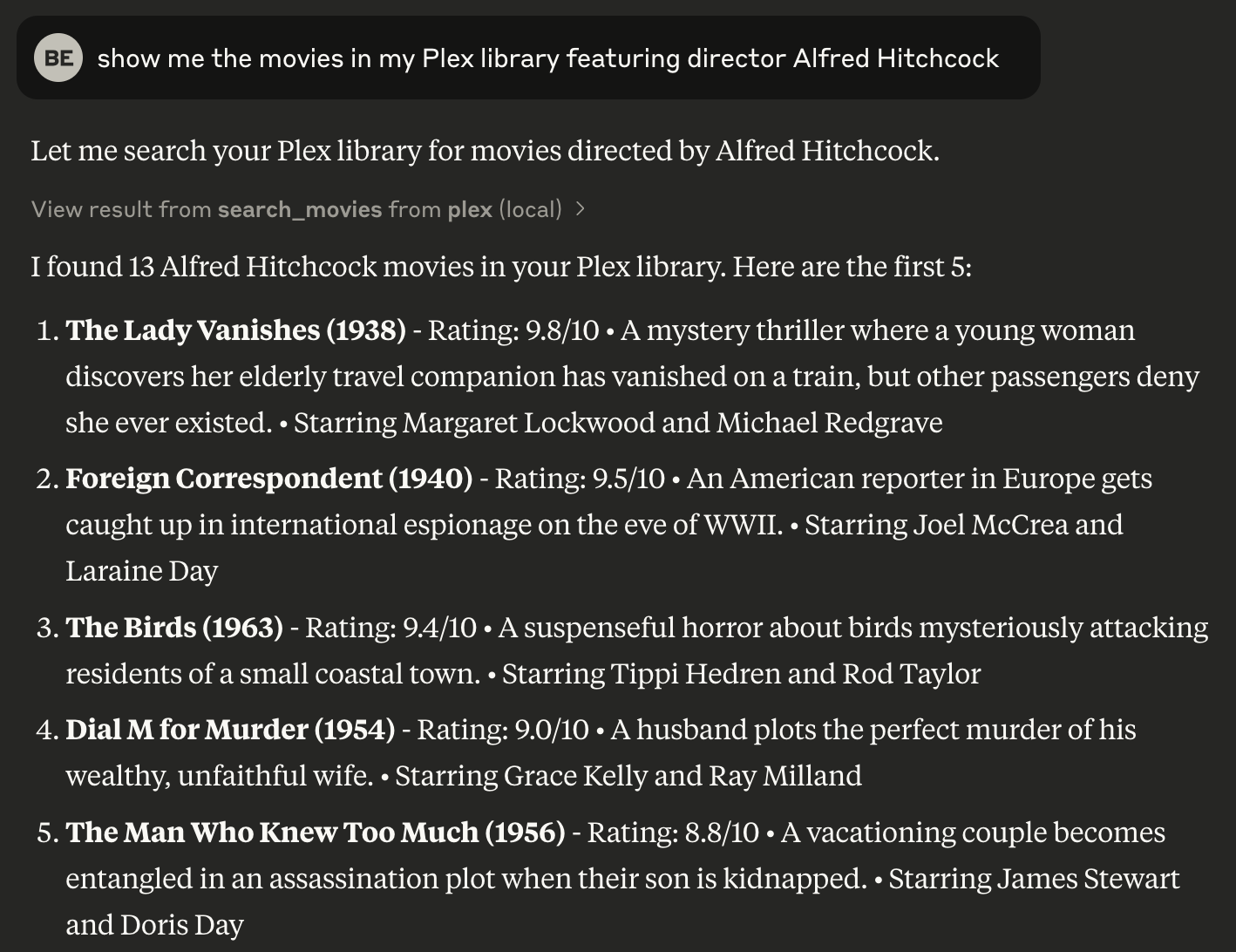
---
2. Find Missing Movies for a Director
Identify movies by a specific director that are missing from your Plex library. This helps you discover gaps in your collection.
---
3. Create a Playlist in Your Plex Library
Create a new playlist in your Plex library using the movies found in a search. This allows you to organize your library efficiently.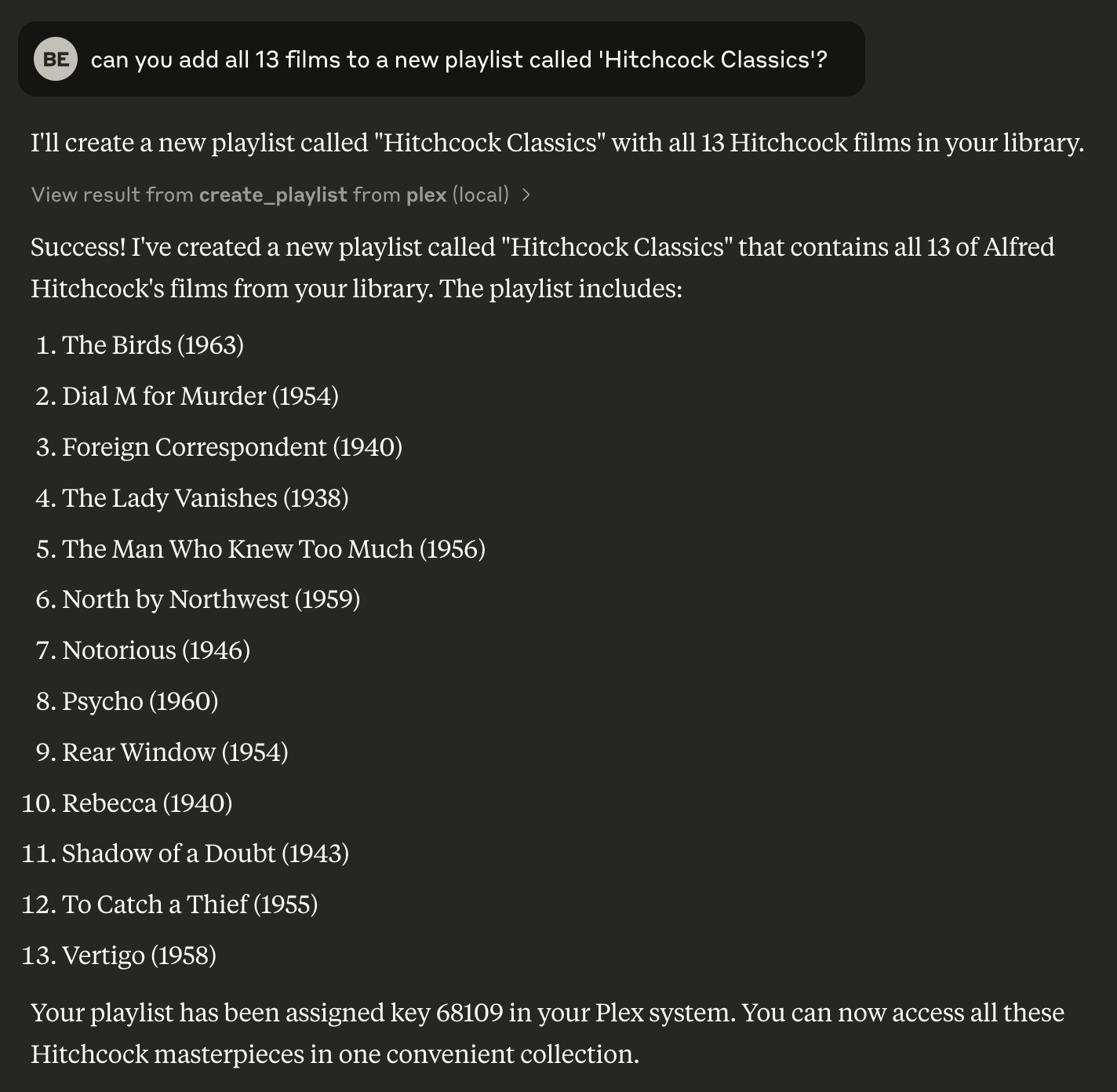
Setup
Prerequisites
- Python 3.8 or higher
- uv package manager
- A Plex Media Server with API access
Installation
Installing via Smithery
To install Plex Media Server Integration for Claude Desktop automatically via Smithery:
npx -y @smithery/cli install @djbriane/plex-mcp --client claude
Installing Manually
1. Clone this repository: git clone <repository-url>
cd plex-mcp
2. Install dependencies with uv:
   uv venv

   source .venv/bin/activate

   uv sync
3. Configure environment variables for your Plex server:
- PLEX_TOKEN: Your Plex authentication token
- PLEX_SERVER_URL: Your Plex server URL (e.g., http://192.168.1.100:32400)
Finding Your Plex Token
You can find your Plex token in this way:
- Sign in to Plex Web App
- Open Developer Tools
- In Console tab, paste and run:
window.localStorage.getItem('myPlexAccessToken')
Usage with Claude
Add the following configuration to your Claude app:
{
    "mcpServers": {
        "plex": {
            "command": "uv",
            "args": [
                "--directory",
                "FULL_PATH_TO_PROJECT",
                "run",
                "src/plex_mcp/plex_mcp.py"
            ],
            "env": {
                "PLEX_TOKEN": "YOUR_PLEX_TOKEN",
                "PLEX_SERVER_URL": "YOUR_PLEX_SERVER_URL"
            }
        }
    }
}
Available Commands
The Plex MCP server exposes these commands:
| Command | Description | OpenAPI Reference |
|----------------------|-----------------------------------------------------------------------------|---------------------------------------|
| search_movies | Search for movies in your library by various filters (e.g., title, director, genre) with support for a limit parameter to control the number of results. | /library/sections/{sectionKey}/search |
| get_movie_details | Get detailed information about a specific movie. | /library/metadata/{ratingKey} |
| get_movie_genres | Get the genres for a specific movie. | /library/sections/{sectionKey}/genre |
| list_playlists | List all playlists on your Plex server. | /playlists |
| get_playlist_items | Get the items in a specific playlist. | /playlists/{playlistID}/items |
| create_playlist | Create a new playlist with specified movies. | /playlists |
| delete_playlist | Delete a playlist from your Plex server. | /playlists/{playlistID} |
| add_to_playlist | Add a movie to an existing playlist. | /playlists/{playlistID}/items |
| recent_movies | Get recently added movies from your library. | /library/recentlyAdded |
Running Tests
This project includes both unit tests and integration tests. Use the following instructions to run each type of test:
Unit Tests
Unit tests use dummy data to verify the functionality of each module without requiring a live Plex server.
To run all unit tests:
uv run pytest
Integration Tests
Integration tests run against a live Plex server using environment variables defined in a .env file. First, create a .env file in your project root with your Plex configuration:
PLEX_SERVER_URL=https://your-plex-server-url:32400
PLEX_TOKEN=yourPlexTokenHere
Integration tests are marked with the integration marker. To run only the integration tests:
uv run pytest -m integration
If you are experiencing connection issues to your Plex server try running the integration tests to help troubleshoot.
Code Style and Conventions
- Module Structure:
Use clear section headers for imports, logging setup, utility functions, class definitions, global helpers, tool methods, and main execution (guarded by if __name__ == "__main__":).
- Naming:
Use CamelCase for classes and lower_snake_case for functions, variables, and fixtures. In tests, list built-in fixtures (e.g. monkeypatch) before custom ones.
- Documentation & Comments:
Include a concise docstring for every module, class, and function, with in-line comments for complex logic.
- Error Handling & Logging:
Use Python’s logging module with consistent error messages (prefix “ERROR:”) and explicit exception handling.
- Asynchronous Patterns:
Define I/O-bound functions as async and use asyncio.to_thread() to handle blocking operations.
Sign in to leave a review
Use Google, GitHub, or an email account so ratings stay tied to real people.
No reviews posted yet.





