
Patchwork OS
About
A local-first MCP bridge for Claude Code, Claude Desktop, and other MCP clients. 177 tools (LSP, debugger, terminal, git, GitHub, file ops) via a companion VS Code extension, with an optional layer for YAML automation recipes, a human approval queue, persistent decision traces, a
Details
- Author
- Oolab-labs
- Downloads
- 316
- Categories
- Productivity, Developer Tools, Automation
Jump to
- 177 built-in tools (LSP, git, terminal, debugger, files) plus hot-reloadable plugins
- YAML recipes triggered by cron, file save, git commit, test run, or webhook
- Delegation policy with three risk tiers and four‑source precedence
- Durable trace memory – every approval and recipe run is saved as JSONL
- OAuth with PKCE S256 and dynamic client registration for a private personal API
- Works natively on Windows, macOS, and Linux with no WSL required

Setting up with Highlight
This MCP is not yet compatible with Highlight’s one-click setup. However, you can still use it with Highlight by following these steps:
- Download and install Highlight from highlightai.com/download
- Navigate to the plugins tab and select "Add Custom Plugin"
-
Configure the plugin with the settings below
Plugin Name
Patchwork OSCommand (node, npx, python, etc.)Please refer to the README for specific instructions on how to obtain API keys or other required environment variables.
- Enable "Start Automatically" if you want the plugin to start when Highlight launches





From the repository
Install the npm package (npm install -g patchwork-os). For the Claude IDE Bridge run claude-ide-bridge and connect Claude Code with claude --ide. For the full Patchwork OS run patchwork init to scaffold configuration and start the dashboard at http://localhost:3200. A dashboard‑only mode requires no code editor—just npx patchwork-os@beta init then patchwork start.
Claude Desktop / Cursor
Paste into your MCP client config file to install this server.
{
    "mcpServers": {
        "patchwork os": {
            "patchwork-os": {
                "command": "npx",
                "args": [
                    "-y",
                    "patchwork-os"
                ]
            }
        }
    }
}McpServers
{
    "patchwork-os": {
        "command": "npx",
        "args": [
            "-y",
            "patchwork-os"
        ]
    }
}
Patchwork OS




Your personal AI runtime, local-first.
You decide which model. You decide which actions need a human nod. You own the credentials, the logs, and the deployment. Nothing phones home unless you opt in to anonymous analytics.
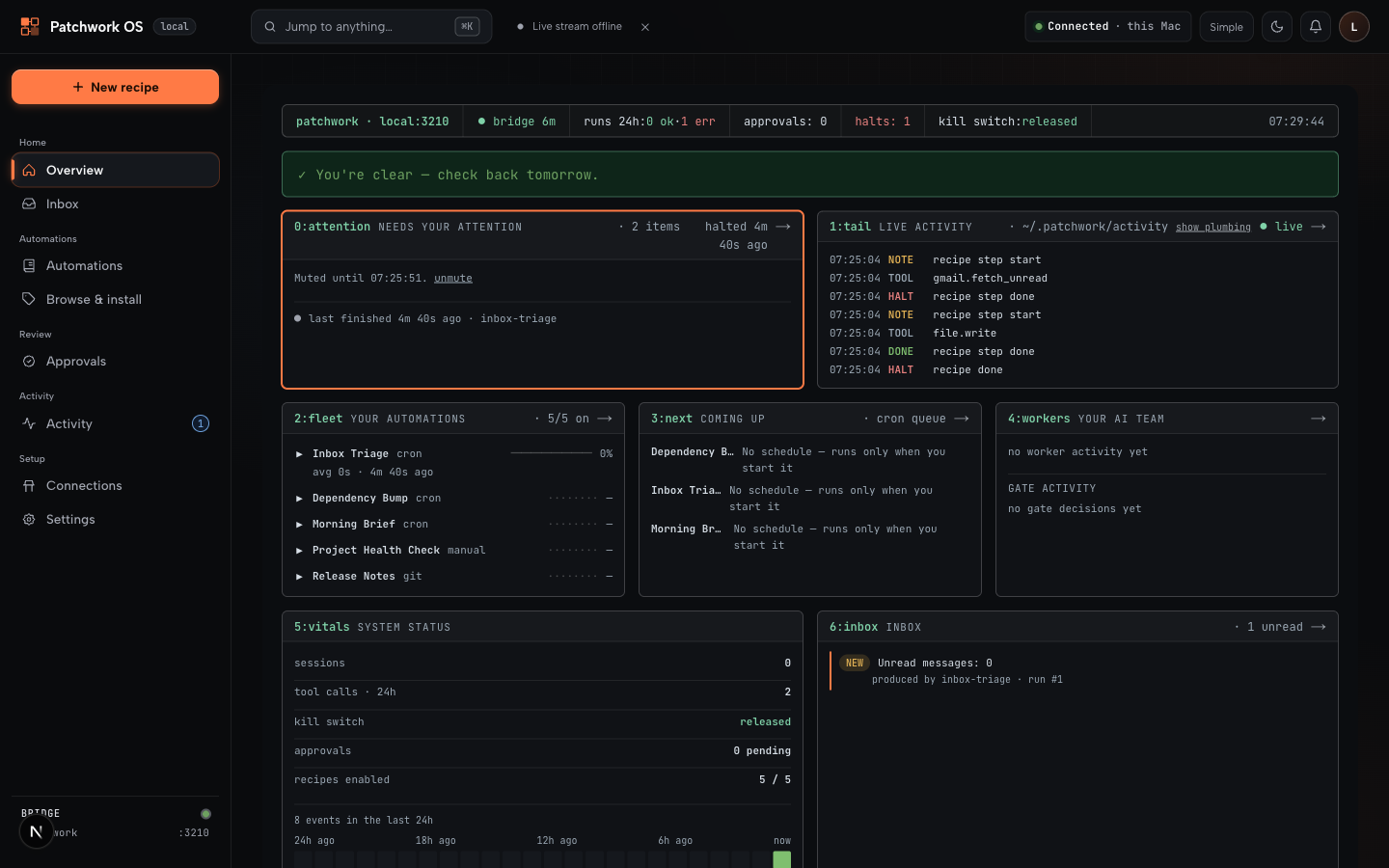
> Patchwork OS is a local-first personal AI runtime: pluggable model providers, hot-reloadable tools, YAML recipes, a delegation policy with approval queue, and a durable trace memory — all running on your machine, all under your policy.
Contents
- Two ways to use it
- Dashboard only — no editor required
- Claude IDE Bridge — quick start
- Windows
- Architecture
- Telemetry
- Contributing & support
Five primitives, one runtime:
- Tools — 177 built-in (LSP, git, terminal, debugger, files) plus any plugin you write. Plugins hot-reload — Claude can author a tool mid-session and call it on the next turn. See Live Toolsmithing.
- Recipes — YAML automations triggered by cron, file save, git commit, test run, or webhook. Anything that can POST a JSON payload can fire a recipe.
- Delegation Policy — three risk tiers, four-source precedence (managed → project-local → project → user). Auto-approve safe, require approval for risky, block dangerous.
- Trace memory — every approval, every recipe run, every enrichment is durable JSONL. Past decisions are surfaced into future sessions automatically. Bundle and back up with patchwork traces export.
- OAuth — turn your runtime into a private personal API. PKCE S256, dynamic client registration, deployable on a VPS in minutes.
> Why not [an MCP server / Zapier / a hosted assistant / a local agent framework]? See the comparison page for the honest tradeoff against each.
>
> What does this look like in one diagram? See the architecture overview.
---
The same codebase ships two ways to use it
Pick the layer you need.
| | What you get | Install | Best for |
|---|---|---|---|
| 🔌 Claude IDE Bridge | MCP bridge connecting Claude Code to your IDE. 177 tools — diagnostics, LSP, debugger, terminal, git, GitHub, file ops. | npm i -g patchwork-os then run claude-ide-bridge | Anyone who wants Claude Code to see and act on their editor state |
| 🤖 Patchwork OS | Everything in the bridge plus YAML recipes, approval queue, oversight dashboard, mobile push approvals, multi-model providers, JetBrains companion. | Same package, run patchwork init | Power users running automation, agent workflows, or background tasks |
Same codebase. Bridge is the foundation; Patchwork OS is the optional layer on top. No vendor lock-in. Runs on your machine.
---
Dashboard Only — No Code Editor Required
> You do not need VS Code, Windsurf, Cursor, or Claude Code CLI to use the Patchwork dashboard.
The dashboard is a standalone Next.js app that communicates with the bridge over HTTP. No editor extension required.
Prereqs: Node.js 22+ · tmux on macOS/Linux (brew install tmux / apt install tmux) — auto-detected, falls back to background mode if absent. Windows: natively supported — no WSL required.
npx patchwork-os@beta init   # scaffolds ~/.patchwork and generates a dashboard login (no install needed)
patchwork start              # launches bridge + dashboard (auto-detects tmux; falls back to background mode if absent)
Open http://localhost:3200 — that's it. npx patchwork-os@beta init auto-generates a dashboard password and saves it to ~/.patchwork/.env — it prints the password at the end of setup, save it for your first login.
What you get: run and schedule YAML recipes, connect external services (Gmail, Calendar, Slack), review AI drafts in the approval queue, read your AI inbox — all from the browser. No coding required.
> Want IDE features too? See Claude IDE Bridge — Quick Start below to add LSP, debugger, and editor tools on top.
---
🔌 Claude IDE Bridge — Quick Start
> Developers only — skip to Dashboard Only above if you just want the web dashboard.
Prerequisites: a supported code editor — VS Code, Cursor, Windsurf, or Google Antigravity (or JetBrains via the companion plugin) — plus Node.js 22+ and the Claude Code CLI. The bridge's LSP, debugger, and editor-state tools run through the editor extension; without one you're limited to the headless CLI subset.
```bash
Sign in to leave a review
Use Google, GitHub, or an email account so ratings stay tied to real people.
No reviews posted yet.




