
OpenSearch MCP <> LLM Integration Guide
About
Step by step guide for integrating LLMs with OpenSearch MCP servers
Details
- Author
- madhankb
- GitHub stars
- 1
- Downloads
- 205
- Categories
- Database
Jump to
- Provides MCP tools for managing OpenSearch indices and documents.
- Supports creating, reading, updating, and deleting indices and documents.
- Enables search and delete by query using natural language.
- Offers cluster health and statistics inspection.
- Includes alias management and a general-purpose API request tool.
- Integrates with Amazon Q and Anthropic Claude Desktop.

Setting up with Highlight
This MCP is not yet compatible with Highlight’s one-click setup. However, you can still use it with Highlight by following these steps:
- Download and install Highlight from highlightai.com/download
- Navigate to the plugins tab and select "Add Custom Plugin"
-
Configure the plugin with the settings below
Plugin Name
OpenSearch MCP <> LLM Integration GuideCommand (node, npx, python, etc.)Please refer to the README for specific instructions on how to obtain API keys or other required environment variables.
- Enable "Start Automatically" if you want the plugin to start when Highlight launches





From the repository
Install the MCP server via pipx install opensearch-mcp-server. Configure your LLM client by creating a JSON file (mcp.json for Amazon Q or claude_desktop_config.json for Claude Desktop) with the command path and environment variables (OPENSEARCH_URL, OPENSEARCH_SSL_VERIFY, OPENSEARCH_USERNAME, OPENSEARCH_PASSWORD). Start a local OpenSearch instance using the provided docker-compose.yml, then use natural language prompts in the LLM to perform operations like creating indices, adding documents, and searching.
Claude Desktop / Cursor
Paste into your MCP client config file to install this server.
{
    "mcpServers": {
        "opensearch mcp <> llm integration guide": {
            "opensearch-mcp-integration": {
                "command": "docker",
                "args": [
                    "compose",
                    "up",
                    "-d"
                ]
            }
        }
    }
}McpServers
{
    "opensearch-mcp-integration": {
        "command": "docker",
        "args": [
            "compose",
            "up",
            "-d"
        ]
    }
}
OpenSearch MCP LLM Integration Guide
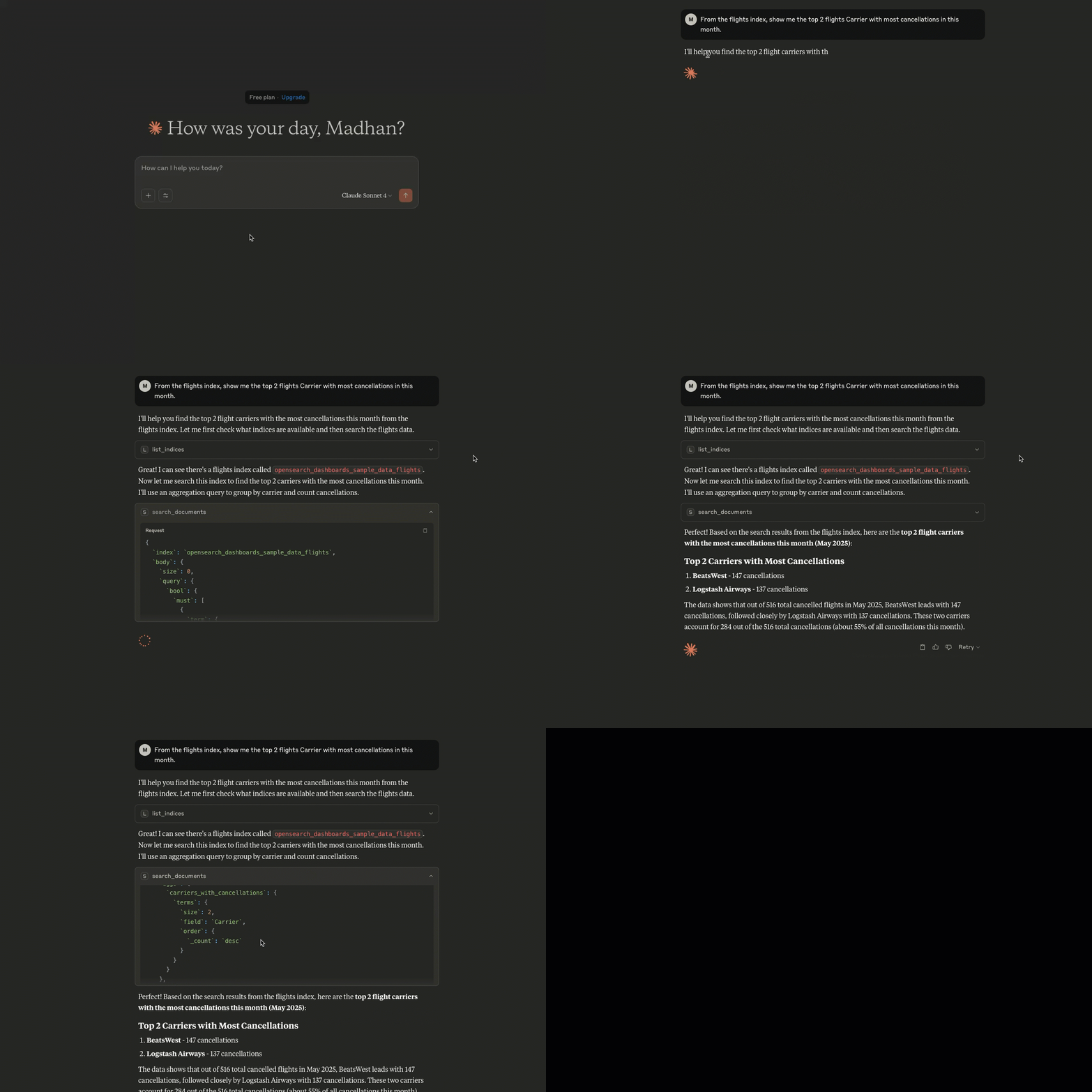
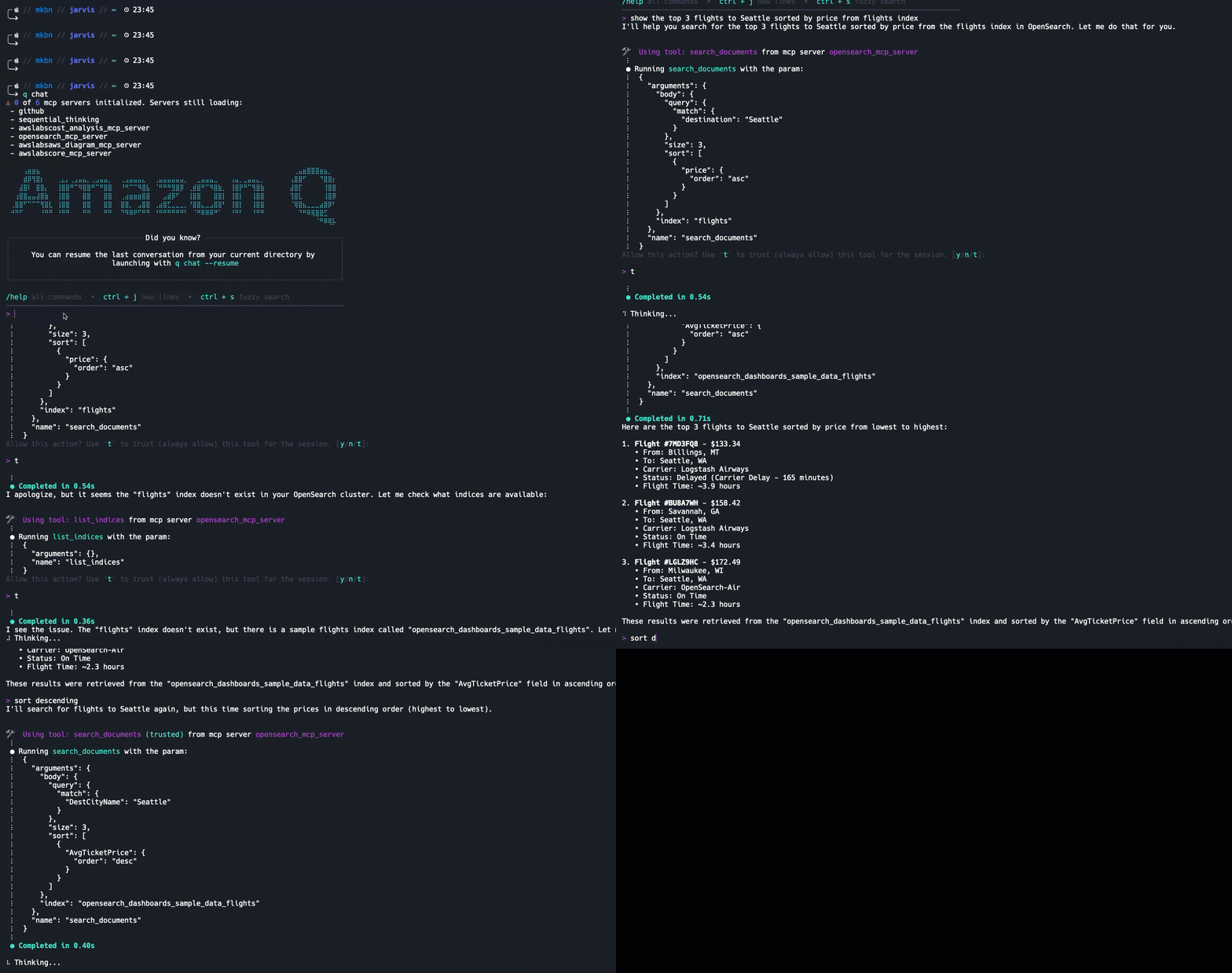
This guide provides step-by-step instructions for integrating Amazon Q & Anthropic Claude desktop with OpenSearch using MCP servers for natural language interactions.
Anthropic Claude
Amazon Q
Prerequisites
- Docker and Docker Compose installed
- Python 3.x installed
- pipx installed (pip install pipx)
- Amazon Q CLI
- Anthropic Claude Desktop
1. Setting up Local OpenSearch Instance
1. Create a new directory for your project:
mkdir opensearch-mcp && cd opensearch-mcp
2. Create a docker-compose.yml file with the following content:
   version: '3'

   services:

     opensearch:

       image: opensearchproject/opensearch:latest

       environment:

         - discovery.type=single-node

         - bootstrap.memory_lock=true

         - "OPENSEARCH_JAVA_OPTS=-Xms512m -Xmx512m"

         - "OPENSEARCH_INITIAL_ADMIN_PASSWORD=myStrongPassword123!"

         - "plugins.security.ssl.http.enabled=true"

         - "plugins.security.ssl.transport.enabled=true"

         - "plugins.security.ssl.http.pemcert_filepath=certs/node.pem"

         - "plugins.security.ssl.http.pemkey_filepath=certs/node-key.pem"

         - "plugins.security.ssl.http.pemtrustedcas_filepath=certs/root-ca.pem"

         - "plugins.security.ssl.transport.pemcert_filepath=certs/node.pem"

         - "plugins.security.ssl.transport.pemkey_filepath=certs/node-key.pem"

         - "plugins.security.ssl.transport.pemtrustedcas_filepath=certs/root-ca.pem"

       ulimits:

         memlock:

           soft: -1

           hard: -1

         nofile:

           soft: 65536

           hard: 65536

       volumes:

         - opensearch-data:/usr/share/opensearch/data

         - ./certs:/usr/share/opensearch/config/certs

       ports:

         - 9200:9200

         - 9600:9600

       networks:

         - opensearch-net


     opensearch-dashboards:

       image: opensearchproject/opensearch-dashboards:latest

       environment:

         - 'OPENSEARCH_HOSTS=["https://opensearch:9200"]'

         - "OPENSEARCH_SSL_VERIFICATIONMODE=none"

         - "OPENSEARCH_SECURITY_ADMIN_PASSWORD=myStrongPassword123!"

         - "SERVER_SSL_ENABLED=true"

         - "SERVER_SSL_CERTIFICATE=/usr/share/opensearch-dashboards/config/certs/node.pem"

         - "SERVER_SSL_KEY=/usr/share/opensearch-dashboards/config/certs/node-key.pem"

       ports:

         - 5601:5601

       volumes:

         - ./certs:/usr/share/opensearch-dashboards/config/certs

       depends_on:

         - opensearch

       networks:

         - opensearch-net


   volumes:

     opensearch-data:


   networks:

     opensearch-net:
3. Start the containers:
docker compose up -d
2. Installing OpenSearch MCP Server
1. Install the OpenSearch MCP server using pipx:
pipx install opensearch-mcp-server
3. Configuring LLMs with MCP server configurations
1. Amazon Q: Create a mcp.json file in your Amazon Q configuration directory (~/.aws/amazonq/mcp.json)
2. Anthropic Claude: Create a claude_desktop_config.json file in your Claude Desktop configuration directory (~/Library/Application Support/Claude/claude_desktop_config.json)
   {

     "mcpServers": {

       "opensearch-mcp-server": {

         "command": "/Users/YOUR_USERNAME/.local/bin/opensearch-mcp-server",

         "args": [],

         "env": {

           "OPENSEARCH_URL": "https://localhost:9200",

           "OPENSEARCH_SSL_VERIFY": "none",

           "OPENSEARCH_USERNAME": "admin",

           "OPENSEARCH_PASSWORD": "myStrongPassword123!"

         }

       }

     }

   }
Replace YOUR_USERNAME with your system username or specify the location where the opensearch-mcp-server is installed.
4. Verifying the Setup
1. Check OpenSearch is running:
curl -XGET -u admin:myStrongPassword123! https://localhost:9200
2. Verify OpenSearch Dashboards:
- Open https://localhost:5601 in your browser
3. Check indices:
curl -XGET -u admin:myStrongPassword123! https://localhost:9200/_cat/indices
5. Using Natural Language with OpenSearch
Here are some example commands you can try in LLMs:
1. Create an index:
Create a new index called "books" with title and author fields
2. Add documents:
Add a document to the books index with title "The Great Gatsby" and author "F. Scott Fitzgerald"
3. Search documents:
Search for books by F. Scott Fitzgerald
4. Get index information:
Show me the mapping of the books index
Troubleshooting
1. If MCP server fails to initialize:
- Check if OpenSearch is running (docker ps)
- Verify credentials in mcp_config.json
- Check OpenSearch logs (docker compose logs opensearch)
2. If tools are not available:
- Restart the LLMs
- Check MCP server logs
- Verify the mcp_config.json syntax
Available MCP Tools
The OpenSearch MCP server provides several tools for interacting with OpenSearch:
- list_indices: List all indices.
- get_index: Returns information (mappings, settings, aliases) about one or more indices. Args: index: Name of the index
- create_index: Create a new index. Args: index: Name of the index body: Optional index configuration including mappings and settings
- delete_index: Delete an index. Args: index: Name of the index
- search_documents: Search for documents. Args: index: Name of the index body: Search query
- index_document: Creates or updates a document in the index. Args: index: Name of the index document: Document data id: Optional document ID
- get_document: Get a document by ID. Args: index: Name of the index id: Document ID
- delete_document: Delete a document by ID. Args: index: Name of the index id: Document ID
- delete_by_query: Deletes documents matching the provided query. Args: index: Name of the index body: Query to match documents for deletion
- get_cluster_health: Returns basic information about the health of the cluster.
- get_cluster_stats: Returns high-level overview of cluster statistics.
- list_aliases: List all aliases.
- get_alias: Get alias information for a specific index. Args: index: Name of the index
- put_alias: Create or update an alias for a specific index. Args: index: Name of the index name: Name of the alias body: Alias configuration
- delete_alias: Delete an alias for a specific index. Args: index: Name of the index name: Name of the alias
- general_api_request: Perform a general HTTP API request. Use this tool for any Elasticsearch/OpenSearch API that does not have a dedicated tool. Args: method: HTTP method (GET, POST, PUT, DELETE, etc.) path: API endpoint path params: Query parameters body: Request body
Security Notes
1. Always use strong passwords in production
2. Enable SSL in production environments
3. Regularly rotate credentials
Additional Resources
- OpenSearch Documentation
- Amazon Q Documentation
- MCP Protocol Documentation
Sign in to leave a review
Use Google, GitHub, or an email account so ratings stay tied to real people.
No reviews posted yet.





