
.NET OpenAI MCP Agent
About
Sample to create an AI Agent using OpenAI models with any MCP server running on Azure Container Apps
Details
- Author
- Azure-Samples
- GitHub stars
- 28
- Downloads
- 229
- Categories
- AI
Jump to
- .NET Blazor front end for the MCP host/client.
- Uses Azure OpenAI with the GPT-5-mini model by default.
- Remote MCP server (TypeScript) for to‑do operations.
- Both apps run on Azure Container Apps.
- Built‑in ACA authentication protects the client app.
- Deployable from the command line with azd up.
Use GitHub Codespaces or clone the repository with azd init -t openai-mcp-agent-dotnet. Set the environment name, then deploy with azd up. After deployment, navigate to the client app URL, log in (or bypass login by setting USE_LOGIN false), and enter natural‑language prompts like “Give me list of to do.” or “Set meeting at 1pm.” Clean up with azd down --force --prune.
.NET OpenAI MCP Agent
This is an MCP agent app written in .NET, using Azure OpenAI, with a remote MCP server written in TypeScript.
Features
This app provides features like:
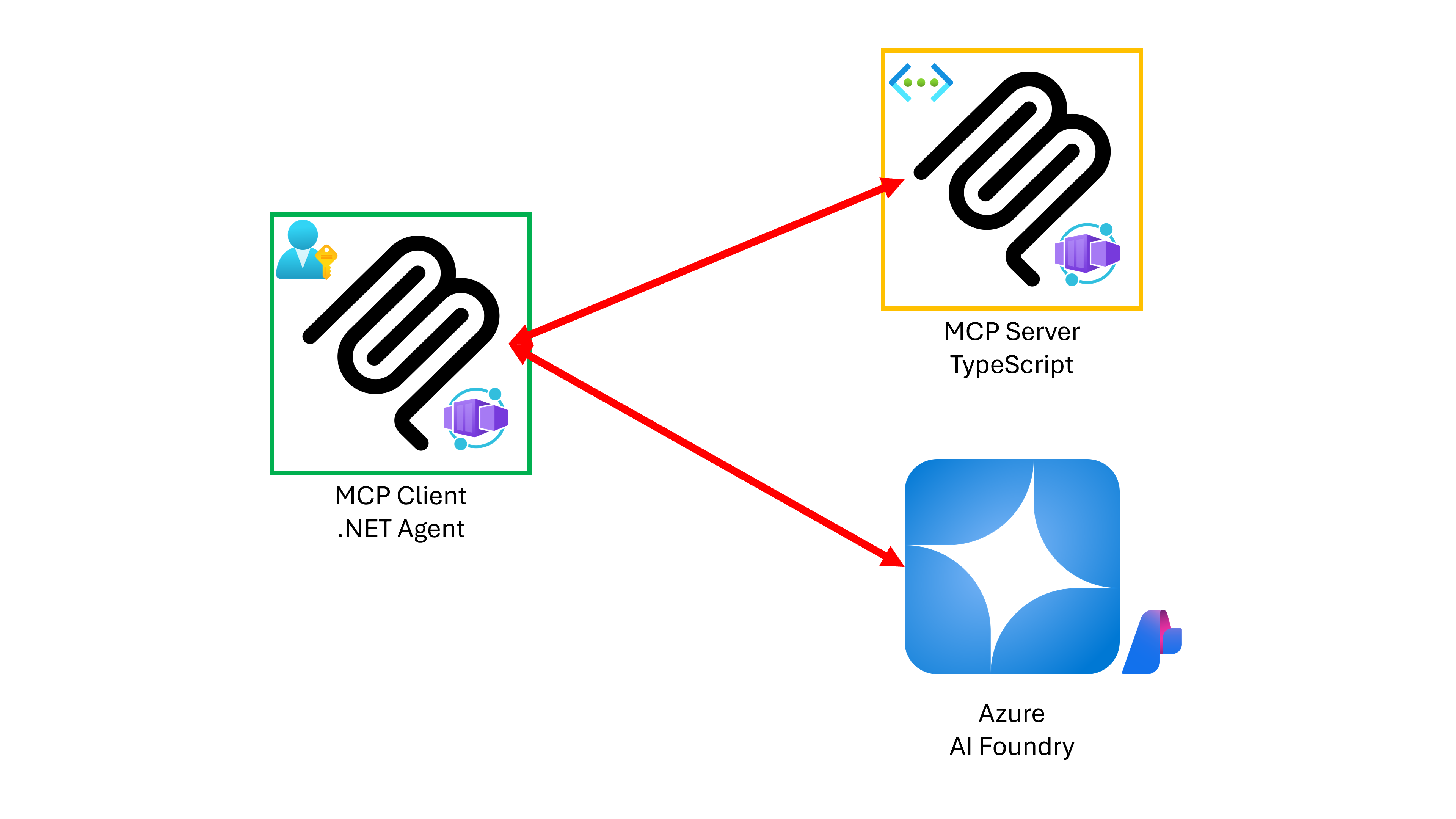
- The MCP host + MCP client app is written in .NET Blazor.
- The MCP client app connects to a to-do MCP server written in TypeScript.
- Both MCP client and server apps are running on Azure Container Apps (ACA).
- The MCP client app is secured by the built-in auth of ACA.
- The MCP server app is only accessible from the MCP client app.
Prerequisites
- .NET 9 SDK
- Visual Studio Code + C# Dev Kit
- node.js LTS
- Docker Desktop or Podman Desktop
- Azure Subscription
Getting Started
You can now use GitHub Codespaces to run this sample app (takes several minutes to open it)! 👉  .
.
Get Azure AI Foundry or GitHub Models
- To run this app, you should have an Azure AI Foundry instance.
- If you use Azure AI Foundry, make sure you have the GPT-5-mini models deployed.
- As a default, the deployed model name is gpt-5-mini.
Get AI Agent App
1. Create a directory for the app.
    # zsh/bash
    mkdir -p openai-mcp-agent-dotnet
    # PowerShell
    New-Item -ItemType Directory -Path openai-mcp-agent-dotnet -Force
1. Initialize azd.
    cd openai-mcp-agent-dotnet
    azd init -t openai-mcp-agent-dotnet
> NOTE: You'll be asked to enter an environment name, which will be the name of your Azure Resource Group. For example, the environment name might be openai-mcp-agent.
Run on Azure
1. Check that you have the necessary permissions:
- Your Azure account must have the Microsoft.Authorization/roleAssignments/write permission, such as Role Based Access Control Administrator, User Access Administrator, or Owner at the subscription level.
- Your Azure account must also have the Microsoft.Resources/deployments/write permission at the subscription level.
1. Login to Azure.
azd auth login
1. Deploy apps to Azure. It will automatically find the MCP server app and deploy it at the same time.
azd up
> NOTE:
>
> 1. By default, the MCP client app is protected by the ACA built-in auth feature. You can turn off this feature before running azd up by setting:
>
>
   >    azd env set USE_LOGIN false

   >
>
> 1. By default, the agent uses
gpt-5-mini. You can change it to something else by setting:>
>
   >    azd env set GPT_MODEL_NAME <azure-openai-model-name>

   >
>
> 1. By default, the agent uses the keyless approach for Azure OpenAI authentication. You can change it to use Azure OpenAI API key by setting:
>
>
   >    azd env set AOAI_USE_API_KEY true

   >
>
> 1. By default, the agent is production mode. You can change it to the development mode to either
Both or Client that shows more detailed logs by setting:>
>
   >    azd env set ENABLE_DEVELOPMENT_MODE Both

   >
>
> 1. By default, the MCP server app is production mode. You can change it to the development mode to either
Both or Server that shows more detailed logs by setting:>
>
   >    azd env set ENABLE_DEVELOPMENT_MODE Both

   >
>
> 1. During the deployment,
> - You will be asked to enter the Azure Subscription and two locations - one for Azure AI Foundry and the other for the rest of resources.
2. In the terminal, get the client app URL deployed. It might look like:
https://mcptodo-clientapp.{{some-random-string}}.{{location}}.azurecontainerapps.io/
3. Navigate to the client app URL, log-in to the app and enter prompts like:
    Give me list of to do.
    Set "meeting at 1pm".
    Give me list of to do.
    Mark #1 as completed.
    Delete #1 from the to-do list.
> NOTE: You might not be asked to login, if you've set the USE_LOGIN value to false.
4. Clean up all the resources deployed.
azd down --force --prune
Resources
- OpenAI SDK - .NET
- OpenAI MCP samples
- Azure OpenAI - Next-generation API
- How to switch between OpenAI and Azure OpenAI endpoints
- .NET AI Template
- MCP .NET samples
- MCP Todo app in TypeScript
Sign in to leave a review
Use Google, GitHub, or an email account so ratings stay tied to real people.
No reviews posted yet.



