
Open Multi-Agent Canvas
About
The open-source multi-agent chat interface that lets you manage multiple agents in one dynamic conversation and add MCP servers for deep research
Details
- Author
- CopilotKit
- GitHub stars
- 507
- Downloads
- 1,034
- Categories
- AI
Jump to
- Manage multiple agents in one dynamic conversation
- Built-in MCP Agent for general-purpose tasks
- Connect to custom MCP servers via Stdio or SSE
- Public MCP server integration (e.g., mcp.composio.dev)
- Supports travel planning and AI research agents
- Open-source under MIT License
Clone the repository, rename example.env to .env in the frontend folder and set NEXT_PUBLIC_CPK_PUBLIC_API_KEY from Copilot Cloud, install dependencies with pnpm i, then build and start with pnpm run build && pnpm run start. Optionally run the MCP Agent backend using Poetry and LangGraph.
Open Multi-Agent Canvas
Open Multi-Agent Canvas, created by CopilotKit is an open-source multi-agent chat interface that lets you manage multiple agents in one dynamic conversation. It's built with Next.js, LangGraph, and CopilotKit to help with travel planning, research, and general-purpose tasks through MCP servers.
Existing Agents
Check out these awesome agents (they live in separate repositories). You can run them separately or deploy them on LangSmith:
- CoAgents Travel Agent
- CoAgents AI Researcher
Additionally, this project now includes a built-in MCP (Multi-Channel Protocol) Agent:
- MCP Agent: A general-purpose agent capable of handling various tasks through configurable MCP servers.
Copilot Cloud is required to run this project:
Quick Start 🚀
1. Prerequisites
Make sure you have: - pnpm2. API Keys
- Copilot CloudRunning the Frontend
Rename the example.env file in the frontend folder to .env:
NEXT_PUBLIC_CPK_PUBLIC_API_KEY=...
Install dependencies:
cd frontend
pnpm i
Need a CopilotKit API key? Get one here.
Then, fire up the Next.js project:
pnpm run build && pnpm run start
MCP Agent Setup
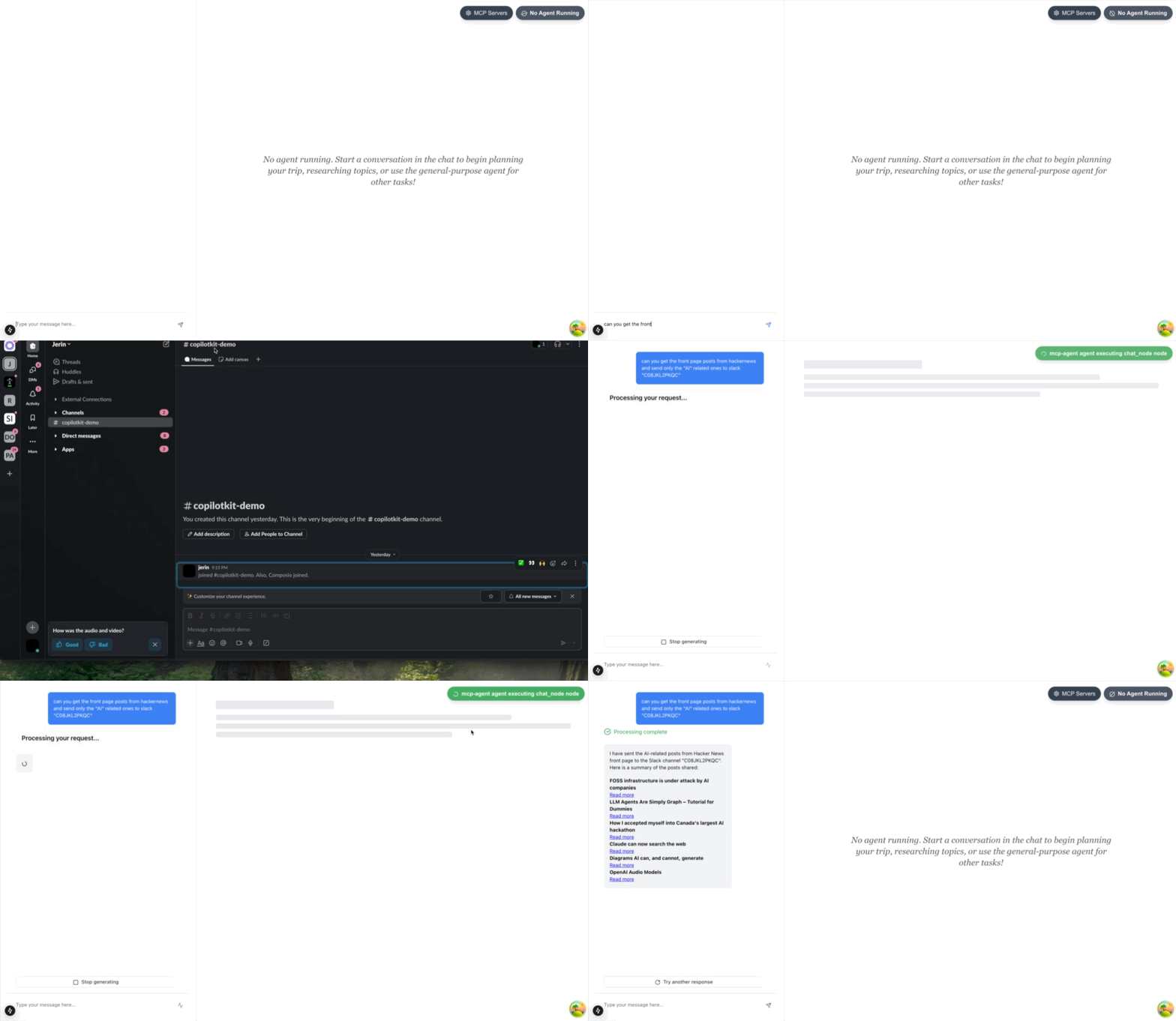
The MCP Agent allows you to connect to various MCP-compatible servers:
1. Configuring Custom MCP Servers:
- Click the "MCP Servers" button in the top right of the interface
- Add servers via the configuration panel:
- Standard IO: Run commands locally (e.g., Python scripts)
- SSE: Connect to external MCP-compatible servers (via Server-Sent Events)
2. Public MCP Servers:
- You can connect to public MCP servers like mcp.composio.dev and mcp.run
Running the MCP Agent Backend (Optional)
Rename the example.env file in the agent folder to .env:
OPENAI_API_KEY=...
LANGSMITH_API_KEY=...
If you want to use the included MCP Agent with the built-in math server:
cd agent
poetry install
poetry run langgraph dev --host localhost --port 8123 --no-browser
Running a tunnel
Add another terminal and select Remote Endpoint.
Then select Local Development.
Once this is done, copy the command into your terminal and change the port to match the LangGraph server 8123
Documentation
- CopilotKit Docs - LangGraph Platform Docs - Model Context Protocol (MCP) DocsLicense
Distributed under the MIT License. See LICENSE for more info.---
> Note: This project has been consolidated into the CopilotKit monorepo.
> The latest version lives at examples/showcases/multi-agent-canvas.
> Please open issues and pull requests in the main CopilotKit repository.
Sign in to leave a review
Use Google, GitHub, or an email account so ratings stay tied to real people.
No reviews posted yet.



