
notify-completion-mcp-server
About
The MCP server that provides notifications when AI agents complete long-running tasks. This allows you to leave your desktop without forgetting about tasks.
Details
- Author
- nakat-t
- GitHub stars
- 2
- Downloads
- 126
- Categories
- Other
Jump to
- Provides notifications when AI agents complete long-running tasks
- Offers two MCP tools: start-timer and check-overdue
- Configurable overdue command for custom notifications
- Supports adjustable threshold to skip short tasks
- Works with Cline, Claude Desktop, Cursor, and GitHub Copilot

Setting up with Highlight
This MCP is not yet compatible with Highlight’s one-click setup. However, you can still use it with Highlight by following these steps:
- Download and install Highlight from highlightai.com/download
- Navigate to the plugins tab and select "Add Custom Plugin"
-
Configure the plugin with the settings below
Plugin Name
notify-completion-mcp-serverCommand (node, npx, python, etc.)Please refer to the README for specific instructions on how to obtain API keys or other required environment variables.
- Enable "Start Automatically" if you want the plugin to start when Highlight launches





From the repository
Add the server configuration to your MCP client settings (e.g., cline_mcp_settings.json) using npx, set the OVERDUE_COMMAND environment variable, optionally configure THRESHOLD and EXECUTE_IN_SERVER, and paste the provided custom instructions into your client settings to direct AI agents to call the start-timer and check-overdue tools.
Claude Desktop / Cursor
Paste into your MCP client config file to install this server.
{
    "mcpServers": {
        "notify-completion-mcp-server": {
            "notify-completion": {
                "command": "npx",
                "args": [
                    "-y",
                    "@nakat-t/notify-completion-mcp-server@latest"
                ],
                "env": {
                    "OVERDUE_COMMAND": "<Command to execute very flashy effects>"
                },
                "autoApprove": [
                    "start-timer",
                    "check-overdue"
                ]
            }
        }
    }
}McpServers
{
    "notify-completion": {
        "command": "npx",
        "args": [
            "-y",
            "@nakat-t/notify-completion-mcp-server@latest"
        ],
        "env": {
            "OVERDUE_COMMAND": "<Command to execute very flashy effects>"
        },
        "autoApprove": [
            "start-timer",
            "check-overdue"
        ]
    }
}
notify-completion-mcp-server





The MCP server that provides notifications when AI agents complete long-running tasks. This allows you to leave your desktop without forgetting about tasks.
How It Works
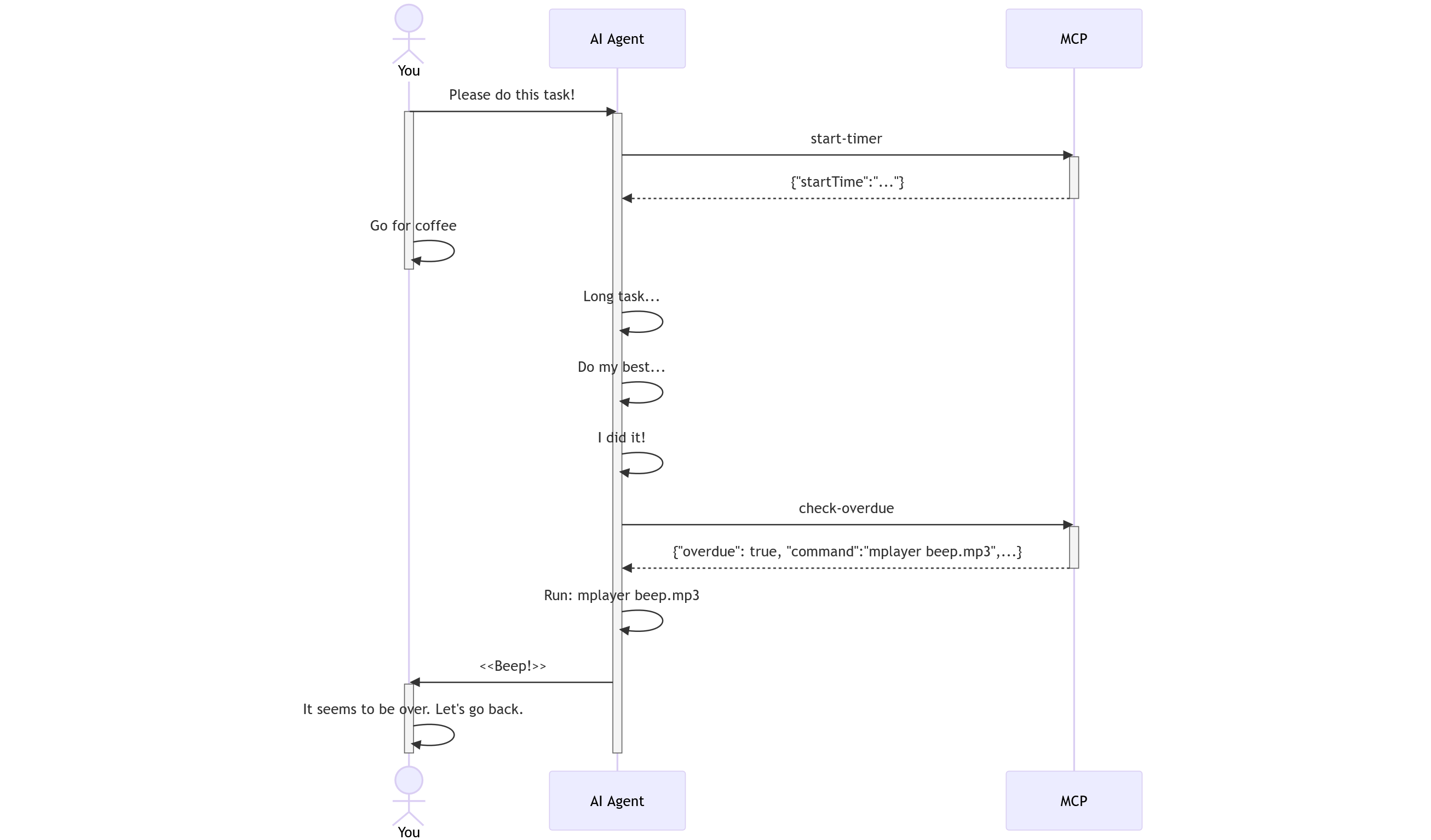
The notify-completion-mcp-server addresses the issue of users needing to actively monitor their computer for AI task completion. By providing a notification mechanism triggered when tasks are finished, users can multitask more efficiently without repeatedly checking task status.
Installation
1. Add config to the client (If using Cline, edit cline_mcp_settings.json):
{
  "mcpServers": {
    "notify-completion": {
      "command": "npx",
      "args": ["-y", "@nakat-t/notify-completion-mcp-server@latest"],
      "env": {
        "OVERDUE_COMMAND": "<Command to execute very flashy effects>",
      },
      "autoApprove": [ "start-timer", "check-overdue" ]
    }
  }
}
2. Change the config environment variables to your value.
OVERDUE_COMMAND: Write a command to notify you when the task is complete.
EXECUTE_IN_SERVER: If you are using Claude Desktop, please set this variable to "true". When using AI capable of executing commands on their own, there is no need to define this variable.
3. Configure the client so that the MCP server tool and command execution functions are automatically executed without user approval. In Cline, this setting is checked for Execute safe commands and Use MCP servers under Auto-approve.
4. Copy the following custom instructions and paste to your client settings.
Custom Instructions
```markdown
Sign in to leave a review
Use Google, GitHub, or an email account so ratings stay tied to real people.
No reviews posted yet.





