
- MCP Server for Network Administration
About
NetSensei is an MCP server to assist network administrators. It provides various network utilities and tools such as ping, traceroute, Nmap scans, and packet sniffing using the Model Context Protocol (MCP) to communicate and process network-related commands.
Details
- Author
- solaconsay
- GitHub stars
- 2
- Downloads
- 190
- Categories
- Other
Jump to
- Ping test with detailed connectivity output
- Traceroute to identify network paths
- Nmap scans with customizable arguments
- Packet sniffing using tshark with filters
- SSH connection and command execution per device platform
- AI assistant for automating routine network tasks

Setting up with Highlight
This MCP is not yet compatible with Highlight’s one-click setup. However, you can still use it with Highlight by following these steps:
- Download and install Highlight from highlightai.com/download
- Navigate to the plugins tab and select "Add Custom Plugin"
-
Configure the plugin with the settings below
Plugin Name
- MCP Server for Network AdministrationCommand (node, npx, python, etc.)Please refer to the README for specific instructions on how to obtain API keys or other required environment variables.
- Enable "Start Automatically" if you want the plugin to start when Highlight launches





From the repository
Add NetSensei to your Claude Desktop configuration using a JSON snippet, or integrate it with OpenWebUI via mcpo on a specified port. The server runs from a local clone of the repository using uv.
Claude Desktop / Cursor
Paste into your MCP client config file to install this server.
{
    "mcpServers": {
        "- mcp server for network administration": {
            "NetSensei": {
                "command": "uv",
                "args": [
                    "run",
                    "--with",
                    "mcp[cli]",
                    "mcp",
                    "run",
                    "C:\\path\\to\\cloned\\repo\\main.py"
                ]
            }
        }
    }
}McpServers
{
    "NetSensei": {
        "command": "uv",
        "args": [
            "run",
            "--with",
            "mcp[cli]",
            "mcp",
            "run",
            "C:\\path\\to\\cloned\\repo\\main.py"
        ]
    }
}
NetSensei - MCP Server for Network Administration
NetSensei is an MCP server to assist network administrators. It provides various network utilities and tools such as ping, traceroute, Nmap scans, packet sniffing, and SSH using the Model Context Protocol (MCP) to communicate and process network-related commands.
Usage
You can use this with Claude Desktop or with OpenWebUI using mcpoFeatures
- Ping Test: Quickly test network connectivity with detailed output.
- Traceroute: Identify the network path to any destination.
- Nmap Scan: Perform network scans with customizable arguments to discover devices and services.
- Packet Sniffer: Use tshark to capture and analyze network packets, filtered by custom criteria (e.g., DNS, HTTP, ICMP).
- SSH connection: Connect to a device thru ssh and execute commands based on the device platform (e.g. Ubuntu Server, Cisco, Aruba, etc.).
- AI Assistant: Leverage the power of AI to automate routine network tasks and gain deeper insights.
Requirements
- Python 3.x - MCP Python SDK - https://github.com/modelcontextprotocol/python-sdk - uvicorn - ASGI server to run the FastAPI server. - tshark (Wireshark's command-line tool) must be installed and accessible from your system PATH. - nmap - For network scanning. - netmiko - For ssh connection and command execution. - A supported network interface (e.g., Wi-Fi, Ethernet) for packet sniffing.Installation
1. Clone this repository:
   git clone https://github.com/yourusername/netsensei.git

   cd netsensei
2. Add this to your Claude Desktop config file.
{
"mcpServers": {
"NetSensei": {
"command": "uv",
"args": [
"run",
"--with",
"mcp[cli]",
"mcp",
"run",
"C:\\path\\to\\cloned\\repo\\main.py"
]
}
}
}
3. Integrating with OpenWebUI
uvx mcpo --port 9003 -- mcp run main.py
```
Example
Prompting Claude AI to discover live host in a network.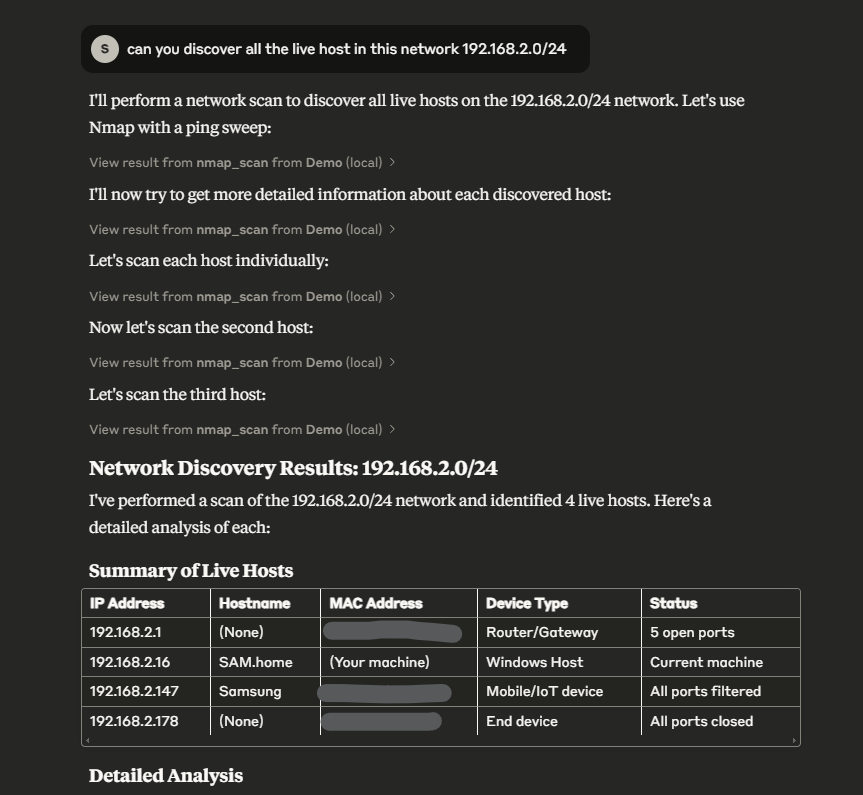
Contribution
Contributions are welcome! Feel free to fork the repository, create an issue, or submit a pull request.License
This project is licensed under the MIT License - see the LICENSE file for details.Sign in to leave a review
Use Google, GitHub, or an email account so ratings stay tied to real people.
No reviews posted yet.





