
Monad Bridge MCP Server
About
Monad Bridge MCP Server is a lightweight Model Context Protocol server that enables bridging functionality between Ethereum Sepolia and Monad Testnet networks using the Wormhole bridge. It is designed for developers using Claude Desktop to interact with Monadbridge and Wormhole…
Details
- Author
- rawakinode
- GitHub stars
- 1
- Downloads
- 215
- Categories
- Developer Tools
Jump to
- Get wallet address from private key
- Check ETH balance on Sepolia testnet
- Check MON balance on Monad testnet
- Bridge wMON from Sepolia to MON on Monad
- Bridge MON from Monad to wMON on Sepolia
- Check wMON balance on Sepolia testnet
- View last 10 bridge transactions in either direction
Clone the repository, run npm install and npm run build, then configure Claude Desktop by editing claude_desktop_config.json with the path to the built index.js and your private key in the PRIVATE_KEY environment variable. After restarting Claude, use commands like "show my wallet address" or "bridge 1 mon sepolia to monad" to execute supported tools.
Monad Bridge MCP Server
A lightweight Model Context Protocol (MCP) server that enables bridging functionality between Ethereum Sepolia and Monad Testnet networks using the Wormhole bridge. This MCP interacts with Monadbridge and Wormholes APIs.
🚀 Supported Tools
This MCP server provides the following tools:
| Tools Name | Description | Command |
|----------------------------------|-------------------------------------------------------------|------|
| get-wallet-address | Get wallet address from private key. | show my wallet address |
| get-eth-balance | Check ETH balance on Sepolia testnet. | check our ETH balance |
| get-mon-balance | Check MON balance on Monad testnet. | check our MONAD balance |
| bridge-sepolia-wmon-to-monad | Bridge wrapped MON (wMON) on Sepolia to MON on Monad. | bridge 1 mon sepolia to monad |
| bridge-monad-to-sepolia-wmon | Bridge MON from Monad to wMON on Sepolia. | bridge 1 monad to sepolia |
| get-wmon-sepolia-balance | Check Wrapped MON (wMON) balance on Sepolia. | check our wmon balance on sepolia |
|get-10-last-bridge-transaction|Get and view the last 10 bridge transactions from Sepolia to Monad or Monad to Sepolia| get 10 last bridge transaction get last bridge|
Quick Start
- Clone the repository
git clone https://github.com/rawakinode/monad-bridge-mcp-server.git

cd monad-bridge-mcp-server

npm install
- Build and run
npm run build
Prerequisites
- Node.js (v16 or newer)
- npm or yarn
- Claude Desktop (for MCP Client integration)
How to Use
1. You need to Download and install Claude Dekstop
2. Open Claude Dekstop
3. Go to Settings > Developer
4. Open config . Edit claude_desktop_config.json
5. Add the following configuration.
{

  "mcpServers": {

    "monad-mcp": {

      "command": "node",

      "args": ["<your-local-path>monad-bridge-mcp-server\\build\\index.js"],

      "env": {

        "PRIVATE_KEY": "<your-private-key>"

      }

    }

  }

}
6. Replace
<your-local-path>monad-bridge-mcp-server\\build\\index.js with the actual path to your project directory (e.g., E:\data\monad-bridge-mcp-server\build\index.js on Windows or /home/user/monad-bridge-mcp-server\build\index.js on Linux).7. Restart Claude Desktop.
8. When prompted, allow MCP access for the chat session
(Allow for This Chat).
Command Usage
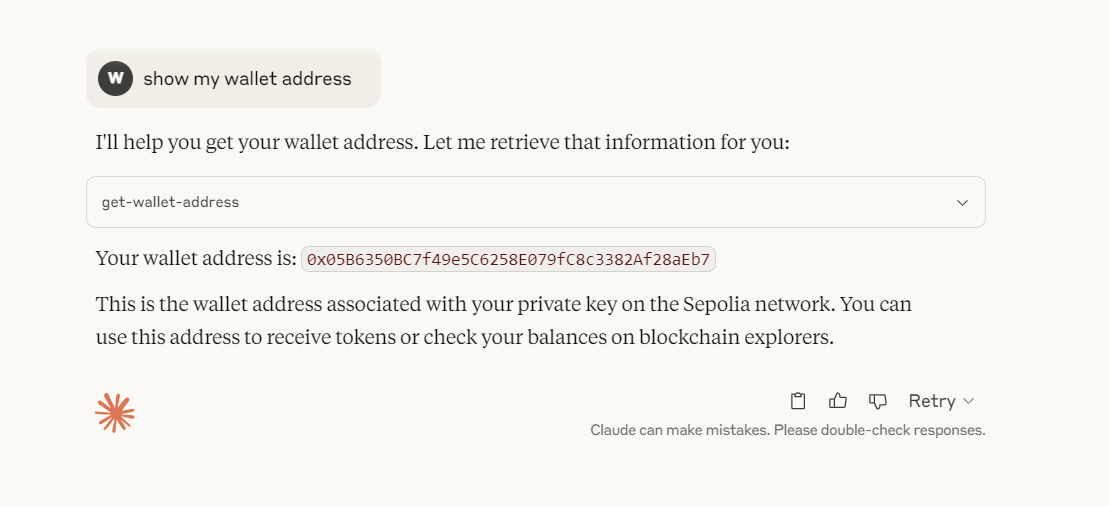
Check Wallet Address
- Write command show my wallet address on Claude.
- Allow MCP access for the chat session (Allow for This Chat).
- Claude will respon with your wallet address from your PRIVATE_KEY.
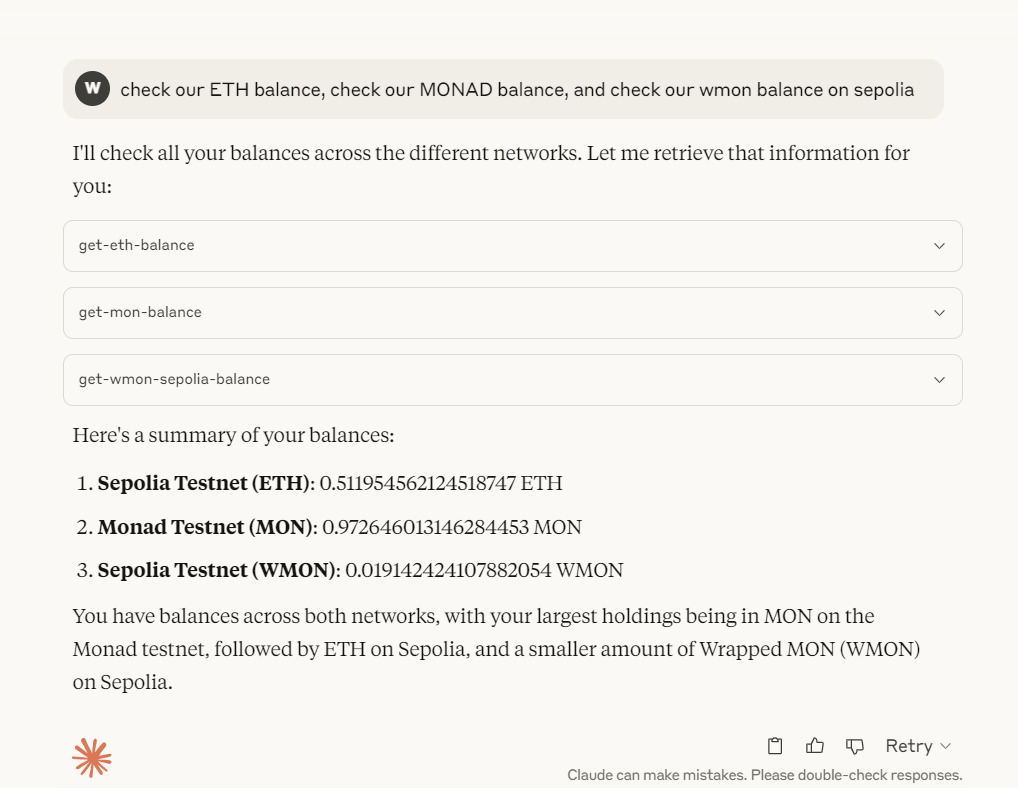
Check Wallet Balance (ETH, MONAD, and wMON)
- Write command check our ETH balance, check our MONAD balance, and check our wmon balance on sepolia on Claude.
- Allow MCP access for the chat session (Allow for This Chat).
- Claude will respon with balance ETH sepolia, MON, and wMON Sepolia.
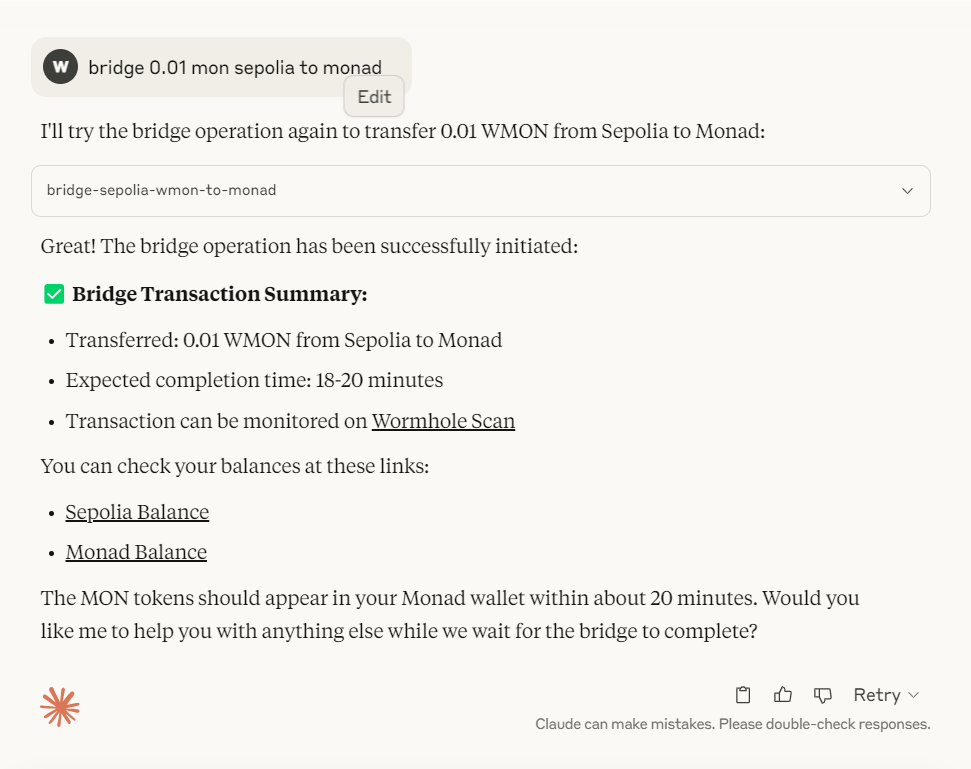
Bridge wMON Sepolia > MONAD
- Write command bridge 0.01 wmon sepolia to monad on Claude.
- Allow MCP access for the chat session (Allow for This Chat).
- If success, Claude will respon with success transaction details.
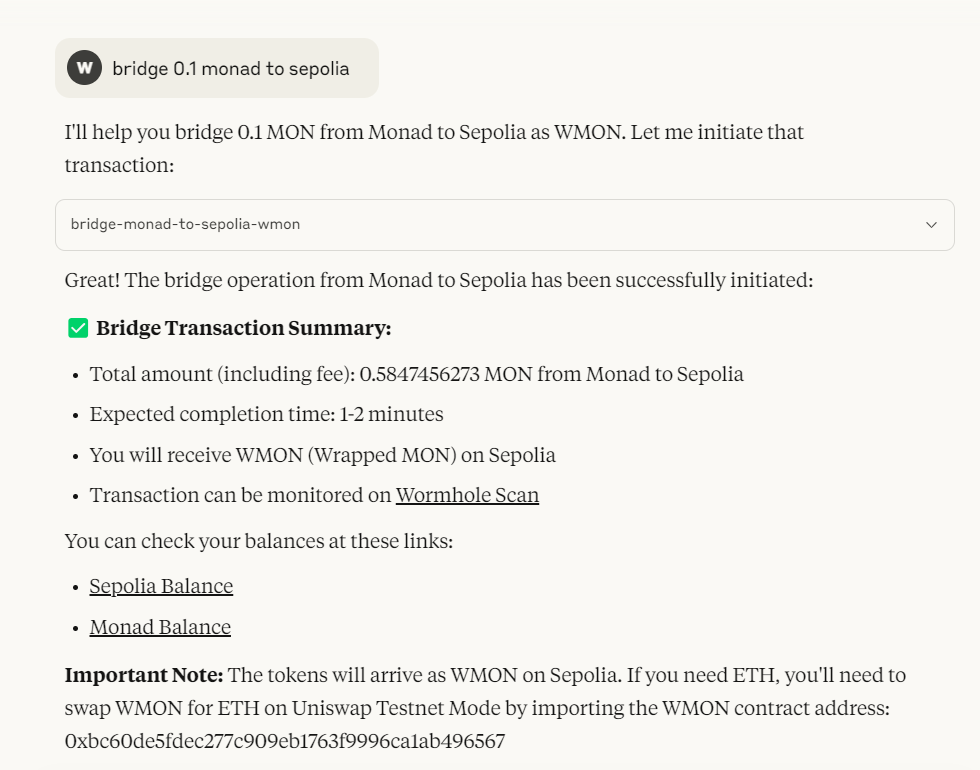
Bridge MONAD > wMON Sepolia
- Write command bridge 0.01 monad to wmon sepolia on Claude.
- Allow MCP access for the chat session (Allow for This Chat).
- If success, Claude will respon with success transaction details.
Important Links
- View on Etherscan Sepolia
- View on Monad Testnet Explorer
- Wormhole Scan (Testnet)
Contact
Sign in to leave a review
Use Google, GitHub, or an email account so ratings stay tied to real people.
No reviews posted yet.





