
📊 Metabase MCP Server
About
Backend integration layer that connects your Metabase instance with AI assistants using the Model Context Protocol (MCP)
Details
- Author
- CW-Codewalnut
- GitHub stars
- 16
- Downloads
- 293
- Categories
- Search
Jump to

Setting up with Highlight
This MCP is not yet compatible with Highlight’s one-click setup. However, you can still use it with Highlight by following these steps:
- Download and install Highlight from highlightai.com/download
- Navigate to the plugins tab and select "Add Custom Plugin"
-
Configure the plugin with the settings below
Plugin Name
📊 Metabase MCP ServerCommand (node, npx, python, etc.)Please refer to the README for specific instructions on how to obtain API keys or other required environment variables.
- Enable "Start Automatically" if you want the plugin to start when Highlight launches





From the repository
{
"mcpServers": {
"metabase-mcp-server-cw-codewalnut": {
"command": "uv",
"args": [
"venv",
".venv"
]
}
}
}
Claude Desktop / Cursor
Paste into your MCP client config file to install this server.
{
    "mcpServers": {
        "\ud83d\udcca metabase mcp server": {
            "metabase-mcp-server-cw-codewalnut": {
                "command": "uv",
                "args": [
                    "venv",
                    ".venv"
                ]
            }
        }
    }
}McpServers
{
    "metabase-mcp-server-cw-codewalnut": {
        "command": "uv",
        "args": [
            "venv",
            ".venv"
        ]
    }
}
📊 Metabase MCP Server
📚 Table of Contents
1. What is this tool about?
2. Video Walkthrough
3. Architecture Diagram
4. Getting Started
- Set Up Metabase
- Install uv Package Manager
- Clone or Download the Repository
- Install dependencies
- Configure Your Credentials
- Connect to Your MCP client
5. Configuration Options
6. Getting Your Metabase API Key
7. DXT File Support
8. How to Create Your Own DXT File
9. Remote Deployment
10. Debugging with MCP Inspector
11. Available Tools
12. Example Prompts to Try
13. Connect with Us
14. License
---
😊 What is this tool about?
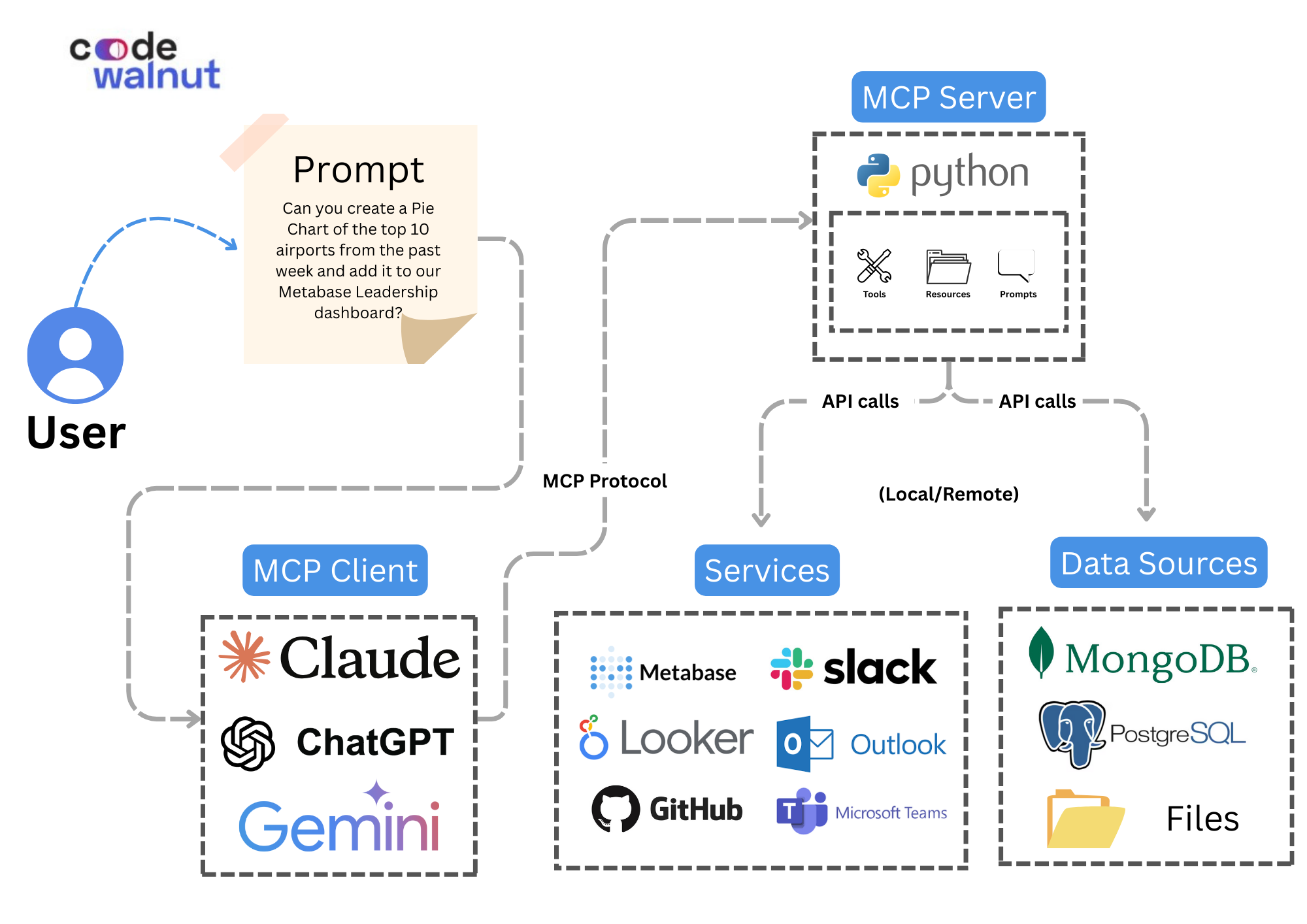
Metabase MCP Server is a backend integration layer that connects your Metabase instance with AI assistants using the Model Context Protocol (MCP). This allows business leaders, product managers and analysts to interact with business intelligence assets like dashboards and charts using natural language—through any MCP client (e.g., Claude Desktop).
Instead of navigating through menus or constructing SQL queries manually, you can:
- You can ask a question and get an instant insight.
- Generate dashboards and charts by describing what you want.
- Manage user access and database connections through simple instructions.
This project makes Metabase not just a dashboarding tool—but a conversational, intelligent business assistant.
---
🎥 Video Walkthrough
Watch this video to see the Metabase MCP Server in action:

---
📐 Architecture Diagram
---
🚀 Getting Started
1. Set Up Metabase (If you haven't already)
Follow the official Metabase installation guide: Metabase Docs
2. Install uv Package Manager
Install uv which includes Python and package management:
Windows:
powershell -ExecutionPolicy ByPass -c "irm https://astral.sh/uv/install.ps1 | iex"
macOS/Linux:
curl -LsSf https://astral.sh/uv/install.sh | sh
Or install via package managers:
```bash
Sign in to leave a review
Use Google, GitHub, or an email account so ratings stay tied to real people.
No reviews posted yet.





