
The
About
MCP server to efficiently check all Mermaid diagram types for syntax errors
Details
- Author
- vtomilin
- Downloads
- 273
- Categories
- Other, AI
Jump to
- Single validate_syntax tool for all Mermaid diagram types
- Reuses a persistent headless browser instance for low latency
- Uses puppeteer-core – no automatic browser download
- Faster and more deterministic than mmdc-based validators
- Supports Chrome-based and Firefox browsers

Setting up with Highlight
This MCP is not yet compatible with Highlight’s one-click setup. However, you can still use it with Highlight by following these steps:
- Download and install Highlight from highlightai.com/download
- Navigate to the plugins tab and select "Add Custom Plugin"
-
Configure the plugin with the settings below
Plugin Name
TheCommand (node, npx, python, etc.)Please refer to the README for specific instructions on how to obtain API keys or other required environment variables.
- Enable "Start Automatically" if you want the plugin to start when Highlight launches





From the repository
Install and configure your MCP client to run npx -y @vtomilin/mermaider <config>, where <config> is either an inline JSON string or a path to a JSON configuration file containing the browser’s executablePath (and optionally "browser": "firefox"). The server opens a headless browser once and reuses it for all subsequent tool calls, keeping latency low. Examples are provided for VSCode, Cursor/Windsurf, and Bun (via global installation).
Claude Desktop / Cursor
Paste into your MCP client config file to install this server.
{
    "mcpServers": {
        "the": {
            "mermaider": {
                "command": "npx",
                "args": [
                    "-y",
                    "@vtomilin/mermaider",
                    "<config>"
                ]
            }
        }
    }
}McpServers
{
    "mermaider": {
        "command": "npx",
        "args": [
            "-y",
            "@vtomilin/mermaider",
            "<config>"
        ]
    }
}
The mermaider MCP server: fast, reliable Mermaid diagram syntax checker
<!-- markdown-toc start - Don't edit this section. Run M-x markdown-toc-refresh-toc -->
Table of Contents
- The mermaider MCP server: fast, reliable Mermaid diagram syntax checker
- Overview
- Why using the browser at all?
- The LLMs syntax problem
- What makes mermaider different?
- Installation
- VSCode
- Cursor/Windsuf/...
- Bun
- Recommendations
- Usage Examples
- References
- Other Mermaid related MCP servers
- License
<!-- markdown-toc end -->
Overview
The mermaider is an MCP server that provides validate_syntax tool that checks all Mermaid diagram types for syntax errors.
For that, it uses [puppeteer-core package][2] and [mermaid-js/mermaid API][3] directly to efficiently use already installed Chrome-based or Firefox browser.
Efficiently means:
- The browser (with a new page) is opened and kept running headless (by default) for as long as this MCP server process is active – to achieve low-latency tool calls.
- Every validate_syntax tool call reuses the browser and the page.
Why using the browser at all?
Unfortunately, [mermaid-js/mermaid][3] relies on full browser context (DOM) for its functionality, even for parsing the diagrams. Packages like [happy-dom][4] or [jsdom][5] do not quite cut it.
The mermaider uses relatively light-weight [puppeteer-core package][2] (as opposed to full puppeteer) to access already installed browser.
The LLMs syntax problem
Modern LLMs typically are perfectly capable of generating Mermaid diagrams, however often lack ability to reliably check the generated syntax. This is where the mermaider MCP comes in.
What makes mermaider different?
There are other MCPs that can (sort of) validate Mermaid syntax, however, they typically work by launching [mmdc command-line utility][1] process every time respective tool is invoked (by the LLM).
That brings a few issues:
- Speed: spawning mmdc process, which (then itself launches the browser) for every tool call is slow and expensive.
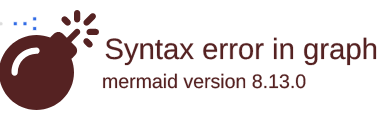
- Non-determinism: mmdc's purpose really is to generate images, not validate syntax. As such, occasionally it exits with 0 code and generates an image (like one below) for diagrams with broken syntax as opposed to exiting with non-zero code and spitting out an error message to STDERR. In this case, MCP server that uses mmdc would have no idea the error occurred so you end up with a bunch of these images instead of your diagrams.
- Side Effects: mmdc may install Chrome browser unbeknownst to you as that is the default puppeteer's behaviour, quote:
>When you install Puppeteer, it automatically downloads a recent version of Chrome for Testing (~170MB macOS, ~282MB Linux, ~280MB Windows) and a chrome-headless-shell binary (starting with Puppeteer v21.6.0) that is guaranteed to work with Puppeteer. The browser is downloaded to the $HOME/.cache/puppeteer folder by default (starting with Puppeteer v19.0.0). See configuration for configuration options and environmental variables to control the download behavior.
Installation
In general, below is the command that your MCP client should use:
npx -y @vtomilin/mermaider <config>
Where <config> is either an inline JSON string, or a config file path, e.g.
npx -y @vtomilin/mermaider '{"executablePath": "/Applications/FirefoxDeveloperEdition.app/Contents/MacOS/firefox", "browser": "firefox"}'
Or:
npx -y @vtomilin/mermaider /home/user/etc/Firefox.json
Where /home/user/etc/Firefox.json is a JSON file containing the configuration, for example, for Firefox browser:
{
  "executablePath": "/Applications/FirefoxDeveloperEdition.app/Contents/MacOS/firefox",
  "browser": "firefox"
}
Another config file example, using the Brave (Chrome-based) browser:
{
  "executablePath": "/Applications/Brave Browser.app/Contents/MacOS/Brave Browser"
}
Complete list of available Browser configuration options defined in Puppeteer's Browser Launchoptions.
VSCode
Press Cmd-Shift-P (or Ctrl-Shift-P), then MCP: Add Server.... Select Command (stdio) Run a local command that implements the MCP protocol. Enter npx -y @vtomilin/mermaider /home/user/etc/Firefox.json (or whatever config method). Enter the server name (mermaider). And you should be all set.
Cursor/Windsuf/...
{
  "mcpServers": {
    "mermaider": {
      "command": "npx",
      "args": ["-y", "@vtomilin/mermaider", "/home/user/etc/Firefox.json"]
    }
  }
}
Bun
Even though this project is built with Bun the mermaider package can not be run directly with bunx at the moment. You would have to install the package globally with bun add -g @vtomilin/mermaider first. Then you can just use mermaider-bun executable to run the server:
{
  "mcpServers": {
    "mermaider": {
      "command": "mermaider-bun",
      "args": ["/home/user/etc/Firefox.json"]
    }
  }
}
Recommendations
- Check Puppeteer's Supported Browsers List for supported browsers.
- Use a secondary browser for mermaider MCP. Do not use your primary browser.
Usage Examples
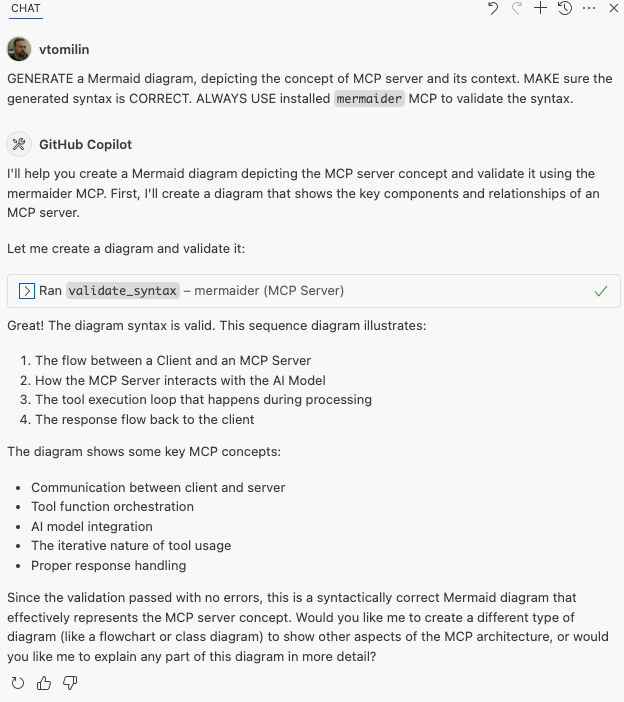
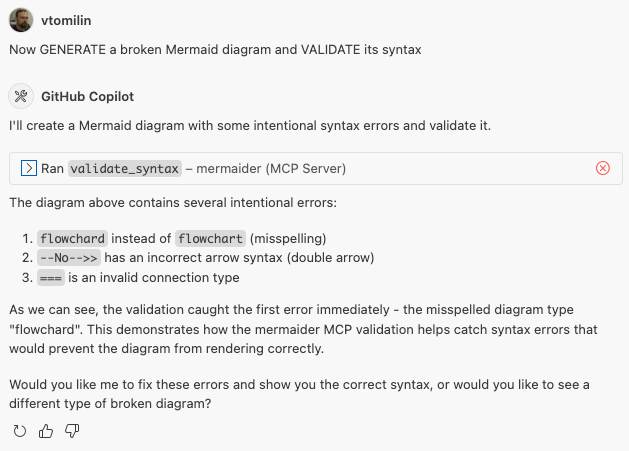
Example sessions using Github Copilot in VSCode:
- Generating a diagram and checking its syntax with mermaider:
- Generating an intentionally broken diagram and checking its syntax with mermaider:
References
Other Mermaid related MCP servers
- mcp-mermaid-validator: A Model Context Protocol server that validates and renders Mermaid diagrams.
- mermaid-mcp-server: A Model Context Protocol (MCP) server providing tools for validating and rendering Mermaid diagrams.
[1]: <https://github.com/mermaid-js/mermaid-cli> "Mermaid @mermaid-js/cli package"
[2]: <https://github.com/puppeteer/puppeteer> "Puppeteer package"
[3]: <https://github.com/mermaid-js/mermaid> "mermaid-js/mermaid API package"
[4]: <https://github.com/capricorn86/happy-dom> "happy-dom"
[5]: <https://github.com/jsdom/jsdom> "jsdom"
License
Sign in to leave a review
Use Google, GitHub, or an email account so ratings stay tied to real people.
No reviews posted yet.





