
mermaid-live-mcp - From prompt to diagram in seconds
About
An MCP server that generates live Mermaid diagrams from any AI assistant. Claude, Cursor, and more.
Details
- Author
- iishyfishyy
- Downloads
- 319
- Categories
- Productivity, Other, AI
Jump to
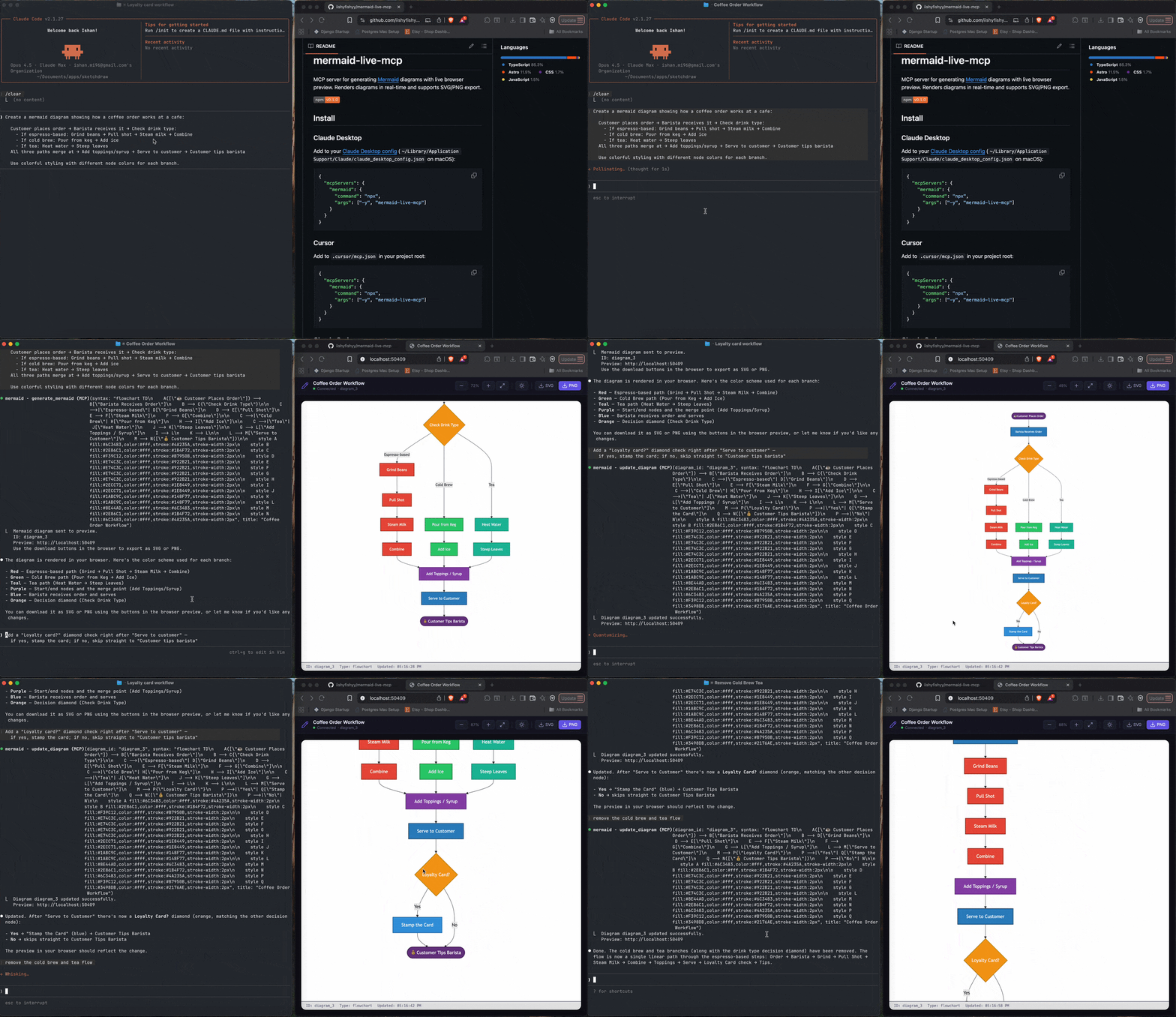
- Live browser preview with real-time WebSocket updates
- SVG and PNG export via download buttons or tool
- Supports all Mermaid diagram types
- No page refresh needed for diagram updates
- Four dedicated tools for diagram lifecycle

Setting up with Highlight
This MCP is not yet compatible with Highlight’s one-click setup. However, you can still use it with Highlight by following these steps:
- Download and install Highlight from highlightai.com/download
- Navigate to the plugins tab and select "Add Custom Plugin"
-
Configure the plugin with the settings below
Plugin Name
mermaid-live-mcp - From prompt to diagram in secondsCommand (node, npx, python, etc.)Please refer to the README for specific instructions on how to obtain API keys or other required environment variables.
- Enable "Start Automatically" if you want the plugin to start when Highlight launches





From the repository
Install the server via npx and add it to your MCP client configuration (Claude Desktop, Cursor, Claude Code, or Windsurf). The server exposes four tools: generate_mermaid, update_diagram, list_diagrams, and export_diagram. Use generate_mermaid with your Mermaid syntax to open a live browser preview, then update or export as needed.
generate_mermaid
Generate a diagram from Mermaid.js syntax. Renders in live preview browser with SVG/PNG download options. Supports flowcharts, sequence diagrams, class diagrams, state diagrams, ER diagrams, Gantt charts, and more.
update_diagram
Replace a diagram's Mermaid syntax and re-render it in the preview.
list_diagrams
List all diagrams generated in this session.
export_diagram
Write a diagram's SVG to disk. PNG export is available via the browser download buttons.
Claude Desktop / Cursor
Paste into your MCP client config file to install this server.
{
    "mcpServers": {
        "mermaid-live-mcp - from prompt to diagram in seconds": {
            "mermaid": {
                "command": "npx",
                "args": [
                    "-y",
                    "mermaid-live-mcp"
                ]
            }
        }
    }
}McpServers
{
    "mermaid": {
        "command": "npx",
        "args": [
            "-y",
            "mermaid-live-mcp"
        ]
    }
}
mermaid-live-mcp
MCP server for generating Mermaid diagrams with live browser preview. Renders diagrams in real-time and supports SVG/PNG export.
<a href="https://npmjs.com/package/mermaid-live-mcp">
<p align="center">
</p>
Install
Claude Desktop
Add to your Claude Desktop config (~/Library/Application Support/Claude/claude_desktop_config.json on macOS):
{
  "mcpServers": {
    "mermaid": {
      "command": "npx",
      "args": ["-y", "mermaid-live-mcp"]
    }
  }
}
Cursor
Add to .cursor/mcp.json in your project root:
{
  "mcpServers": {
    "mermaid": {
      "command": "npx",
      "args": ["-y", "mermaid-live-mcp"]
    }
  }
}
Claude Code
claude mcp add mermaid -- npx -y mermaid-live-mcp
Windsurf
Add to ~/.codeium/windsurf/mcp_config.json:
{
  "mcpServers": {
    "mermaid": {
      "command": "npx",
      "args": ["-y", "mermaid-live-mcp"]
    }
  }
}
Tools
| Tool | Description |
|------|-------------|
| generate_mermaid | Generate a diagram from Mermaid syntax and open a live preview in the browser |
| update_diagram | Replace a diagram's Mermaid syntax and re-render the live preview |
| list_diagrams | List all diagrams generated in the current session |
| export_diagram | Write a diagram's SVG to disk |
How it works
When you ask your AI assistant to create a diagram, mermaid-live-mcp will:
1. Parse the Mermaid syntax
2. Open a browser tab with a live preview
3. Render the diagram as SVG in real-time via WebSocket
4. Provide download buttons for SVG and PNG export
Updates to a diagram are pushed instantly to the browser — no page refresh needed.
Supported diagram types
All Mermaid diagram types are supported, including flowcharts, sequence diagrams, class diagrams, state diagrams, ER diagrams, Gantt charts, pie charts, git graphs, mindmaps, timelines, and more.
Development
pnpm install
pnpm build
Project structure
| Package | Description |
|---------|-------------|
| packages/mcp-server | MCP server (published as mermaid-live-mcp) |
| packages/preview | Live browser preview via WebSocket |
| packages/core | Diagram parsing, layout, and SVG rendering |
| packages/cli | Command-line interface |
License
MIT
Sign in to leave a review
Use Google, GitHub, or an email account so ratings stay tied to real people.
No reviews posted yet.





