
MCP SSE Proxy Server
About
Start any MCP Server remotely using the MCP standard protocol.
Details
- Author
- jinyalong
- GitHub stars
- 3
- Downloads
- 153
- Categories
- Other
Jump to
- SSE long connection support for server push
- JSON-RPC 2.0 message format support
- Both shared and independent session modes
- Dynamic session environment configuration via request parameters
- Automatic connection keep-alive (30-second heartbeat)
- Built-in support for NPX and UVX STDIO process deployment

Setting up with Highlight
This MCP is not yet compatible with Highlight’s one-click setup. However, you can still use it with Highlight by following these steps:
- Download and install Highlight from highlightai.com/download
- Navigate to the plugins tab and select "Add Custom Plugin"
-
Configure the plugin with the settings below
Plugin Name
MCP SSE Proxy ServerCommand (node, npx, python, etc.)Please refer to the README for specific instructions on how to obtain API keys or other required environment variables.
- Enable "Start Automatically" if you want the plugin to start when Highlight launches





From the repository
Configure via environment variables (AUTH_KEY, SHARED_SESSION, MCP_SERVER_CONFIG) and run the server using Python (python main.py) or Docker (docker run codefriday123/mcpproxy:1.0). Connect clients to the GET /sse endpoint and send JSON-RPC messages to the returned message endpoint via POST /messages.
Claude Desktop / Cursor
Paste into your MCP client config file to install this server.
{
    "mcpServers": {
        "mcp sse proxy server": {
            "mcpproxy": {
                "command": "python",
                "args": [
                    "main.py"
                ]
            }
        }
    }
}McpServers
{
    "mcpproxy": {
        "command": "python",
        "args": [
            "main.py"
        ]
    }
}
MCP SSE Proxy Server
<p align="center">

</p>
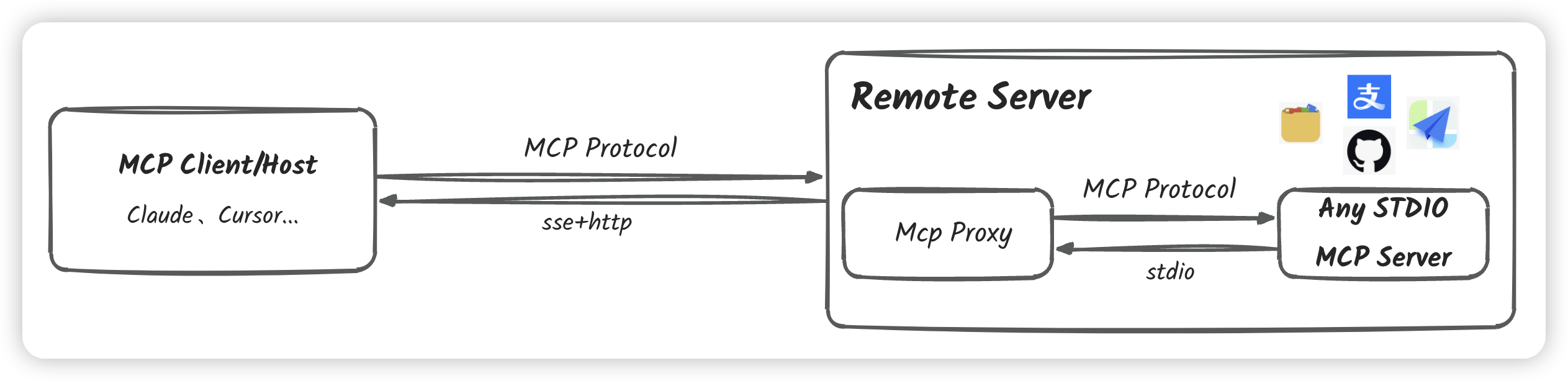
The MCP SSE Proxy Server is a Server-Sent Events (SSE) based Model Context Protocol (MCP) proxy server that enables remote execution of MCP servers using the standard MCP protocol. It supports both shared and independent session modes.
> Model Context Protocol (MCP) is an open protocol that standardizes how applications provide context to LLMs. Think of MCP like a USB-C port for AI applications. Just as USB-C provides a standardized way to connect your devices to various peripherals and accessories, MCP provides a standardized way to connect AI models to different data sources and tools.
>
> For more information about MCP:
> - MCP Documentation (English)
> - MCP Documentation (中文)
> - MCP Server Gallery - Discover and explore various MCP servers
What Problems Does It Solve?
This project allows you to:
- Start and interact with any MCP server remotely using standard MCP protocol
- Maintain stable long connections through SSE
- Support multiple clients sharing a single MCP session or maintaining independent sessions
- Dynamically configure server environment through request parameters
- Quick deployment of STDIO processes via NPX and UVX
System Architecture
<p align="center">
</p>
Features
- SSE long connection support for server push
- JSON-RPC 2.0 message format support
- Both shared and independent session modes
- Dynamic session environment configuration via request parameters
- Automatic connection keep-alive (30-second heartbeat)
- Complete error handling and logging
- Built-in support for NPX and UVX STDIO process deployment
Integration & Customization
Custom Docker Images
The MCP SSE Proxy Server is designed to be highly integrable into various custom Docker images. This flexibility allows you to create specialized environments for different use cases:
- Browser Automation: Integrate with Chrome/Chromium for browser-based MCP servers
- Database Operations: Bundle with specific databases for data manipulation MCP servers
- Development Tools: Package with development tools for code-related MCP servers
- AI/ML Tools: Include AI/ML libraries for machine learning MCP servers
Advanced Routing
While the default configuration loads MCP server commands through environment variables, you can extend the functionality by:
1. Multiple Server Integration: Configure multiple MCP servers through a configuration file
2. Dynamic Routing: Add routing fields to SSE connections to direct traffic to different MCP servers
3. Custom Router: Build your own MCP router project by extending this base implementation
This flexibility allows you to:
- Create specialized MCP server clusters
- Implement load balancing across multiple servers
- Design custom routing logic based on your needs
- Build hierarchical MCP server architectures
Configuration
Environment Variables
- SHARED_SESSION: Controls session mode
- true: Shared session mode (default), all clients share one MCP session
- false: Independent session mode, each client creates a separate MCP session
- AUTH_KEY: Server access key
- If set, all requests must provide this key
- Passed via URL parameter auth_key
- MCP_SERVER_CONFIG: MCP server configuration
Examples:
  # Run Node.js-based MCP server using NPX

  MCP_SERVER_CONFIG="npx -y @modelcontextprotocol/server-filesystem ."


  # Run Python-based MCP server using UVX

  MCP_SERVER_CONFIG="uvx mcp-server-fetch"
Dynamic Configuration
In independent session mode (SHARED_SESSION=false), each SSE connection starts a new MCP server process. You can dynamically configure environment variables for each session through URL parameters:
GET /sse?auth_key=xxx&[CUSTOM_ENV]=value
This mechanism is particularly useful for scenarios requiring user-specific credentials. For example, when deploying a GitHub MCP server, different users can use their own Personal Access Tokens:
1. Configure the base command when deploying the server:
export MCP_SERVER_CONFIG="npx -y @modelcontextprotocol/server-github"
2. Users provide their tokens via URL when connecting:
GET /sse?auth_key=xxx&GITHUB_PERSONAL_ACCESS_TOKEN=ghp_xxxxxxxxxxxx
This way, you only need to deploy one MCP proxy server to serve multiple users, with each user using their own GitHub credentials. Other supported environment variable configurations:
- General Configuration:
- NODE_ENV: Node.js environment (development/production)
- DEBUG: Debug log level
- Server-Specific Configuration:
- GitHub MCP Server: GITHUB_PERSONAL_ACCESS_TOKEN
- Filesystem MCP Server: ROOT_DIR
- Other server-specific environment variables
Note: Environment variables in URL parameters override server default configurations.
API Endpoints
SSE Connection
GET /sse?auth_key=xxx
After successfully establishing a connection, the server returns a message endpoint URL:
event: endpoint

data: /messages?session_id=<session_id>
Message Sending
POST /messages?session_id=<session_id>
Content-Type: application/json
{

    "jsonrpc": "2.0",

    "method": "method_name",

    "params": {},

    "id": 1

}
Supported Methods
- initialize: Initialize session
- tools/list: List available tools
- tools/call: Call a tool
- prompts/list: List available prompts
- prompts/get: Get a prompt
- resources/list: List resources
- resources/templates/list: List resource templates
- resources/read: Read a resource
- resources/subscribe: Subscribe to a resource
- resources/unsubscribe: Unsubscribe from a resource
Running the Server
Using Python
```bash
Sign in to leave a review
Use Google, GitHub, or an email account so ratings stay tied to real people.
No reviews posted yet.





