

ZoomEye MCP Server
About
A Model Context Protocol server that provides network asset information based on query conditions. This server allows LLMs to obtain network asset information and supports querying network asset information by zoomeye dork etc.
Details
- Author
- zoomeye-ai
- GitHub stars
- 79
- Downloads
- 449
- Categories
- Other, Security
Jump to
- Query ZoomEye for network asset information using dorks
- Caching mechanism improves performance and reduces API calls
- Automatic retry mechanism for failed API requests
- Comprehensive error handling and logging

Setting up with Highlight
This MCP is not yet compatible with Highlight’s one-click setup. However, you can still use it with Highlight by following these steps:
- Download and install Highlight from highlightai.com/download
- Navigate to the plugins tab and select "Add Custom Plugin"
-
Configure the plugin with the settings below
Plugin Name
ZoomEye MCP ServerCommand (node, npx, python, etc.)Please refer to the README for specific instructions on how to obtain API keys or other required environment variables.
- Enable "Start Automatically" if you want the plugin to start when Highlight launches





From the repository
Install via pip, uv, or Docker, set the ZOOMEYE_API_KEY environment variable, then configure your AI assistant (Claude Desktop, Cursor, Windsurf, etc.) to use the server. Query network information using natural language.
Claude Desktop / Cursor
Paste into your MCP client config file to install this server.
{
    "mcpServers": {
        "zoomeye mcp server": {
            "mcp_zoomeye": {
                "command": "python",
                "args": [
                    "-m",
                    "mcp_server_zoomeye"
                ]
            }
        }
    }
}McpServers
{
    "mcp_zoomeye": {
        "command": "python",
        "args": [
            "-m",
            "mcp_server_zoomeye"
        ]
    }
}
🚀 ZoomEye MCP Server
A Model Context Protocol (MCP) server that provides network asset information based on query conditions. This server allows Large Language Models (LLMs) to obtain network asset information by querying ZoomEye using dorks and other search parameters.
🔔 Announcement
🎉 We are excited to announce the official open-source release of ZoomEye MCP Server — a powerful Model Context Protocol (MCP) server that brings real-time cyber asset intelligence to AI assistants and development environments.
🚀 Free Trial: 7-Day FREE Access to ZoomEye MCP!
Experience ZoomEye MCP — the AI-powered cyberspace asset search engine — absolutely free for 7 days!
🔍 Search global internet assets, track real-time changes, and unlock AI-driven insights — all in one place.
👉 How to claim:
1. Follow us on Twitter: @zoomeye_team
2. DM us "MCP" and your MCP setup screenshot
3. Get instant access to your 7-day membership
🎁 Limited-time free trial — explore the power of AI asset search today!
💡 Provide insightful feedback that gets officially adopted, and you'll unlock even more rewards!
🔧 Fully compatible with leading MCP environments:
- Claude Desktop
- Cursor
- Windsurf
- Cline
- Continue
- Zed
- Cherry Studio
- Chatbox
🔗 Explore ZoomEye MCP Server on:
- GitHub: zoomeye-ai/mcp_zoomeye
- MCP.so: mcp.so/server/mcp_zoomeye
- Cursor Directory: cursor.directory/mcp/zoomeye
- Pulse MCP: pulsemcp.com/servers/zoomeye
- Glama MCP: glama.ai/mcp/servers
We welcome everyone to use, explore, and contribute!
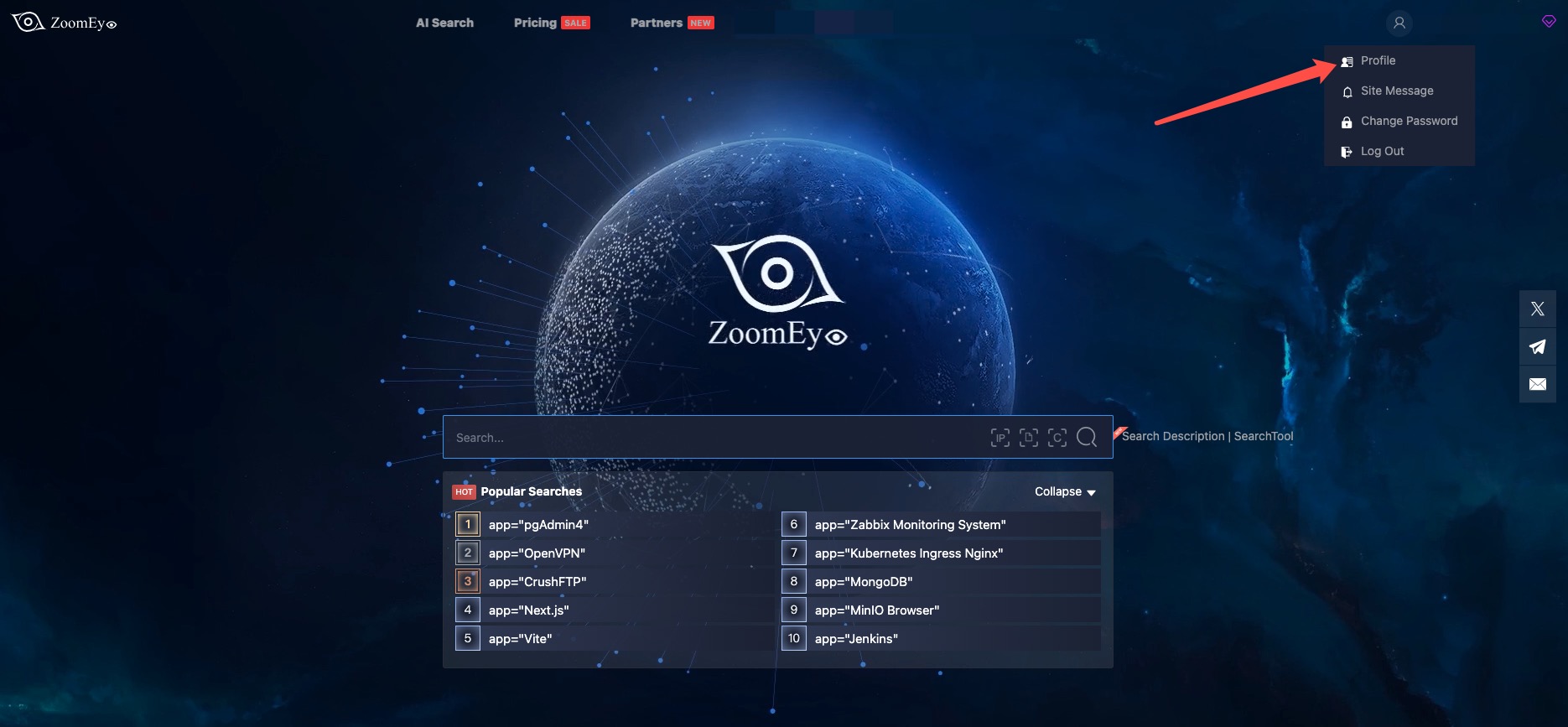
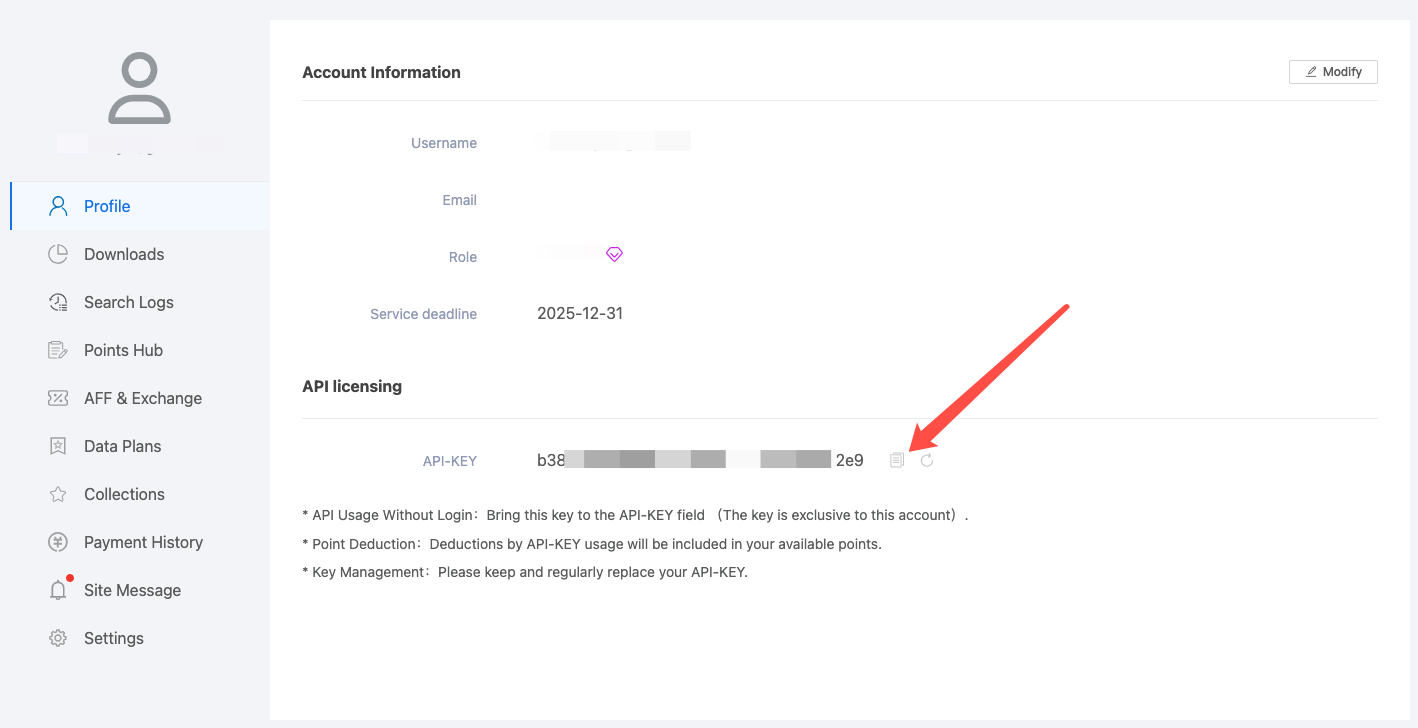
🔑 How can I get a ZoomEye API key?
To use this MCP server, you’ll need a ZoomEye API key.
1. Go to https://www.zoomeye.ai
2. Register or log in
3. Click your avatar → Profile
4. Copy your API-KEY
5. Set the environment variable:
export ZOOMEYE_API_KEY="your_api_key_here"
Features
- Query ZoomEye for network asset information using dorks
- Caching mechanism to improve performance and reduce API calls
- Automatic retry mechanism for failed API requests
- Comprehensive error handling and logging
Available Tools
- zoomeye_search - Get network asset information based on query conditions.
- Required parameters:
- qbase64 (string): Base64 encoded query string for ZoomEye search
- Optional parameters:
- page (integer): View asset page number, default is 1
- pagesize (integer): Number of records per page, default is 10, maximum is 1000
- fields (string): The fields to return, separated by commas
- sub_type (string): Data type, supports v4, v6, and web. Default is v4
- facets (string): Statistical items, separated by commas if there are multiple
- ignore_cache (boolean): Whether to ignore the cache
Usage Guide
Basic Usage
Once the server is running, you can interact with it through your AI assistant or development environment. Here's how to use it:
1. Start the server using one of the installation methods above
2. Configure your AI assistant (Claude Desktop, Cursor, Windsurf, Cline, Continue, Zed, etc.) to use the server
3. Query network information using natural language

Search Syntax Guide
- Search Scope covers devices (IPv4, IPv6) and websites (domains).
- When entering a search string, the system will match keywords in "global" mode, including content from various
protocols such as HTTP, SSH, FTP, etc. (e.g., HTTP/HTTPS protocol headers, body, SSL, title, and other protocol
banners).
- Search strings are case-insensitive and will be segmented for matching (the search results page provides a "
segmentation" test feature). When using == for search, it enforces exact case-sensitive matching with strict syntax.
- Please use quotes for search strings (e.g., "Cisco System" or 'Cisco System'). If the search string contains quotes,
use the escape character, e.g.,"a\"b". If the search string contains parentheses, use the escape character, e.g.,
portinfo\(\).
You can see more detailed search syntax rules in prompts.py.
For more information on the ZoomEye Search API, refer to the ZoomEye API v2 documentation.
Getting Started
Prerequisites
1. ZoomEye API Key
- Register for an account at ZoomEye
- Obtain your API key from your account settings
- The API key will be used to authenticate your requests to the ZoomEye API
2. Python Environment
- Python 3.10 or higher is required
- Alternatively, you can use Docker to run the server without installing Python
Installation
Using PIP
Alternatively, you can install mcp-server-zoomeye via pip:
pip install mcp-server-zoomeye
After installation, you can run it as a script using the following command:
python -m mcp_server_zoomeye
Using Docker
You can also run the ZoomEye MCP server using Docker:
Pull from Docker Hub
```bash
Sign in to leave a review
Use Google, GitHub, or an email account so ratings stay tied to real people.
No reviews posted yet.





