
MCP KIPRIS
About
mcp server for kipris plus, for search patent in
Details
- Author
- nuri428
- Downloads
- 301
- Categories
- Other
Jump to
- Korean patent search by applicant, keyword, application number, and righter.
- Detailed patent info and summary retrieval by application number.
- International patent search by applicant, keyword, application number, etc.
- Supports multiple country codes (US, EP, JP, CN, etc.).
- Sort options: publication date, application date, registration date, etc.
- All responses are returned in JSON format.

Setting up with Highlight
This MCP is not yet compatible with Highlight’s one-click setup. However, you can still use it with Highlight by following these steps:
- Download and install Highlight from highlightai.com/download
- Navigate to the plugins tab and select "Add Custom Plugin"
-
Configure the plugin with the settings below
Plugin Name
MCP KIPRISCommand (node, npx, python, etc.)Please refer to the README for specific instructions on how to obtain API keys or other required environment variables.
- Enable "Start Automatically" if you want the plugin to start when Highlight launches





From the repository
Set the KIPRIS_API_KEY environment variable, install dependencies (pip install -r requirements.txt), then run the server in HTTP mode (python -m mcp_kipris.sse_server --http --port 6274 --host 0.0.0.0) or stdio mode (python -m mcp_kipris.server). Use tool calls like patent_applicant_search with arguments such as applicant name and sort options.
Claude Desktop / Cursor
Paste into your MCP client config file to install this server.
{
    "mcpServers": {
        "mcp kipris": {
            "mcp_kipris": {
                "command": "python",
                "args": [
                    "-m",
                    "mcp_kipris.sse_server",
                    "--http",
                    "--port",
                    "6274",
                    "--host",
                    "0.0.0.0"
                ]
            }
        }
    }
}McpServers
{
    "mcp_kipris": {
        "command": "python",
        "args": [
            "-m",
            "mcp_kipris.sse_server",
            "--http",
            "--port",
            "6274",
            "--host",
            "0.0.0.0"
        ]
    }
}
MCP KIPRIS
KIPRIS(한국특허정보원) API를 활용한 특허 검색 도구입니다.
기능
한국 특허 검색
1. 출원인 검색 (PatentApplicantSearchTool) - 출원인 이름으로 특허 검색 - 정렬 및 필터링 옵션 지원2. 키워드 검색 (PatentFreeSearchTool)
- 자유 텍스트로 특허 검색
- 정렬 및 필터링 옵션 지원
3. 출원번호 검색 (PatentApplicationNumberSearchTool)
- 출원번호로 특허 검색
- 상세 정보 조회 가능
4. 권리자 검색 (PatentRighterSearchTool)
- 권리자 이름으로 특허 검색
- 정렬 및 필터링 옵션 지원
5. 특허 상세 정보 검색 (PatentDetailSearchTool)
- 출원번호로 특허의 상세 정보 조회
6. 특허 요약 정보 검색 (PatentSummarySearchTool)
- 출원번호로 특허의 요약 정보 조회
해외 특허 검색
1. 출원인 검색 (ForeignPatentApplicantSearchTool) - 출원인 이름으로 해외 특허 검색 - 국가별 검색 지원2. 출원번호 검색 (ForeignPatentApplicationNumberSearchTool)
- 출원번호로 해외 특허 검색
- 국가별 검색 지원
3. 키워드 검색 (ForeignPatentFreeSearchTool)
- 자유 텍스트로 해외 특허 검색
- 국가별 검색 지원
4. 국제출원번호 검색 (ForeignPatentInternationalApplicationNumberSearchTool)
- 국제출원번호로 해외 특허 검색
5. 국제공개번호 검색 (ForeignPatentInternationalOpenNumberSearchTool)
- 국제공개번호로 해외 특허 검색
설치 및 실행
환경 설정
1. KIPRIS API 키 설정export KIPRIS_API_KEY="your_api_key"
2. 의존성 설치
pip install -r requirements.txt
실행 방법
1. HTTP 서버 모드python -m mcp_kipris.sse_server --http --port 6274 --host 0.0.0.0
2. stdio 서버 모드
python -m mcp_kipris.server
지원하는 국가 코드
- US: 미국 - EP: 유럽 - WO: PCT - JP: 일본 - PJ: 일본영문초록 - CP: 중국 - CN: 중국특허영문초록 - TW: 대만영문초록 - RU: 러시아 - CO: 콜롬비아 - SE: 스웨덴 - ES: 스페인 - IL: 이스라엘정렬 옵션
- PD: 공고일자 - AD: 출원일자 - GD: 등록일자 - OPD: 공개일자 - FD: 국제출원일자 - FOD: 국제공개일자 - RD: 우선권주장일자특허 상태 코드
- A: 공개 - C: 정정공개 - F: 공고 - G: 정정공고 - I: 무효공고 - J: 취소공고 - R: 재공고Claude 설정
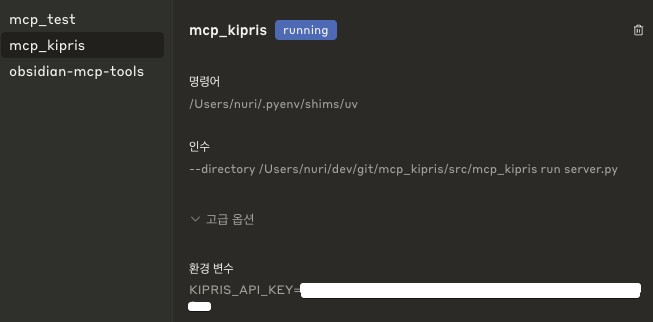
Claude를 사용하기 위한 설정은 다음과 같습니다:
설치 방법
1. Python 3.12 이상이 필요합니다.
2. 가상환경을 생성하고 활성화합니다:
```bash
python -m venv .venv
source .venv/bin/activate # Linux/Mac
Sign in to leave a review
Use Google, GitHub, or an email account so ratings stay tied to real people.
No reviews posted yet.





