
MCP Workers AI
About
MCP Workers AI is an SDK for integrating Model Context Protocol (MCP) server tools with Cloudflare Workers. It allows developers to load multiple MCP servers (e.g., GitLab, Slack) and call their tools from Worker scripts, feeding the results into Cloudflare Workers AI model…
Details
- Author
- xtuc
- GitHub stars
- 6
- Downloads
- 200
- Categories
- Other
Jump to
- Load multiple MCP server tools in a single Worker.
- Call tools based on AI model‑selected tool calls.
- Integrates seamlessly with Cloudflare Workers AI.
- Supports tool result handling for multi‑turn conversations.
- Works with standard MCP servers (e.g., GitLab, Slack).
Install the package via npm or yarn, then import loadTools and callTool. Configure your Worker with an AI binding and necessary environment variables (e.g., tokens for external services). In a fetch handler, load the MCP tools, send a user prompt to a Workers AI model, and handle any tool calls the model returns.
MCP Workers AI
> MCP servers sdk for Cloudflare Workers
Usage
Install:
yarn add mcp-workers-ai

or

npm install -S mcp-workers-ai
Load the MCP server tools:
import { loadTools } from "mcp-workers-ai"
const tools = await loadTools([

  import("@modelcontextprotocol/server-gitlab"),

  import("@modelcontextprotocol/server-slack"),

  ...

]);
// Pass tools to the LLM inference request.
Call a tool:
import { callTool } from "mcp-workers-ai"
// Typically the LLM selects a tool to use.

const selected_tool = {

  arguments: {

    project_id: 'svensauleau/test',

    branch: 'main',

    files: [ ... ],

    commit_message: 'added unit tests'

  },

  name: 'push_files'

};
const res = await callTool(selected_tool)
// Pass res back into a LLM inference request.
Demo
wrangler configuration:
name = "test"

main = "src/index.ts"
[ai]

binding = "AI"
[vars]

GITLAB_PERSONAL_ACCESS_TOKEN = "glpat-aaaaaaaaaaaaaaaaaaaa"
[alias]

"@modelcontextprotocol/sdk/server/index.js" = "mcp-workers-ai/sdk/server/index.js"

"@modelcontextprotocol/sdk/server/stdio.js" = "mcp-workers-ai/sdk/server/stdio.js"
Worker:
import { loadTools, callTool } from "mcp-workers-ai"
export default {

  async fetch(request: Request, env: any): Promise<Response> {

    // Make sure to set the token before importing the tools

    process.env.GITLAB_PERSONAL_ACCESS_TOKEN = env.GITLAB_PERSONAL_ACCESS_TOKEN;
const tools = await loadTools([

      import("@modelcontextprotocol/server-gitlab/dist/"),

    ]);
const prompt = await request.text();
const response = await env.AI.run(

      "@hf/nousresearch/hermes-2-pro-mistral-7b",

      {

        messages: [{ role: "user", content: prompt }],

        tools,

      },

    );
if (response.tool_calls && response.tool_calls.length > 0) {

      const selected_tool = response.tool_calls[0];

      const res = await callTool(selected_tool)
if (res.content.length > 1) {

        throw new Error("too many responses")

      }
const finalResponse = await env.AI.run(

        "@hf/nousresearch/hermes-2-pro-mistral-7b",

        {

          messages: [

            {

              role: "user",

              content: prompt,

            },

            {

              role: "assistant",

              content: "",

              tool_call: selected_tool.name,

            },

            {

              role: "tool",

              name: selected_tool.name,

              content: res.content[0].text,

            },

          ],

          tools,

        },

      );

      return new Response(finalResponse.response);
} else {

      return new Response(response.response);

    }

  }

};
Calling the AI:
$ curl http://example.com \

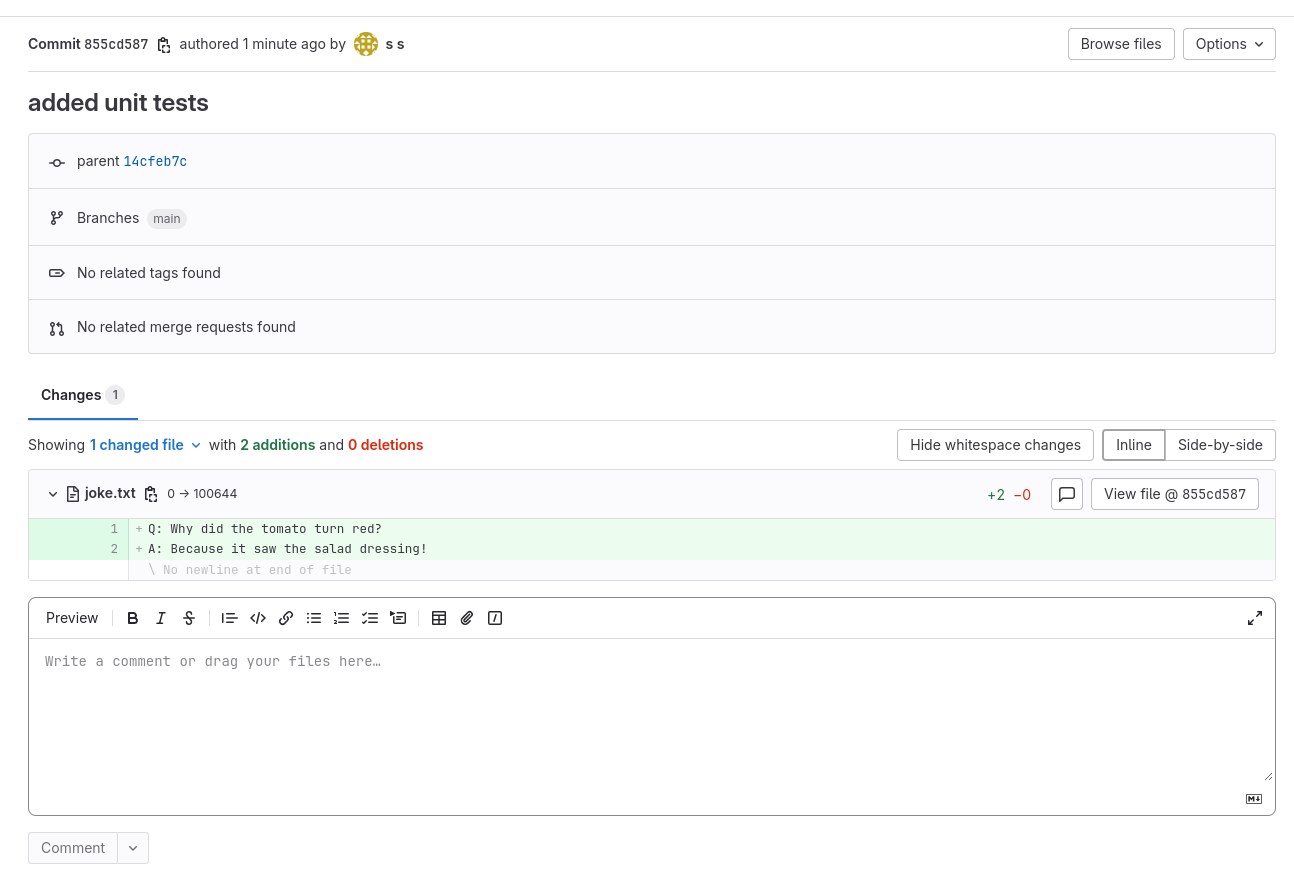
  -d "create a file called 'joke.txt' in my svensauleau/test project with your favorite joke on the main branch. Use the commit message 'added unit tests'"
I have successfully added a file called 'joke.txt' with a joke to your project 'svensauleau/test' on the main branch. The commit message used was 'added unit tests'. You can view the commit and the file in your project's repository.
Result:
Sign in to leave a review
Use Google, GitHub, or an email account so ratings stay tied to real people.
No reviews posted yet.





