
MCP Wolfram Alpha (Client + Server)
About
A Python-powered Model Context Protocol MCP server and client that uses Wolfram Alpha via API.
Details
- Author
- ricocf
- GitHub stars
- 84
- Downloads
- 225
- Categories
- Other
Jump to
- Wolfram|Alpha integration for math, science, and data queries.
- Modular architecture easily extendable to additional APIs.
- Multi‑client support handling interactions from multiple interfaces.
- MCP‑Client example using Gemini with LangChain.
- UI support via Gradio for a web interface.

Setting up with Highlight
This MCP is not yet compatible with Highlight’s one-click setup. However, you can still use it with Highlight by following these steps:
- Download and install Highlight from highlightai.com/download
- Navigate to the plugins tab and select "Add Custom Plugin"
-
Configure the plugin with the settings below
Plugin Name
MCP Wolfram Alpha (Client + Server)Command (node, npx, python, etc.)Please refer to the README for specific instructions on how to obtain API keys or other required environment variables.
- Enable "Start Automatically" if you want the plugin to start when Highlight launches





From the repository
Clone the repository, set the required WOLFRAM_API_KEY (and optionally GeminiAPI) in a .env file, and install dependencies with pip install -r requirements.txt or uv sync. For Claude Desktop, add the provided JSON configuration; for VSCode, use the configs/vscode_mcp.json template. Run the client as a CLI tool with python main.py or launch the Gradio UI with python main.py --ui. Docker images are also available for both modes.
Claude Desktop / Cursor
Paste into your MCP client config file to install this server.
{
    "mcpServers": {
        "mcp wolfram alpha (client + server)": {
            "mcp-wolframalpha": {
                "command": "uv",
                "args": [
                    "sync"
                ]
            }
        }
    }
}McpServers
{
    "mcp-wolframalpha": {
        "command": "uv",
        "args": [
            "sync"
        ]
    }
}
MCP Wolfram Alpha (Server + Client)
Seamlessly integrate Wolfram Alpha into your chat applications.This project implements an MCP (Model Context Protocol) server designed to interface with the Wolfram Alpha API. It enables chat-based applications to perform computational queries and retrieve structured knowledge, facilitating advanced conversational capabilities.
Included is an MCP-Client example utilizing Gemini via LangChain, demonstrating how to connect large language models to the MCP server for real-time interactions with Wolfram Alpha’s knowledge engine.

---
Features
- Wolfram|Alpha Integration for math, science, and data queries.
- Modular Architecture Easily extendable to support additional APIs and functionalities.
- Multi-Client Support Seamlessly handle interactions from multiple clients or interfaces.
- MCP-Client example using Gemini (via LangChain).
- UI Support using Gradio for a user-friendly web interface to interact with Google AI and Wolfram Alpha MCP server.
---
Installation
Clone the Repo
   git clone https://github.com/ricocf/mcp-wolframalpha.git
cd mcp-wolframalpha
Set Up Environment Variables
Create a .env file based on the example:
- WOLFRAM_API_KEY=your_wolframalpha_appid
- GeminiAPI=your_google_gemini_api_key (Optional if using Client method below.)
Install Requirements
pip install -r requirements.txt
Install the required dependencies with uv:
Ensure uv is installed.
uv sync
Configuration
To use with the VSCode MCP Server:
1. Create a configuration file at .vscode/mcp.json in your project root.
2. Use the example provided in configs/vscode_mcp.json as a template.
3. For more details, refer to the VSCode MCP Server Guide.
To use with Claude Desktop:
{

  "mcpServers": {

    "WolframAlphaServer": {

      "command": "python3",

      "args": [

        "/path/to/src/core/server.py"

      ]

    }

  }

}
Client Usage Example
This project includes an LLM client that communicates with the MCP server.
Run with Gradio UI
- Required: GeminiAPI - Provides a local web interface to interact with Google AI and Wolfram Alpha. - To run the client directly from the command line:python main.py --ui
Docker
To build and run the client inside a Docker container:docker build -t wolframalphaui -f .devops/ui.Dockerfile .
docker run wolframalphaui
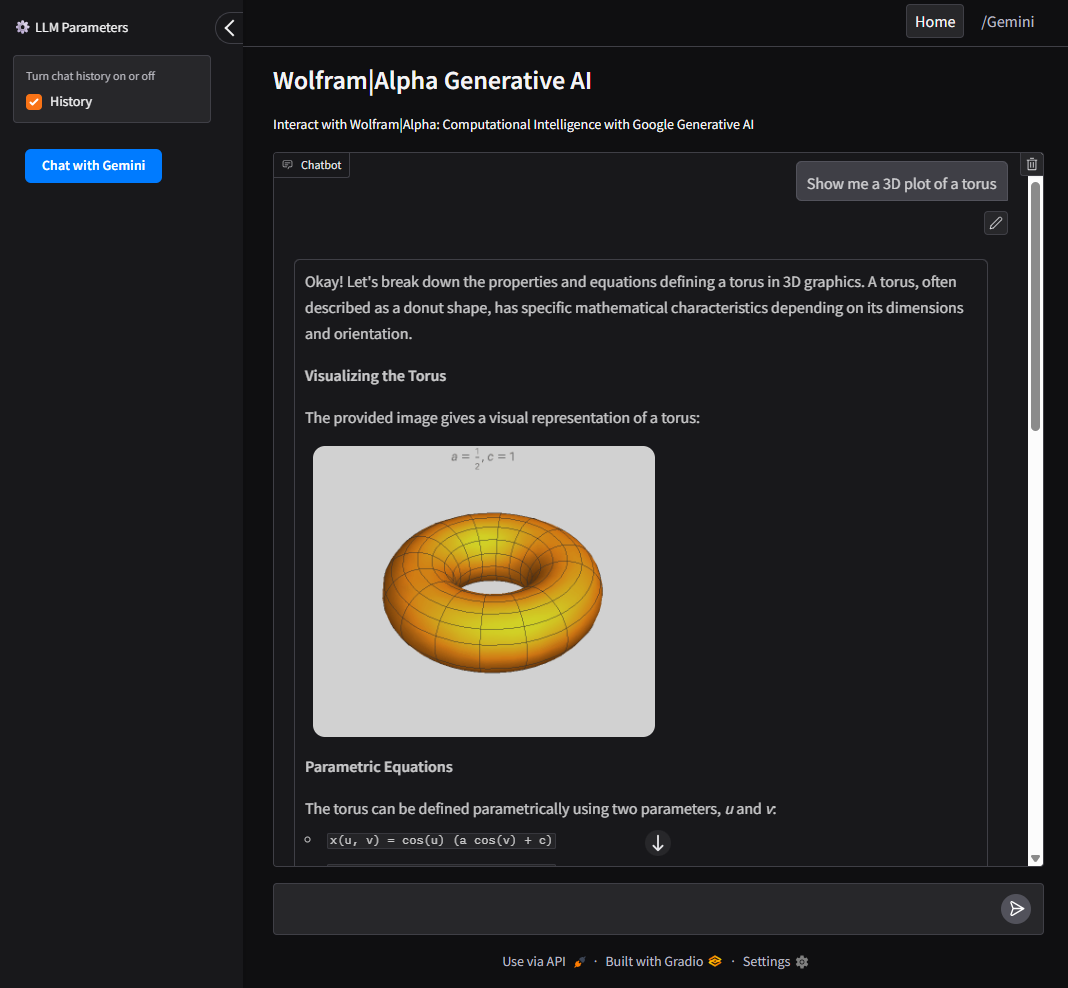
UI
- Intuitive interface built with Gradio to interact with both Google AI (Gemini) and the Wolfram Alpha MCP server.
- Allows users to switch between Wolfram Alpha, Google AI (Gemini), and query history.
Run as CLI Tool
- Required: GeminiAPI - To run the client directly from the command line:python main.py
Docker
To build and run the client inside a Docker container:docker build -t wolframalpha -f .devops/llm.Dockerfile .
docker run -it wolframalpha
Contact
Feel free to give feedback. The e-mail address is shown if you execute this in a shell:
printf "\x61\x6b\x61\x6c\x61\x72\x69\x63\x31\x40\x6f\x75\x74\x6c\x6f\x6f\x6b\x2e\x63\x6f\x6d\x0a"
Sign in to leave a review
Use Google, GitHub, or an email account so ratings stay tied to real people.
No reviews posted yet.





