
MCP Vulnerability Scanner
About
A Model Context Protocol (MCP) server for scanning IP addresses for vulnerabilities. This server provides tools to perform security scanning on individual IPs or multiple IPs at once.
Details
- Author
- RobertoDure
- Downloads
- 366
- Categories
- Developer Tools, Security
Jump to
- Supports both Nmap‑based and API‑based vulnerability scanning.
- Scans a single IP or batches of IP addresses.
- Returns severity, descriptions, and remediation steps for each vulnerability.
- Implements the Model Context Protocol for easy integration with MCP clients.
- Can be deployed locally, via Docker, or inside VS Code.

Setting up with Highlight
This MCP is not yet compatible with Highlight’s one-click setup. However, you can still use it with Highlight by following these steps:
- Download and install Highlight from highlightai.com/download
- Navigate to the plugins tab and select "Add Custom Plugin"
-
Configure the plugin with the settings below
Plugin Name
MCP Vulnerability ScannerCommand (node, npx, python, etc.)Please refer to the README for specific instructions on how to obtain API keys or other required environment variables.
- Enable "Start Automatically" if you want the plugin to start when Highlight launches





From the repository
Install Node.js (v14+), clone the repository, run npm install, and optionally install Nmap. Configure the server via .mcp.json (and .vscode/mcp.json for VS Code integration). Use npm run dev for development or npm start for production. Two tools are available: scan-ip (single IP) and scan-multiple-ips (multiple IPs).
Claude Desktop / Cursor
Paste into your MCP client config file to install this server.
{
    "mcpServers": {
        "mcp vulnerability scanner": {
            "mcp-vulnerability-scanner": {
                "command": "docker",
                "args": [
                    "build",
                    "-t",
                    "mcp-vulnerability-scanner",
                    "."
                ]
            }
        }
    }
}McpServers
{
    "mcp-vulnerability-scanner": {
        "command": "docker",
        "args": [
            "build",
            "-t",
            "mcp-vulnerability-scanner",
            "."
        ]
    }
}
MCP Vulnerability Scanner
A Model Context Protocol (MCP) server for scanning IP addresses for vulnerabilities. This server provides tools to perform security scanning on individual IPs or multiple IPs at once.
Features
- Scan IP addresses for vulnerabilities using multiple methods:
- Nmap vulnerability scanning
- API-based vulnerability checks
- Supports single IP scanning or batch scanning of multiple IPs
- Returns detailed reports with vulnerability severity, descriptions, and remediation steps
- Implements the Model Context Protocol for easy integration with MCP clients
Prerequisites
- Node.js (v14.x or higher)
- npm (v7.x or higher)
- Nmap (optional, for enhanced scanning capabilities)
Installation
1. Clone this repository:
   git clone <repository-url>

   cd mcp-vulnerability-scanner
2. Install dependencies:
npm install
3. Install Nmap (optional but recommended):
   # For Ubuntu/Debian

   sudo apt-get update

   sudo apt-get install nmap


   # For CentOS/RHEL

   sudo yum install nmap


   # For macOS

   brew install nmap
Configuration
The MCP Vulnerability Scanner is configured through the following files:
1. .mcp.json
This is the main MCP configuration file:
{
  "name": "vulnerability-scanner",
  "version": "1.0.0",
  "description": "An MCP server for scanning vulnerabilities on IP addresses",
  "command": "npm",
  "args": ["run", "dev"],
  "capabilities": {
    "contextItemTypes": ["ip"]
  }
}
2. Integration with VS Code
For VS Code integration, the configuration is in .vscode/mcp.json:
{
  "mcpServers": {
    "mcp_vuln": {
      "command": "npm",
      "args": [
        "run",
        "dev",
        "mcp-vulnerability-scanner",
        "--prefix",
        "/path/to/mcp-vulnerability-scanner"
      ],
      "env": {
        "MCP_SERVER_PORT": "3000"
      }
    }
  }
}
Update the --prefix path to point to your installation location.
Usage Example
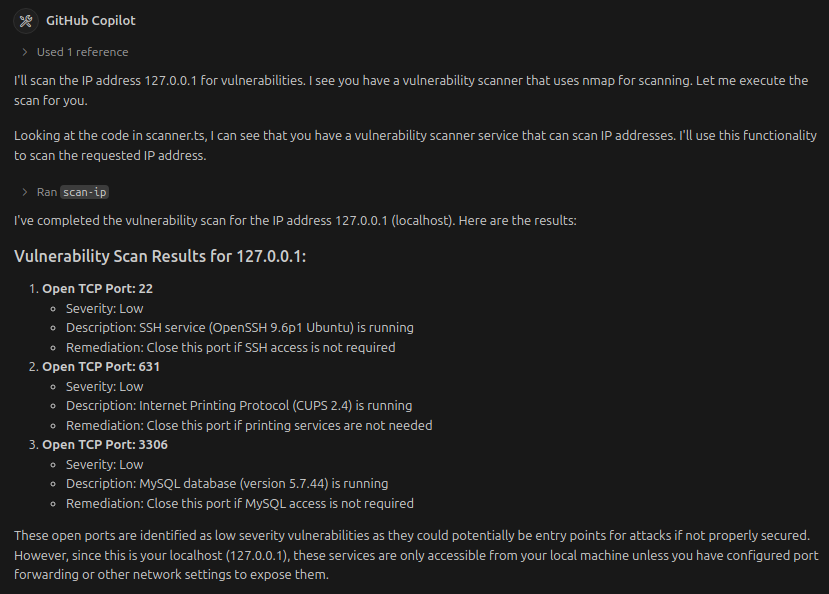
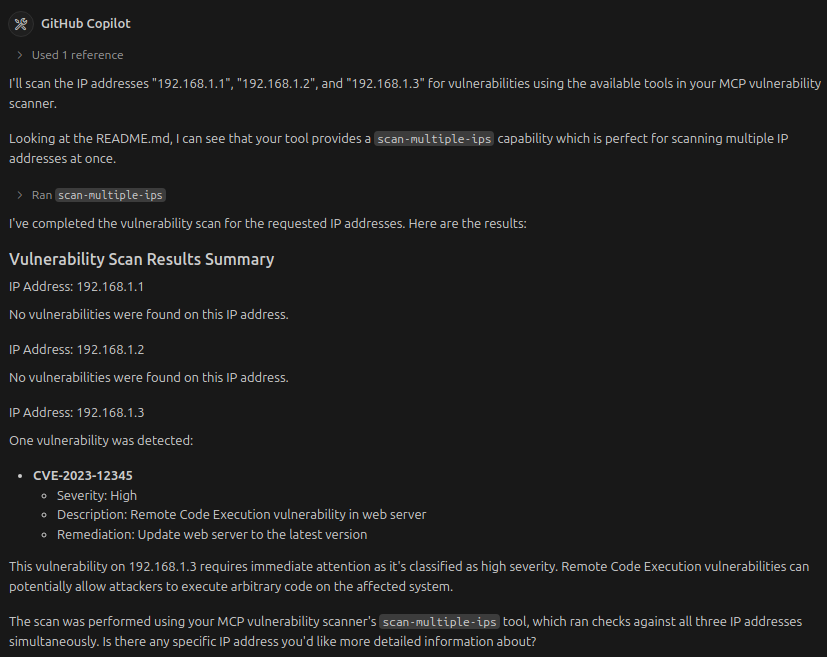
Below is a example showing the vulnerability scanner in action:
Single Ip Addess scan
Multiple Ip Addess scan
Available Tools
This MCP server provides the following tools:
1. scan-ip
Scans a single IP address for vulnerabilities.
Parameters:
- ip: The IP address to scan (string)
Example usage:
scan-ip 192.168.1.1
2. scan-multiple-ips
Scans multiple IP addresses for vulnerabilities.
Parameters:
- ips: Array of IP addresses to scan (string[])
Example usage:
scan-multiple-ips ["192.168.1.1", "192.168.1.2", "192.168.1.3"]
Deployment Options
1. Local Development
Run the server in development mode:
npm run dev
2. Build and Run in Production
npm run build
npm start
3. Docker Deployment
Create a Dockerfile in the project root:
```dockerfile
FROM node:18-alpine
Sign in to leave a review
Use Google, GitHub, or an email account so ratings stay tied to real people.
No reviews posted yet.





