
MCP Yahoo Finance Server and UI
About
The MCP Yahoo Finance Server is a tool that fetches real-time stock data, company information, and historical price data using the Yahoo Finance API. It integrates with the Multi-Client Protocol (MCP) framework and includes a web-based UI built with FastAPI and DaisyUI…
Details
- Author
- quartermaine
- Downloads
- 212
- Categories
- Finance
Jump to
- Fetches current stock prices for any stock symbol.
- Retrieves detailed company information (sector, industry, market cap).
- Gets historical stock price data for a date range.
- Built on the MCP framework for easy client integration.
- Powered by Azure OpenAI for natural language query processing.
- Includes a web UI using FastAPI and DaisyUI components.

Setting up with Highlight
This MCP is not yet compatible with Highlight’s one-click setup. However, you can still use it with Highlight by following these steps:
- Download and install Highlight from highlightai.com/download
- Navigate to the plugins tab and select "Add Custom Plugin"
-
Configure the plugin with the settings below
Plugin Name
MCP Yahoo Finance Server and UICommand (node, npx, python, etc.)Please refer to the README for specific instructions on how to obtain API keys or other required environment variables.
- Enable "Start Automatically" if you want the plugin to start when Highlight launches





From the repository
Install the server by cloning the repository, creating a Python virtual environment with uv, and installing dependencies. Run the server with uv run yahoo_finance.py and start the UI with uvicorn main:app --reload. Alternatively, build and run a Docker image using the provided Dockerfile. Configure Azure OpenAI parameters in a .env file for natural language query processing. The server can also be integrated with GitHub Copilot via a .vscode/mcp.json file.
Claude Desktop / Cursor
Paste into your MCP client config file to install this server.
{
    "mcpServers": {
        "mcp yahoo finance server and ui": {
            "mcp-server-yahoo-finance-quartermaine": {
                "command": "pipx",
                "args": [
                    "ensurepath"
                ]
            }
        }
    }
}McpServers
{
    "mcp-server-yahoo-finance-quartermaine": {
        "command": "pipx",
        "args": [
            "ensurepath"
        ]
    }
}
MCP Yahoo Finance Server and UI
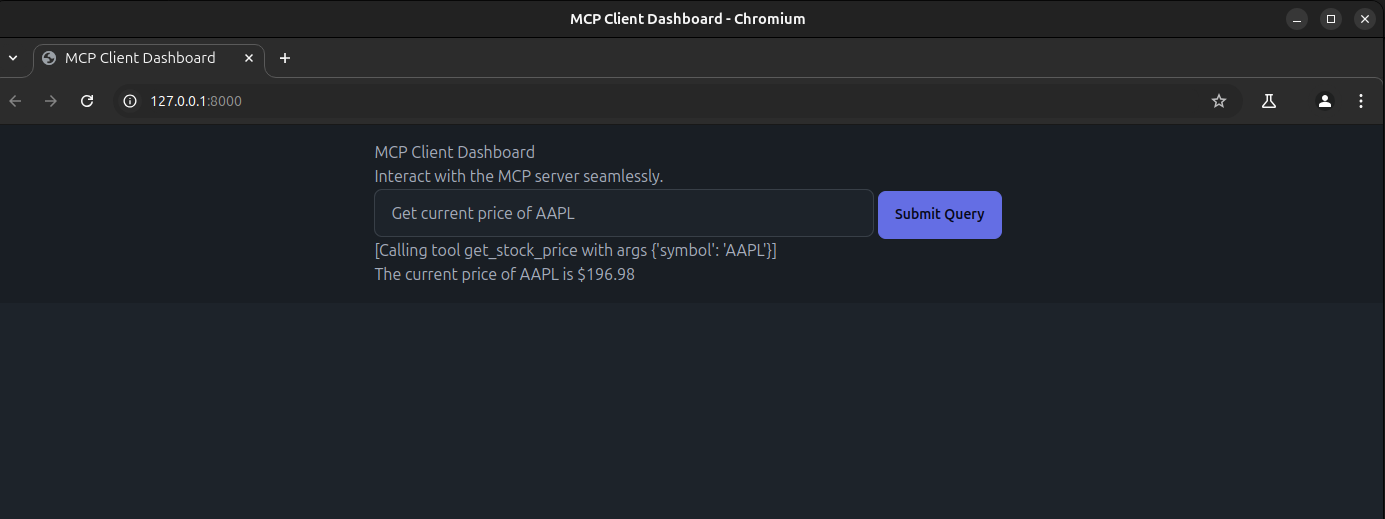
The MCP Yahoo Finance Server is a tool designed to fetch real-time stock data, company information, and historical price data using the Yahoo Finance API. It integrates with the Multi-Client Protocol (MCP) framework to provide seamless communication between clients and the server.
The project also includes a web-based UI built using FastAPI and DaisyUI components , enabling users to interact with the server through an intuitive interface
Before proceeding, ensure you have cloned the repository:
git clone https://github.com/quartermaine/mcp-server-yahoo-finance.git
cd <repository-directory>
Table of Contents
1. Features 2. Installation 3. Docker Setup 3. Usage 4. Environment Configuration 5. Integrating with GitHub Copilot 5. Examples 6. TODOFeatures
- Fetch current stock prices for any given stock symbol. - Retrieve detailed company information (e.g., sector, industry, market cap). - Get historical stock price data for a specific date range. - Built on the MCP framework for easy integration with clients. - Powered by Azure OpenAI for natural language query processing. - ncludes a web-based UI built using FastAPI and DaisyUI components for a user-friendly experienceInstallation
Prerequisites
Before you begin, ensure you have the following tools installed: 1. pipx: A tool to install Python applications in isolated environments. 2. uv: A fast Python package and environment manager.Steps to Install
1. Install pipx
Update your package list and install pipx:sudo apt update
sudo apt install pipx
pipx ensurepath
2. Install uv
Install uv using the official installation script:wget -qO- https://astral.sh/uv/install.sh | sh
source $HOME/.local/bin/env
3. Create a Project and Environment
Create a new project directory:mkdir mcp-client
cd mcp-client
Create a virtual environment using uv:
uv venv
Activate the virtual environment:
source .venv/bin/activate
Install required dependencies:
uv add fastapi jinja2 uvicorn mcp anthropic python-dotenv openai yfinance
Docker Setup
To build and run the application using Docker, follow these steps:
1. Build the Docker Image:
Use the docker build command to create a Docker image. Replace <tag_name> with a name of your choice (e.g., mcp-finance):
docker build -t <tag_name> .
docker build -t mcp-finance .
2. Run the Docker Container :
Use the docker run command to start the container. Map port 8000 on your host machine to port 8000 in the container:
docker run -p 8000:8000 <tag_name>
docker run -p 8000:8000 mcp-finance
3. Access the UI :
After running the container, navigate to the URL printed in the terminal logs (e.g., http://0.0.0.0:8000) to access the web-based
Usage
Running the Server
To run the Yahoo Finance MCP server, execute the following command in one terminal with the activated environment:
uv run yahoo_finance.py
Running the UI
In another terminal with the activated environment, start the FastAPI app (UI) using Uvicorn:uvicorn main:app --reload
After running this command, Uvicorn will print a log message with the URL where the app is running, typically:
INFO: Uvicorn running on http://127.0.0.1:8000 (Press CTRL+C to quit)
Open the provided link (http://127.0.0.1:8000) in your browser to access the UI built with DaisyUI components
Environment Configuration
This project uses Azure OpenAI as the Language Model (LLM) provider. To configure the necessary parameters, follow these steps:
1. Create a .env File:
Copy the .env.example file to create a .env file:
cp .env.example .env
2. Set Azure OpenAI Parameters:
Open the .env file and set the following environment variables:
   AZURE_OPEN_AI_API_VERSION=<your_api_version>

   AZURE_OPEN_AI_ENDPOINT=<your_endpoint>

   AZURE_OPEN_AI_API_KEY=<your_api_key>

   AZURE_OPEN_AI_DEPLOYMENT_MODEL=<your_deployment_model>
Replace <your_api_version>, <your_endpoint>, <your_api_key>, and <your_deployment_model> with your actual Azure OpenAI credentials.
3. Verify the .env File:
Ensure the .env file is correctly formatted and contains all required parameters. Example:
   AZURE_OPEN_AI_API_VERSION=2023-05-15

   AZURE_OPEN_AI_ENDPOINT=https://<your-resource-name>.openai.azure.com/

   AZURE_OPEN_AI_API_KEY=12345abcdef67890ghijklmnopqrstuvwxyz

   AZURE_OPEN_AI_DEPLOYMENT_MODEL=gpt-4
4. Load Environment Variables:
The python-dotenv library automatically loads the .env file when running the server or client. Ensure the .env file is located in the root directory of your project.
Integrating with Github Copilot
To integrate the MCP Yahoo Finance Server with GitHub Copilot in Visual Studio Code, follow these steps:
1. Create a start-mcp.sh script
Create a shell script named start-mcp.sh to activate the virtual environment and start the server. Add the following content to the file:
```bash
#!/bin/bash
Sign in to leave a review
Use Google, GitHub, or an email account so ratings stay tied to real people.
No reviews posted yet.



