
MCP Server Rememberizer
About
Interact with Rememberizer's document and knowledge management API to search, retrieve, and manage documents.
Details
- Author
- skydeckai
- GitHub stars
- 35
- Downloads
- 174
- Categories
- Productivity, Knowledge Base, Other
Jump to
- Retrieve semantically similar internal knowledge chunks
- Smart search across multiple document sources
- List integrated knowledge systems (Slack, Gmail, Dropbox, etc.)
- View account holder name and email
- Paginated list of all personal/team documents
- Save text snippets for future retrieval

Setting up with Highlight
This MCP is not yet compatible with Highlight’s one-click setup. However, you can still use it with Highlight by following these steps:
- Download and install Highlight from highlightai.com/download
- Navigate to the plugins tab and select "Add Custom Plugin"
-
Configure the plugin with the settings below
Plugin Name
MCP Server RememberizerCommand (node, npx, python, etc.)Please refer to the README for specific instructions on how to obtain API keys or other required environment variables.
- Enable "Start Automatically" if you want the plugin to start when Highlight launches





From the repository
Install via uvx mcp-server-rememberizer and set the REMEMBERIZER_API_TOKEN environment variable. Configure with Claude Desktop by adding the server entry to claude_desktop_config.json or use the MseeP AI Helper app to install and configure the token.
Claude Desktop / Cursor
Paste into your MCP client config file to install this server.
{
    "mcpServers": {
        "mcp server rememberizer": {
            "mcp-server-rememberizer": {
                "command": "uvx",
                "args": [
                    "mcp-server-rememberizer"
                ]
            }
        }
    }
}McpServers
{
    "mcp-server-rememberizer": {
        "command": "uvx",
        "args": [
            "mcp-server-rememberizer"
        ]
    }
}
MCP Server Rememberizer

A Model Context Protocol server for interacting with Rememberizer's document and knowledge management API. This server enables Large Language Models to search, retrieve, and manage documents and integrations through Rememberizer.
Please note that mcp-server-rememberizer is currently in development and the functionality may be subject to change.
Components
Resources
The server provides access to two types of resources: Documents or Slack discussions
Tools
1. retrieve_semantically_similar_internal_knowledge
- Send a block of text and retrieve cosine similar matches from your connected Rememberizer personal/team internal knowledge and memory repository
- Input:
- match_this (string): Up to a 400-word sentence for which you wish to find semantically similar chunks of knowledge
- n_results (integer, optional): Number of semantically similar chunks of text to return. Use 'n_results=3' for up to 5, and 'n_results=10' for more information
- from_datetime_ISO8601 (string, optional): Start date in ISO 8601 format with timezone (e.g., 2023-01-01T00:00:00Z). Use this to filter results from a specific date
- to_datetime_ISO8601 (string, optional): End date in ISO 8601 format with timezone (e.g., 2024-01-01T00:00:00Z). Use this to filter results until a specific date
- Returns: Search results as text output
2. smart_search_internal_knowledge
- Search for documents in Rememberizer in its personal/team internal knowledge and memory repository using a simple query that returns the results of an agentic search. The search may include sources such as Slack discussions, Gmail, Dropbox documents, Google Drive documents, and uploaded files
- Input:
- query (string): Up to a 400-word sentence for which you wish to find semantically similar chunks of knowledge
- user_context (string, optional): The additional context for the query. You might need to summarize the conversation up to this point for better context-awared results
- n_results (integer, optional): Number of semantically similar chunks of text to return. Use 'n_results=3' for up to 5, and 'n_results=10' for more information
- from_datetime_ISO8601 (string, optional): Start date in ISO 8601 format with timezone (e.g., 2023-01-01T00:00:00Z). Use this to filter results from a specific date
- to_datetime_ISO8601 (string, optional): End date in ISO 8601 format with timezone (e.g., 2024-01-01T00:00:00Z). Use this to filter results until a specific date
- Returns: Search results as text output
3. list_internal_knowledge_systems
- List the sources of personal/team internal knowledge. These may include Slack discussions, Gmail, Dropbox documents, Google Drive documents, and uploaded files
- Input: None required
- Returns: List of available integrations
4. rememberizer_account_information
- Get information about your Rememberizer.ai personal/team knowledge repository account. This includes account holder name and email address
- Input: None required
- Returns: Account information details
5. list_personal_team_knowledge_documents
- Retrieves a paginated list of all documents in your personal/team knowledge system. Sources could include Slack discussions, Gmail, Dropbox documents, Google Drive documents, and uploaded files
- Input:
- page (integer, optional): Page number for pagination, starts at 1 (default: 1)
- page_size (integer, optional): Number of documents per page, range 1-1000 (default: 100)
- Returns: List of documents
6. remember_this
- Save a piece of text information in your Rememberizer.ai knowledge system so that it may be recalled in future through tools retrieve_semantically_similar_internal_knowledge or smart_search_internal_knowledge
- Input:
- name (string): Name of the information. This is used to identify the information in the future
- content (string): The information you wish to memorize
- Returns: Confirmation data
Installation
Manual Installation
uvx mcp-server-rememberizer
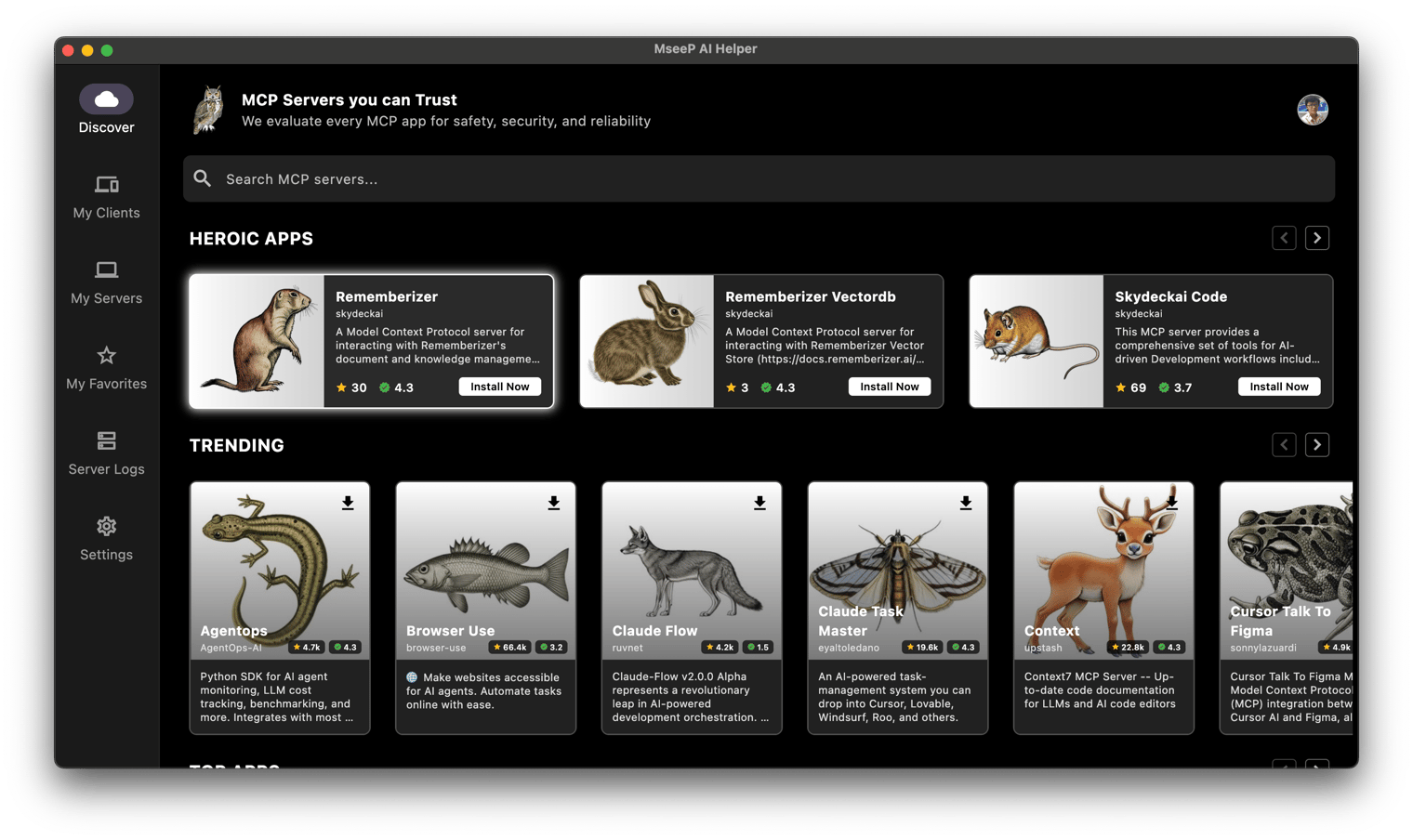
Via MseeP AI Helper App
If you have MseeP AI Helper app installed, you can search for "Rememberizer" and install the mcp-server-rememberizer.
Configuration
Environment Variables
The following environment variables are required:
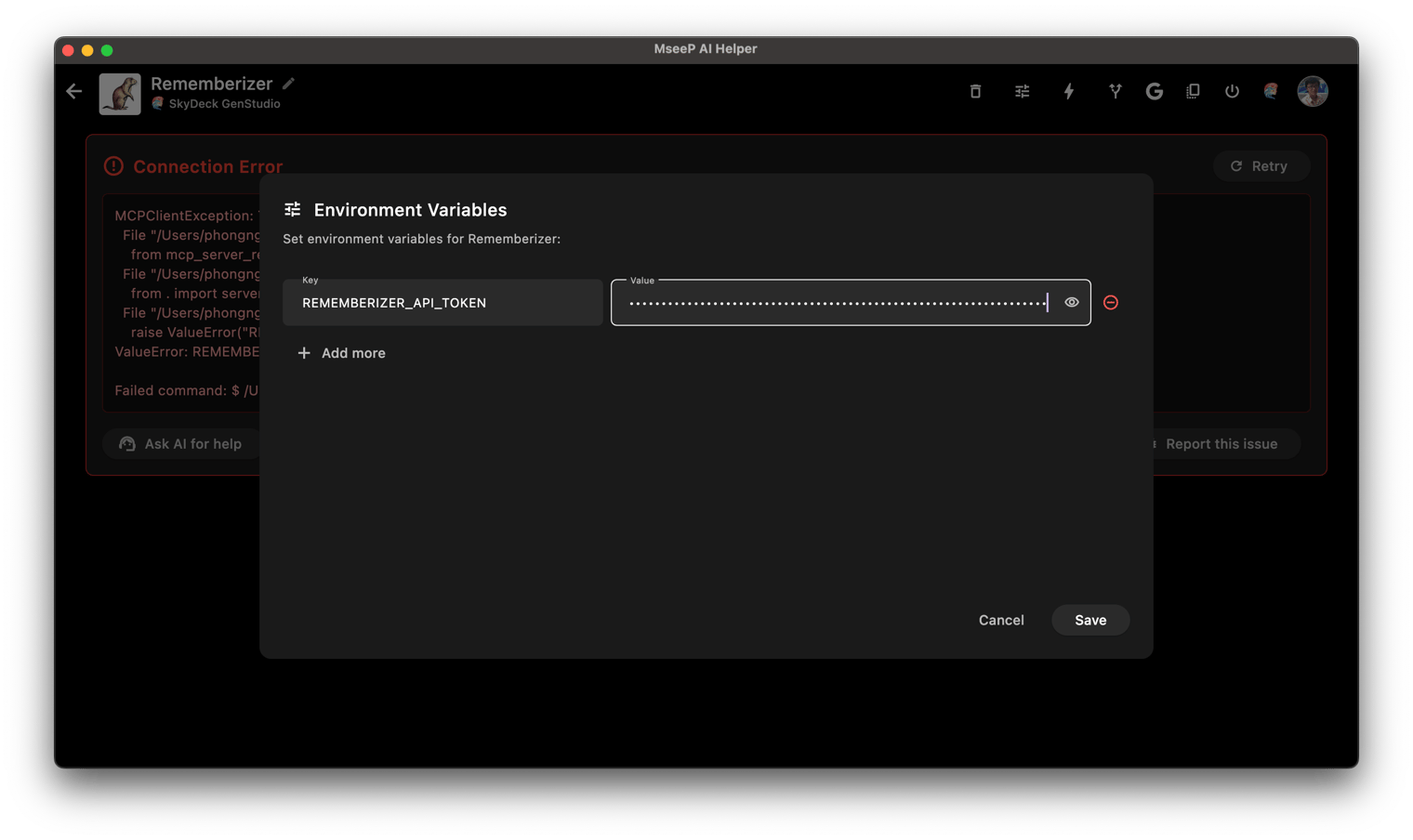
- REMEMBERIZER_API_TOKEN: Your Rememberizer API token
You can register an API key by creating your own Common Knowledge in Rememberizer.
Usage with Claude Desktop
Add this to your claude_desktop_config.json:
"mcpServers": {
  "rememberizer": {
      "command": "uvx",
      "args": ["mcp-server-rememberizer"],
      "env": {
        "REMEMBERIZER_API_TOKEN": "your_rememberizer_api_token"
      }
    },
}
Usage with MseeP AI Helper App
Add the env REMEMBERIZER_API_TOKEN to mcp-server-rememberizer.
With support from the Rememberizer MCP server, you can now ask the following questions in your Claude Desktop app or SkyDeck AI GenStudio
- _What is my Rememberizer account?_
- _List all documents that I have there._
- _Give me a quick summary about "..."_
- and so on...
To learn more about Rememberizer MCP Server: https://docs.rememberizer.ai/personal-use/integrations/rememberizer-mcp-servers
License
This project is licensed under the Apache License 2.0 - see the LICENSE file for details.
Sign in to leave a review
Use Google, GitHub, or an email account so ratings stay tied to real people.
No reviews posted yet.





