
Hedera MCP Server
Description
# Hedera MCP Server This project provides a server that integrates with a Langchain wrapper to interact with the Hedera network. It allows users to perform Hedera operations through natural language commands facilitated by the Langchain setup. ## ⚠️ Attention Since the current…
About
# Hedera MCP Server This project provides a server that integrates with a Langchain wrapper to interact with the Hedera network. It allows users to perform Hedera operations through natural language commands facilitated by the Langchain setup. ## ⚠️ Attention Since the current version on the `master` branch was moved…
Details
- Author
- hedera-dev
- Downloads
- 130
- Categories
- Other
Jump to
- Natural language interaction with the Hedera network
- Integrates with Langchain wrapper for request interpretation
- SSE transport with token-based authentication
- Supports creating tokens, transferring HBAR, smart contracts
Clone the repository, copy .env.example into .env in both packages/langchain-proxy and packages/mcp-server, fill in required keys and tokens, install dependencies with pnpm install, then start the Langchain Proxy with pnpm run dev:lc and the MCP server with pnpm run dev:mcp. Configure your MCP client with the SSE endpoint and X-MCP-AUTH-TOKEN header.
Hedera MCP Server
This project provides a server that integrates with a Langchain wrapper to interact with the Hedera network. It allows users to perform Hedera operations through natural language commands facilitated by the Langchain setup.
⚠️ Attention
Since the current version on themaster branch was moved from another repository, it temporarily includes the hedera-agent-kit package, which hasn't been officially released yet. Therefore, it is included as a dependency pulled from GitHub.
Prerequisites
Before you begin, ensure you have the following installed:
- Node.js (20 or later recommended)
- pnpm (npm install -g pnpm)
- Git
Quickstart
The whole thing consists of two services that we need to run.1. Clone the repository:
    git clone https://github.com/mateuszm-arianelabs/hedera-mcp-server.git

    cd hedera-mcp-server
2. Set up environment variables in packages:
- You need to copy the .env.example file and create .env from it in two locations:
- packages/langchain-proxy
- packages/mcp-server
Edit the .env file and fill in the required configuration values (e.g., Hedera keys, network details).
API_URL=                  # url to langchain proxy endpoint

PORT=                     # port on which MCP server will be started

MCP_AUTH_TOKEN=           # array of accepted tokens separated by comas

LANGCHAIN_PROXY_TOKEN=    # token for accessing the Langchain proxy
3. Install dependencies:
pnpm install
4. Start Lang chain Proxy Service
pnpm run dev:lc
(Or
pnpm start for production mode, if configured).5. Run the mcp server:
pnpm run dev:mcp
(Or
pnpm start for production mode, if configured).
Available Tools
- Interact with Hedera: This core functionality enables the server to make calls to the running Langchain wrapper service. The wrapper then interprets these requests and performs the corresponding actions on the Hedera network (e.g., creating tokens, transferring HBAR, interacting with smart contracts).
Configuration for Visual Studio Code
To establish a connection with an MCP server, theX-MCP-AUTH-TOKEN header is required.
Below is an example .vscode/settings.json configuration for Visual Studio Code:
{
    "mcp": {
        "inputs": [],
        "servers": {
            "hedera": {
                "type": "sse",
                "url": "http://localhost:3000/sse",
                "headers": { "X-MCP-AUTH-TOKEN": "your-mcp-auth-token"}
            }
        }
    }
}
Note: Currently, passing additional headers (such as X-MCP-AUTH-TOKEN) is not supported in Cursor IDE.
Source: Cursor Forum
However, MCP integration is evolving rapidly, and support for custom headers is expected to be added in future versions of Cursor and other MCP Client Tools.
Potential Transition to OAuth
As of March 2025, the official MCP OAuth specification has been published, but it still has several limitations and implementation challenges. A revision of the approach is likely (source).
In preparation for future OAuth integration, here are some example repositories that showcase MCP + OAuth setups:
- Cloudflare MCP + Auth0
- Cloudflare MCP + GitHub OAuth
- Geelen’s MCP Remote Example
These can be used as references when considering OAuth-based authentication for MCP servers in future development phases.
Simplified Architecture
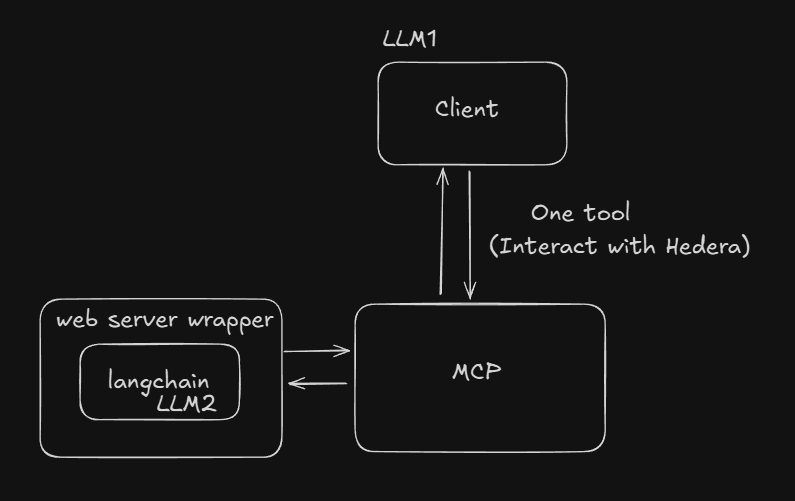
API Documentation (langchain-proxy)
GET /sse
Establishes a Server-Sent Events (SSE) connection with the MCP server.
Request
GET /sse
X-MCP-AUTH-TOKEN: example-token
| Header | Type | Description |
|------------|------|---------------------------------------------------------------------------------------------------------------|
| X-MCP-AUTH-TOKEN | string | Required authentication token that must match one of the tokens in servers env file (MCP_AUTH_TOKEN variable) |
Response
On successful authentication, establishes an SSE connection with content type text/event-stream.
Status Codes
200 OK: Connection established successfully
401 Unauthorized: Invalid or missing authentication token
Error response
{

      "content": [

        {

          "type": "text",

          "content": "Unauthorized: Invalid or missing X-MCP-AUTH-TOKEN header"

        }

      ]

    }
Sign in to leave a review
Use Google, GitHub, or an email account so ratings stay tied to real people.
No reviews posted yet.





