
DEVONthink
Description
# Devonthink MCP Server This MCP server provides access to DEVONthink functionality via the Model Context Protocol (MCP). It enables listing, searching, creating, modifying, and managing records and databases in DEVONthink Pro on macOS.  ##…
About
# Devonthink MCP Server This MCP server provides access to DEVONthink functionality via the Model Context Protocol (MCP). It enables listing, searching, creating, modifying, and managing records and databases in DEVONthink Pro on macOS.  ## Features - Exposes a comprehensive set of…
Details
- Author
- dvcrn
- Downloads
- 501
- Categories
- Other, Automation
Jump to
- List, search, and look up records by various attributes
- Create, delete, move, and rename records and groups
- Retrieve and modify record content, properties, and tags
- Create records from URLs in multiple formats
- List open databases and group contents
- All tools are type-safe and validated with Zod schemas

Setting up with Highlight
This MCP is not yet compatible with Highlight’s one-click setup. However, you can still use it with Highlight by following these steps:
- Download and install Highlight from highlightai.com/download
- Navigate to the plugins tab and select "Add Custom Plugin"
-
Configure the plugin with the settings below
Plugin Name
DEVONthinkCommand (node, npx, python, etc.)Please refer to the README for specific instructions on how to obtain API keys or other required environment variables.
- Enable "Start Automatically" if you want the plugin to start when Highlight launches





From the repository
Add the server to your Claude configuration using npx -y mcp-server-devonthink. Once configured, the server exposes 16 tools that can be invoked through any MCP client to interact with DEVONthink databases and records.
is_running
Check if the DEVONthink application is currently running. Example: {}
create_record
Create a new record in DEVONthink. Example: { "name": "New Note", "type": "markdown", "content": "# Hello World" }
import_file
Import an existing file or folder from a POSIX path or file URL into DEVONthink. Defaults to the global Inbox when no destination is provided. Example: { "filePath": "/Users/david/Documents/report.pdf" }
delete_record
Delete a record from DEVONthink. Example: { "uuid": "1234-5678-90AB-CDEF" }
move_record
Move a record to a different group in DEVONthink. Example: { "uuid": "1234-5678-90AB-CDEF", "destinationGroupUuid": "FEDC-BA09-8765-4321" }
get_record_properties
Get detailed properties and metadata for a DEVONthink record. Example: { "uuid": "1234-5678-90AB-CDEF" }
get_record_by_identifier
Get a DEVONthink record using its UUID, ID, or x-devonthink-item:// reference URL. Example (Reference URL): { "referenceURL": "x-devonthink-item://1234-5678-90AB-CDEF" } Example (Reference URL - email): { "referenceURL": "x-devonthink-item://message:%3Cfoo@bar.com%3E" } Example (UUID): { "uuid": "1234-5678-90AB-CDEF" } Example (ID): { "id": 12345, "databaseName": "MyDatabase" }
search
Search DEVONthink records. Examples: {"query": "invoice"} or {"query": "project review", "groupPath": "/Meetings", "databaseName": "MyDB"}. Note: groupPath requires databaseName and must be database-relative (e.g., "/Meetings" not "/MyDB/Meetings").
lookup_record
Look up records in DEVONthink by a specific attribute. Example: { "lookupType": "filename", "value": "report.pdf" }
create_from_url
Create a record in DEVONthink from a web URL. Example: { "url": "https://www.example.com", "format": "markdown" }
get_open_databases
Get a list of all currently open databases in DEVONthink. Example: {}
current_database
Get information about the currently selected database in DEVONthink. Example: {}
selected_records
Get information about currently selected records in DEVONthink. Example: {}
list_group_content
Lists the content of a specific group in DEVONthink. Example: { "uuid": "1234-5678-90AB-CDEF" }
get_record_content
Gets the content of a specific record in DEVONthink. Example: { "uuid": "1234-5678-90AB-CDEF" }
rename_record
Renames a specific record in DEVONthink. Example: { "uuid": "1234-5678-90AB-CDEF", "newName": "New Record Name" }
add_tags
Adds tags to a DEVONthink record. Example: { "uuid": "1234-5678-90AB-CDEF", "tags": ["important", "work"] }
remove_tags
Removes tags from a specific record in DEVONthink. Example: { "uuid": "1234-5678-90AB-CDEF", "tags": ["old-tag"] }
classify
Get classification proposals for a DEVONthink record. Example: { "recordUuid": "1234-5678-90AB-CDEF" }
compare
Compare DEVONthink records for similarities. Example 1: Find similar records { "recordUuid": "1234-5678-90AB-CDEF" } Example 2: Compare two specific records { "recordUuid": "1234-5678-90AB-CDEF", "compareWithUuid": "FEDC-BA09-8765-4321" }
replicate_record
Replicate a record within the same database to a destination group. Example: { "uuid": "1234-5678-90AB-CDEF", "destinationGroupUuid": "FEDC-BA09-8765-4321" }
duplicate_record
Duplicate a record to any destination group, creating an independent copy. Example: { "uuid": "1234-5678-90AB-CDEF", "destinationGroupUuid": "FEDC-BA09-8765-4321" }
convert_record
Convert a record to a different format, creating a new record. Example: { "uuid": "1234-5678-90AB-CDEF", "format": "markdown" }
update_record_content
Updates the content of an existing record in DEVONthink. Example: { "uuid": "1234-5678-90AB-CDEF", "content": "# New Content" }
set_record_properties
Set properties on a DEVONthink record (comment, flag, locked, exclude* flags). Example: { "uuid": "1234-5678-90AB-CDEF", "comment": "Updated by tool", "flag": true, "locked": true, "excludeFromChat": true }
ask_ai_about_documents
Ask AI questions about specific DEVONthink documents for analysis, comparison, or extraction.
check_ai_health
Check if DEVONthink's AI services are available and working properly.
create_summary_document
Create an AI-generated summary document from multiple DEVONthink documents.
get_ai_tool_documentation
Get detailed documentation for DEVONthink AI tools including examples and use cases.
Claude Desktop / Cursor
Paste into your MCP client config file to install this server.
{
    "mcpServers": {
        "devonthink": {
            "devonthink": {
                "command": "npx",
                "args": [
                    "-y",
                    "mcp-server-devonthink"
                ]
            }
        }
    }
}McpServers
{
    "devonthink": {
        "command": "npx",
        "args": [
            "-y",
            "mcp-server-devonthink"
        ]
    }
}
Devonthink MCP Server
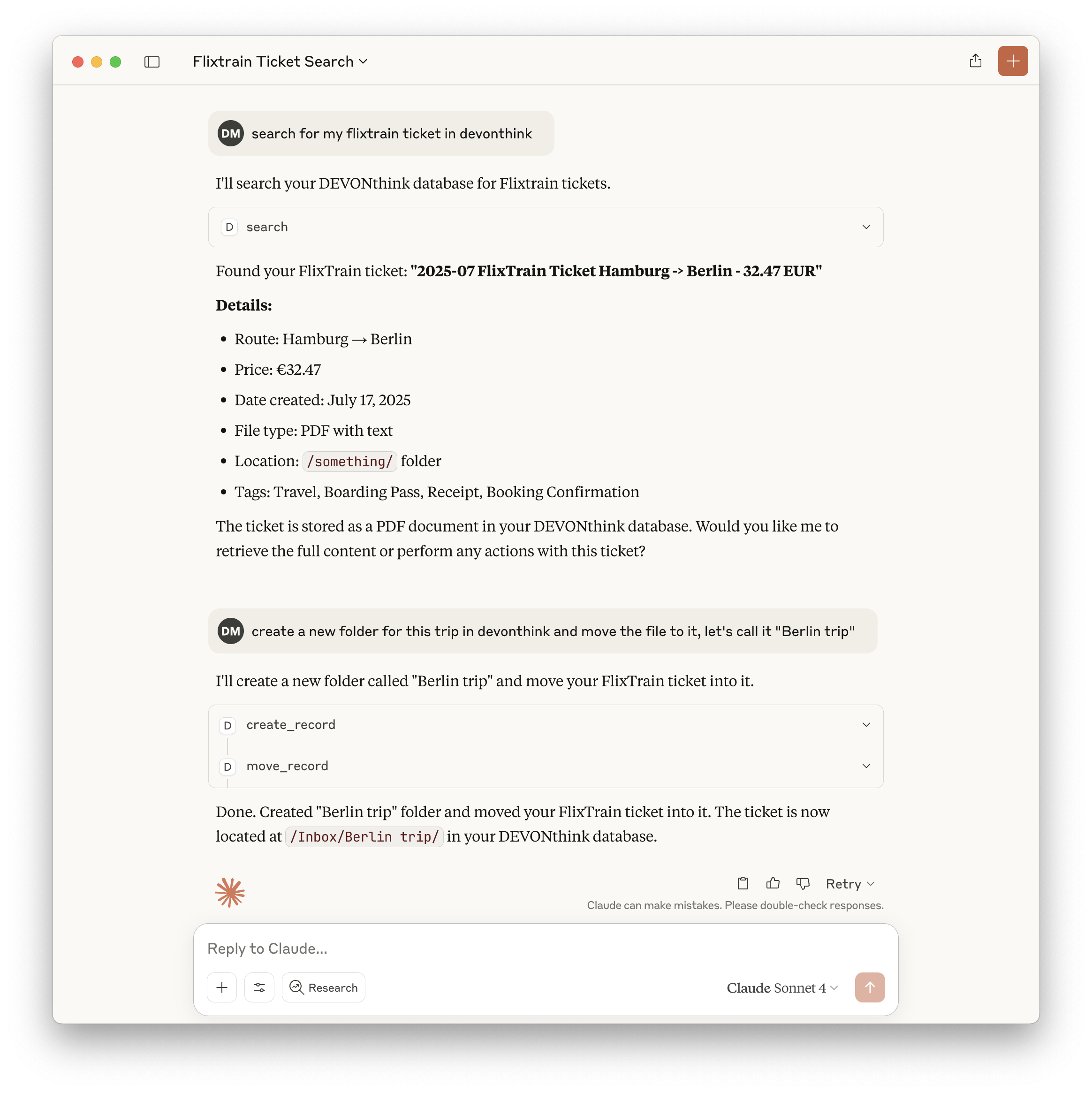
This MCP server provides access to DEVONthink functionality via the Model Context Protocol (MCP). It enables listing, searching, creating, modifying, and managing records and databases in DEVONthink Pro on macOS.
Features
- Exposes a comprehensive set of DEVONthink operations as MCP tools
- List, search, and look up records by various attributes
- Create, delete, move, and rename records and groups
- Retrieve and modify record content, properties, and tags
- Create records from URLs in multiple formats
- List open databases and group contents
- All tools are type-safe and validated with Zod schemas
Tools
Core Tools
1. is_running
- Checks if DEVONthink is currently running
- No input required
- Returns: { "success": true | false }
2. create_record
- Creates new records (notes, bookmarks, groups) with specified properties
- Input: record type, name, parent group, and optional metadata
3. delete_record
- Deletes records by ID, name, or path
- Input: record identifier
4. move_record
- Moves records between groups
- Input: record ID and destination group
5. get_record_properties
- Retrieves detailed metadata and properties for records
- Input: record identifier
6. search
- Performs text-based searches with various comparison options
- Input: query string and search options
7. lookup_record
- Looks up records by filename, path, URL, tags, comment, or content hash (exact matches only)
- Input: lookup type and value
8. create_from_url
- Creates records from web URLs in multiple formats
- Input: URL and format options
9. get_open_databases
- Lists all currently open databases
- No input required
10. list_group_content
- Lists the content of a specific group
- Input: group identifier
11. get_record_content
- Retrieves the content of a specific record
- Input: record identifier
12. rename_record
- Renames a specific record
- Input: record ID and new name
13. add_tags
- Adds tags to a specific record
- Input: record ID and tags
14. remove_tags
- Removes tags from a specific record
- Input: record ID and tags
15. classify
- Gets classification proposals for a record using DEVONthink's AI
- Input: record UUID, optional database name, comparison type, and tags option
- Returns: Array of classification proposals (groups or tags) with scores
16. compare
- Compares records to find similarities (hybrid approach)
- Input: primary record UUID, optional second record UUID, database name, and comparison type
- Returns: Either similar records (single mode) or detailed comparison analysis (two-record mode)
Example: Search Tool
{
  "query": "project plan",
  "comparison": "contains",
  "database": "Inbox"
}
Returns:
{
  "results": [
    { "id": "123", "name": "Project Plan", "path": "/Inbox/Project Plan.md" }
  ]
}
Usage with Claude
Add to your Claude configuration:
{
  "mcpServers": {
    "devonthink": {
      "command": "npx",
      "args": ["-y", "mcp-server-devonthink"]
    }
  }
}
Implementation Details
- Uses JXA (JavaScript for Automation) to control DEVONthink via AppleScript APIs
- All tool inputs are validated with Zod schemas for safety and clarity
- Returns structured JSON for all tool outputs
- Implements robust error handling for all operations
- Includes comprehensive tests using Vitest
See CLAUDE.md for full documentation, tool development guidelines, and API reference.
Sign in to leave a review
Use Google, GitHub, or an email account so ratings stay tied to real people.
No reviews posted yet.




