An MCP server for Azure DevOps, enabling AI assistants to interact with Azure DevOps APIs.
Details
Author
Tiberriver256
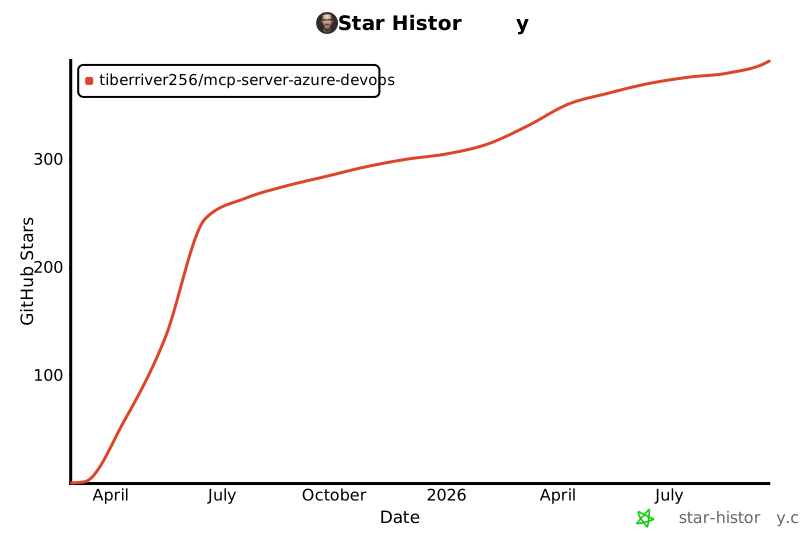
GitHub stars
377
Downloads
678
Categories
Developer Tools, Other, Infrastructure, Project Management, Cloud Service, AI
Jump to
- Manage projects, work items, repositories, pull requests, branches, and pipelines.
- Create and update work items, branches, pull requests, and commits.
- Search code, wiki pages, and work items across projects.
- Access repository content via standardized resource URIs.
- Three authentication methods: PAT, Azure Identity, and Azure CLI.
- Supports both Azure DevOps Services (cloud) and Azure DevOps Server (on-prem).
Setting up with Highlight
This MCP is not yet compatible with Highlight’s one-click setup. However, you can still use it with Highlight by following these steps:
Install via npx (npx -y @tiberriver256/mcp-server-azure-devops) or run from source. Configure authentication with a Personal Access Token (PAT), Azure Identity, or Azure CLI. Set the required environment variable AZURE_DEVOPS_ORG_URL (organization URL or Server collection URL) and, optionally, AZURE_DEVOPS_DEFAULT_PROJECT. Integrate with Claude Desktop or Cursor AI by adding a JSON configuration block in your MCP settings file.
get_me
Get details of the authenticated user (id, displayName, email)
list_organizations
List all Azure DevOps organizations accessible to the current authentication
list_projects
List all projects in an organization
get_project
Get details of a specific project
get_project_details
Get comprehensive details of a project including process, work item types, and teams
get_work_item
Get details of a specific work item
list_work_items
List work items in a project
create_work_item
Create a new work item
update_work_item
Update an existing work item
manage_work_item_link
Add or remove a link between work items
create_pipeline
Create a new pipeline in a project
delete_pipeline
Delete a pipeline from a project
list_pipelines
List pipelines in a project
get_pipeline
Get details of a specific pipeline
trigger_pipeline
Trigger a pipeline run
get_repository
Get details of a specific repository
get_repository_details
Get detailed information about a repository including statistics and refs
list_repositories
List repositories in a project
get_file_content
Get content of a file or directory from a repository
get_all_repositories_tree
Displays a hierarchical tree view of files and directories across multiple Azure DevOps repositories within a project, based on their default branches
search_code
Search for code across repositories in a project
search_wiki
Search for content across wiki pages in a project
search_work_items
Search for work items across projects in Azure DevOps
create_pull_request
Create a new pull request
list_pull_requests
List pull requests in a repository
get_wikis
Get details of wikis in a project
get_wiki_page
Get the content of a wiki page
create_wiki
Create a new wiki in the project
update_wiki_page
Update content of a wiki page
Claude Desktop / Cursor
Paste into your MCP client config file to install this server.
# Azure DevOps MCP Server
A Model Context Protocol (MCP) server implementation for Azure DevOps, allowing AI assistants to interact with Azure DevOps APIs through a standardized protocol.
> **Looking for the official server?** Microsoft maintains a product-supported Azure DevOps MCP at [microsoft/azure-devops-mcp](https://github.com/microsoft/azure-devops-mcp). If you use Azure DevOps Services (cloud), start there.
>
> This community server remains a good fit when you need **Azure DevOps Server (on-premises)** support — especially older versions that may not work with Microsoft's MCP — or features not yet available in the official server. See [Discussion #237](https://github.com/Tiberriver256/mcp-server-azure-devops/discussions/237) for more context.
## Overview
This server implements the [Model Context Protocol (MCP)](https://modelcontextprotocol.io/) for Azure DevOps, enabling AI assistants like Claude to interact with Azure DevOps resources securely. The server acts as a bridge between AI models and Azure DevOps APIs, providing a standardized way to:
- Access and manage projects, work items, repositories, and more
- Create and update work items, branches, and pull requests
- Execute common DevOps workflows through natural language
- Access repository content via standardized resource URIs
- Safely authenticate and interact with Azure DevOps resources
## Server Structure
The server is structured around the Model Context Protocol (MCP) for communicating with AI assistants. It provides tools for interacting with Azure DevOps resources including:
- Projects
- Work Items
- Repositories
- Pull Requests
- Branches
- Pipelines
### Core Components
- **AzureDevOpsServer**: Main server class that initializes the MCP server and registers tools
- **Feature Modules**: Organized by feature area (work-items, projects, repositories, etc.)
- **Request Handlers**: Each feature module provides request identification and handling functions
- **Tool Handlers**: Modular functions for each Azure DevOps operation
- **Configuration**: Environment-based configuration for organization URL, PAT, etc.
The server uses a feature-based architecture where each feature area (like work-items, projects, repositories) is encapsulated in its own module. This makes the codebase more maintainable and easier to extend with new features.
## Getting Started
### Prerequisites
- Node.js (v16+)
- npm or yarn
- Azure DevOps account with appropriate access
- Authentication credentials (see [Authentication Guide](https://github.com/tiberriver256/mcp-server-azure-devops/blob/main/docs/authentication.md) for details):
- Personal Access Token (PAT), or
- Azure Identity credentials, or
- Azure CLI login
### Running from npm (npx)
If you just want to run the **published** server package, you **do not** need to clone or build this repository:
```bash
npx -y @tiberriver256/mcp-server-azure-devops
```
### Running locally (from source)
From a checkout of this repository:
```bash
npm ci
cp .env.example .env # then edit values
npm run build
npm start # runs: node dist/index.js
```
For iterative development (auto-reload):
```bash
npm run dev # runs src/index.ts via ts-node-dev
```
### Usage with Claude Desktop/Cursor AI
To integrate with Claude Desktop or Cursor AI, add one of the following configurations to your configuration file.
#### Azure Identity Authentication
Be sure you are logged in to Azure CLI with `az login` then add the following:
```json
{
"mcpServers": {
"azureDevOps": {
"command": "npx",
"args": ["-y", "@tiberriver256/mcp-server-azure-devops"],
"env": {
"AZURE_DEVOPS_ORG_URL": "https://dev.azure.com/your-organization",
"AZURE_DEVOPS_AUTH_METHOD": "azure-identity",
"AZURE_DEVOPS_DEFAULT_PROJECT": "your-project-name"
}
}
}
}
```
#### Personal Access Token (PAT) Authentication
```json
{
"mcpServers": {
"azureDevOps": {
"command": "npx",
"args": ["-y", "@tiberriver256/mcp-server-azure-devops"],
"env": {
"AZURE_DEVOPS_ORG_URL": "https://dev.azure.com/your-organization",
"AZURE_DEVOPS_AUTH_METHOD": "pat",
"AZURE_DEVOPS_PAT": "<YOUR_PAT>",
"AZURE_DEVOPS_DEFAULT_PROJECT": "your-project-name"
}
}
}
}
```
Azure DevOps Server (on-prem) requires PAT authentication. Example:
```json
{
"mcpServers": {
"azureDevOps": {
"command": "npx",
"args": ["-y", "@tiberriver256/mcp-server-azure-devops"],
"env": {
"AZURE_DEVOPS_ORG_URL": "https://server:8080/tfs/DefaultCollection",
"AZURE_DEVOPS_AUTH_METHOD": "pat",
"AZURE_DEVOPS_PAT": "<YOUR_PAT>",
"AZURE_DEVOPS_DEFAULT_PROJECT": "your-project-name"
}
}
}
}
```
For detailed configuration instructions and more authentication options, see the [Authentication Guide](https://github.com/tiberriver256/mcp-server-azure-devops/blob/main/docs/authentication.md).
## Authentication Methods
This server supports multiple authentication methods for connecting to Azure DevOps APIs. For detailed setup instructions, configuration examples, and troubleshooting tips, see the [Authentication Guide](https://github.com/tiberriver256/mcp-server-azure-devops/blob/main/docs/authentication.md).
### Supported Authentication Methods
1. **Personal Access Token (PAT)** - Simple token-based authentication
2. **Azure Identity (DefaultAzureCredential)** - Flexible authentication using the Azure Identity SDK
3. **Azure CLI** - Authentication using your Azure CLI login
Example configuration files for each authentication method are available in the [examples directory](https://github.com/tiberriver256/mcp-server-azure-devops/tree/main/docs/examples).
Azure DevOps Server (on-prem) supports PAT authentication only. Azure Identity and Azure CLI are supported for Azure DevOps Services.
## Environment Variables
For a complete list of environment variables and their descriptions, see the [Authentication Guide](https://github.com/tiberriver256/mcp-server-azure-devops/blob/main/docs/authentication.md#configuration-reference).
Key environment variables include:
| Variable | Description | Required | Default |
| ------------------------------ | ---------------------------------------------------------------------------------- | ---------------------------- | ---------------- |
| `AZURE_DEVOPS_AUTH_METHOD` | Authentication method (`pat`, `azure-identity`, or `azure-cli`) - case-insensitive | No | `azure-identity` |
| `AZURE_DEVOPS_ORG_URL` | Full URL to your Azure DevOps organization or Server collection (e.g., `https://server:8080/tfs/DefaultCollection`) | Yes | - |
| `AZURE_DEVOPS_PAT` | Personal Access Token (for PAT auth) | Only with PAT auth | - |
| `AZURE_DEVOPS_DEFAULT_PROJECT` | Default project if none specified | No | - |
| `AZURE_DEVOPS_API_VERSION` | API version to use | No | Latest |
| `AZURE_TENANT_ID` | Azure AD tenant ID (for service principals) | Only with service principals | - |
| `AZURE_CLIENT_ID` | Azure AD application ID (for service principals) | Only with service principals | - |
| `AZURE_CLIENT_SECRET` | Azure AD client secret (for service principals) | Only with service principals | - |
| `LOG_LEVEL` | Logging level (debug, info, warn, error) | No | info |
## Troubleshooting Authentication
For detailed troubleshooting information for each authentication method, see the [Authentication Guide](https://github.com/tiberriver256/mcp-server-azure-devops/blob/main/docs/authentication.md#troubleshooting-authentication-issues).
Common issues include:
- Invalid or expired credentials
- Insufficient permissions
- Network connectivity problems
- Configuration errors
## Authentication Implementation Details
For technical details about how authentication is implemented in the Azure DevOps MCP server, see the [Authentication Guide](https://github.com/tiberriver256/mcp-server-azure-devops/blob/main/docs/authentication.md) and the source code in the `src/auth` directory.
## Available Tools
The Azure DevOps MCP server provides a variety of tools for interacting with Azure DevOps resources. For detailed documentation on each tool, please refer to the corresponding documentation.
### User Tools
- `get_me`: Get details of the authenticated user (id, displayName, email) (Azure DevOps Services only)
### Organization Tools
- `list_organizations`: List all accessible organizations (Azure DevOps Services only)
### Project Tools
- `list_projects`: List all projects in an organization
- `get_project`: Get details of a specific project
- `get_project_details`: Get comprehensive details of a project including process, work item types, and teams
### Repository Tools
- `list_repositories`: List all repositories in a project
- `get_repository`: Get details of a specific repository
- `get_repository_details`: Get detailed information about a repository including statistics and refs
- `get_file_content`: Get content of a file or directory from a repository
- `get_repository_tree`: List a repository's file tree from any path and depth
- `create_branch`: Create a new branch from an existing one
- `create_commit`: Commit multiple file changes to a branch using unified diffs or search/replace instructions
### Work Item Tools
- `get_work_item`: Retrieve a work item by ID
- `create_work_item`: Create a new work item
- `update_work_item`: Update an existing work item
- `list_work_items`: List work items in a project
- `manage_work_item_link`: Add, remove, or update links between work items
### Search Tools
- `search_code`: Search for code across repositories in a project
- `search_wiki`: Search for content across wiki pages in a project
- `search_work_items`: Search for work items across projects in Azure DevOps
### Pipelines Tools
- `list_pipelines`: List pipelines in a project
- `get_pipeline`: Get details of a specific pipeline
- `list_pipeline_runs`: List recent runs for a pipeline with optional filters
- `get_pipeline_run`: Get detailed run information and artifact summaries
- `download_pipeline_artifact`: Download a single artifact file as text
- `pipeline_timeline`: Retrieve the stage and job timeline for a run
- `get_pipeline_log`: Retrieve raw or JSON-formatted log content
- `trigger_pipeline`: Trigger a pipeline run with customizable parameters
### Wiki Tools
- `get_wikis`: List all wikis in a project
- `get_wiki_page`: Get content of a specific wiki page as plain text
### Pull Request Tools
- [`create_pull_request`](https://github.com/tiberriver256/mcp-server-azure-devops/blob/main/docs/tools/pull-requests.md#create_pull_request) - Create a new pull request
- [`get_pull_request`](https://github.com/tiberriver256/mcp-server-azure-devops/blob/main/docs/tools/pull-requests.md#get_pull_request) - Get a pull request by ID
- [`list_pull_requests`](https://github.com/tiberriver256/mcp-server-azure-devops/blob/main/docs/tools/pull-requests.md#list_pull_requests) - List pull requests in a repository
- [`add_pull_request_comment`](https://github.com/tiberriver256/mcp-server-azure-devops/blob/main/docs/tools/pull-requests.md#add_pull_request_comment) - Add a comment to a pull request
- [`get_pull_request_comments`](https://github.com/tiberriver256/mcp-server-azure-devops/blob/main/docs/tools/pull-requests.md#get_pull_request_comments) - Get comments from a pull request
- [`update_pull_request`](https://github.com/tiberriver256/mcp-server-azure-devops/blob/main/docs/tools/pull-requests.md#update_pull_request) - Update an existing pull request (title, description, status, draft state, reviewers, work items)
- [`get_pull_request_changes`](https://github.com/tiberriver256/mcp-server-azure-devops/blob/main/docs/tools/pull-requests.md#get_pull_request_changes) - List changes in a pull request and policy evaluation status
- [`get_pull_request_checks`](https://github.com/tiberriver256/mcp-server-azure-devops/blob/main/docs/tools/pull-requests.md#get_pull_request_checks) - Summarize status checks, policy evaluations, and their related pipelines
For comprehensive documentation on all tools, see the [Tools Documentation](https://github.com/tiberriver256/mcp-server-azure-devops/tree/main/docs/tools).
## Contributing
Contributions are welcome! Please see [CONTRIBUTING.md](https://github.com/tiberriver256/mcp-server-azure-devops/blob/main/CONTRIBUTING.md) for contribution guidelines.
## Star History
[](https://www.star-history.com/#tiberriver256/mcp-server-azure-devops&Date)
## License
MIT
No reviews yet — be the first
Sign in to leave a review
Use Google, GitHub, or an email account so ratings stay tied to real people.
Social sign-in isn’t configured yet. You can still create an account with email below, or ask an admin to add Google/GitHub/Discord OAuth credentials.
Sequential Thinking is an MCP server that provides a tool for dynamic and reflective problem-solving through a structured, step-by-step thinking process. It is…
Filesystem is a Node.js server that implements the Model Context Protocol (MCP) for filesystem operations. It enables AI assistants to read, write, and manage…