
Mcp Quiz Generator
About
A quiz generator server based on Model Context Protocol (MCP) that generates Markdown questions according to requirements and converts them into HTML and Word format quiz files.
Details
- Author
- kkjzio
- Downloads
- 300
- Categories
- Developer Tools
Jump to
- Supports single choice, multiple choice, true/false, and short answer questions
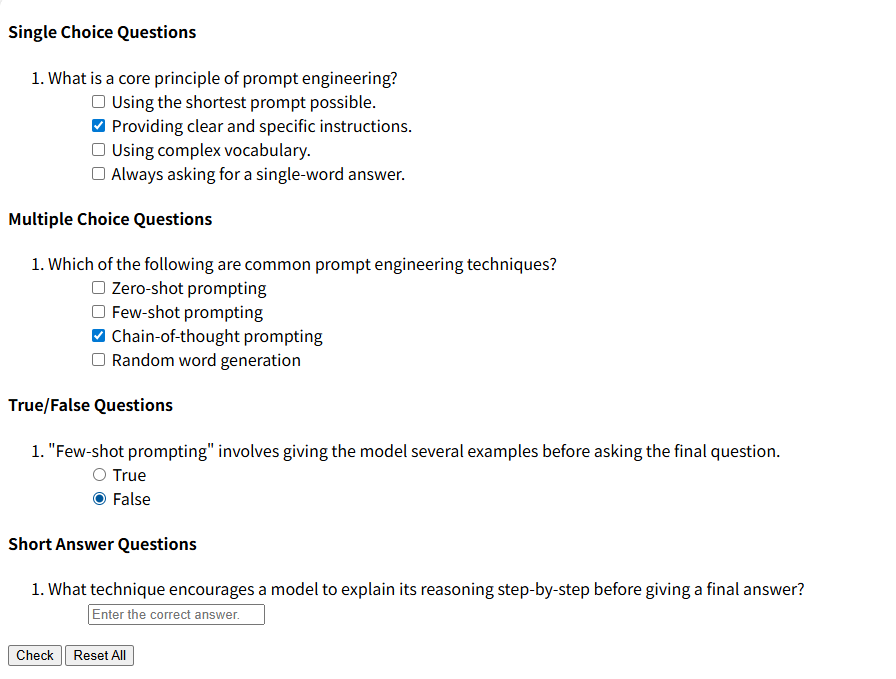
- Generates interactive HTML quiz files for online answering
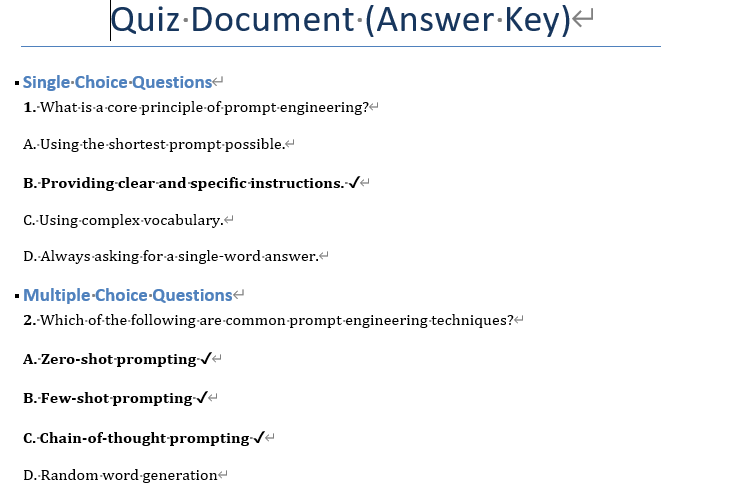
- Produces Word quiz files (student version and teacher answer key)
- Integrates with MCP protocol for use in editors like Cursor and VSCode
- Uses uv for fast dependency management

Setting up with Highlight
This MCP is not yet compatible with Highlight’s one-click setup. However, you can still use it with Highlight by following these steps:
- Download and install Highlight from highlightai.com/download
- Navigate to the plugins tab and select "Add Custom Plugin"
-
Configure the plugin with the settings below
Plugin Name
Mcp Quiz GeneratorCommand (node, npx, python, etc.)Please refer to the README for specific instructions on how to obtain API keys or other required environment variables.
- Enable "Start Automatically" if you want the plugin to start when Highlight launches





From the repository
Ensure Python 3.10+ and the uv package manager are installed. Configure the MCP server in Cursor/VSCode using either uvx (recommended) or a direct Python command, specifying the --output-folder parameter. Once configured, an AI assistant can call the tool with parameters markdown_content, format_type (html/word/both), and optional custom_filename to generate quiz files.
generate_quiz
Generate quiz files from markdown content in specified format(s). This tool converts markdown quiz content to HTML and/or Word documents based on the format_type parameter. Markdown Text Format Requirements: The markdown content must follow this specific format for different question types: #### Single Choice Questions 1. What are the test automation frameworks developed by MaxSoft? - [x] IntelliAPI (correct answer marked with [x]) - [ ] WebBot (incorrect answers marked with [ ]) - [ ] Gauge - [ ] Selenium #### Multiple Choice Questions 2. What are the test automation frameworks developed by MaxSoft? - [x] IntelliAPI (multiple correct answers marked with [x]) - [x] WebBot (multiple correct answers marked with [x]) - [ ] Gauge (incorrect answers marked with [ ]) - [ ] Selenium #### True/False Questions 3. MaxSoft is a software company. - (x) True (correct answer marked with (x)) - ( ) False (incorrect answer marked with ( )) 4. The domain of MaxSoft is test automation framework development. - (x) True - ( ) False #### Short Answer Questions 5. Who is the Co-Founder of MaxSoft? - R:= Osanda (answer marked with R:= followed by the correct answer) Args: markdown_content: Markdown content following the specified format requirements above format_type: Output format - "html" for HTML only, "word" for Word only, "both" for both formats (default: "word") custom_filename: Optional custom filename (without extension). If not provided, timestamp will be used. Returns: Success message with file paths for the generated format(s)
Claude Desktop / Cursor
Paste into your MCP client config file to install this server.
{
    "mcpServers": {
        "mcp quiz generator": {
            "mcp-quiz-generator": {
                "command": "uvx",
                "args": [
                    "mcp-quiz-generator",
                    "--output-folder",
                    "{output-folder-path}"
                ]
            }
        }
    }
}McpServers
{
    "mcp-quiz-generator": {
        "command": "uvx",
        "args": [
            "mcp-quiz-generator",
            "--output-folder",
            "{output-folder-path}"
        ]
    }
}
MCP Quiz Generator
A quiz generator server based on Model Context Protocol (MCP) that generates Markdown questions according to requirements and converts them into HTML and Word format quiz files.Features
- 🎯 Support for multiple question types: single choice, multiple choice, true/false, short answer - 📄 Generate interactive HTML quiz files - 📝 Generate Word format quiz files (including answer key and student versions) - 🔧 Based on MCP protocol, integrates with editors like Cursor, VSCode - ⚡ Fast dependency management using uvSupported Question Formats
Single Choice Questions
``markdown
1. Which testing automation frameworks has MaxSoft developed?
- [x] IntelliAPI (Correct answer marked with [x])
- [ ] WebBot (Incorrect answer marked with [ ])
- [ ] Gauge
- [ ] Selenium
`
Multiple Choice Questions
`markdown
2. Which testing automation frameworks has MaxSoft developed?
- [x] IntelliAPI (Multiple correct answers all marked with [x])
- [x] WebBot
- [ ] Gauge (Incorrect answer marked with [ ])
- [ ] Selenium
`
True/False Questions
`markdown
3. MaxSoft is a software company.
- (x) True (Correct answer marked with (x))
- ( ) False (Incorrect answer marked with ( ))
`
Short Answer Questions
`markdown
4. Who is the co-founder of MaxSoft?
- R:= Osanda (Answer marked with R:= followed by correct answer)
`
Installation and Setup


Prerequisites


- Python 3.10 or higher
- uv package manager

Configuring MCP in Cursor/VSCode


Method 1: Using uvx (Recommended)


1. Create MCP configuration file:

   In Cursor/VSCode, open MCP settings and add the following configuration:
`json
{
"mcpServers": {
"mcp-quiz-generator": {
"command": "uvx",
"args": ["mcp-quiz-generator" , "--output-folder" , "{output-folder-path}"]
}
}
}
`
Note: Replace {output-folder-path} with the storage path for generated files.
Method 2: Using Python directly
1. First ensure dependencies are installed:
`bash
uv sync
`
2. Add to MCP configuration:
`json
{
"mcpServers": {
"mcp-quiz-generator": {
"command": "/path/to/mcp-quiz-generator/.venv/bin/python",
"args": ["run", "mcp-quiz-generator" , "--output-folder" , "{output-folder-path}"]
}
}
}
`
Note: Replace {output-folder-path} with the storage path for generated files.
Tool Parameters
- markdown_content: Quiz content in Markdown format
- format_type: Output format
- "html": Generate HTML file only
- "word": Generate Word file only
- "both": Generate both HTML and Word files (default)
- custom_filename: Custom filename (optional, without extension)
Output Files
If the --output-folder parameter is not used, generated files will be saved in the data/ directory by default:
- HTML file: Interactive quiz with online answering support
-  - Word files:
 -
-
-
- _quiz.docx: Student version (without answers)
- _answer_key.docx: Teacher version (with answers and markings)
Project Structure
`
mcp-quiz-generator/
├── src/
│   └── quiz_mcp/
│       ├── __init__.py
│       ├── server.py          # MCP server main file
│       └── app/               # Application module directory
│           ├── extensions/    # Markdown extensions
│           └── static/        # Static resource files
├── data/                      # Output file directory (default)
├── pyproject.toml            # Project configuration
├── uv.lock                   # Dependency lock file
└── README.md                 # Project documentation
`
Troubleshooting


Common Issues


1. uv command not found
   - Ensure uv is properly installed and added to PATH
   - Restart terminal or editor

2. MCP server connection failed
   - Check if paths in configuration file are correct
   - Ensure virtual environment is created:
uv sync
   - Check editor's MCP logs for detailed error information

3. Generated file format is incorrect
   - Check if Markdown content follows specified format
   - Ensure options have correct indentation (4 spaces)

--output-folder Parameter Description


The
--output-folder parameter is used to specify the output directory for generated quiz files.
Syntax:
`bash
uv run mcp-quiz-generator --output-folder <directory-path>
`
Parameter Description:
- <directory-path>: Specifies the directory path for output files
- Default value: data (if this parameter is not specified, files will be saved to data/ directory)
- If the specified directory doesn't exist, the program will create it automatically
Usage Examples:
``bashSign in to leave a review
Use Google, GitHub, or an email account so ratings stay tied to real people.
No reviews posted yet.





