
MCP + openGauss
About
MCP Server for openGauss database and its tools
Details
- Author
- vincentsunx
- GitHub stars
- 3
- Downloads
- 368
- Categories
- Other, AI
Jump to
- Provides a standardized MCP interface to openGauss.
- Enables natural‑language database queries via Claude Desktop.
- Lightweight execution using uv.
- Easy configuration with environment variables.
- Works with any MCP‑compatible LLM agent.

Setting up with Highlight
This MCP is not yet compatible with Highlight’s one-click setup. However, you can still use it with Highlight by following these steps:
- Download and install Highlight from highlightai.com/download
- Navigate to the plugins tab and select "Add Custom Plugin"
-
Configure the plugin with the settings below
Plugin Name
MCP + openGaussCommand (node, npx, python, etc.)Please refer to the README for specific instructions on how to obtain API keys or other required environment variables.
- Enable "Start Automatically" if you want the plugin to start when Highlight launches





From the repository
1. Install Python 3 and uv.
2. Deploy openGauss (e.g., via container) and start it.
3. Download the openGauss_mcp_server source code (version 0.1.0).
4. In Claude Desktop’s configuration file, add a mcpServers entry that points uv to the server’s directory and sets the required environment variables (OPENGAUSS_HOST, PORT, USER, PASSWORD, DBNAME).
5. Restart Claude Desktop; the MCP tools become available, and you can run database queries by talking to Claude.
Claude Desktop / Cursor
Paste into your MCP client config file to install this server.
{
    "mcpServers": {
        "mcp + opengauss": {
            "openGauss": {
                "command": "uv",
                "args": [
                    "--directory",
                    "path/to/openGauss_mcp_server",
                    "run",
                    "server.py"
                ],
                "env": {
                    "OPENGAUSS_HOST": "localhost",
                    "OPENGAUSS_PORT": "8888",
                    "OPENGAUSS_USER": "your_username",
                    "OPENGAUSS_PASSWORD": "your_password",
                    "OPENGAUSS_DBNAME": "your_database"
                }
            }
        }
    }
}McpServers
{
    "openGauss": {
        "command": "uv",
        "args": [
            "--directory",
            "path/to/openGauss_mcp_server",
            "run",
            "server.py"
        ],
        "env": {
            "OPENGAUSS_HOST": "localhost",
            "OPENGAUSS_PORT": "8888",
            "OPENGAUSS_USER": "your_username",
            "OPENGAUSS_PASSWORD": "your_password",
            "OPENGAUSS_DBNAME": "your_database"
        }
    }
}
MCP + openGauss
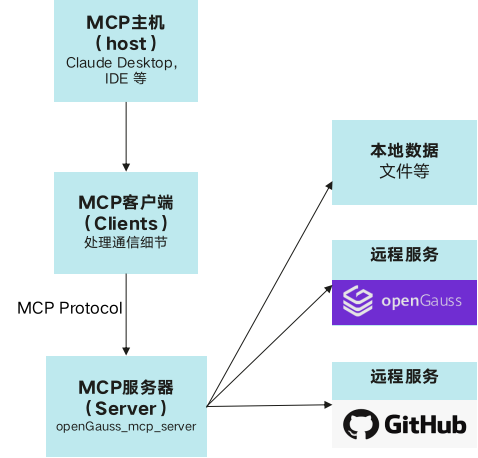
随着AI从静态推理向动态交互演进,智能体(Agent)逐渐成为焦点。Agent不仅能够调用LLM进行推理,还能访问数据库、调用API、执行任务。然而,当前LLM和Agent之间缺乏标准化交互协议, 每个新数据源都需要自定义实现,使得真正互联的系统难以扩展。MCP(Model Context Protocol, 模型上下文协议)解决了这一挑战,MCP是为LLM和Agent系统设计的标准化交互框架,使LLM可以与外部数据库、API和工具进行高效交互。openGauss + MCP + LLM 架构
图 1 openGauss + MCP + LLM 架构
<div style="display:flex;justfy-content:center;">
</div>
快速搭建openGauss + MCP + LLM的AI Agent应用
环境准备
- 安装python3环境,安装uv。 - 通过容器部署并启动openGauss数据库。(openGauss官网:学习->文档->最新开发版本->安装指南->容器镜像安装) - 下载Claude Desktop配合MCP协议进行问答操作。获取openGauss_mcp_server源码
访问链接, 获取openGauss_mcp_server源码,当前版本为(0.1.0)。配置参数
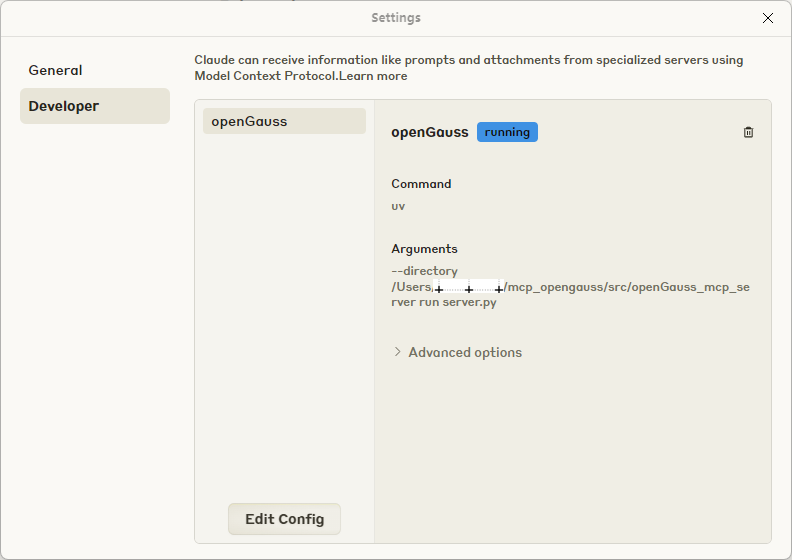
- 打开Claude Desktop设置,编辑配置文件。图 2 Claude Desktop配置页面
<div style="display:flex;justfy-content:center;">
</div>
- 通过Edit Config增加配置
{
    "mcpServers": {
        "openGauss": {
            "command": "uv",
            "args": [
            "--directory",
            "path/to/openGauss_mcp_server",
            "run",
            "server.py"
            ],
            "env": {
                "OPENGAUSS_HOST": "localhost",
                "OPENGAUSS_PORT": "8888",
                "OPENGAUSS_USER": "your_username",
                "OPENGAUSS_PASSWORD": "your_password",
                "OPENGAUSS_DBNAME": "your_database"
            }
        }
    }
}
AI服务集成
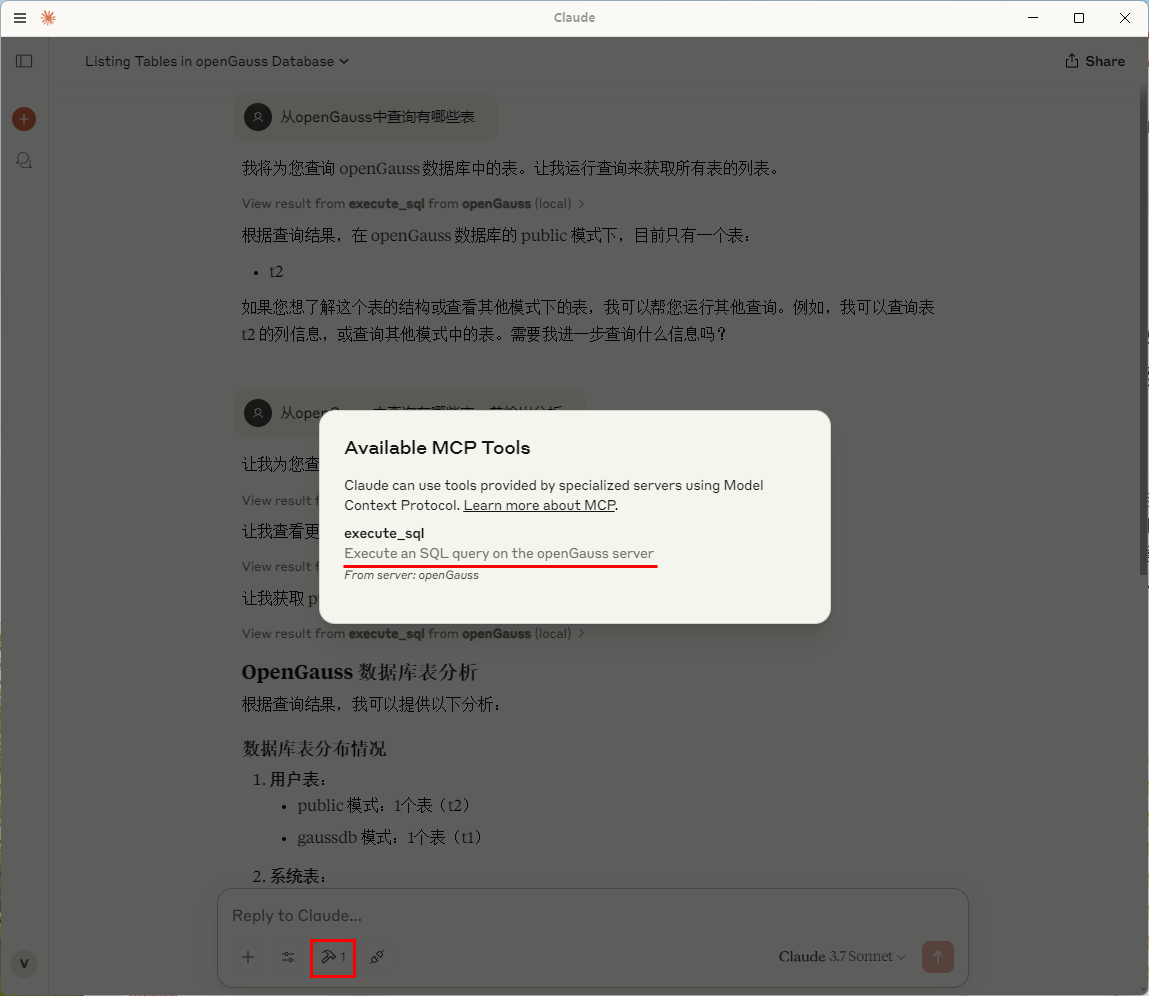
重新启动Claude Desktop
可以看到可用MCP Tool, 执行sql通过openGauss server图 3 Claude Desktop可用MCP Tool
<div style="display:flex;justfy-content:center;">
</div>
使用Cluade Desktop通过openGauss进行问答
图 4 Claude Desktop问答演示 <div style="display:flex;justfy-content:center;">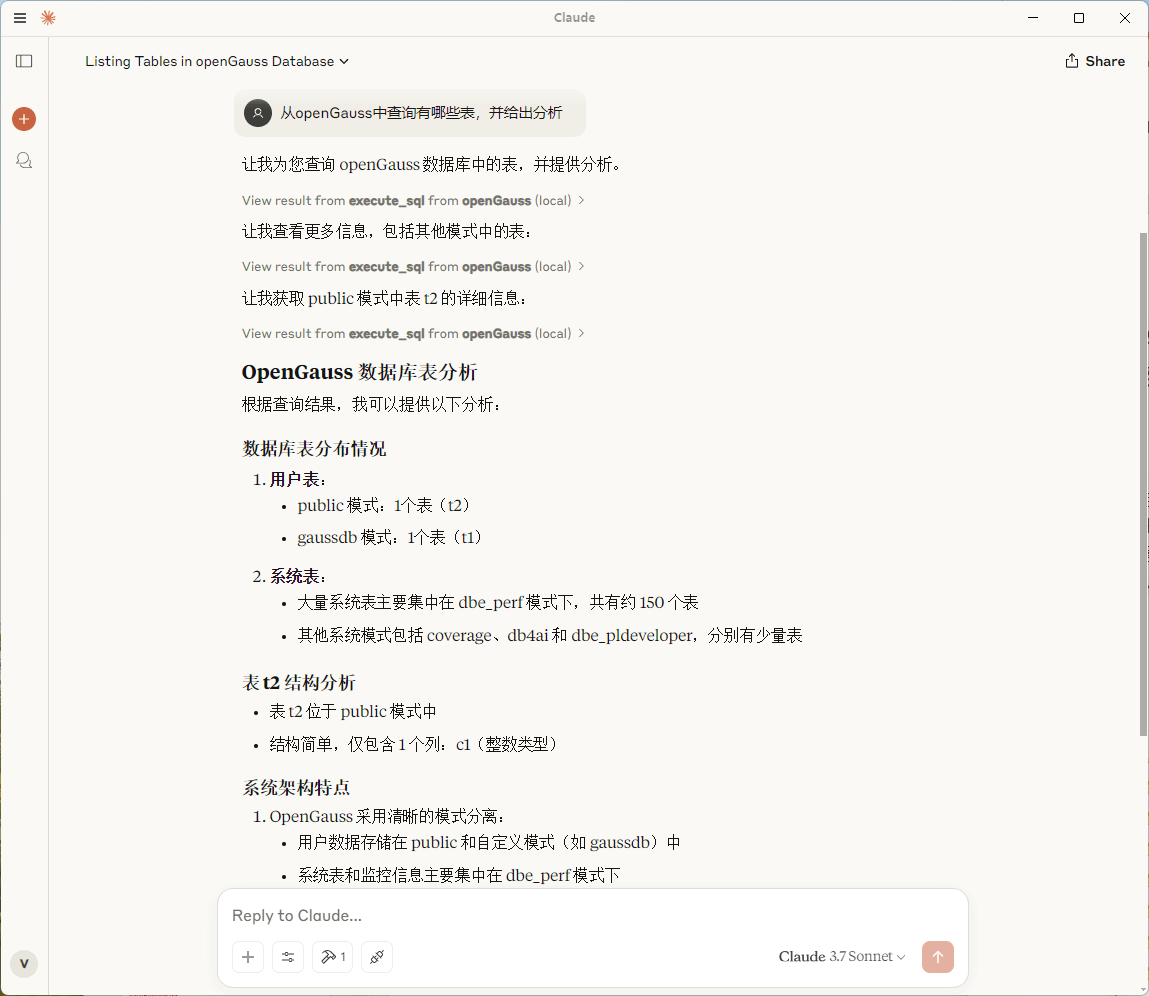 </div>
Sign in to leave a review
Use Google, GitHub, or an email account so ratings stay tied to real people.
No reviews posted yet.





