
MianshiyaServer
Description
# 面试鸭 MCP Server ## 简介 [面试鸭](https://mianshiya.com/) 的题目搜索API现已兼容MCP协议,是国内首家兼容MCP协议的面试刷题网站。关于MCP协议,详见MCP官方[文档](https://modelcontextprotocol.io/)。 依赖`MCP Java SDK`开发,任意支持MCP协议的智能体助手(如`Claude`、`Cursor`以及`千帆AppBuilder`等)都可以快速接入。 以下会给更出详细的适配说明。 ## 工具列表 #### 题目搜索 `questionSearch` -…
About
# 面试鸭 MCP Server ## 简介 [面试鸭](https://mianshiya.com/) 的题目搜索API现已兼容MCP协议,是国内首家兼容MCP协议的面试刷题网站。关于MCP协议,详见MCP官方[文档](https://modelcontextprotocol.io/)。 依赖`MCP Java SDK`开发,任意支持MCP协议的智能体助手(如`Claude`、`Cursor`以及`千帆AppBuilder`等)都可以快速接入。 以下会给更出详细的适配说明。 ## 工具列表 #### 题目搜索 `questionSearch` - 将面试题目检索为面试鸭里的题目链接 - 输入: `题目` - 输出…
Details
- Author
- gulihua10010
- Downloads
- 239
- Categories
- Other
Jump to
- Searches interview questions from Mianshiya.com via one tool.
- Returns results as clickable markdown links: 题目.
- Fully compatible with the MCP protocol.
- Supports multiple MCP clients (Claude, Cursor, Qianfan AppBuilder).
- Can be configured with any AI model via Spring AI starters.
- Requires only a Java runtime—no external API key for the server itself.

Setting up with Highlight
This MCP is not yet compatible with Highlight’s one-click setup. However, you can still use it with Highlight by following these steps:
- Download and install Highlight from highlightai.com/download
- Navigate to the plugins tab and select "Add Custom Plugin"
-
Configure the plugin with the settings below
Plugin Name
MianshiyaServerCommand (node, npx, python, etc.)Please refer to the README for specific instructions on how to obtain API keys or other required environment variables.
- Enable "Start Automatically" if you want the plugin to start when Highlight launches





From the repository
After cloning the repository and building with Maven (mvn clean package), configure the server by adding its Java command-line invocation to your MCP client's JSON configuration (e.g., in Cherry Studio or an application.yml file). At runtime, invoke the tool by asking a question; the server returns a formatted link to the matching interview question on Mianshiya.
Claude Desktop / Cursor
Paste into your MCP client config file to install this server.
{
    "mcpServers": {
        "mianshiyaserver": {
            "mianshiyaServer": {
                "command": "java",
                "args": [
                    "-Dspring.ai.mcp.server.stdio=true",
                    "-Dspring.main.web-application-type=none",
                    "-Dlogging.pattern.console=",
                    "-jar",
                    "/yourPath/mcp-server-0.0.1-SNAPSHOT.jar"
                ],
                "env": []
            }
        }
    }
}McpServers
{
    "mianshiyaServer": {
        "command": "java",
        "args": [
            "-Dspring.ai.mcp.server.stdio=true",
            "-Dspring.main.web-application-type=none",
            "-Dlogging.pattern.console=",
            "-jar",
            "/yourPath/mcp-server-0.0.1-SNAPSHOT.jar"
        ],
        "env": []
    }
}
面试鸭 MCP Server
简介
面试鸭
的题目搜索API现已兼容MCP协议,是国内首家兼容MCP协议的面试刷题网站。关于MCP协议,详见MCP官方文档。
依赖MCP Java SDK开发,任意支持MCP协议的智能体助手(如Claude、Cursor以及千帆AppBuilder等)都可以快速接入。
以下会给更出详细的适配说明。
工具列表
题目搜索 questionSearch
- 将面试题目检索为面试鸭里的题目链接
- 输入: 题目
- 输出: 题目
快速开始
使用面试鸭MCP Server主要通过Java SDK 的形式
Java 接入
> 前提需要Java运行时环境
安装
`` bash
git clone https://github.com/gulihua10010/mcp-mianshiya-server
构建
bash
cd mcp-mianshiya-server
mvn clean package
jsonCherry Studio
使用
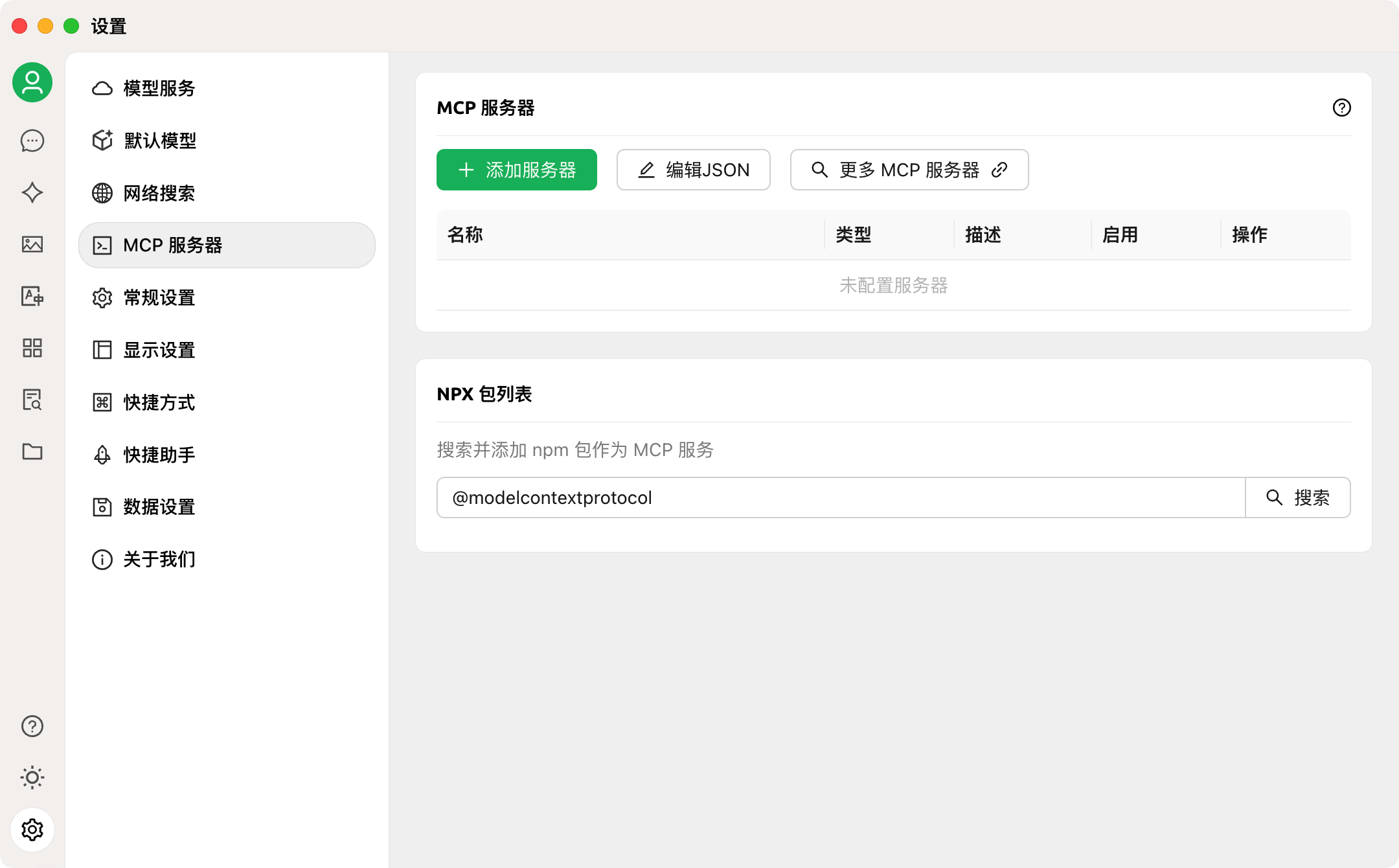
1) 打开
的设置,点击MCP 服务器。编辑 JSON
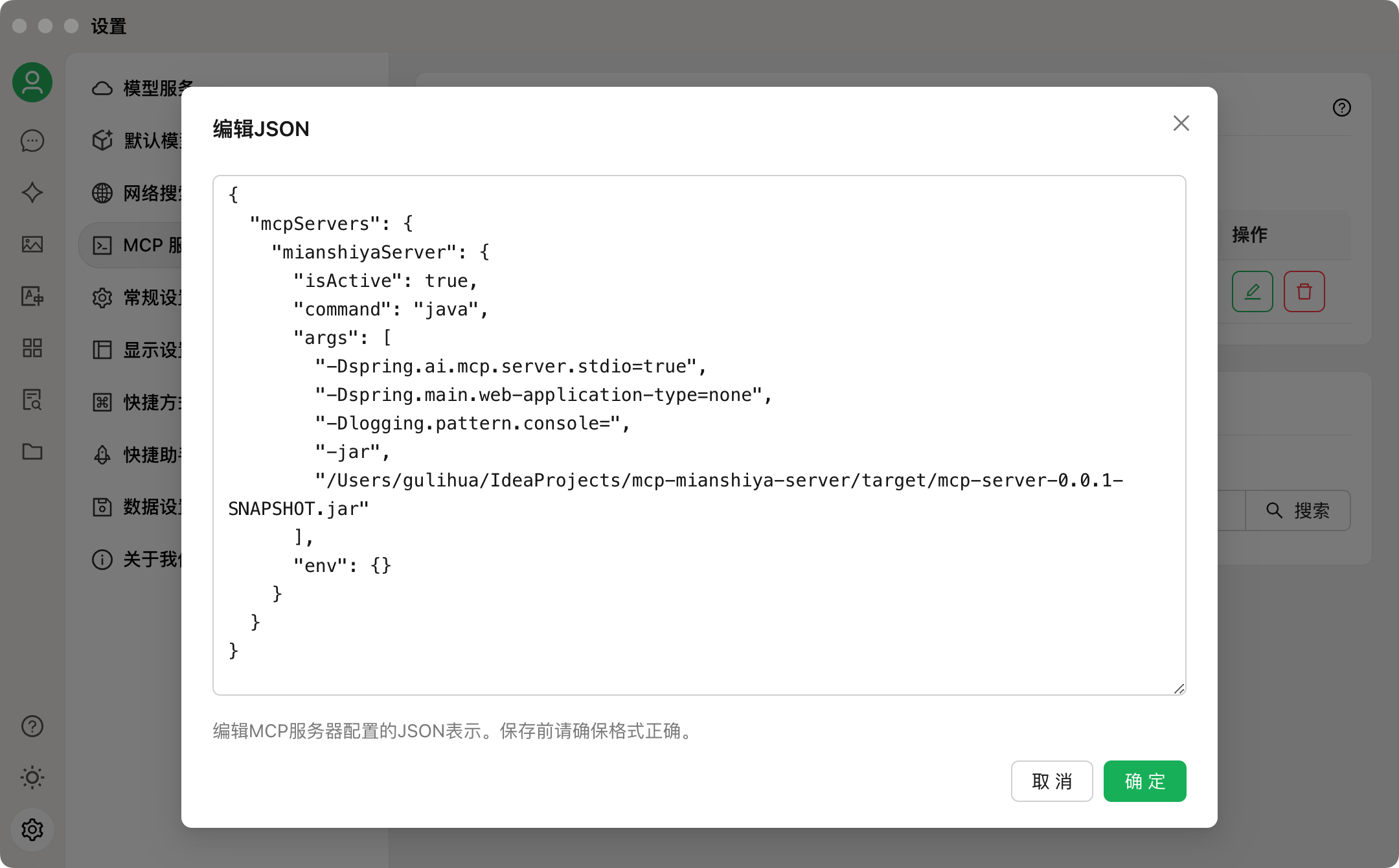
2) 点击
,将以下配置添加到配置文件中。
{
"mcpServers": {
"mianshiyaServer": {
"command": "java",
"args": [
"-Dspring.ai.mcp.server.stdio=true",
"-Dspring.main.web-application-type=none",
"-Dlogging.pattern.console=",
"-jar",
"/yourPath/mcp-server-0.0.1-SNAPSHOT.jar"
],
"env": {}
}
}
}
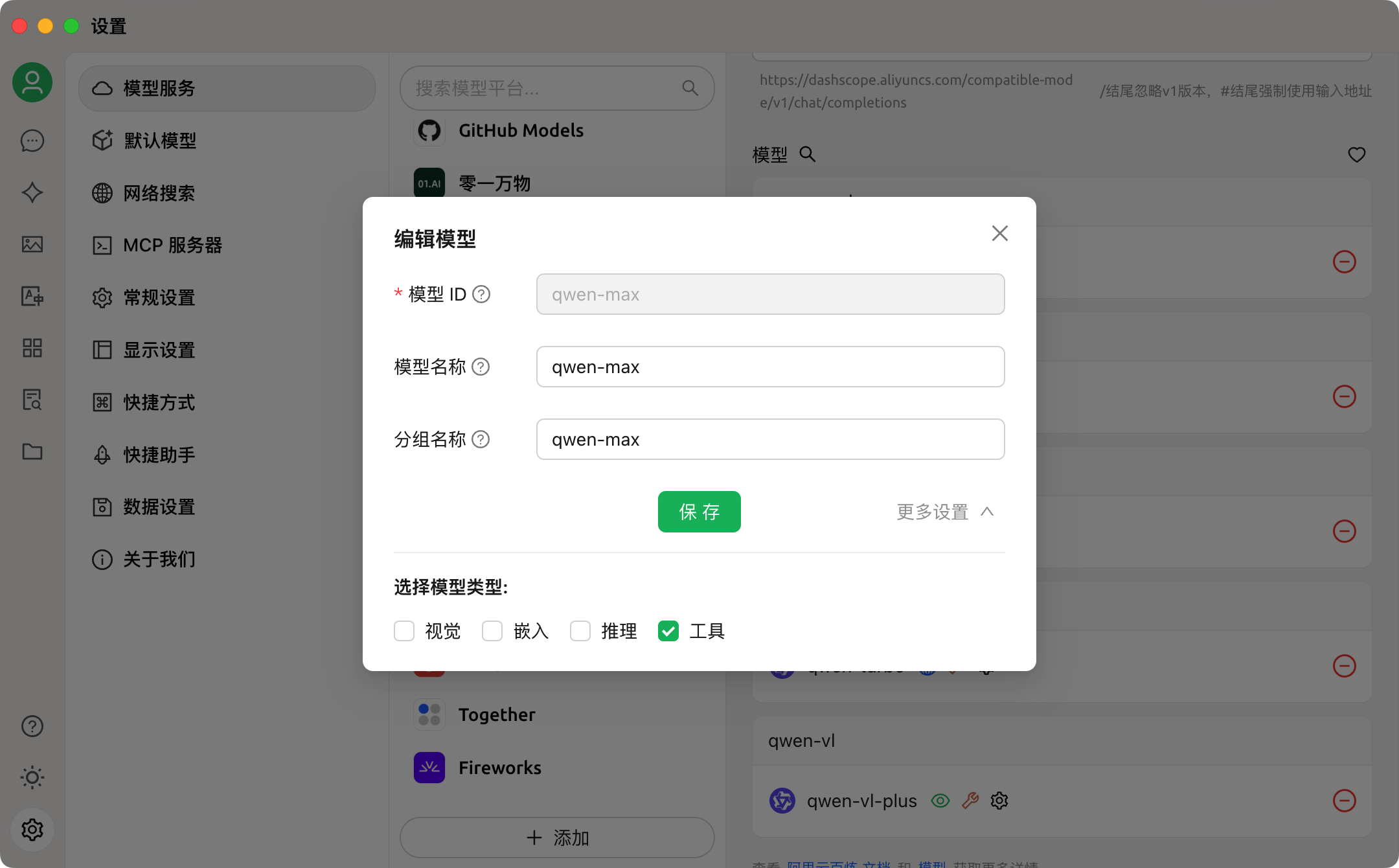
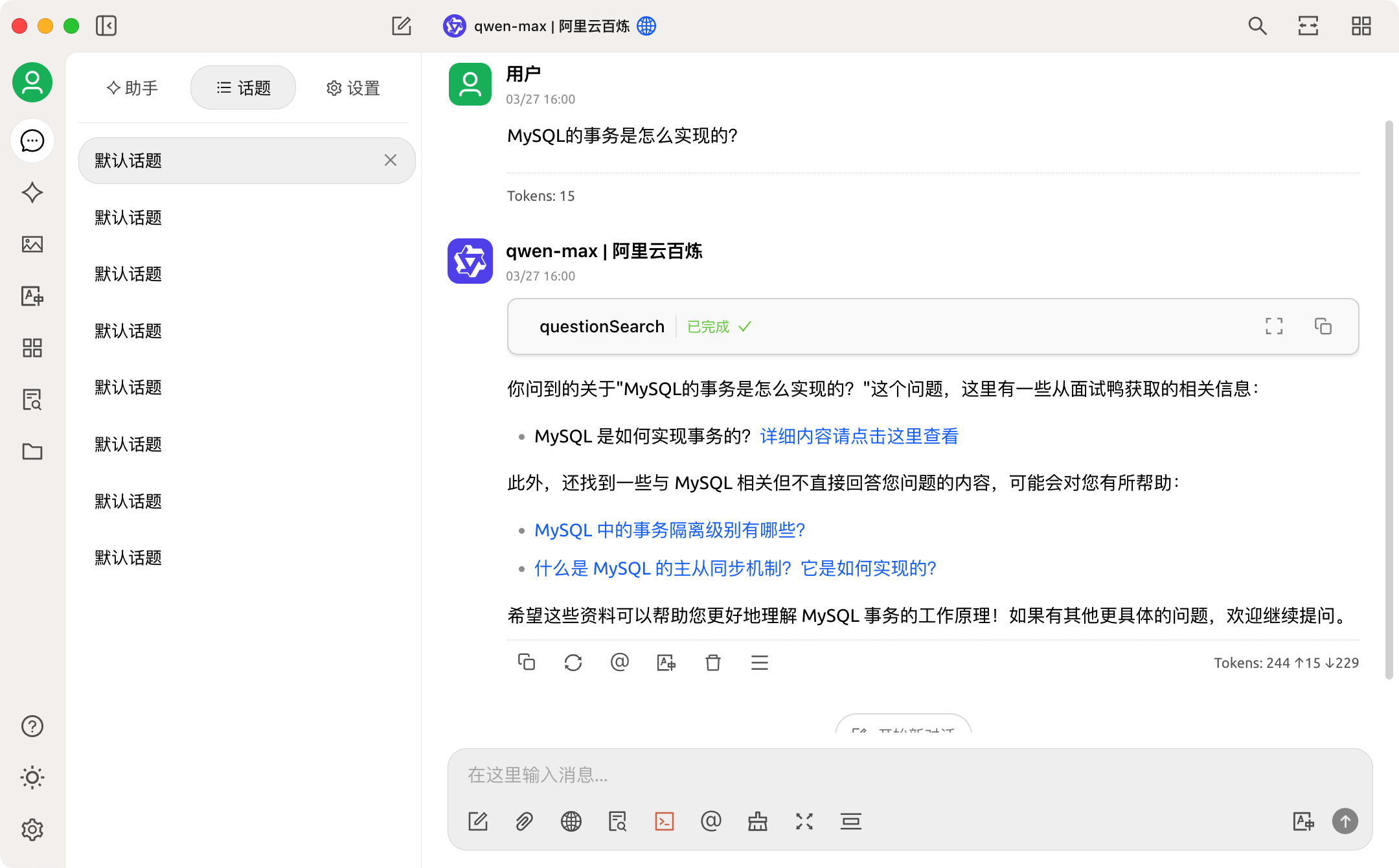
3) 在设置-模型服务里选择一个模型,输入API密钥,选择模型设置,勾选下工具函数调用功能。
4) 在输入框下面勾选开启MCP服务。
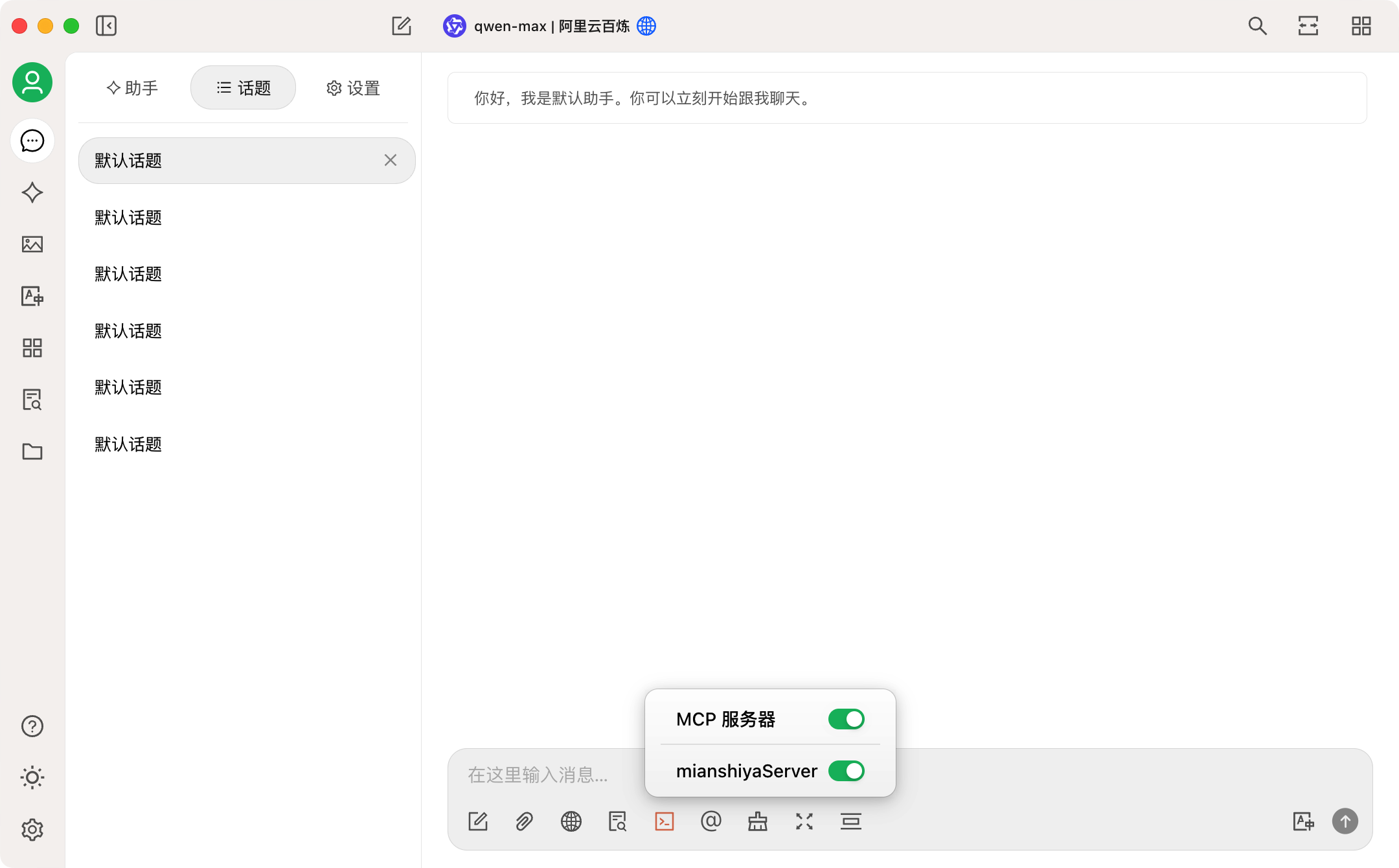
5) 配置完成,然后查询下面试题目
代码调用
1) 引入依赖
<dependency>
<groupId>com.alibaba.cloud.ai</groupId>
<artifactId>spring-ai-alibaba-starter</artifactId>
<version>1.0.0-M6.1</version>
</dependency>
<dependency>
<groupId>org.springframework.ai</groupId>
<artifactId>spring-ai-mcp-client-spring-boot-starter</artifactId>
<version>1.0.0-M6</version>
</dependency>
2) 配置MCP服务器

   需要在application.yml中配置MCP服务器的一些参数:
spring:
ai:
mcp:
client:
stdio:
# 指定MCP服务器配置文件
servers-configuration: classpath:/mcp-servers-config.json
mandatory-file-encoding: UTF-8
其中mcp-servers-config.json的配置如下:
{
"mcpServers": {
"mianshiyaServer": {
"command": "java",
"args": [
"-Dspring.ai.mcp.server.stdio=true",
"-Dspring.main.web-application-type=none",
"-Dlogging.pattern.console=",
"-jar",
"/Users/gulihua/Documents/mcp-server/target/mcp-server-0.0.1-SNAPSHOT.jar"
],
"env": {}
}
}
}
yaml客户端我们使用阿里巴巴的通义千问模型,所以引入spring-ai-alibaba-starter依赖,如果你使用的是其他的模型,也可以使用对应的依赖项,比如openAI引入spring-ai-openai-spring-boot-starter这个依赖就行了。
配置大模型的密钥等信息:
spring:
ai:
dashscope:
api-key: ${通义千问的key}
chat:
options:
model: qwen-max
通义千问的key可以直接去官网 去申请,模型我们用的是通义千问-Max。

3) 初始化聊天客户端
@Bean
public ChatClient initChatClient(ChatClient.Builder chatClientBuilder,
ToolCallbackProvider mcpTools) {
return chatClientBuilder
.defaultTools(mcpTools)
.build();
}
4) 接口调用
@PostMapping(value = "/ai/answer/sse", produces = MediaType.TEXT_EVENT_STREAM_VALUE)
public Flux<String> generateStreamAsString(@RequestBody AskRequest request) {
Flux<String> content = chatClient.prompt()
.user(request.getContent())
.stream()
.content();
return content
.concatWith(Flux.just("[complete]"));
}
``
Sign in to leave a review
Use Google, GitHub, or an email account so ratings stay tied to real people.
No reviews posted yet.





