
Gitee Enterprise MCP Server
About
mcp-gitee-ent is the Model Context Protocol (MCP) server implementation for Gitee Enterprise. It provides a set of tools that interact with the Gitee Enterprise API, allowing AI assistants to manage repositories, issues, pull requests, etc.
Details
- Author
- oschina
- GitHub stars
- 1
- Downloads
- 311
- Categories
- Other
Jump to
- Interact with enterprise repositories, issues, and pull requests
- Enterprise-level operations and management
- Configurable API base URL for custom instances
- Support for both SSE and Stdio transport
- Dynamic enable/disable of individual toolsets
- Rich set of tools covering over 30 actions
Requires Go 1.23.0+ and an MCP token (obtained from Gitee). Build from source, use go install, or run via npx. Configure MCP hosts (Claude, Cursor, etc.) with JSON specifying command and environment variables like GITEE_ENT_MCP_ACCESS_TOKEN and GITEE_ENT_API_BASE. Optional command-line flags control token, API base, transport, SSE address, and toolset filtering.
Gitee Enterprise MCP Server
Gitee Enterprise MCP Server is a Model Context Protocol (MCP) server implementation for Gitee Enterprise. It provides a set of tools for interacting with Gitee Enterprise API, allowing AI assistants to manage enterprise repositories, issues, pull requests, and more.

Features
- Interact with Gitee Enterprise repositories, issues, pull requests
- Support for enterprise-level operations and management
- Configurable API base URL to support different Gitee Enterprise instances
- Support for SSE and Stdio transport
- Dynamic toolset enable/disable
<Details>
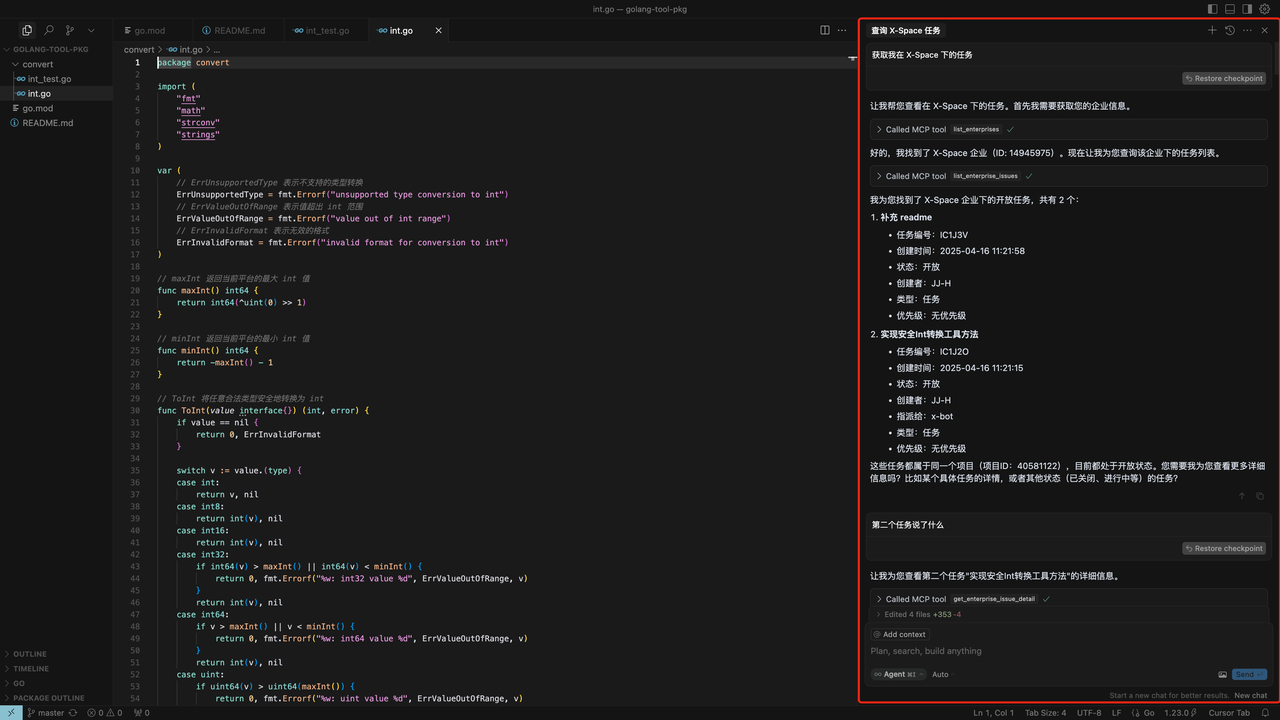
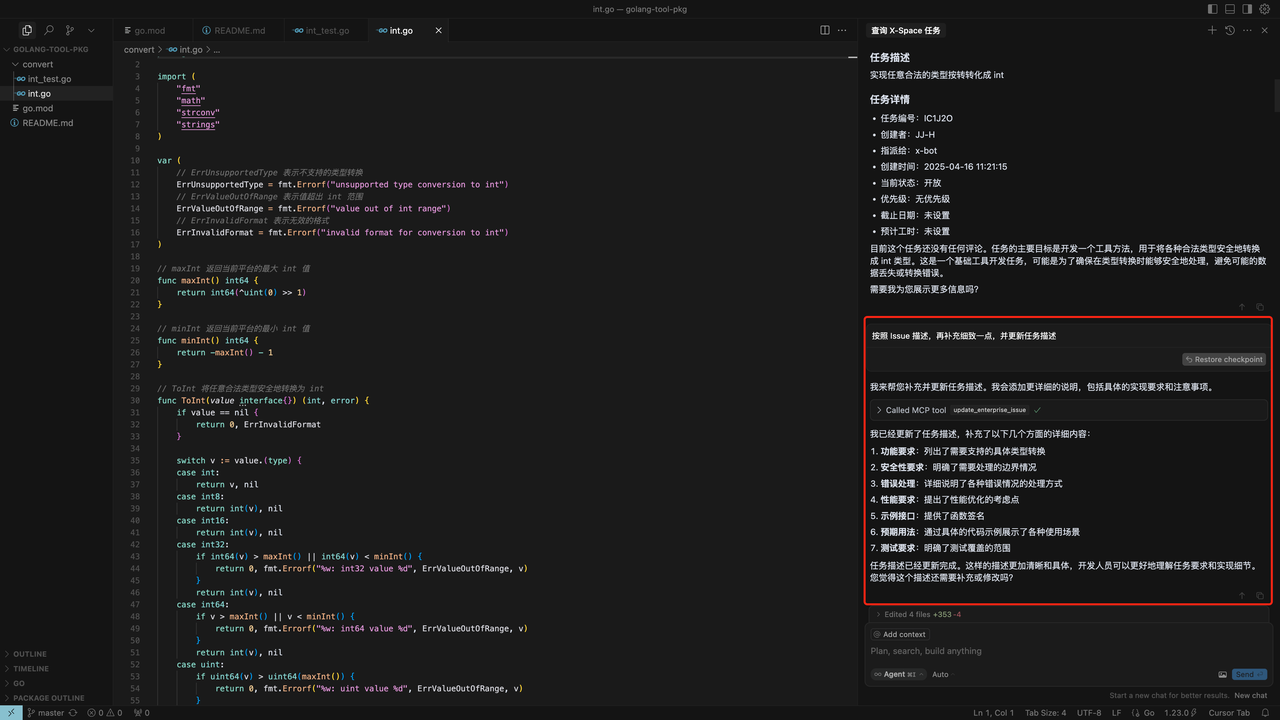
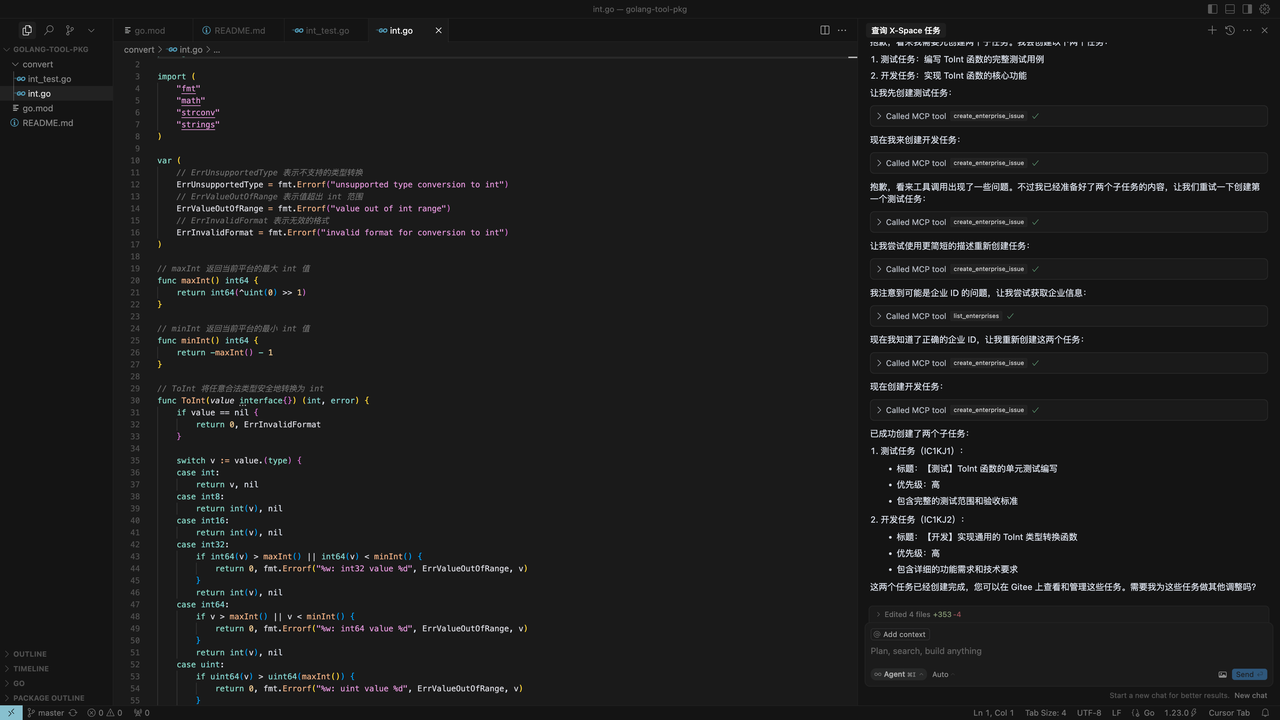
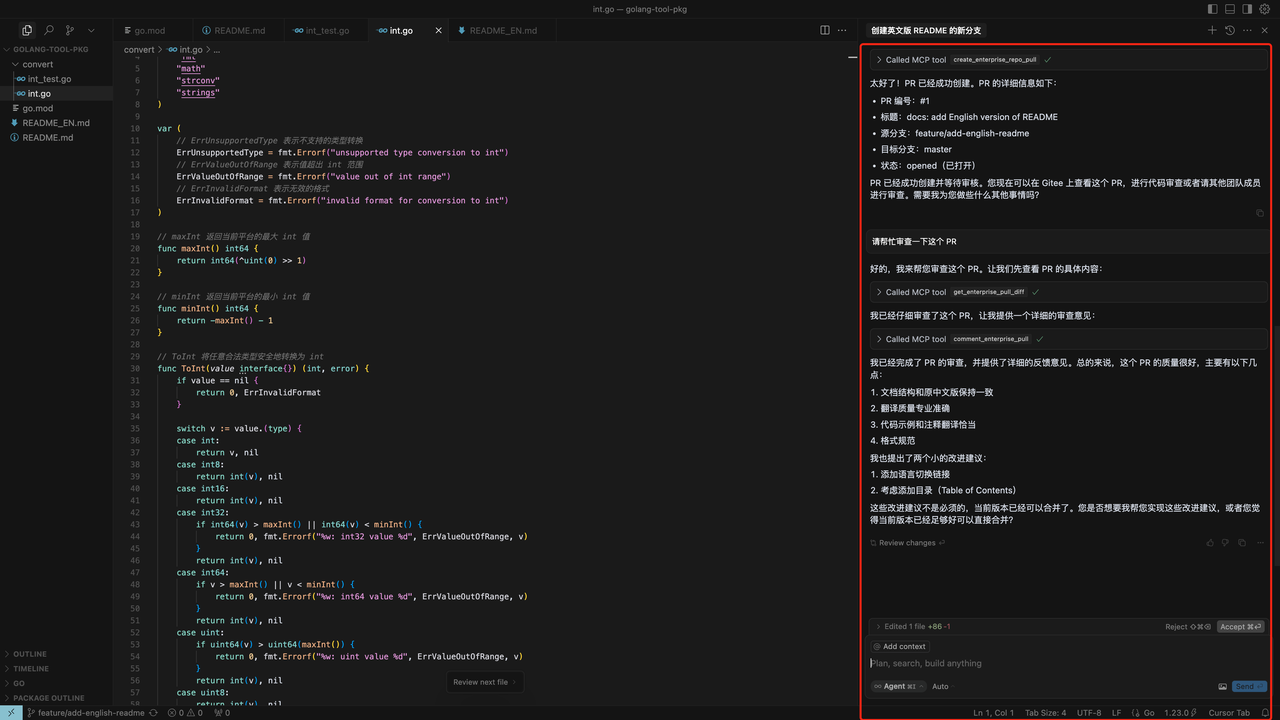
<summary><b>Scenario Example</b></summary>
1. Get specific enterprise issues
2. Improve the issue content
3. Divide subtasks
4. Create PR/Review PR
</details>
Installation(This step can be skipped directly when starting npx)
Prerequisites
- Go 1.23.0 or higher
- MCP token, Go to get
Building from Source
1. Clone the repository:
   git clone https://gitee.com/oschina/mcp-gitee-ent.git

   cd mcp-gitee-ent
2. Build the project:
make build
Move ./bin/mcp-gitee-ent PATH env
Use go install
go install gitee.com/oschina/mcp-gitee-ent@latest
Usage
Check mcp-gitee-ent version:
mcp-gitee-ent --version
MCP Hosts Configuration
<div align="center"> <a href="docs/install/claude.md" title="Claude"> </a>
<a href="docs/install/cursor.md" title="Cursor">
</a>
<a href="docs/install/cursor.md" title="Cursor"> </a>
<a href="docs/install/trae.md" title="Trae">
</a>
<a href="docs/install/trae.md" title="Trae"> </a>
<a href="docs/install/cline.md" title="Cline">
</a>
<a href="docs/install/cline.md" title="Cline"> </a>
<a href="docs/install/windsurf.md" title="Windsurf">
</a>
<a href="docs/install/windsurf.md" title="Windsurf"> </a>
</div>
</a>
</div>
Config example:
- npx
{

  "mcpServers": {

    "gitee-ent": {

      "command": "npx",

      "args": [

        "-y",

        "@gitee/mcp-gitee-ent@latest"

      ],

      "env": {

         "GITEE_ENT_API_BASE": "https://api.gitee.com/enterprises",

         "GITEE_ENT_MCP_ACCESS_TOKEN": "<your mcp ent access token>"

      }

    }

  }

}
- executable
{

  "mcpServers": {

    "gitee-ent": {

      "command": "mcp-gitee-ent",

      "env": {

        "GITEE_ENT_API_BASE": "https://api.gitee.com/enterprises",

        "GITEE_ENT_MCP_ACCESS_TOKEN": "<your mcp ent access token>",

      }

    }

  }

}
Command-line Options
- --token: access token
- --api-base: Gitee Ent API base URL (default: https://api.gitee.com/enterprises)
- --version: Show version information
- --transport: Transport type (stdio or sse, default: stdio)
- --sse-address: The host and port to start the SSE server on (default: localhost:8000)
- --enabled-toolsets: Comma-separated list of tools to enable (if specified, only these tools will be enabled)
- --disabled-toolsets: Comma-separated list of tools to disable
Environment Variables
You can also configure the server using environment variables:
- GITEE_ENT_MCP_ACCESS_TOKEN: Gitee MCP ent access token
- GITEE_ENT_API_BASE: Gitee ENT API base URL
- ENABLED_TOOLSETS: Comma-separated list of tools to enable
- DISABLED_TOOLSETS: Comma-separated list of tools to disable
Toolset Management
Toolset management supports two modes:
1. Enable specified tools (whitelist mode):
- Use --enabled-toolsets parameter or ENABLED_TOOLSETS environment variable
- Specify after, only listed tools will be enabled, others will be disabled
- Example: --enabled-toolsets="update_enterprise_issue,list_enterprise_repositories"
2. Disable specified tools (blacklist mode):
- Use --disabled-toolsets parameter or DISABLED_TOOLSETS environment variable
- Specify after, listed tools will be disabled, others will be enabled
- Example: --disabled-toolsets="update_enterprise_issue,list_enterprise_repositories"
Note:
- If both enabled-toolsets and disabled-toolsets are specified, enabled-toolsets takes precedence
- Tool names are case-sensitive
Available Tools
The server provides various tools for interacting with Gitee Enterprise:
| Tool | Category | Description |
|----------------------------------------|---------------|-------------|
| list_enterprises | Enterprise | List user's enterprises |
| list_enterprise_repositories | Repository | List repositories in an enterprise |
| create_enterprise_repository | Repository | Create a repository in an enterprise |
| create_enterprise_repo_release | Repository | Create a release for repository |
| list_enterprise_repo_releases | Repository | List releases for repository |
| get_enterprise_repository_file_content | Repository | Get the content of a specific file in the repository |
| get_enterprise_repo_tree | Repository | Get the tree structure of a repository |
| list_enterprise_pulls | Pull Request | List enterprise pull requests |
| create_enterprise_repo_pull | Pull Request | Create a pull request for repository |
| merge_enterprise_pull | Pull Request | Merge a pull request |
| get_enterprise_pull_detail | Pull Request | Get pull request detail |
| update_enterprise_pull | Pull Request | Update a pull request |
| get_enterprise_pull_diff | Pull Request | Get pull request diff |
| comment_enterprise_pull | Pull Request | Comment on a pull request |
| list_enterprise_pull_comments | Pull Request | List pull request comments |
| create_enterprise_issue | Issue | Create an issue |
| update_enterprise_issue | Issue | Update an issue |
| get_enterprise_issue_detail | Issue | Get issue detail |
| list_enterprise_issues | Issue | List issues |
| comment_enterprise_issue | Issue | Comment on an issue |
| list_enterprise_issue_comments | Issue | List issue comments |
| get_user_info | User | Get user info |
| list_enterprise_members | Member | List members of an enterprise |
| list_enterprise_groups | Group | List groups in an enterprise |
| list_enterprise_labels | Label | List labels of an enterprise |
| list_programs | Program | List programs of an enterprise |
| list_scrum_sprints | Program | List Scrum Sprints |
| create_scrum_sprint | Program | Create a Scrum Sprint |
| list_scrum_versions | Program | List Scrum Versions |
| list_issue_types | Issue Type | List issue types |
| list_issue_type_states | Issue State | List issue states |
Contribution
We welcome contributions from the open-source community! If you'd like to contribute to this project, please follow these guidelines:
1. Fork the repository.
2. Create a new branch for your feature or bug fix.
3. Make your changes and ensure the code is well-documented.
4. Submit a pull request with a clear description of your changes.
For more information, please refer to the CONTRIBUTING file.
Sign in to leave a review
Use Google, GitHub, or an email account so ratings stay tied to real people.
No reviews posted yet.





