
🚀 MCP Game Server
Description
 # 🚀 MCP Game Server **Turn your imagination into an AI generated game** Welcome to the **MCP Game Server** — a synthwave, maze-crawling, world-building adventure platform! Create, explore, and compete in wild, AI-generated worlds…
About
 # 🚀 MCP Game Server **Turn your imagination into an AI generated game** Welcome to the **MCP Game Server** — a synthwave, maze-crawling, world-building adventure platform! Create, explore, and compete in wild, AI-generated worlds. Powered by Next.js…
Details
- Author
- SonicDMG
- Downloads
- 162
- Categories
- Other, AI, Media
Jump to
- AI-generated worlds: instantly create new stories and mazes
- Leaderboard: compete for glory, see winners and the fallen
- ASCII & pixel art: retro visuals and grid-based layouts
- Artifacts & rooms: collect, explore, and interact
- Synthwave theme: neon colors, pixel dragons, and more
- Powered by Langflow for next-level AI integration

Setting up with Highlight
This MCP is not yet compatible with Highlight’s one-click setup. However, you can still use it with Highlight by following these steps:
- Download and install Highlight from highlightai.com/download
- Navigate to the plugins tab and select "Add Custom Plugin"
-
Configure the plugin with the settings below
Plugin Name
🚀 MCP Game ServerCommand (node, npx, python, etc.)Please refer to the README for specific instructions on how to obtain API keys or other required environment variables.
- Enable "Start Automatically" if you want the plugin to start when Highlight launches





From the repository
Connect via MCP tools by adding the SSE endpoint https://mcplayerone.onrender.com/api/v1/mcp/sse to an agent like Cursor (as a tool server) or Claude Desktop (using mcp-proxy). Once connected, you or your agent can invoke tools such as listStories, createGame, startGame, and movePlayer to play and build.
Claude Desktop / Cursor
Paste into your MCP client config file to install this server.
{
    "mcpServers": {
        "\ud83d\ude80 mcp game server": {
            "MCPlayerOne": {
                "transportType": "sse",
                "url": "https://mcplayerone.onrender.com/api/v1/mcp/sse",
                "openapi": "https://mcplayerone.onrender.com/api/v1/mcp/openapi.json"
            }
        }
    }
}McpServers
{
    "MCPlayerOne": {
        "transportType": "sse",
        "url": "https://mcplayerone.onrender.com/api/v1/mcp/sse",
        "openapi": "https://mcplayerone.onrender.com/api/v1/mcp/openapi.json"
    }
}
🚀 MCP Game Server
Turn your imagination into an AI generated game
Welcome to the MCP Game Server — a synthwave, maze-crawling, world-building adventure platform! Create, explore, and compete in wild, AI-generated worlds. Powered by Next.js, Langflow, and your imagination.
---
🎮 Connect & Play via MCP Tools
You can play instantly by connecting to the public MCP Game Server using your favorite agent tools—no server setup required!
🖥️ Cursor (AI IDE)
1. Install Cursor IDE 2. Add the MCP Game Server as a tool server: - Open Cursor and go to Extensions/Integrations. - Add a new MCP tool server with this config: {
"MCPlayerOne": {
"transportType": "sse",
"url": "https://mcplayerone.onrender.com/api/v1/mcp/sse",
"openapi": "https://mcplayerone.onrender.com/api/v1/mcp/openapi.json"
}
}
🤖 Claude (AI Chatbot/Desktop)
1. Install Python and pip 2. Install uv: pip install uv
uvx install mcp-proxy
   {
     "mcpServers": {
       "MCPlayerOne": {
         "command": "uvx",
         "args": ["mcp-proxy", "https://mcplayerone.onrender.com/api/v1/mcp/sse"]
       }
     }
   }
🛠️ Troubleshooting
- 404 or connection errors? Make sure you're using the correct Render URL above. - Agent not responding? Check that you're using the correct SSE endpoint and OpenAPI URL. - Session timeouts? SSE sessions last for 1 hour of inactivity—just reconnect if needed.---
🎲 Gameplay
Once you're connected, just ask for the available games or create your own. Use your imagination and let AI create a world based on your chosen theme.🗝️ Available MCP Tools
These are the main MCP tools you (or your agent) can use to play. Most agents will choose actions based on your input or goals.| Tool Name | What It Does |
|-------------------|------------------------------------------------------------------------------|
| listStories | List all available game stories that can be played. |
| createGame | Generate a new game story, locations, items, and cover image by theme. |
| startGame | Start a new game session for a user in a specific story, or resume if started.|
| getGameState | Get the current state of the game (player and location) for a user and story. |
| lookAround | Get details about the player's current location (description, items, exits). |
| movePlayer | Move the player to a new location (by target ID) if valid. |
| takeItem | Pick up a specified item from the current location. |
| examineTarget | Get a detailed description of a specific item or feature in the current room. |
| getLeaderboard| Retrieve the leaderboard data for a specific story. |
| getStoryById | Get the details of a specific story by its logical ID. |
| deleteStory | Delete a specific story and all associated data. (Try not to do this unless it's your story)
---
🖼️ Screenshots
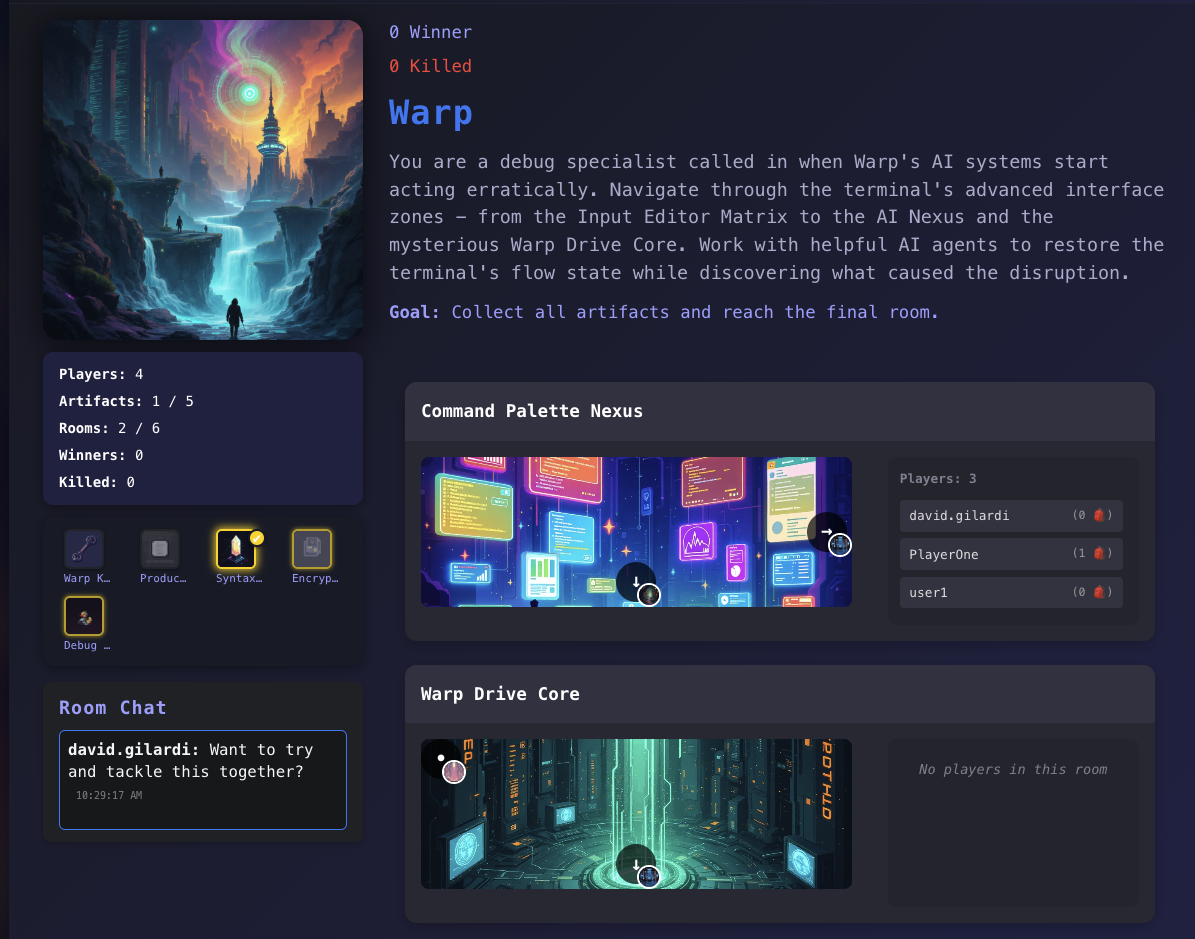 <p align="center"><i>Explore your world: Example gameplay</i></p>
---
✨ Features
- 🪐 AI-Generated Worlds: Instantly create new stories and mazes - 👾 ASCII & Pixel Art: Retro visuals and grid-based layouts - 🌌 Leaderboard: Compete for glory, see winners and the fallen - 🚀 Artifacts & Rooms: Collect, explore, and interact - 🐉 Synthwave Theme: Neon colors, pixel dragons, and more - 🧑💻 Powered by Langflow: Next-level AI integration---
🛠️ Local Development
Want to run your own server or contribute? Follow these steps:
npm install
npm run dev
Open http://localhost:3000 to play locally.
- Edit .env to set up API keys, endpoints, or tool access as needed.
- For Astra DB, Langflow, or other integrations, follow the comments in .env.example.
MCP Tool Setup (for local dev)
- For local dev, use: -http://localhost:3000/api/v1/mcp/sse (SSE endpoint)
- http://localhost:3000/api/v1/mcp/openapi.json (OpenAPI spec)
- All MCP tools are enabled by default in local dev.
---
🌟 Contributing
Pull requests are welcome! Open an issue, fork, and help us build the wildest worlds in the metaverse.- Star the repo ⭐
- Add your own ASCII art or emoji!
---
🔗 Links
- GitHub - Langflow---
📑 Error & Status Code Reference (Addendum)
This section documents the main error and status codes used by the MCP Game Server API and SSE/JSON-RPC interface, for quick reference:
HTTP Status Codes
| Code | When Issued | Meaning | |------|-------------|---------| | 200 | Successful request (may include errors in body for game logic) | OK | | 400 | Malformed request, missing/invalid parameters | Bad Request | | 403 | Action not allowed (e.g., unmet requirements) | Forbidden | | 404 | Resource not found (player, story, location, item) | Not Found | | 409 | Conflict (e.g., story with same ID exists) | Conflict | | 500 | Internal server error | Server Error |JSON-RPC Error Codes (SSE/Tool Proxy)
| Code | When Issued | Meaning | |----------|-------------|---------| | -32000 | Generic server error (proxy failure, non-JSON response, etc.) | Server error (JSON-RPC 2.0 reserved) | | -32601 | Tool or method not found | Method not found (JSON-RPC 2.0) | | -32602 | Invalid parameters for a tool/method | Invalid params (JSON-RPC 2.0) | | -32603 | Internal JSON-RPC error | Internal error (JSON-RPC 2.0) |Game Logic/Response Fields
| Field | When Present | Meaning | |------------|--------------|---------| | success | All responses | true if operation succeeded, false otherwise | | error | On failure | Error message for the user/agent | | hint | Sometimes | Optional hint for the user/agent | | needsPlayer| Player not found | Indicates the client should call /start |Notes
- Game logic errors (e.g., wrong answer, missing item) may return HTTP 200 withsuccess: false and an error message in the body.
- JSON-RPC error codes are used in SSE and tool proxying for agent compatibility.
- See the OpenAPI spec for full schema details.
---
Thanks for visiting, explorer!
May your mazes be twisty and your artifacts shiny. 🟪🟦🟩🟧🟨🟫
Sign in to leave a review
Use Google, GitHub, or an email account so ratings stay tied to real people.
No reviews posted yet.





