
MCP Composer
About
Connect and dynamically manage multiple MCP servers/tools through a single SSE interface, allowing your AI agent or AI APP to control MCP servers more flexibly
Details
- Author
- htkuan
- GitHub stars
- 17
- Downloads
- 380
- Categories
- Other
Jump to
- Dynamic MCP Server Management with on‑the‑fly activation/deactivation.
- Unified Server-Sent Events (SSE) interface for all managed capabilities.
- Multiple dynamic SSE endpoints for different AI agents or tools.
- Independent interface configuration per SSE endpoint.
After cloning the repository, install dependencies with make install or uv sync. Configure your MCP servers by editing mcp_servers.json and setting environment variables in .env. Run the application with make run or uv run src/main.py. Alternatively, use make run-docker for a Docker deployment.
MCP Composer
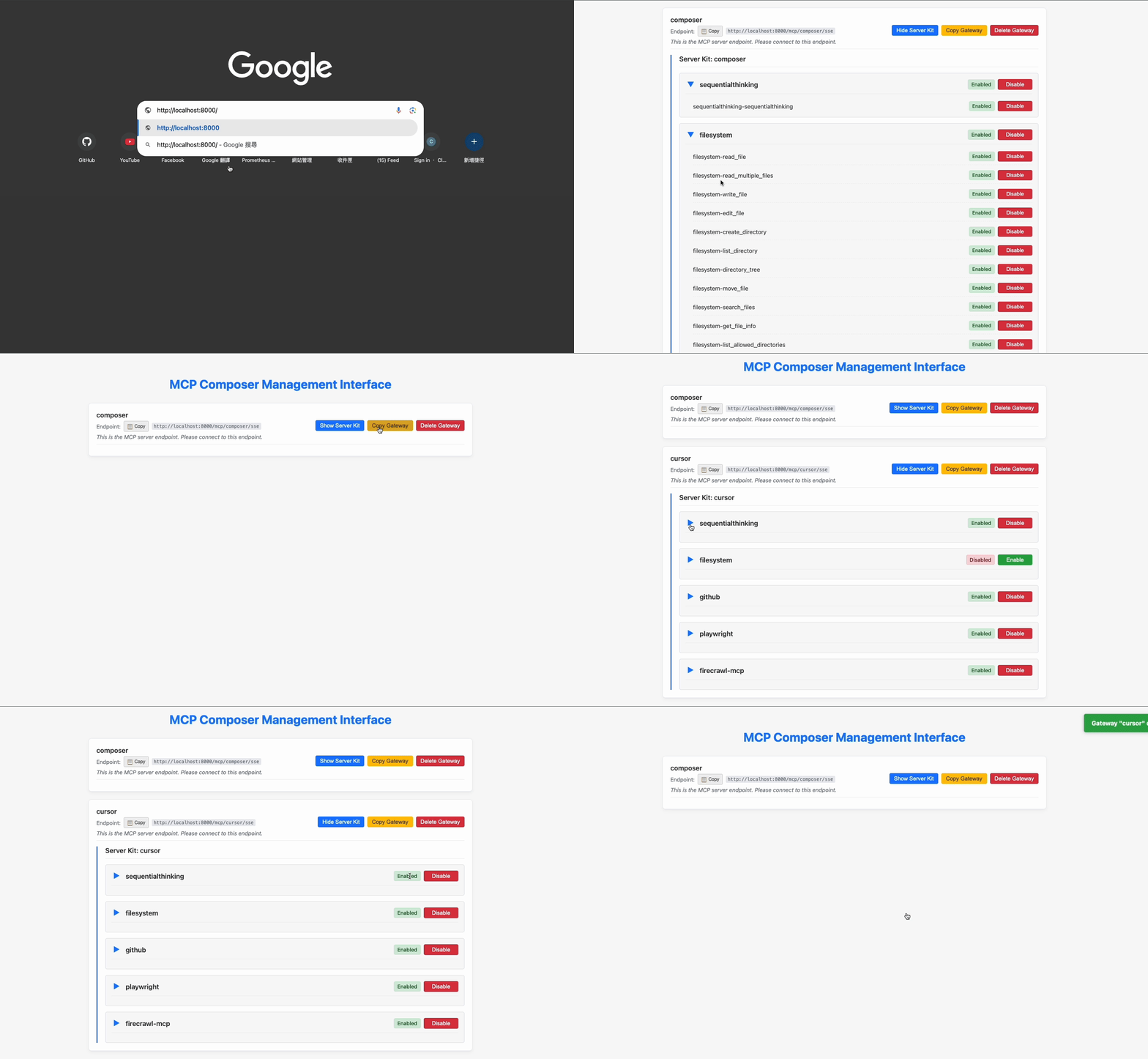
MCP Composer is a gateway service that centrally manages all your MCP servers. You can use it to consolidate all the MCP servers you need and open independent ports with different combinations of servers and tools for each service (like AI agents or tools) that requires access to MCP servers.
Key Features
Dynamic MCP Server Management: Dynamically manages connections to multiple MCP servers and their tools, enabling on-the-fly activation or deactivation of services.
Unified SSE Interface: Exposes a single Server-Sent Events (SSE) interface that provides access to all capabilities of the managed MCP servers.
Multiple Dynamic Endpoints: Supports dynamic creation and removal of multiple SSE endpoints to accommodate different AI agents or AI tools.
Independent Interface Configuration: Each SSE interface independently manages its own combination of MCP servers and tools, allowing for customized service provision.
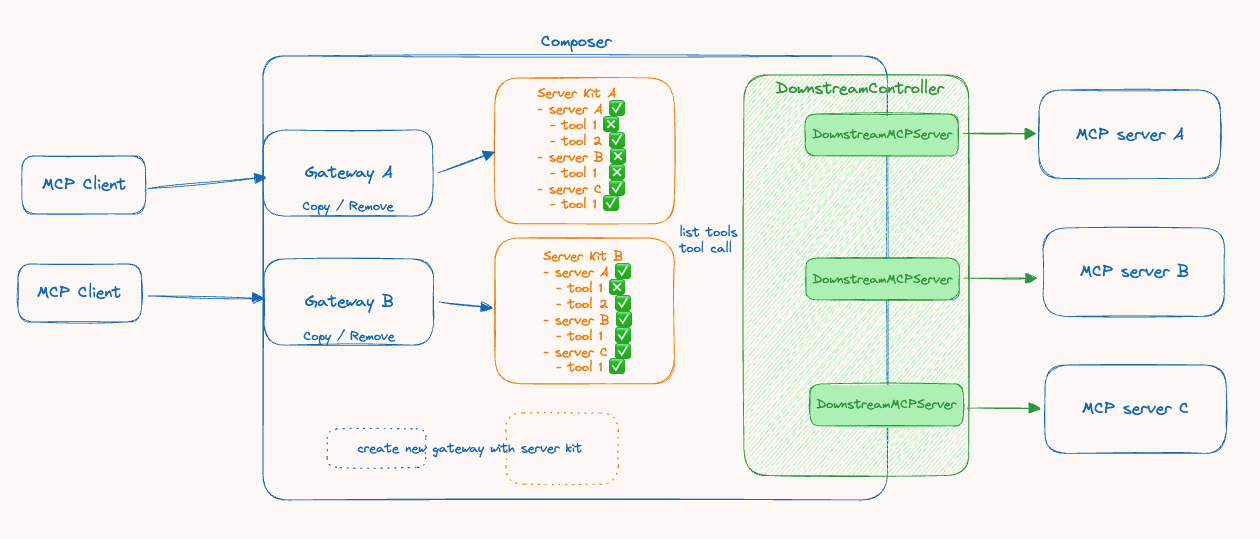
System Architecture
Key Terms
MCP Client: External tools or AI agents and AI workflows, such as Cursor, n8n, etc.
Gateway[A/B]: MCP server implementation bound to ServerKit and managed by the Composer, used to handle MCP Client connections.
Server Kit: Manages and controls information about Downstream MCP servers and which tools within servers should be enabled.
Downstream Controller: Responsible for controlling and managing connections to Downstream MCP servers.
Downstream MCP Server: An internal object connecting to a Downstream MCP server, implemented as an internal MCP client that links to the Downstream MCP server.
MCP Server: External MCP server services, such as: https://github.com/modelcontextprotocol/servers etc.
Composer: Provides APIs to control and orchestrate Gateways, Server Kits, and Downstream Controllers.
Requirements
Python >= 3.12
- uv: A fast Python package installer and manager.
Installation
Method 1:
1. Clone the repository:
    git clone https://github.com/htkuan/mcp-composer

    cd mcp-composer
2. Install dependencies:
Use uv to sync the project dependencies.
    make install

    # or directly use uv

    # uv sync
Method 2:
use docker compose to run the project
make run-docker
Configuration
Before running the application, you need to configure the target MCP servers.
1. Copy the example configuration file:
cp mcp_servers.example.json mcp_servers.json
2. Edit
mcp_servers.json and enter the details of the MCP servers you want to connect to.
3. Set up environment variables:
cp .env.example .env
4. Edit the
.env file to configure the following settings:-
HOST: Server host address (default: 0.0.0.0)-
PORT: Server port (default: 8000)-
MCP_COMPOSER_PROXY_URL: MCP Composer proxy URL (default: http://localhost:8000)-
MCP_SERVERS_CONFIG_PATH: Path to the MCP servers configuration file (default: ./mcp_servers.json)
Running
Use uv to run the FastAPI application:
```bash
make run
Sign in to leave a review
Use Google, GitHub, or an email account so ratings stay tied to real people.
No reviews posted yet.





