
ClamAV MCP
About
ClamAV MCP is a simple Model Context Protocol server that allows scanning files for viruses using the ClamAV engine. It is built for developers or AI assistants (like Cursor) that need to check files for malware before further processing.
Details
- Author
- a2amarket
- GitHub stars
- 3
- Downloads
- 308
- Categories
- Other, Security
Jump to
- Scans files for viruses using the ClamAV engine.
- Provides a single scan_file API endpoint.
- Accepts file data as a Base64-encoded string.
- Returns scan result, raw output, and error information.
- Designed for use with AI assistants like Cursor.

Setting up with Highlight
This MCP is not yet compatible with Highlight’s one-click setup. However, you can still use it with Highlight by following these steps:
- Download and install Highlight from highlightai.com/download
- Navigate to the plugins tab and select "Add Custom Plugin"
-
Configure the plugin with the settings below
Plugin Name
ClamAV MCPCommand (node, npx, python, etc.)Please refer to the README for specific instructions on how to obtain API keys or other required environment variables.
- Enable "Start Automatically" if you want the plugin to start when Highlight launches





From the repository
First ensure ClamAV is installed on your system (see installation instructions for Ubuntu/Debian, Windows, or macOS). Then run the server with uv run mcp run main.py -t sse. It listens for SSE connections on port 8000 by default. To integrate with Cursor, add a configuration entry with the server’s URL pointing to http://[SERVER_IP]:8000/sse.
Claude Desktop / Cursor
Paste into your MCP client config file to install this server.
{
    "mcpServers": {
        "clamav mcp": {
            "ClamAV Scanner": {
                "url": "http://127.0.0.1:8000/sse"
            }
        }
    }
}McpServers
{
    "ClamAV Scanner": {
        "url": "http://127.0.0.1:8000/sse"
    }
}
ClamAV MCP
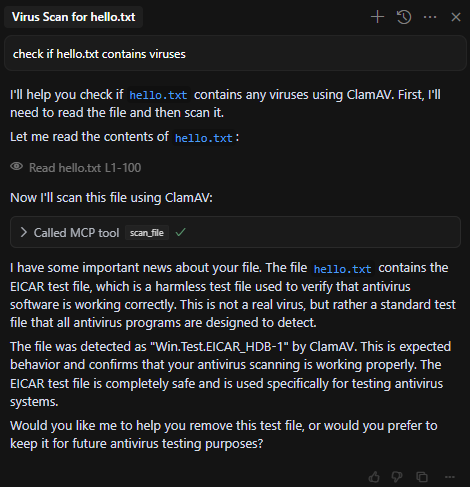
Simple ClamAV MCP that allows scanning files for viruses using the ClamAV engine.
Requirements
This project requires ClamAV to be installed on your system. Here's how to install it:
Ubuntu/Debian
sudo apt-get update
sudo apt-get install clamav clamav-daemon
Windows
1. Download the ClamAV installer from ClamAV's official website 2. Run the installer and follow the setup wizard 3. Make sure to add ClamAV to your system PATHmacOS
brew install clamav
Usage
To run the MCP server:
uv run mcp run main.py -t sse
The server will start and listen for SSE connections on port 8000 by default.
Cursor Configuration
To use this MCP with Cursor, add the following configuration to your Cursor settings:
{
  "mcpServers": {
    "ClamAV Server": {
      "url": "http://[SERVER_IP]:8000/sse"
    }
  }
}
This configuration tells Cursor to connect to the ClamAV MCP server.
API
The MCP provides a single endpoint:
scan_file
- Parameters: -base64_data: Base64 encoded string of the file to scan
- filename: Name of the file to use in the scan
- Returns:
- success: Boolean indicating if the scan was successful
- result: Raw output from clamscan command
- error: Error message if the scan failedSign in to leave a review
Use Google, GitHub, or an email account so ratings stay tied to real people.
No reviews posted yet.





